
 Web Development
 Data Science
 Python
 SQL
SQL JavaScript
 Artificial Intelligence
 IT & Software
 IT Certifications
 Hacking
 AWS
AWS Arduino
 DevOps
 3D Modeling
 Graphic Design
 Photoshop
 Drawing
 Digital Painting
 UX Design
 Business
 Data Analysis
 Communication Skills
 Project Management
 Leadership & Management
 Human Resources
 Digital Marketing
 Social Media Marketing
 Marketing
 SEO
SEO Google Analytics
 Branding
 Excel
Excel Office Productivity
 SAP
SAP PowerPoint
 Microsoft Access
 SharePoint
 Finance & Accounting
 Trading & Investing
 Accounting
 Bitcoin
 Personal Finance
 Video Editing & Animation
 Photography
 Adobe Premier Pro
 Adobe Lightroom
 Personal Development
 Productivity
 Career Development
 Life Coaching
 Health & Fitness
 Meditation & Mindfulness
 Yoga
Yoga Music
Music Music Production
 Guitar
 Piano
Piano Singing
 Language Learning
 Teaching & Academics
 Engineering
 Math
Math Lifestyle
Creating 3D environments in Blender (Udemy.com)
Learn Blender 5, build your first environment and master the basics of 3D creation
Created by: Rob Tuytel
Last updated November 2025
Our take
Based on the ratings of 14,407 students, a sample of their written reviews and the syllabus, as the course stood in November 2025. No course pays to be reviewed.
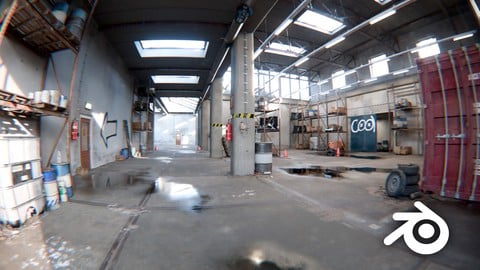
Rob Tuytel co-runs Poly Haven, the free texture library much of the Blender world leans on, and this is his environment art course, rebuilt in late 2025 for Blender 5. The new track walks a complete beginner through an industrial factory hall over seven chapters: interface, beams and doors, puddles and wall dirt, Geometry Nodes scatter, cloth tarps and a compositor pass. Behind that sits the older Blender 3.2 material, roughly 30 hours of grass, forest paths, ruins and a castle sunset. It suits people who want to build realistic scenes, not characters or animation.
Reviewers call it easy to follow and beginner friendly, and one notes that shortcuts and mouse clicks are called out. An intermediate user said the grass chapters finally showed him how grass is actually built instead of relying on scatter addons. The complaints are consistent: Rob moves fast, some students rewind constantly to catch clicks, and a few say steps are shown without explaining why. Two say the shortcuts shown did not match what worked on their machine. One experienced student calls the Geometry Nodes sections rushed. The biggest gripe is the old track. One student found the Forest Farmhouse chapter uses textures that are no longer available, and the description itself says the Blender 3 material no longer gets support.
With about 117,000 students and 14,400 reviews averaging 4.7, the audience is large and mostly happy, though the 16GB RAM requirement is worth checking before buying. It is paid, so treat it as a Blender 5 factory course with a large, aging bonus library, and expect to pause a lot. People who want a broader grounding in modeling first may prefer the Complete Blender Creator course listed beside it. This one is for anyone whose goal is scenes that look like photographs.
Pros
- Seven fresh Blender 5 chapters, updated November 2025, build one complete factory hall from blueprints
- Taught by a Poly Haven co-runner with 18 years of environment work, using real site references and no AI textures
- One reviewer says shortcuts and mouse clicks are called out, which made that section much faster to follow
- 150 plus photo scanned assets and materials included for the industrial scene
Cons
- Rob moves fast; several reviewers struggle to keep up, and some say steps are shown without a why
- The Blender 3.2 chapters, most of the 38 hours, are unsupported and one reviewer found textures missing
- Geometry Nodes sections feel rushed to at least one experienced student, and the course needs 16GB RAM
Very easy to follow, clear beginner guide to start so you are used to using blender, very fun!
Listed as all levels, but it is really a beginner course; one intermediate reviewer still learned from the grass and scatter chapters.
Featured in our guide: The Best Game Development Courses on Udemy in 2026
 What you will learn
- Creating stunning unique environments
- Learn Blender 5.0, 4.1
- Working with Geometry nodes
- Learn the Blender basics
- Creating a procedural volumetric sky
- Organize your workflow to make large environment scenes
- Use 4k /8k PBR textures
Course content
15 sections · 248 lectures · 38 hours of video
- 1Chapter 1 - learning blender (5.0) 1 free preview7 lectures · 1.2 hours
- 2Chapter 2 - Building the factory hall (5.0)8 lectures · 55 min
- 3Chapter 3 - Making construction beams and pillars (5.0)8 lectures · 58 min
- 4Chapter 4 - Light trays and doors (5.0)7 lectures · 57 min
- 5Chapter 5 - Water puddles and wall dirt (5.0)10 lectures · 1.2 hours
- 6Chapter 6 - Adding Fine Details and Environmental Scatter (5.0)9 lectures · 1.1 hours
- 7Chapter 7 - Factory Set Dressing and Compositing (5.0)10 lectures · 1.1 hours
- 8Chapter 01 - Introduction (3.2) 1 free preview5 lectures · 8 min
- 9Chapter 02 - Starting with Blender (3.2)17 lectures · 2.3 hours
- 10Chapter 3 - Creating grass (3.2)28 lectures · 4.8 hours
- 11Chapter 4 - Creating a forest path (3.2)32 lectures · 5.8 hours
- 12Chapter 5 - Ruine landscape (3.2)31 lectures · 5.2 hours
- 13Chapter 6: Forest farmhouse scene (3.2)37 lectures · 6.6 hours
- 14Chapter 7 : Creating a castle sunset scene (3.2)18 lectures · 2.7 hours
- 15Chapter 8 : Creating a mountain ruine scene21 lectures · 3.1 hours
Who it is for
The instructor says it suits
- This course is meant for artists who like to grow in their workflow
- Beginners
- Environment artists
- Game level artists
What you need before you start
- Blender version 5.0 and 4.1 or above
- Computer ( min 16GB ram)
How it compares
Against the other 100 rated Udemy courses in Blender on CourseDuck:
- Rating4.7 out of 5higher than 70% of them
- Reviews14,407#2 of 101 by number of reviews
- Length37.9 hourslonger than 91% of them
- Last updatedNovember 2025more recently than 71% of them
 Course Description
 Blender Awards Best Paid Course
Start your Blender journey with Blender 5. This beginner friendly course introduces you to Blender from the ground up using the tools and workflows available in the newest version. Even if you have never opened Blender before, you will learn step by step how to build a realistic industrial factory environment from scratch.
Every chapter presents a small, achievable task that gradually builds your confidence in navigation, modeling, materials, lighting and overall scene development.
Learn Blender 5 From Zero Experience
In Parts 1 and 2 you discover the Blender 5 interface. You will learn how to navigate, manipulate objects, work with materials and set up lighting while creating a simple room.
From Part 3 onward, we start constructing the factory hall using blueprints. You will model key structural elements of the environment yourself, such as beams, doors, wall details and architectural features that define the identity of the factory. This gives you hands on experience with Blender’s modeling tools in a way that is accessible for beginners.
To complete the environment, you enrich the scene with a high quality library of 150 plus photo scanned assets and materials, all matching the industrial theme.
Authenticity, Not AI
This course is based on real world industrial locations, captured through on site footage and reference material. No AI generated images or textures are used. Everything you learn is grounded in how real environments look, age and behave. This ensures you develop an eye for authenticity and realistic detail right from the start.
Blender 5 Tools Featured in the Course
Throughout the course you will work with:
• Geometry Nodes Presets to scatter debris and clutter naturally
• Materials to create puddles, dirt layers, plaster surfaces and graffiti overlays
• Modifiers to build structural elements like beams, doors and wall details
• Cloth Simulation to create a tarp and realistic plastic wrapping
• The Blender 5 Compositor, where you apply preset effects to enhance your final render
Each tool is introduced clearly, practically and with a real result behind every step.
What You Will Create
During the course, you will:
• Build a complete factory hall based on blueprints
• Model beams, doors and other architectural elements
• Work with materials to create puddles, dirt buildup, plaster and graffiti
• Fill the environment with natural debris using Geometry Nodes presets
• Simulate cloth to create a tarp and plastic wrapping
• Use compositor presets for a polished final render
• Add a simple motion camera track to bring the scene alive
The entire workflow is beginner friendly, engaging and achievable.
About the Previous Course (Blender Version 3)
The earlier Blender 3 version of this course is still available for those who want access to it, but it no longer receives active support. All updates, improvements and help are now focused on this Blender 5 edition.
Beginner Friendly, Authentic and Practical
If you want to learn Blender 5 by building a realistic environment inspired by real industrial spaces, this course is the perfect place to start.
About me
My name is Rob Tuytel and I have been a environment designer for the past 18 years. I have a huge passion for the Dutch 17th century and mainly focus on medieval architecture. I am Co-Founder of Polyhaven together with Greg Zaal. I love to study old environment paintings and use these as an inspiration for my work. You might know me from the Tears of Steel open Blender movie or from my previous environment course for Blender 4.0.

 Udemy Discount
The discount is applied through our link. Open the course from here and Udemy's current promotional price is applied at checkout on most courses, no code to type.
Some courses are excluded from Udemy's promotions. If the price does not drop, clear your browser cookies and use the button again.
Instructor Details

- 4.7 Rating
 14,407 Reviews
Rob Tuytel
Hello, I'm Rob Tuytel, and for the past 18 years I've been passionate about creating detailed and atmospheric 3D environments. What started as a fascination with historic landscapes and old architecture grew into a lifelong journey through the world of Blender, where I bring scenes to life with light, texture, and storytelling.
Together with Greg Zaal, I run Poly Haven, a platform where we share free, high-quality textures and 3D models with the community.
 More Blender courses

Low Poly Landscapes: Blender Bite Sized Course (2025)
4.9 (1,704 Reviews)
 Provider: Udemy
 Time: 6.2h
$99.99

Absolute Beginners 3D character in Blender course (2022)
4.9 (1,133 Reviews)
- Provider: Udemy
- Time: 14.5h
$94.99


Complete Blender Creator: 3D Modelling (Compatible with 4.3) (2026)
4.8 (69,132 Reviews)
- Provider: Udemy
- Time: 13.8h
$199.99

The Ultimate Blender 3D Sculpting Course (2026)
4.8 (3,904 Reviews)
- Provider: Udemy
- Time: 37.2h
$119.99

Blender Total! From Basic to Advanced 3D! (2025)
4.8 (2,407 Reviews)
- Provider: Udemy
- Time: 21.3h
$109.99
 Reviews

By Muhammad Sameed on 8/7/2026
This course helped me a lot in understanding Blender and creating high-profile realistic environments. I highly recommend it to any beginner out there looking to master 3D environment design!
By Ali Rzayev on 5/20/2026
Instructions are not enough, for example in the video creator said we are using “shift + ‘“ I have tried this on my PC but it didn’t change anything. I tried to figure out how I can use this function but it didn’t work for me.
By Rizwan Ahmed on 4/24/2026
course is good so far, but at times some concepts are not explained, like cube projection, and how floor UV was disturbed by adding edge lines, but overall enjoying it
By Lalit Batra on 2/24/2026
i am not beginner enroll in this course with intermediate level of skills and understand pipeline how projects are made, and how things work before this course i don't know about grass creation i always use scatter addons of blender and custom grass before this course.and after the course i am surprised how grass were made. thanks to the creator of the course. learn very much from this course and many more to go
By Dimpletain S. on 12/14/2025
This course is the best Blender Course I have ever bought despite being among the cheapest. It is clear that Rob has a passion for his craft as well as a dedication to 3d artists. The updating of the course over the years to match new blender versions as well as support for whateevr mishaps you encounter is something you won't see on the market. Not at this price, not with this quality. Rob, if you read this, I am grateful for you and this course. It was truly exceptioonal. Five stars doesn't cut it. No course has ever moved me to tears like this. And no, I'm not being dramatic, dammit. If you are considering taking it, here's what you should know: 1. You will be show step by step what to do and also given the opportunity to problem-solve on your own. You will also be provided with the fiinished files for if you could not finish a task, say a grass patch or something. This is incredibly useful especially when hou are wokring with a different Blender version. (some part sof the course use a different version of Blender) I recommend just downloading that version tbh. But the course is updated so you can just use blender 5.0 for the newer section! 2. If you get stuck, you can search similar questions or ask a new one. In my experience, responses were within a day or two. Incredibly fast, considering most Udemy instructors never really return at all to help out! Be exact and respectful and add screenshots. But of course if you don't know what is really wrong or how to ask (because goddamit, Blender befuddles the mind), you could also say that, too! But try to be clear and concise. 3. The videos are broken down into sizable chunks so you feel like you are making progress. There are many hours in this course because there is a lot to cover. But the videos are 12-15 minutes each. This helps you pace yourself. Lastly, do not be dismayed if you still find Blender challenging. There is a sort of ambiance of possibility in Rob's classes. No rush, no hustle or desperation, just attention and love for the craft. You will catch this attitude from his courses. You will not feel embarrassed for not getting it right even the umpteenth time. And yes, of course, learning something new is hard and a good course will never eliminate all the challenges. In fact, you truly do not want it to, because you would never grow then. This course offers you the right environment (pun cheekily intended) to grow as well as the right support for when you get stuck. One of the things I look out for when purchasing a course is the tutor's approach to leanring. Of course, you want competence, but what is equally important is: are they severe and brutalist, or are they deliberate, calm, and balanced? Rob is the kind of tutor you need so you keep on believing in yourself and get motivation to finish a course, the right kind of motivation, not the one where you beat yourself up. I would recommend this course to my Nigerian grandma, man, is what I am tryin to say. Never been this detailed for a course review in my life, too, haha
By Yiğithan Ekici on 12/6/2025
Please bring Turkish subtitles to all courses, I promise you I will take all courses! PLEASE! Lütfen tüm kurslara Türkçe altyazı gelsin, sana söz veriyorum tüm kusları alacağım! LÜTFEN!
By Farid Louali on 12/2/2025
So far, this has been a great introduction to Blender. The lessons are easy to follow, even for beginners. Rob is an excellent teacher—I followed his courses years ago and am happy to see him here on Udemy. I don’t want to single out other courses, but many Blender courses promise a lot and end up leaving you discouraged and confused. If you truly want to learn and succeed in Blender’s 3D environment, this is the course to choose. Thank you, Rob, for sharing your knowledge with us!
By Philip Borlin on 11/24/2025
I love the way we did the dice by hand and then with geometry nodes so I could see the difference. I also liked how you taught me about like and shadows and how to frame the render. I really can't wait to get into the environmental chapters! The 4.5 (vs 5) stars come because sometimes the screen isn't zoomed in when going over a critical concept (like a new type of geometry node) and I would like to hear a little more explicit talk about what is going on (for instance I am clicking on space to bring up the search for geometry nodes). These are small things because I am still learning a ton which is the real measure of whether a class is successful
By Aaron Cross on 10/25/2025
Instructor is fantastic. His lessons are ground level and easy to follow, and they don't waste your time. I have found myself learning several things, almost every single lecture. I've had Udemy for a couple of years now, and this is hands down the best instructor I've seen for anything I am learning here.
By Hien Nguyen on 10/16/2025
Khóa học thật sự rất tuyệt vời! Tôi học được rất nhiều từ khóa học và người thầy hướng dẫn rất tận tâm, nhiệt tình, cách hướng dẫn cũng rất chu đáo và dễ hiểu. Mong tìm được thêm khóa học chất lượng từ người thầy này!
 Quality Score
No CourseDuck member has rated this course yet. Taken it? Give each part a thumbs up or down.
Overall Score : 94 / 100
- Video Duration:
 37.9h
37.9h - Price: $174.99
- Provider: Udemy
- Updated:
 November 2025
 - Level:
 All Levels
 - Language:
 English
 - Certificate:
 Yes
Yes - Lectures:248 in 15 sections
- Students:116,900
- Subtitles:15 languages
30-day money-back guarantee on most paid courses
Udemy Coupon Price Tracker
