Learn Animation Production with Blender (Udemy.com)

Use Blender 3D to create your own amazing 3D animations

Created by: Darrin Lile

Produced in 2019

icon
What you will learn

  • Master Blender's Interface and Navigation
  • Create 3D Models
  • UV Map your 3D objects
  • Materials and Texturing
  • Character Rigging
  • Animation
  • Lighting
  • Physics Effects
  • Rendering

icon
Quality Score

Content Quality
/
Video Quality
/
Qualified Instructor
/
Course Pace
/
Course Depth & Coverage
/

Overall Score : 94 / 100

icon
Course Description

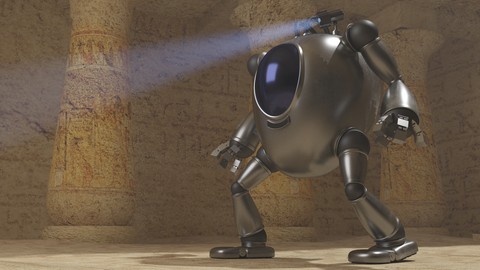
you have a story to tell? An idea to bring to life? Then join me for this project-based introduction to Blender and 3D animation. In this course we'll go through the process of creating an animated scene in Blender from scratch. From the first polygon to the final render. You'll learn all the steps involved in bringing your own 3D animations to life. We'll start with the Blender user interface and navigation tools, providing you with a solid foundation before moving forward. We will then begin modeling the mech character and the environment. You'll learn how to UV map your 3D objects in Blender and texture them. We'll use GIMP to prepare the textures, and the node editor to apply them to Cycles materials in Blender. You'll learn how to rig and animate the mech in Blender 3D, as well as animate the camera in the scene. We'll create volumetric lighting and even create a jet flame effect for the mech's jet pack.
Finally, you'll learn how to render out your animation and use the Blender video sequence editor to create a Quicktime movie.
Topics covered: Blender 3D Interface and Navigation 3D Modeling UV Mapping Materials and Texturing Rigging 3D Animation Lighting Physics Effects Rendering a 3D sceneDarrin Lile is a Blender Foundation Certified Trainer"I love your tutorials! For the first time, I'm able to understand Blender! Thank you so much!" -Jade W"Great work, Darrin. You make a great teacher as well as a fantastic 3D artist. I really appreciate your work; can't wait to see what you do next! -theLegendofSamuel"I just wanted to say how much I appreciate these high quality tutorials you put out!!! You are truly an inspirational person. -Zach BSoftware used: Blender 3D and GIMP; both are free, open source programs that can be used for any purpose.
Who this course is for:
This course is intended for those just starting out in Blender and 3D animation. No prior experience is needed.

icon
Instructor Details

Darrin Lile

Darrin Lile is an animator, developer, and Blender Foundation Certified Trainer teaching courses in computer animation and game development. He received Bachelors and Masters degrees in Film and Media Studies from the University of Kansas and has worked as an animator, a producer of educational films, a sound editor for film and television, and as a computer security analyst.

icon
More courses by Darrin Lile

Blender 2.8 Game Character Creation

$11.99

Blender 2.8 Character Creation

$11.99

Create Game Assets with Blender and Substance Painter

$11.99

Create Game Characters with Blender

$11.99

Create a Game Environment with Blender and Unity

$11.99

Create a Game Character: Blender, Substance Painter, Unity

$11.99

icon
More blender courses

What is Social?

Free

Blender 2.79 Nature environment creation

$11.99

SciFi Crate Design in Blender

$11.99

The Blender 2.8 Encyclopedia

$11.99

Learn 3D Animation - The Ultimate NEW BLENDER 2.8 Course A-Z

$11.99

Blender 2.8 Game Character Creation

$11.99

icon
Reviews

4.7

269 total reviews

5 star 4 star 3 star 2 star 1 star
% Complete
% Complete
% Complete
% Complete
% Complete

By Thomas Barry on 11/1/2020

This course has a great pace and logical flow. I have been frustrated by Blender from previous classes, but this porage is just right.

By Varun Bhadoriya on 10/14/2020

Blender should be updates in new version

By Gaurav sahoo on 9/27/2020

no i am waste my money

By Eric Ford on 9/26/2020

Looks like I have a new version of blender. The interface has changed a lot. Otherwise, 5 stars

By Renato Arata on 9/24/2020

Completo e didtico

By Jeffrey Bruijntjes on 9/7/2020

Very thorough introduction course to blender. Really teaches you the whole pipeline from first polygon to completed animation. Lacks a bit on the hinting at what next steps would be. For instance after the course was done I missed a kind of 'what now' section. Also the course is aimed at beginners and as such will take some shortcuts to make it easier for beginners. This is good but I I would, for example, like to have had some hint on the existence of weight painting for skeletons in stead of using conveniently separated fixed objects per bone. All in all very very recommendable for beginners. Was able to follow along with blender 2.9 with some minor adjustments/googling here and there. 4.5/5

By Original Content Robot on 7/24/2020

Yep, another brilliant course. This can be done in 2.8 it does take a bit a of looking to find tools that were once easy to find.
Jim.

By Prathm Virdee on 7/21/2020

When I first got blender it looked so confusing and I was lost. This guy explains it so good that even me, a 12 year old girl can understand what going on unlike the videos I found on Youtube made by the people of blender

By Robert Wiseman on 7/17/2020

Lost half a star for not being version 2.8 but otherwise fantastic.

By Kevin Jenkins on 6/26/2020

It is good but a bit slow at the moment, working out the differences as Im using Blender 2.8

By Shivaani sasikumar on 6/16/2020

It was but it is hard to remember all of the shortcuts

By Sathyarajkumar Krishnasamy on 6/15/2020

This is USELESS unless instructions are upgraded to current version 2.83.x
You can not follow what the instructor is talking about. I am tired to find equivalent commands in current version and many not working as the instructor is showing. I can't just continue beyond few lessons.