
 JavaScript
 Web Development
 Python
 SQL
SQL Artificial Intelligence
 Machine Learning
 IT & Software
 AWS
AWS Hacking
 Arduino
 3D Modeling
 Photoshop
 Graphic Design
 UX Design
 Drawing
 Adobe After Effects
 Business
 Data Analysis
 Shopify
 Digital Marketing
 Social Media Marketing
 Marketing
 SEO
SEO Google Analytics
 Branding
 Excel
Excel Office Productivity
 Finance & Accounting
 Bitcoin
 Video Editing & Animation
 Photography
 Adobe Premier Pro
 Adobe Lightroom
 Personal Development
 Health & Fitness
 Music
Music Guitar
 Teaching & Academics
 Language Learning
 Engineering
 Lifestyle
Raspberry Pi and Arduino - Go to The Next Level (Udemy.com)
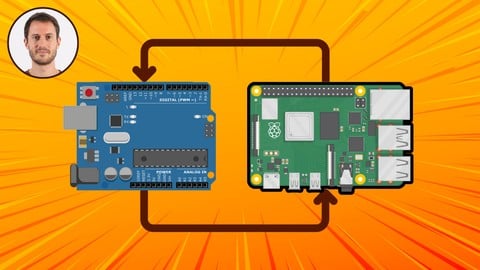
Make your Raspberry Pi Communicate with Arduino - Build a Complete Intercom Project - Serial, Telegram Bot, Pi Camera...
Created by: Edouard Renard
Last updated November 2025
 What you will learn
- Make Raspberry Pi communicate with Arduino, using Serial
- Build a complete Intercom system with Raspberry Pi and Arduino
- Use the Raspberry Pi as the “brain” and the Arduino as the “muscles” of your application
- Understand the differences between Arduino and Raspberry Pi
- Install and configure Arduino IDE on Raspberry Pi OS
- Create a bidirectional Serial communication
- Build a custom protocol to talk over Serial
- Write code with Python 3 on Raspberry Pi and C++ on Arduino
- Create a Telegram Bot with Python 3
- Send notifications from your Raspberry Pi to your phone
- Control Arduino from a Telegram chat
- Practice a lot thanks to 9 activities and one big final project
- Start directly with the best practices
- Develop an engineer mindset when solving problems
- Learn how to be more independent when working on your future projects
- Understand the “why” behind things
 Quality Score
No CourseDuck member has rated this course yet. Taken it? Give each part a thumbs up or down.
Overall Score : 94 / 100
 Course Description
You’re already familiar with Arduino and Raspberry Pi?
You want to go further with those boards, and combine them to create more complex and powerful projects?
Welcome to this Raspberry Pi + Arduino course!
I will take you from an intermediate level on the two boards, to an advanced level, not only on each board, but on the combination of both.
At the end of the course, you will be able to create your own custom projects with Raspberry Pi and Arduino.
Note: his course is not for complete beginners, for example I will not explain to you how to write basic Python or C++ programs. You definitely don’t need to be an expert, but having a good understanding of both Arduino and Raspberry Pi will really help you get started.
→ Why this course?
Working only with Raspberry Pi, or only with Arduino, is already nice: you can do a lot of projects.
But sometimes, this is not enough. You will need to combine the strength of both boards: the power of software with Raspberry Pi (brain), and the closeness to hardware with Arduino (muscles).
When looking for tutorials/courses about this on the Internet, I found that they are all very simplified, and work with a very simplistic setup, and only for that setup. If you add any component, any functionality, you’re going to be stuck.
So in this course, you won’t get a copy/paste example, but a complete (and efficient) step by step process to create any application with Arduino and Raspberry Pi.
I will show you how to start a successful Serial communication between the 2 boards, and how to build an application with new components and features around this bridge.
→ How will you learn, how do I teach?
My method is simple but efficient:
WHY: Focus on the “why” so you understand what you’re doing.
HANDS-ON lessons to learn in a better way.
STEP BY STEP: Every lesson is built on top of previous ones.
PRACTICE with many activities and projects.
NO COPY AND PASTE!!! I write all the code from scratch.
This teaching method actually works: I have already taught 100 000+ students in 150 countries, with 23 000+ reviews over 4.7/5.
Some reviews from my students - related to Raspberry Pi:
“Edouard is an awesome instructor. The course is easy to follow but he makes you think all along the way. Great first class if you are interested in learning Raspberry Pi.” --- Joel Bernstein
“Awesome class! I highly recommend this class. Mr. Renard is a great instructor. The entire class is hands-on, which in my opinion is the best way to learn.” --- Kirk Wynter
“Really happy with the course. Exactly what I paid for and am pretty happy with my progress. I am getting exactly what is promised. Edouard is an excellent teacher.” --- Jihad Anbous
Some other reviews - related to Arduino:
“The course was excellent. Congratulations to Edouard. I had already worked through some of the projects in the Arduino projects book, but I still learned much more in this course. Thanks.” --- Sholto Douglas
“Halfway and still loving this course. The instructor is clear and teaches in such a way that you actually learn how to navigate, conceptualize, and write your own code rather than teaching from premade code. Outstanding work sir!” --- Westley Bolton
→ What will you do in the course?
After an installation section to get all the tools ready for the course (including installing Arduino IDE on your Raspberry Pi OS), you will progress through 4 different parts:
Communicate with Serial between Raspberry Pi and Arduino.
Build the Arduino circuit for the project, one component at a time. Control Arduino components from the Raspberry Pi
Discover new Raspberry Pi functionalities - Camera and Telegram bot. Control the camera from the Arduino, and send commands to Arduino from a Telegram chat.
Complete Intercom Project (see preview video for an overview of the result).
For each part of the course (1-3), you get several additional activities, so you can practice on what you’ve just seen, and link the new knowledge with the previous sections.
For the final project, together we will design a complete communication protocol, and we will also practice on the steps design: basically, how to plan/organize your application before writing code. I will give you some tips to help you design and organize your future projects, so you can start them and know what you need to do, in what order. This is something super important that I don’t often see in other courses or tutorials, and I’ve made sure to focus on this when creating the steps for the final project.
So, you want to build more complex applications with Raspberry Pi and Arduino? Don’t wait any longer and start this course today!
As always, my goal is to give you the freedom to start and finish your own projects. With this freedom you won’t have to rely on some copy/paste examples from the internet, because you will have the foundation that allows you to really understand how things work, and build anything from scratch.
And that’s not all: all along the course I will share with you the best practices I personally use for my own projects. You will be able to create robust and scalable code - both for Arduino and Raspberry Pi.
Oh, and you also get a 30 days money-back guarantee if you’re not fully satisfied - no questions asked :)
See you in the course!
Note - This course is not for you if:
You are a complete Arduino or Raspberry Pi beginner.
You want a copy/paste solution to your problems and don’t want to take the time to understand.

 Udemy Discount
The discount is applied through our link. Open the course from here and Udemy's current promotional price is applied at checkout on most courses, no code to type.
Some courses are excluded from Udemy's promotions. If the price does not drop, clear your browser cookies and use the button again.
Instructor Details

- 4.7 Rating
 407 Reviews
Edouard Renard
Hi, I’m Edouard. I am a software engineer and robotics teacher. I'm also the author of the "ROS 2 from Scratch" book.
I really enjoy teaching new technologies to people, and making complex stuff easy to understand. My method is simple, and contains only 3 words : Step By Step. I know how hard it can be to learn a new topic and just be lost in an ocean of information, without knowing what to do. In my courses, I make sure that you learn one step at a time, through practicing, and that you also learn the best practices.
I am passionate about robotics. I found that it’s amazing how many cool projects you can do with a robot, when you have the required programming knowledge!
I also co-founded a robotics startup in 2016, building a complete robotic arm, from scratch, with Arduino, Raspberry Pi, Ubuntu and ROS. Thus, I am aware of things that work and things that don’t work, thanks to a lot of practice. This will save you precious time and make you progress faster.
 More courses by Edouard Renard
Programming the Arduino - Getting Started (2025)
4.4 (1,150 Reviews)
 Provider: Udemy
 Time: 6.8h
$89.99

Practical C++: Learn C++ Basics Step by Step (2025)
4.6 (1,076 Reviews)
- Provider: Udemy
- Time: 4.9h
$74.99
Arduino OOP (Object Oriented Programming) (2025)
4.7 (358 Reviews)
- Provider: Udemy
- Time: 4.4h
$59.99
More Arduino courses


Learn to Build a Computer (PC) in 2026 - all types!
4.9 (245 Reviews)
- Provider: Udemy
- Time: 6.1h
$74.99

Arduino Step by Step: Getting Started (2024)
4.7 (8,714 Reviews)
- Provider: Udemy
- Time: 21.4h
$159.99
Curso de Manutenção de Celular do Básico ao Avançado (2022)
4.7 (8,526 Reviews)
- Provider: Udemy
- Time: 16.4h
$49.99
 Reviews

By James Gillespie on 7/28/2026
Module 2 had a playback error that kept the video from playing. Ship ahead about 20 seconds and I would play again. Not sure where the error lies.
By Rick Pandey on 4/19/2026
I find the course project good as it was not too complecated and not too easy when I am learning something new. A perfect balance of challenge and understanding the concept easily
By Gregory Mays on 6/1/2025
I had to rewatch a few sections (keeping up the with the instructions * my own fault). Overall I'm enjoying the pace and resharpening of skills that became dull.
By Robert Stack on 4/17/2025
A middle school tech teacher, I happen to need instruction in this very endeavor. M. Renard is a wonderful teacher and clearly an expert in his field.
By Humberto Olsen on 1/2/2025
Curso muito bom! O professor donstra boa didática e uma ampla gama de conhecimento em projetos e programação. Uma sugestão seria de o professor disponibilizar o código para os alunos terem acesso. Gostei muito!
By Dik Harrison on 7/11/2024
Thirteen years ago I started trying to learn Arduino with the Elegoo Starter Kit, but not having an application that I needed it for, I finally dropped the course. Now that I do have an application for it, I decided to take this course. I'm glad I did as it is very enjoyable, even though at 76 I have problems remembering everything and have to keep going back to review. I'm glad to have learned about using TinkerCAD to design circuits as I have been trying to do so with a graphics package with not very good results. I like that everything is discussed in detail because that helps me to remember...
By Tom Hurley on 4/28/2024
Very good at explaining the unique qualities of raspberry and arduino. The steps are easy to follow and although he has an accent he is easy to understand.
By Craig Dolbeer on 2/7/2023
Yes, this course fits for me. I do use the Arduino and Raspberry Pi together but this shows a way to use them through the serial port. Explained vey well.
By Phillip H McCary III on 11/3/2022
This course will teach me how to interface a RPi to my Bolboa robot from Pololu. I am on track to meet my goal. In addition, I will use the USB serial communication style for one of my bigger Robots that has a full ATX mini computer on board.
By Alfred Johnson on 3/1/2022
Edouard is a great instructor I like his pace and his attention detail so far I'm happy as the installation steps went well. Looking forward to start the other sections.
- Video Duration:
 8.9h
8.9h - Price: $84.99 Track Price 11.99 Track Price
- Provider: Udemy
- Updated:
 November 2025
 - Level:
 Intermediate
 - Language:
 English
 - Certificate:
 Yes
Yes
30-day money-back guarantee on most paid courses
Udemy Coupon Price Tracker
