
 Web Development
 Python
 JavaScript
 SQL
SQL Artificial Intelligence
 Data Science
 IT & Software
 Hacking
 AWS
AWS Arduino
 3D Modeling
 Graphic Design
 Photoshop
 Drawing
 UX Design
 Blender
 Business
 Data Analysis
 Shopify
 Digital Marketing
 Social Media Marketing
 Marketing
 SEO
SEO Google Analytics
 Branding
 Excel
Excel Office Productivity
 Finance & Accounting
 Bitcoin
 Video Editing & Animation
 Photography
 Adobe Premier Pro
 Adobe Lightroom
 Personal Development
 Health & Fitness
 Music
Music Guitar
 Teaching & Academics
 Language Learning
 Engineering
 Lifestyle
The Complete Guide to Designing a Mobile App (Udemy.com)
Build your audience with professionally designed, UX-friendly apps
Created by: Codestars
Last updated December 2025
 What you will learn
- Learn basic design principles and tools you can build on for your apps
- Learn the basics of prototyping
- Learn how to explore your competition and leverage that to your advantage
- Understand the differences between the two main platforms: Android & iOS
- Know how to research your potential users and market to effectively target your app
- Be able to plan, sketch, wireframe and design your own apps
- Learn one of the leading design tools, Sketch, to make your ideas come to life
 Course Description
Welcome to The Complete Guide to Designing a Mobile App!
The number of app downloads worldwide in 2017 was 178.1 billion.
The average US user spends 5 hours per day on their mobile phone, primarily browsing apps and looking at websites.
In 2020 mobile apps are projected to generate 188.9 billion U.S. dollars($) in revenue via app stores and in-app advertising.
There are millions of apps out there to download, and (literally!) billions of dollars to be made by app creators. How do you make your app to stand out from the crowd? How do you get users for your app, and keep them?
One answer: GOOD APP DESIGN!
Why Learn App Design?
Many fantastic apps never find a big audience, and one key reason for that is that they're poorly designed.
A good design will make your app stand out from the crowd, and keep your users coming back for more!
There's a difference between building an app and designing it; it's the difference between an app that works perfectly, looks fantastic, and does exactly what it promises... and one that doesn't.
The more design work you put in to your app, the more successful your app will be.
Why Choose THIS Course?
With the same focus on practical learning that Rob Percival brings to his courses, in this course you'll get a brief overview of design principles before getting into the how to and learning by doing, with regular exercises and challenges to test and cement your learning. The first half of the course focuses on:
Design basics - learn simple (but devastatingly effective) design principles. Understand the differences between iOS and Android design systems, and what that means for your app.
Polishing your idea - tailor your app to your users, and stand out from the competition! Learn how to sketch out and wireframe an app idea, and see the difference this makes!
Information architecture - the backbone of any good app. The structure of your design is so important - learn the guiding principles of app and information architecture here!
Style - colour, font, icons, typography - everything you need to know!
Components & patterns - Help users navigate your app. Create forms, fields, notifications, animations and more!
The user experience - make your app simple and intuitive and your users will love you. Learn how here.
Design with Sketch - a complete guide to the hugely well regarded design software, Sketch.
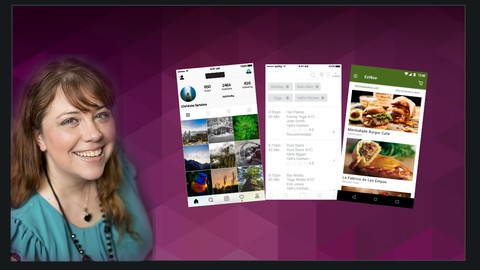
As your skills increase and your confidence grows, you'll start work on three brilliant projects - designing and creating every element of the following apps!
An instagram app
A food delivery app
A studio booking app
By the end of this course you'll know everything there is to know about app design, and also have three hugely impressive projects for your career portfolio!
Who's the Instructor?
This course is taught by Renata Phillippi, a lead UX designer with 10+ years industry experience. Renata specializes in information architecture, interaction design, usability and user research, and has worked with both multinational tech companies and small start ups. Renata is also a hugely experienced teacher - her lectures have been watched over 750,000 times across Linkedin Learning & Udemy!
Who's This Course For?
Beginners who have never designed an app before
Experienced creators who want to maximise the impact of their apps
Anyone who wants to learn app design tips, tricks and methods from an industry professional
So don't wait! Enroll now, and begin building better apps today!
(Also, you have 30 days to change your mind and get your money back, with absolutely no questions asked! So there's no risk!)

 Udemy Discount
The discount is applied through our link. Open the course from here and Udemy's current promotional price is applied at checkout on most courses, no code to type.
Some courses are excluded from Udemy's promotions. If the price does not drop, clear your browser cookies and use the button again.
Instructor Details

- 4.2 Rating
 104 Reviews
Codestars
Codestars is a community of instructors behind 100+ courses and over 3 million students worldwide. We were one of the first coding communities to build here, and we've kept building — across web development, mobile, cyber security, and now AI-powered development and automation.
We want to revolutionize the way people learn to code by making it simple, logical, fun and, above all, accessible. Our courses are built to teach real, applicable skills, taught by instructors who know the subject and know how to teach it.
Together, the instructors that make up the Codestars team create courses on all the topics that students want to learn in the way that students want to learn them: courses that are well-structured, super interactive, and easy to understand.
Whatever you're here to learn — from the fundamentals of programming to the latest in AI-powered development — you're learning from a channel that has already done this at scale, with millions of students, and a track record to show for it.
 More courses by Codestars

The Complete Copywriting Course : Write to Sell Like a Pro (2026)
4.5 (26,148 Reviews)
 Provider: Udemy
 Time: 3h
$159.99

The Complete Python Course | Learn Python by Doing in 2026
4.3 (23,074 Reviews)
- Provider: Udemy
- Time: 35.3h
$129.99

The Complete Machine Learning Course with Python (2026)
4.4 (8,259 Reviews)
- Provider: Udemy
- Time: 17.4h
$109.99

The Complete React Js & Redux Course - Build Modern Web Apps (2025)
4.6 (6,952 Reviews)
- Provider: Udemy
- Time: 8.6h
$89.99


The Complete Sketch 5 Course - Design Apps & Websites 2021 (2025)
4.5 (4,128 Reviews)
- Provider: Udemy
- Time: 15.3h
$84.99
More UI Design courses

Figma Animation for Web Designers: Create Wow Prototypes (2025)
4.8 (55 Reviews)
- Provider: Udemy
- Time: 21.4h
$19.99


Build eCommerce websites with WordPress & WooCommerce (2025)
4.7 (889 Reviews)
- Provider: Udemy
- Time: 28.8h
$84.99

UX / UI Web Design in Figma | Advanced Level | Eng (2026)
4.7 (155 Reviews)
- Provider: Udemy
- Time: 12.3h
$19.99

Become Web Design PRO with Figma in 2026 (2025)
4.7 (129 Reviews)
- Provider: Udemy
- Time: 19.7h
$19.99

Shopify Dropshipping Masterclass 2026: The Complete Guide
4.7 (76 Reviews)
- Provider: Udemy
- Time: 1h
$34.99
 Reviews

By Vishnu Choudhary on 1/14/2026
Really enjoyed this course. It made me look at things from an entirely new perspective.
By Sergio Flores on 9/15/2021
Overall Good course, good I can see she know the what she is talking about. Classes well prepared, good speaking and words flow
By Bülent Başyurt on 4/4/2020
Instructor made the course by reading from slides and making designs not from the scratch but using ready design blocks. Didn't meet my expectations and had to buy another course.
By Patrick Cook on 1/8/2019
Overall, a nice course. Well planned and executed. Some of the content was read from the screen (instead of discussed), but the discussions about Sketch and InVision very helpful to this Adobe man. Would be a great help for a beginner.
By Robert Suffern on 12/12/2018
Very good overview of a lot of topics. If you are just getting into app design it is a very good overview of the design process and especially a lot of tools that you can use to get you productive quickly. I especially appreciated the in-depth overview of Sketch. I had no idea that there was a tool out there that had such an amazing amount of plug-ins and templates available. I think I now have the tools to successfully design my app idea. There are a lot of topics here and they go over them quickly.
By Cajetan Baptista on 11/27/2018
This course covers all the basics, but also delivers a lot of content that people who've designed mobile apps will find useful. It's presented in an easy to follow manner and progresses in a way that makes sense.
By Juan Ugarte on 11/6/2018
Impossible to follow the course because of the speed and the instructor did not go deep in the topics. She jumps extremely fast from one concept to other. Impossible to hear and read at this speed and to retain the concepts. Using speed of 0.75 also is not adequate, it's very slow. Unfortunatelly a good idea not well performed.
By Janine on 10/24/2018
This course broke down what design really is in ways I hadn’t heard before. It was so helpful and very much geared to the beginner but also not patronizing. I loved it!
By Ryan Phillippi on 10/9/2018
The instructor is very thorough and I also like how she gives a history and background of the content and how it has evolved.
By Edward Anetsky on 9/17/2018
The Complete Guide to Designing a Mobile App is a great course. The combination of introductory lectures with the hands-on training makes it easy for even a beginner to understand the concepts of app design and be able to dive right in. I especially enjoyed doing the 3 projects in the course. Being able to do the work myself helped my understanding. The “solutions” to the exercises clearly explain every step of what is needed to be done. As well as teaching me app design, this course is also a great introduction to the design tool Sketch. It’s great that I will have access to this course moving forward, as I’m sure I will refer back to it many times in the future. I highly recommend this course!
 Quality Score
No CourseDuck member has rated this course yet. Taken it? Give each part a thumbs up or down.
Overall Score : 84 / 100
- Video Duration:
 7.6h
7.6h - Price: $64.99 Track Price 11.99 Track Price
- Provider: Udemy
- Updated:
 December 2025
 - Level:
 Beginner
 - Language:
 English
 - Certificate:
 Yes
Yes
30-day money-back guarantee on most paid courses
Udemy Coupon Price Tracker
