
 Web Development
 Data Science
 Python
 SQL
SQL JavaScript
 Artificial Intelligence
 IT & Software
 IT Certifications
 Hacking
 AWS
AWS Arduino
 DevOps
 3D Modeling
 Graphic Design
 Photoshop
 Drawing
 Digital Painting
 UX Design
 Business
 Data Analysis
 Communication Skills
 Project Management
 Leadership & Management
 Human Resources
 Digital Marketing
 Social Media Marketing
 Marketing
 SEO
SEO Google Analytics
 Branding
 Excel
Excel Office Productivity
 SAP
SAP PowerPoint
 Microsoft Access
 SharePoint
 Finance & Accounting
 Trading & Investing
 Accounting
 Bitcoin
 Personal Finance
 Video Editing & Animation
 Photography
 Adobe Premier Pro
 Adobe Lightroom
 Personal Development
 Productivity
 Career Development
 Life Coaching
 Health & Fitness
 Meditation & Mindfulness
 Yoga
Yoga Music
Music Music Production
 Guitar
 Piano
Piano Singing
 Language Learning
 Teaching & Academics
 Engineering
 Math
Math Lifestyle
Building Financial Dashboard in Google Data Studio (Udemy.com)
How to Build Dynamic Financial Dashboard in Google Data Studio From Scratch
Created by: Loc Nguyen
Last updated April 2021
 What you will learn
- Creating financial database from financial reports: Profit & Loss, Balance Sheet and Cash Flow Statement
- Connecting Data Studio to Google Sheets
- Creating powerful time series charts to help with forecasting: monthly revenue, expense, net profit & net profit margin
- Creating time range selection to select the time period displayed in the report
- Creating filter control of companies or organizations
- Creating Scorecards to display key metrics, comparing previous month and previous year performance
- Creating Pie charts, Bar charts, Combo charts & Area charts
- Creating table & Pivot table, showing total
- Creating Calculated field or KPI from existing data.
- Creating pages navigation like a financial software
- Sharing Report & Updating financial data
- Fixing common errors in Google Data Studio
How it compares
Against the other 371 rated Udemy courses in Data Analysis on CourseDuck:
- Rating4.4 out of 5higher than 35% of them
- Reviews317#235 of 372 by number of reviews
- Length1.1 hoursshorter than 95% of them
- Last updatedApril 2021earlier than 84% of them
 Course Description
- Learn from a Financial business intelligence analyst for a Group of more than 10 companies.
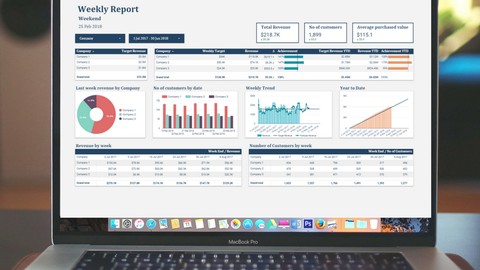
- Create Powerful Interactive Financial Dashboards from Google Sheets Data from scratch.
- No VBA or SQL coding require, just drag and drop, copy and paste.
- Analyze Google Sheets in minutes using powerful visualizations.
- Learn powerful visualizations such as Time Series Charts, Scorecards, Pie Charts, Stacked Area Charts.
- Display comparisons to Previous Period, Previous Year, in one scorecard.
- Create Financial Year to Date Calculations.
- Create filters to easily create interactive dashboards, graphs and reports.
- Create date range selection to easily manage the display range in the charts .
- Share Reports and Updating Data.
- Create pages navigation to make a report look like running in a professional financial software.
- Learn how to Fix error.
- Free access to the report anytime, anywhere by signing in Google Account.

 Udemy Discount
The discount is applied through our link. Open the course from here and Udemy's current promotional price is applied at checkout on most courses, no code to type.
Some courses are excluded from Udemy's promotions. If the price does not drop, clear your browser cookies and use the button again.
Instructor Details

- 4.4 Rating
 317 Reviews
Loc Nguyen
Loc is a Google Data Studio trainer for more than 1000 students from 100 countries.
Loc is also a business intelligence analyst for a Group, focusing on Financial dashboard and Sales Dashboard
He brings this knowledge and experience to his training courses on Udemy.
His current courses on Udemy are:
1. Building financial dashboard in Google Data Studio from scratch
2. Google Data Studio dashboard design
 More Data Analysis courses



Complete neural signal processing and analysis: Zero to hero (2026)
4.8 (2,013 Reviews)
 Provider: Udemy
 Time: 46.9h
$12.99

Excel for Business Analysts Online Course (2023)
4.8 (636 Reviews)
- Provider: Udemy
- Time: 9.3h
$74.99

Alteryx Designer Advanced Certification Mega Bundle (2023)
4.8 (468 Reviews)
- Provider: Udemy
- Time: 16.9h
$69.99

 Reviews

By Carl Hakim on 10/18/2020
Loc covers most basic features of Data Studio but the course is extremely short and could have contained much more practice but did not. The course is good enough for you to cover most the basics of Google Data Studio and get comfortable with it but do not expect any extras with the course.
By Dennis Arrindell on 4/13/2020
This course offers some interesting tools to especiallly improve the aesthetics of your financial dashboard. What I really needed to know from a financial dashboard is how to compare a fixed budget (non active data) to realization/actual numbers (active data as expenses develop). This part was not covered in the lectures, but after posing my question in the Q&A part I got a quick reply from Loc, so overall I am satisfied with the course and the Q&A section.
By RK Hubbard on 9/13/2019
Initially, I was excited ... but in the end, the example video introduction showed MANY more features than was actually taught. In his last video, he said something like 'now that you know how to make some of these basic charts/tables you can teach yourself'. Hmmm. I think he just got bored making videos and decided not to deliver what his course promised.
By Trung Tran on 12/16/2018
This course helps me to improve those points I lack when designing a dashboard on Google Data Studio. Loc's lessons are detailed and organized, help me track and direct to the points I'm in short
By Ticiano Carvalho on 10/26/2018
I am accountant and I was trying to find a model that I can trust that my codes wont be copied more than numbers that I show. With this tool I can do it and with ideas here explained I surely will apply for a real world soon! Thank you!!
By Michael Meyer on 10/23/2018
I try to build up a dashboard for a group of companies with weekly and monthly KPI's. That includes financial and non-financial KPI's. The course helped me a lot to get started and Loc provides very helpful tips and answers questions very quick!
By Stella Rutabana on 10/14/2018
This is exactly what I was looking for. I needed to find a way to present my manager with financial information in a concise manner. This way he can simply check the dashboard whenever needed to get a sense of how we are doing.
By Ferdi van de Kamp on 10/9/2018
Very short and to the point. Shows how to handle a dataset, and exemplifies a few common errors that may trip you. The voice is clear, but somewhat monotonous. The scorecard trick is nice. The hyperlinks as tabs for pages approach seem a bit silly, but I've experienced more google products that seem very beta and maybe I should just shelve it as such, if there is no better way as of yet, I'm happy with the example shown here.
By Taebin Park on 5/9/2018
Pro: This course is perfect for my requirement to build my own business dashboard using FREE google spreadsheet & FREE google data studio. It was easy to follow as he guided diligently step by step for whole configuration on P&L report. Con: Only one con is that other reports that he shows as output is not fully covered. I think it's also possible to generate similar ones with my own, but I needed to assume settings and logic behind other than P&L report.
By Lucio Nguyen on 3/26/2018
Loc is an excellent tutor an experient business analyst. He is also very nice and mellow. If you have any question, just pop him up then he will answer for you in a very friendly way. After this course, as an equity researcher and junior investment banking associate, I highly recommend you take this course for your career.
 Quality Score
No CourseDuck member has rated this course yet. Taken it? Give each part a thumbs up or down.
Overall Score : 88 / 100
- Video Duration:
 1.1h
1.1h - Price: $49.99
- Provider: Udemy
- Updated:
 April 2021
 - Level:
 All Levels
 - Language:
 English
 - Certificate:
 Yes
Yes
30-day money-back guarantee on most paid courses
Udemy Coupon Price Tracker
