
 Web Development
 Data Science
 Python
 SQL
SQL JavaScript
 Artificial Intelligence
 IT & Software
 IT Certifications
 Hacking
 AWS
AWS Arduino
 DevOps
 3D Modeling
 Graphic Design
 Photoshop
 Drawing
 Digital Painting
 UX Design
 Business
 Data Analysis
 Communication Skills
 Project Management
 Leadership & Management
 Human Resources
 Digital Marketing
 Social Media Marketing
 Marketing
 SEO
SEO Google Analytics
 Branding
 Excel
Excel Office Productivity
 SAP
SAP PowerPoint
 Microsoft Access
 SharePoint
 Finance & Accounting
 Trading & Investing
 Accounting
 Bitcoin
 Personal Finance
 Video Editing & Animation
 Photography
 Adobe Premier Pro
 Adobe Lightroom
 Personal Development
 Productivity
 Career Development
 Life Coaching
 Health & Fitness
 Meditation & Mindfulness
 Yoga
Yoga Music
Music Music Production
 Guitar
 Piano
Piano Singing
 Language Learning
 Teaching & Academics
 Engineering
 Math
Math Lifestyle
Coding for kids : Learn Scratch, Python, Robotics, Html Css (Udemy.com)
Be a Technology Creator! Program Games, 3D Design, Animations, Websites, Electronic Circuits, Calculator, Number series
Created by: Robolabz STEM School
Last updated September 2025
Our take
Based on the ratings of 2,967 students, a sample of their written reviews and the syllabus, as the course stood in September 2025. No course pays to be reviewed.
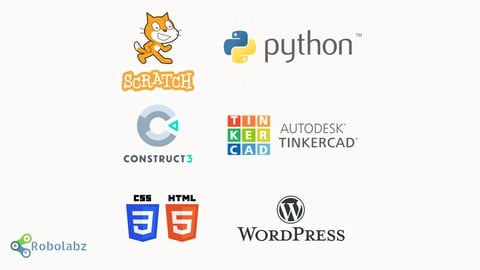
Robolabz STEM School packs nine mini courses into one: Scratch, Python Turtle and simple programs, Arduino circuits in Tinkercad, the Construct 3 game engine, WordPress, HTML and CSS, and 3D design and printing, plus a short electronics chips section. It runs 16.1 hours across 208 lectures, so each topic gets a few hours at most. The audience list points at parents and teachers of kids aged 7 and up, and the only requirement is a computer. Think of it as a sampler, not a deep track in any one language.
Reviewers like the pace. They describe the teaching as step by step, with small details explained, and several kids say the Scratch games and Python Turtle drawings made learning fun rather than dull. Praise is steady: 1,738 of 2,967 ratings are five stars. The complaints are practical. A nine-year-old reviewer lost time hunting for images in chapter 2 and needed help from a parent. Another says the course never says where to get sprites. One finds the explanations too thin, one wants deeper concepts, and one found it too easy.
Depth is the trade-off. The Python section runs about 3.4 hours and the electronics chips section just 23 minutes, so older or more experienced kids may run out of road fast. The course was last updated in September 2025, carries a Bestseller badge and has 15,271 students. We'd suggest it for a child who is still working out what they like: sample Scratch, Python and Arduino, then move to a dedicated course on whichever one sticks. Younger kids may need an adult nearby to track down resources.
Pros
- Nine topics in one course, from Scratch games to Arduino circuits and WordPress sites
- Step-by-step teaching that reviewers find easy to follow, with small details explained
- Python Turtle section turns drawing shapes into something kids call fun
- Gentle start: only a computer is needed, and the audience list says kids 7 and up
Cons
- Missing sprite and image resources leave younger kids stuck and asking a parent for help
- Breadth over depth: electronics chips gets 23 minutes, Python about 3.4 hours
- Some reviewers find it too easy or too thin on explanation, with no quizzes or exercises
It is so much fun and while you are play you are also learn in a fun way rather than a boring way. That is why I gave a five out of five. I would recommend this to everyone!
Beginner level fits: the audience list says kids 7 and up, and no prior coding is needed, just a computer.
 What you will learn
- Create interactive applications like Quiz systems & Calculators using Scratch programming
- Master various Programming concepts with ease & fun and apply them on more than 10 software
- Construct 3 - Learn the Professional Game Engine and build real interactive games - like platformer & Tank Fights
- Create applications to build 2D / 3D Shapes & Patterns through Programming
- Build very interesting Games using Scratch
- Create Animations & Stories using simple programming concepts
- Python : Build various shapes using Turtle graphics
- Build numerous mathematical applications with advanced Python Programming like Student Grades Calculator, number series etc.
- Create a website using HTML coding & style the website using CSS concepts
- Build & Design a Website using Wordpress
- Take your website live for free, use various themes & plugins for Wordpress
- Learn Circuit Building - LED's Motors, Sensors, Robots
- Program Electronics Chips - Arduino, Chibichip
Course content
9 sections · 208 lectures · 16 hours of video 8 articles
- 1SCRATCH Programming 3 free previews34 lectures · 3.9 hours
- 2PYTHON Programming37 lectures · 3.4 hours
- 3Arduino ROBOTICS with Tinkercad36 lectures · 2.3 hours
- 4Professional GAME DEVELOPMENT Engine35 lectures · 1.8 hours
- 5WEBSITE Development with WORDPRESS20 lectures · 1.4 hours
- 6WEB Design with HTML & CSS23 lectures · 1.8 hours
- 73D Designing & 3D Printing17 lectures · 1.1 hours
- 8Electronics Chips Programming5 lectures · 23 min
- 9Bonus Section1 lecture
Who it is for
The instructor says it suits
- Parents/Teachers who wish to teach programming to their kids (7 years+)
- STEM Trainers & Educators
- Anybody planning to start a STEM / Coding Center
- Any beginner in programming
What you need before you start
- You only need a computer and enthusiasm to learn something new
How it compares
Against the other 388 rated Udemy courses in Python on CourseDuck:
- Rating4.3 out of 5higher than 25% of them
- Reviews2,967#106 of 389 by number of reviews
- Length16.1 hourslonger than 67% of them
- Last updatedSeptember 2025more recently than 69% of them
 Course Description
Coding Megacourse : 9 courses in 1
# this course is developed with more than 8 years of extensive work in the field of STEM training. I have trained students of various age groups. I have incorporated all my learnings in the teaching methodology in this course, to make it fun, easy & result oriented. Carefully designed curriculum nurtures critical thinking, logical reasoning, and creativity.
This Course is divided in 3 Parts
Block Based Programming (it has 6 different Courses)
Moving from Block Based programming to Text Based Programming (it has 1 course)
Text Based programming (it has 2 different Courses)
**Master Various Programming Concepts with Ease & Fun:**
In this course, your child will effortlessly grasp programming concepts while having a blast. From block-based programming to text-based programming, our curriculum covers it all. Your child will enjoy learning through engaging activities like creating interactive applications, building games, and designing websites.
#Learn Risk-Free - 30-Day Money-Back Guarantee (But trust us, you won't need it!)
PART-1: Block Based programming - Here we will learn concepts of Programming with easy drag & drop software. Here are the 6 courses we will cover in this part
1. Learning basics of Programming by generation of Visual Designs
Unleash Creativity with 3D Designing & Printing: Your child will unlock the power of programming to construct and print their own 3D shapes and patterns. This exciting journey into the world of 3D will enhance their spatial awareness and unleash their artistic talents
3D Design – Program and build 3D shapes & patterns
3D Printing – Learn to 3D print the designs built
2. Application of programming
Your child will explore the exciting world of electronics programming, where they'll learn to control and simulate electronic chips & Lego platforms.
Electronics Programming, Control & Simulation - Working with 2 Electronic Chips
Robotics Programming, Control & Simulation - Programming Lego
3. SCRATCH Programming & Gaming
With Scratch programming, your child will bring their ideas to life! They'll dive into the world of coding by building interactive applications like quiz systems and calculators. The drag-and-drop interface makes learning fun and accessible, allowing them to express their creativity while developing essential problem-solving skills
Learn basics of programming through movement of sprites
Build application like Quiz & Calculator using Scratch
Build animations & Stories using Scratch
Build Games using scratch Programming
4. Developing games with a Professional Game Engine - CONSTRUCT 3
Unleash the Game Developer Within - Let your child's imagination soar as they explore game development with Construct 3. They will learn to build real interactive games like platformers and tank fights, transforming their ideas into captivating digital experiences. This hands-on approach to game development encourages creativity, logical thinking, and computational skills
Learn the Game engine & build your own interactive games
Build 3 very interesting Games with ease
5. Web Designing with WORDPRESS
Website Design Made Easy - your child will delve into the world of web design and development with drag & drop based software
Build a real website
Make the website live with 0 budget
6. ROBOTICS with Arduino – (no hardware reqd)
Experience the power of Arduino without physical components. Dive into simulations that allow your child to learn and experiment with circuits, programming, and more, all within a virtual environment
Basics of Electricity
LED Projects - Circuit Building & Programming
Motor Projects - Circuit Building & Programming
Sensors & robotics - Circuit Building & Programming
PART -2 : Moving from Block Based programming to Text Based Programming – Here we will learn to shift to text programming using turtle graphics programming with python.
7. Moving from Scratch to Python - TURTLE programming
Learn the analogy in Scratch & Python
Build various shapes (triangle, square, polygons, circle) in python
Program complex designs
PART -3 : Text Based programming – Here we will learn to build applications by writing text programs.
8. PYTHON Programming
Empower Mathematical Thinking with Python Programming: Math and programming go hand in hand! Through Python programming, your child will explore mathematical concepts in a dynamic and practical way. They will create mathematical applications like student grade calculators, and dive into number series generation, enhancing their problem-solving skills along the way
Learn various Programming concepts like loops, variables, conditional statements & data types
Build mathematical applications like student grade calculator
Build numerical applications like number series, calculator etc
9. HTML & CSS Programming
Give your child the skills to create their own website from scratch! They will learn HTML coding to structure web pages, CSS concepts to add style and design, and even build and design websites using the popular WordPress platform. They'll discover the thrill of seeing their creations come to life online
Build website using HTML programming
Style the website using CSS Coding
This Mega course is regularly updated with new lectures / courses so that you get most value out of it & this course can exceed your expectations.
Learn Programming & Math
You will learn different programming concepts in an easy way like
Loops - For & While
Conditional Statements - If & else
Using variables
Data Types
Sounds boring but you'll love the way Maths concepts are explained in the course like
Number lines
X Y Z axes
3D objects (Cube, Cuboid, Pipe, Tubes etc.)
2D objects (Square, Hexagon, Octagon, Decagon, Circle)
Natural numbers

 Udemy Discount
The discount is applied through our link. Open the course from here and Udemy's current promotional price is applied at checkout on most courses, no code to type.
Some courses are excluded from Udemy's promotions. If the price does not drop, clear your browser cookies and use the button again.
Instructor Details
- 4.3 Rating
 2,967 Reviews
Robolabz STEM School
I am an Automation Engineer with PG in Operations. Certification in Robotics from IIT Kharagpur (OP), Kuka Robots & in PLC programming. I have 15+ years of Industrial work experience.
I am highly enthusiastic about coding, building Robots, Programmable Cars and have participated in various tech events like Robo wars, Coding competitions & Car Racing events during my college days.
I have been teaching Coding, Robotics & STEM to kids and adults Online & Offline in Classroom and I possess practical experience of 9 years in teaching to a varied age groups starting age 6 years to working professionals.
I am highly committed and enthusiastic about education. I know and believe that Education needs to be practical and that’s why all of my courses are based on my practical experience, I try to explain even theoretical concepts practically. I have not made courses where I don’t have practical expertise.
Apart from this, I have 4.5 years of Automobile Industry experience & around 11 years of Industrial Consultancy experience. I specialize in Industrial Automation, programming Industrial PLC’s of Allen Bradley & microprocessors based equipment. I have hands on working experience on Robots of ABB, Fanuc & Kuka.
 More courses by Robolabz STEM School
Robotics for Kids : Learn coding while building Robots (2024)
4.6 (202 Reviews)
 Provider: Udemy
 Time: 4.6h
$69.99
More Python courses

Python 3: Deep Dive (Part 1 - Functional) (2024)
4.9 (13,534 Reviews)
- Provider: Udemy
- Time: 45.8h
$22.99

Python 3: Deep Dive (Part 3 - Dictionaries, Sets, JSON) (2023)
4.9 (1,996 Reviews)
- Provider: Udemy
- Time: 21.9h
$17.99

Programming for Everybody (Getting Started with Python)
4.9 (717 Reviews)
- Provider: Coursera
- Time: 12h
Free

An Introduction to Interactive Programming in Python (2013)
4.9 (554 Reviews)
- Provider: Coursera
- Time: 6h 40m
Free

Python: Python Programming Language | Tutorial | Beginner (2023)
4.9 (239 Reviews)
- Provider: Udemy
- Time: 5.1h
$19.99

An Introduction to Interactive Programming in Python (Part 2)
4.9 (225 Reviews)
- Provider: Coursera
- Time: 25h
Free
 Reviews

By Keshav Kumar on 6/15/2026
I’m 9 and I’m not a professional, so I had to ask my dad, and also I worked soo long to make the images before finding out resources, where I got it, this is from chapter 2. Regards, Krushaan Kumar P
By Divya Sharma on 4/8/2026
It is so much fun and while you are play you are also learn in a fun way rather than a boring way. That is why I gave a five out of five. I would recommend this to everyone!
By Atif Rafiq on 3/6/2026
It's amazing! It not only teaches you to program, but it also teaches you how to open and import files, and tells you the importance of the X and Y axis, and size, creating perspective in an interactive course!
By Dinesh Neupane on 12/7/2025
this was amazing
By João Colaço on 7/19/2023
Very good! I am professional web developer with an Electronics and Computers Master, so I already knew all concepts in this course, but the softwares and teaching methods were new to me, so I am really happy to be able to teach STEM concepts and programming in this simple yet powerful and joyful ways! =)
By Muhammad Fawaz Hassan on 6/8/2023
This course was really fun and easy to do, except it involved a lot of software downloading, which I did not like that much. I would prefer if there was a web-based version.
By Cled on 6/3/2023
I loved the course I really loved the course I really really really really really really really really really really really really loved the course even if I am finish with the course I still go back and do the things I learned I go back to Scratch and do some more stuff I still go back to Tinkercad to do 3d designs and wiring I also go back to python to do the text coding.
By Geetanjali From World Of Kids on 1/16/2023
did not like the female version ..she should explain to the point. too much unnecessary sentences used. liked the male version explanation...female is saying the same thing again and again in different sentences which irritates alot.
By Fahd Akmal on 6/6/2022
It was the best match for me. I no know all the basics of programming. It was very nice and I recommend it to every one who wants to learn programming. FIVE STARSS!
By Sparsh Dabholkar on 9/22/2021
This course was very good. I learned how to make a website, which helped me with an assignment at school. I also learned a lot about python, which helped me in the Canadian Computing Competition in my school.
By Ayaan on 11/8/2020
ask this at end of corse
By Souleymane Dembele on 10/13/2020
Awesome ,amazing ,you have to get!!!!!!!!!!!!!!!!!!!!!
 Quality Score
No CourseDuck member has rated this course yet. Taken it? Give each part a thumbs up or down.
Overall Score : 86 / 100
- Video Duration:
 16.1h
16.1h - Price: $12.99
- Provider: Udemy
- Updated:
 September 2025
 - Level:
 Beginner
 - Language:
 English
 - Certificate:
 Yes
Yes - Lectures:208 in 9 sections
- Students:15,300
- Subtitles:1 language
- Udemy badge:Bestseller
30-day money-back guarantee on most paid courses
Udemy Coupon Price Tracker
