
 Web Development
 Data Science
 Python
 SQL
SQL JavaScript
 Artificial Intelligence
 IT & Software
 IT Certifications
 Hacking
 AWS
AWS Arduino
 DevOps
 3D Modeling
 Graphic Design
 Photoshop
 Drawing
 Digital Painting
 UX Design
 Business
 Data Analysis
 Communication Skills
 Project Management
 Leadership & Management
 Human Resources
 Digital Marketing
 Social Media Marketing
 Marketing
 SEO
SEO Google Analytics
 Branding
 Excel
Excel Office Productivity
 SAP
SAP PowerPoint
 Microsoft Access
 SharePoint
 Finance & Accounting
 Trading & Investing
 Accounting
 Bitcoin
 Personal Finance
 Video Editing & Animation
 Photography
 Adobe Premier Pro
 Adobe Lightroom
 Personal Development
 Productivity
 Career Development
 Life Coaching
 Health & Fitness
 Meditation & Mindfulness
 Yoga
Yoga Music
Music Music Production
 Guitar
 Piano
Piano Singing
 Language Learning
 Teaching & Academics
 Engineering
 Math
Math Lifestyle
Design your own USB Rubber Ducky Ethical Hacking tool! (Udemy.com)
Use a cheap microcontroller and Arduino IDE to write your own Human Interface Device payloads for Penetration testing
Created by: Kody Kinzie
Last updated June 2020
 What you will learn
- Hacking with Human Interface devices
- Writing your first ethical hacking payload
- Creating advanced tracking payloads
- How Social Engineering & HID attacks work
- Arduino IDE Basics
How it compares
Against the other 523 rated Udemy courses in Hacking on CourseDuck:
- Rating4.3 out of 5higher than 21% of them
- Reviews90#458 of 524 by number of reviews
- Length2.2 hoursshorter than 78% of them
- Last updatedJune 2020earlier than 82% of them
 Course Description
Installing backdoors, exfiltrating documents, or capturing credentials is incredibly easy with a seemingly innocent USB drive called the USB Rubber Ducky. An Expert hacker with a few minutes, photographic memory and perfect typing accuracy can use a few well-crafted keystrokes to hack virtually anything they have physical access to. However, the right hardware can do the same thing every time on demand without fail. That’s where the Rubber Ducky and other Human Interface Devices (HID) come into play. They inject keystrokes at superhuman speeds, violating the inherent trust computers have in humans by posing as a keyboard.
In this class, we’ll learn more about what HID attacks are, how they work, the social engineering that can be involved in their deployment, and how to use them in your Pen-testing engagements. Keyboards announce themselves to computers as HID devices and are in turn automatically recognized and accepted. We'll program a microcontroller in Arduino to take advantage of this by acting as an HID device. We can then create our scripts that run when the device is plugged into a target computer. All at only a fraction of the cost of the more well-branded USB Rubber Ducky!
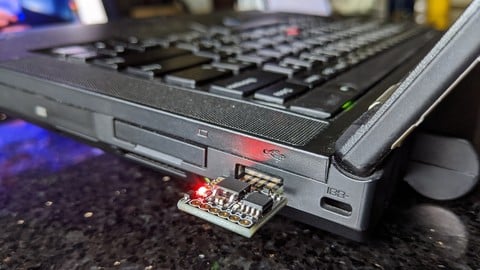
Students will learn to use a low-cost Digispark to program their payloads for use in Ethical Hacking and Penetration testing. We'll go over creating more advanced payloads, including tracking payloads which run in the background, as well as Rickroll payloads which can be used with permission on friends and family to demonstrate how HID attacks work. Additionally, students learn to automate nearly anything on an unattended device which can be extremely useful when you need to run the same commands on a series of computers. That’s how the Original USB Ruber Ducky was invented. Hak5 founder Darren Kitchen, while working as a sysadmin, got tired of typing the same commands to fix printers and network shares, again and again, the device evolved out of laziness. He programmed a development board to emulate the typing for him - and thus the keystroke injection attack was born.

 Udemy Discount
The discount is applied through our link. Open the course from here and Udemy's current promotional price is applied at checkout on most courses, no code to type.
Some courses are excluded from Udemy's promotions. If the price does not drop, clear your browser cookies and use the button again.
Instructor Details

- 4.3 Rating
 90 Reviews
Kody Kinzie
Kody Kinzie is a security researcher at Varonis, with a background in Wi-Fi security and low-cost hacking tools. He hosts the Cyber Weapons Lab show on Null Byte's YouTube channel, a soon to be released show for Hak5, and the Varonis Security Tools podcast. Aside from Wi-Fi hacking, Kody also teaches about open-source intelligence, Python programming, and Arduino-based hacking tools.
 More Hacking courses

Getting Started with Wireshark: The Ultimate Hands-On Course (2025)
4.8 (12,167 Reviews)
 Provider: Udemy
 Time: 4.4h
$109.99

The Ultimate Dark Web, Anonymity, Privacy & Security Course (2025)
4.8 (9,329 Reviews)
- Provider: Udemy
- Time: 10.3h
$27.99

Computer Basics for Beginners: Understanding Computer Basics (2025)
4.8 (4,524 Reviews)
- Provider: Udemy
- Time: 5.8h
$14.99

Ultimate F5 LTM Training from Beginner to Expert 2026
4.8 (1,927 Reviews)
- Provider: Udemy
- Time: 13.5h
$84.99

IP Addressing and Subnetting - Hands-on Learning Approach (2020)
4.8 (1,522 Reviews)
- Provider: Udemy
- Time: 4.2h
$15.99

Cisco BGP Masterclass for Enterprise Network Engineers (2026)
4.8 (1,369 Reviews)
- Provider: Udemy
- Time: 16.4h
$11.99
 Reviews

By Himadri Jyoti on 7/28/2023
This is a great course with right mix of explanation and hands-on activity.
By Jose Antonio Garcia Viera on 8/22/2022
Der Kurs ist sehr informativ und ging tief in die Materie, aber ich hatte Probleme bei der Instaltion des Digispark, so das ein Troubelshooting Link an dieser Stelle sehr hilfreich gewesen wäre! Der Kurs spricht im Nachhinein die die Instalationsprobleme an und löst diese jedoch zum großen Teil. Was ich als anstrengend empfunden habe, war die Tatsache das der Kurs in echtzeit Beispiele gezeigt hat die authentisch den verlauf der Entwicklung von Skripten gezeigt hat, die aber das verfolgen des Kurses an dieser Stelle erschweren!
By Marcos Sepulveda on 6/23/2022
Great videos, amazing content and good place to find info that u can’t usually find very commonly elsewhere!!!!!!
By Ryan Bedran on 9/24/2021
Instructor doesnt respond to question in the Q/A section
By Mike Whitt on 8/22/2021
Video should also cover windows information. Like about the digispark being identified by the computer. I had to download a driver and wasn't told where to find it so I had to do more leg work than I should have had to do.
By Robin Parker on 12/28/2020
Kody's stuff is always good. Here he shows us how to use these tiny little £1 digispark cards as USB rubber Ducky type devices. Lots of hands-on practice. Links to loads of valuable material, github script samples etc.
By C Mac on 12/1/2020
Great information so far. Waiting for my Digispark ATTiny85 to arrive in the post so I can get started on the labs!
By Dalton on 8/14/2020
Easy to follow and made for a fun little project with plenty of ways to expand its usefulness!
By Isiah Jones on 7/25/2020
I appreciate the steps that are being pointed out as to which OS they work on especially if our target of interest are different OS. Would like to see the talking screen fade in and out so we can see the slides better on mobile devices and zoom in when he’s showing his laptop screen live as well.
By Mateo Martinez on 7/16/2020
This was a great course, hope to see more courses revolving around this topic in the future! Great course for beginners getting into ethical hacking! Thanks Kody!
 Quality Score
No CourseDuck member has rated this course yet. Taken it? Give each part a thumbs up or down.
Overall Score : 86 / 100
- Video Duration:
 2.2h
2.2h - Price: $49.99
- Provider: Udemy
- Updated:
 June 2020
 - Level:
 Beginner
 - Language:
 English
 - Certificate:
 Yes
Yes
30-day money-back guarantee on most paid courses
Udemy Coupon Price Tracker
