
 Web Development
 Data Science
 Python
 SQL
SQL JavaScript
 Artificial Intelligence
 IT & Software
 IT Certifications
 Hacking
 AWS
AWS Arduino
 DevOps
 3D Modeling
 Graphic Design
 Photoshop
 Drawing
 Digital Painting
 UX Design
 Business
 Data Analysis
 Communication Skills
 Project Management
 Leadership & Management
 Human Resources
 Digital Marketing
 Social Media Marketing
 Marketing
 SEO
SEO Google Analytics
 Branding
 Excel
Excel Office Productivity
 SAP
SAP PowerPoint
 Microsoft Access
 SharePoint
 Finance & Accounting
 Trading & Investing
 Accounting
 Bitcoin
 Personal Finance
 Video Editing & Animation
 Photography
 Adobe Premier Pro
 Adobe Lightroom
 Personal Development
 Productivity
 Career Development
 Life Coaching
 Health & Fitness
 Meditation & Mindfulness
 Yoga
Yoga Music
Music Music Production
 Guitar
 Piano
Piano Singing
 Language Learning
 Teaching & Academics
 Engineering
 Math
Math Lifestyle
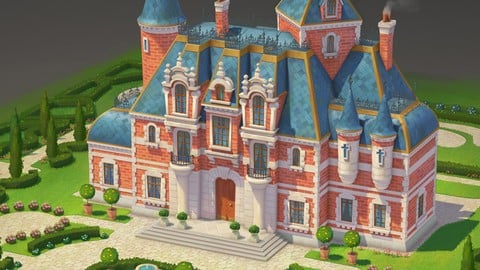
Game Stylized Building Concept Art with Blender + Photoshop (Udemy.com)
Master the Art of Creating Unique and Engaging Stylized Buildings for Game Environments with Digital Painting and 3D
Created by: Pedro De Elizalde
Last updated June 2024
 What you will learn
- Learn how to design a stylized building
- Learn how to paint a stylized building
- Learn how to use Blender for Concept Art
- Understand shape language when designing a building
- Learn concept art
- Learn how to render details
- Paint with photoshop
- 3d modeling
- Learn how to color your design
- Learn how to sketch a building from imagination
- Understand stylized art
- Architecture
- Game art development
- Add new piece to your portfolio
- digital painting
- digital art
How it compares
Against the other 413 rated Udemy courses in Graphic Design on CourseDuck:
- Rating4.4 out of 5higher than 31% of them
- Reviews36#392 of 414 by number of reviews
- Length2.9 hoursshorter than 72% of them
- Last updatedJune 2024earlier than 58% of them
 Course Description
What You'll Learn : design a stylized building useful for either game production, children’s book storytelling, animation projects or any other project that requires stylized architecture.
Whether you are just starting at concept art or you already have some years of experience, this tutorial will be great value for understanding principles of stylized architecture and knowing how to follow those unique details in order to maintain a consistent style throughout your designs.
By the end of this Class: you will not only understand the necessary tools in Blender to model your own buildings but also you will end up with a professional looking image ready to be added to your portfolio.
Resources you can find them in the first video lesson.
Now we have AI, Why should i learn this : AI is good at rendering amazing images in seconds but when it comes to close-up details, maintain the same style and shape language you can get stuck. You need to be able to show in detail where the window connects with the building, how the texture looks, is the texture going to be realistic? or stylized with bigger shapes? Will your edges be hard in some areas and soft in other areas? Will the door be almost the same size of the character, yes? Why? Then the rest of the buildings in your game, book or animation film should follow same style. Understanding the foundation of stylized art will help you to have more believable designs and not just a shiny AI image that lacks of functionality.
For your class assignment you can model and paint a Stylized Building with the technique shown in the class. Along with 3 Studys based on your type of architecture, 3 sketches from imagination and 1 color sketch. Feel free to also share an image of your 3D model if you want also.
What you’ll need for this class: Blender ( download for free in their website ,until version 4.1, NOT 4.2, you can choose to download earlier versions in their website) and Photoshop.
What we'll Do:
Organize references
Realistic to Stylized excercise
Studies to understand the architecture we want to achieve
Imagination sketches
I will teach you how to use Blender to model your own building based on your sketches
Export render passes for easy painting in Photoshop
Import renders into Photoshop and appy shadows
Adding dynamic texture to each color
Adding extra lines of details that we didn't do in the 3d
Finials design and placing them
Hand paint to erase the 3D fake look
Garden vegetation painting and modeling
Projects files : final JPG and sketches for reference, textures used in my scene, architecture types, 3D Scene FBX ( open Blender and go to FILE-IMPORT-FBX to view it)
Please don't forget to leave a review! I would really appreciate it!

 Udemy Discount
The discount is applied through our link. Open the course from here and Udemy's current promotional price is applied at checkout on most courses, no code to type.
Some courses are excluded from Udemy's promotions. If the price does not drop, clear your browser cookies and use the button again.
Instructor Details

- 4.4 Rating
 36 Reviews
Pedro De Elizalde
I am an Environment Concept Artist born and raised in Buenos Aires Argentina, when I was younger I was lucky to do some traditional animation and humoristic drawing courses that helped me to slowly establish my art foundation followed by online self study for many years.
Today with 9+ years of experience I have worked on a wide variety of projects in games and animation. Including projects like theme parks in Thailand (Fantasea), Mobile games for companies like Moonton, Cyberpunk games, scifi, interior designs for bars, nfts, virtual reality projects,childrens book illustrations, card illustrations and many more.
Besides that i constantly like to keep increasing my skills on traditional art with oils or Ink.
 More Graphic Design courses

Adobe InDesign - From Basics to Professional Level Designs (2024)
4.9 (320 Reviews)
 Provider: Udemy
 Time: 11.4h
$84.99

Shop Drawing & Details-Autodesk Revit 2025- for BIM Modelers
4.9 (300 Reviews)
- Provider: Udemy
- Time: 30.9h
$10.99

The Adobe Illustrator CC Mastery Course: Basics to Pro + AI (2026)
4.9 (268 Reviews)
- Provider: Udemy
- Time: 30.8h
$19.99


Software Architecture & System Design Practical Case Studies (2026)
4.8 (2,584 Reviews)
- Provider: Udemy
- Time: 4h
$15.99

Graphic Design Masterclass: Design 40+ Projects in Photoshop (2025)
4.8 (668 Reviews)
- Provider: Udemy
- Time: 16.5h
$109.99
 Reviews

By Ömer Faruk Koç on 12/22/2025
Friends, the course is generally good, but it has one drawback: while it explains how to use the tools for beginners, the video modeling part doesn't perfectly replicate the final model. Keep this in mind; you'll need to figure out how to do some things yourself after the tools are explained.
By Jean chris Randriamalala on 4/11/2025
There no assignement, no way to consolidated what you're trying to teach the audience
By Yauheniya Savitskaya on 11/10/2024
the beginning of the course is not as impressive as I expected, nothing really new for me. Hope that following lessons will be more useful
By Gemma Chandler on 8/11/2024
Amazing tutorial with a professional instructor. This tutorial was gold for me. Detailed explanations and great results. Packed with knowledge for both beginners and experienced artists. Highly recommend!
By Josue Butler on 8/11/2024
Exceeded my expectations! Well-structured lessons with clear explanations. Great focus on game stylization. Perfect for aspiring game concept artists. And also the instructor has many years of professional experience which is crucial for this type of stylized art.
By Charlotte Chan on 8/11/2024
Amazing tutorial! The teacher makes complex techniques easy to understand. Perfect for beginners wanting to improve their digital painting skill but also for experienced artists, the level of difficulty depends on yourself on how complex you want your building to be. Highly recommend!
By Flaviana Leontina on 8/6/2024
Great tutorial for anyone trying to make stylized concept art, the instructor really cares about explaining each step of the process. Awesome!
By Barry Alan on 7/9/2024
The instructor's step-by-step approach and real-world insights make learning enjoyable and effective. This course has significantly improved my concept art skills.
By Cristina Kelley on 7/5/2024
This course gets 5 stars! Learn to create stunning game buildings with Blender's 3D modeling and Photoshop's painting magic. Build your concept art skills for impressive portfolios
By Kartikeya Leofric on 7/5/2024
Absolutely loved this course! The combination of Blender and Photoshop techniques is perfect for stylized game art. The instructor's step-by-step approach and real-world insights make learning enjoyable and effective. This course has significantly improved my concept art skills.
 Quality Score
No CourseDuck member has rated this course yet. Taken it? Give each part a thumbs up or down.
Overall Score : 88 / 100
- Video Duration:
 2.9h
2.9h - Price: $59.99
- Provider: Udemy
- Updated:
 June 2024
 - Level:
 All Levels
 - Language:
 English
 - Certificate:
 Yes
Yes
30-day money-back guarantee on most paid courses
Udemy Coupon Price Tracker
