
 Web Development
 Data Science
 Python
 SQL
SQL JavaScript
 Artificial Intelligence
 IT & Software
 IT Certifications
 Hacking
 AWS
AWS Arduino
 DevOps
 3D Modeling
 Graphic Design
 Photoshop
 Drawing
 Digital Painting
 UX Design
 Business
 Data Analysis
 Communication Skills
 Project Management
 Leadership & Management
 Human Resources
 Digital Marketing
 Social Media Marketing
 Marketing
 SEO
SEO Google Analytics
 Branding
 Excel
Excel Office Productivity
 SAP
SAP PowerPoint
 Microsoft Access
 SharePoint
 Finance & Accounting
 Trading & Investing
 Accounting
 Bitcoin
 Personal Finance
 Video Editing & Animation
 Photography
 Adobe Premier Pro
 Adobe Lightroom
 Personal Development
 Productivity
 Career Development
 Life Coaching
 Health & Fitness
 Meditation & Mindfulness
 Yoga
Yoga Music
Music Music Production
 Guitar
 Piano
Piano Singing
 Language Learning
 Teaching & Academics
 Engineering
 Math
Math Lifestyle
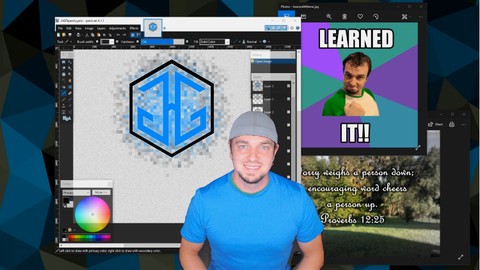
Paint.NET: Learn "Photoshopping" skills the free & easy way! (Udemy.com)
Learn to edit photography, design logos & graphic art, game sprites, memes and more. Free & easy with Paint Dot Net!
Created by: Jared Gaul
Last updated November 2018
 What you will learn
- Edit photography
- Design logos/branding
- Create game sprites & textures
- Add interesting effects to images
- Create menu icons
- Make the next viral meme
- Add watermarks to your content
How it compares
Against the other 413 rated Udemy courses in Graphic Design on CourseDuck:
- Rating4.4 out of 5higher than 31% of them
- Reviews69#346 of 414 by number of reviews
- Length4.2 hoursshorter than 56% of them
- Last updatedNovember 2018earlier than 90% of them
 Course Description
Want to create content or edit photography but don't want to spend the time or money on something as intimidating as Photoshop? Use Paint.Net instead!
In this course I will teach you a variety of skills and concepts using Paint dot NET that are common across many image editing software packages, even Photoshop. You don't have to be an artist or designer, anybody with a PC and an imagination can bring it to reality. As a programmer I'm pretty far from being a legit artist yet I've used this software to create content for various video games I created.
Maybe you are setting up a blog, or an online shop and need branding and content. Perhaps you want to edit family photos, make greeting cards, or spice up your social media posts. Or you just have a passion for epic memes and think you have the next viral sensation. Whatever the desire I'll show you how you can make it with just a little bit of time using free, fun, and easy software.

 Udemy Discount
The discount is applied through our link. Open the course from here and Udemy's current promotional price is applied at checkout on most courses, no code to type.
Some courses are excluded from Udemy's promotions. If the price does not drop, clear your browser cookies and use the button again.
Instructor Details

- 4.4 Rating
 69 Reviews
Jared Gaul
I have been blessed with over 15 years of creative real time software development experience. The companies I've helped range from indie game studios shipping titles on mobile, consoles, and PC, all the way up to industry giants such as Lockheed Martin with their multi-million dollar simulators and even Disney's Emerging Technologies R&D team developing new magical experiences. I also had the honor of being a Full Sail University Course Director which is also where I graduated from with a degree in Game Design & Development.
Outside of my full time job I've had a never ending urge to learn and create and I have channeled that into developing my own cross platform game engine which was used to publish a variety of games/apps. I have also done a fair amount of design work creating logos and game assets. My most recent pursuits have been various inventions which I have modeled and 3D printed all from home creating full scale usable prototypes.
I believe hands on learning provides quicker comprehension and immediate experience. I've always had to spend the extra time to dig deeper and tear things apart to truly understand them and I hope to provide that in my courses in as streamlined an experience as I can. We'll avoid boring trivia and get straight to the practical/fun parts so you can get back to chasing your imagination.
Let's make awesome stuff together!
 More Graphic Design courses

Adobe InDesign - From Basics to Professional Level Designs (2024)
4.9 (320 Reviews)
 Provider: Udemy
 Time: 11.4h
$84.99

Shop Drawing & Details-Autodesk Revit 2025- for BIM Modelers
4.9 (300 Reviews)
- Provider: Udemy
- Time: 30.9h
$10.99

The Adobe Illustrator CC Mastery Course: Basics to Pro + AI (2026)
4.9 (268 Reviews)
- Provider: Udemy
- Time: 30.8h
$19.99


Software Architecture & System Design Practical Case Studies (2026)
4.8 (2,584 Reviews)
- Provider: Udemy
- Time: 4h
$15.99

Graphic Design Masterclass: Design 40+ Projects in Photoshop (2025)
4.8 (668 Reviews)
- Provider: Udemy
- Time: 16.5h
$109.99
 Reviews

By UoC Developer on 12/11/2024
Really enjoyed this course. Even though I've been using Pain.Net for a few years now - I picked up some very useful new techniques. Many thanks For info, I recently discovered in v5.0.9 you can hold down the 'space' key to temporarily activate the hand tool, rather than using 'H' which deselects your current tool.
By George Karboulonis on 9/19/2023
This is a useful course for beginners. The instructor explains how to use every tool in the program. However, there are not enough practical tutorials on how to use these tools. This course would also benefit by covering some of the optional addons that Paint.NET supports but are not part of the program. The volume in this course is too low.
By Timothy on 3/8/2022
I looking to create marketing material for Constant Contact and pamphlets. So I am looking to understand more about the layers with multiple images.
By Wolfgang Suchy on 1/28/2022
I had quite some experience with paint.net before the course, self taught. Did learn a good amount of stuff that I can use in the future though. money worth spent
By Deanne Mott on 5/26/2021
This course was incredibly useful to me. I had been struggling with image editing using paint.net, and did not want to use Photoshop which has tons of classes. I learned so many useful methods and tricks with paint.net. This course is probably the first one I've ever taken (out of many!) that I plan to go back through again. There were so many things to learn that I didn't catch them all the first time through. Thank you for this course!
By John Roper on 2/18/2021
This was a fantastic course for learning the basics and a few more complex features of Paint.Net. I would recommend it to anyone looking to learn how to use this software as an alternative to paid alternatives out there.
By Allan Koven on 4/28/2019
Sometimes hard to see icons as they are small. In addition, explanations are said quickly and even with cc are a bit hard to follow. Voice is soft, would prefer sharper sound. Still confused with masks and how they work.
By Chris Lauterbach on 11/26/2018
Having used Paint.net for about 3 years much of the preliminary information I already know. But there were still things demonstraed that I was unaware of.
By Paolo Scandalitta on 11/20/2018
Si, mirato e ben fatto; forse leggermente troppo lento, preferirei fosse leggermente più veloce, ci penso poi io a fermare e andare indietro se non capisco
By Andre Kruetzfeldt on 10/27/2018
The instructor presented the subject on a way that I was able to follow the course on my own pace. I did like the examples chosen and the in depth explanations the instructor added to them. E.g. How to cope with and iPhone in Portrait and Landscape mode.
 Quality Score
No CourseDuck member has rated this course yet. Taken it? Give each part a thumbs up or down.
Overall Score : 88 / 100
- Video Duration:
 4.2h
4.2h - Price: $54.99
- Provider: Udemy
- Updated:
 November 2018
 - Level:
 Beginner
 - Language:
 English
 - Certificate:
 Yes
Yes
30-day money-back guarantee on most paid courses
Udemy Coupon Price Tracker
