
 Web Development
 Data Science
 Python
 SQL
SQL JavaScript
 Artificial Intelligence
 IT & Software
 IT Certifications
 Hacking
 AWS
AWS Arduino
 DevOps
 3D Modeling
 Graphic Design
 Photoshop
 Drawing
 Digital Painting
 UX Design
 Business
 Data Analysis
 Communication Skills
 Project Management
 Leadership & Management
 Human Resources
 Digital Marketing
 Social Media Marketing
 Marketing
 SEO
SEO Google Analytics
 Branding
 Excel
Excel Office Productivity
 SAP
SAP PowerPoint
 Microsoft Access
 SharePoint
 Finance & Accounting
 Trading & Investing
 Accounting
 Bitcoin
 Personal Finance
 Video Editing & Animation
 Photography
 Adobe Premier Pro
 Adobe Lightroom
 Personal Development
 Productivity
 Career Development
 Life Coaching
 Health & Fitness
 Meditation & Mindfulness
 Yoga
Yoga Music
Music Music Production
 Guitar
 Piano
Piano Singing
 Language Learning
 Teaching & Academics
 Engineering
 Math
Math Lifestyle
Revit 2025 for Interior Design Mastery + Advanced Rendering (Udemy.com)
step-by-step 3D Modeling + Enscape Realistic Rendering + Material + Lighting + Furniture- Architects and BIM Designers
Created by: Farimah Ghavanlou
Last updated October 2025
 What you will learn
- Professional Interior 3D Modeling in Revit
- Decorative walls, Arches, Columns, and Interior Ornamentation
- Ceilings, Decorative Elements, and Classic Details
- Advanced Materials for Realistic Visual Effects
- Precise Lighting Setup and Execution for Interior Spaces
- Furniture Arrangement and Decorative Element Placement for Enhanced Aesthetics
- Using Revit's Rendering Tools to Generate High-Quality Images
- Optimization Techniques to Reduce File Size and Improve Performance
How it compares
Against the other 413 rated Udemy courses in Graphic Design on CourseDuck:
- Rating4.7 out of 5higher than 81% of them
- Reviews120#290 of 414 by number of reviews
- Length8 hourslonger than 69% of them
- Last updatedOctober 2025more recently than 57% of them
 Course Description
This course is project-based, and in addition to learning the software, you will gain hands-on experience in completing real-world projects from start to finish.
Why is Revit one of the best tools for interior design, and how can we use it most effectively?
What is the difference between basic and professional interior modeling in Revit?
How can BIM be used in Revit to professionally manage an interior design project?
How can lighting, material, and rendering settings be combined to create realistic interior visuals in Revit?
In this course, you will learn how to model a classic interior space in Autodesk Revit through a hands-on, project-based approach. From 3D modeling and architectural structure creation to material application, lighting setup, and final rendering, every step will be covered in detail.
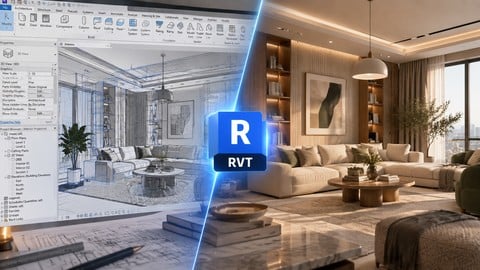
Based on a real-world project, you will gain the skills to model interiors just like the sample image—covering everything from decorative walls and ceilings to furniture layout and high-quality rendering.
Headlines:
Professional interior 3D Modeling in Revit
Creating decorative walls, arches, columns, and interior ornamentation
Modeling ceilings, decorative elements, and classic details
Advanced material application for realistic visual effects
Precise lighting setup and execution for interior spaces
Furniture arrangement and decorative element placement for enhanced aesthetics
Using Revit's rendering tools to generate high-quality images
Optimization techniques to reduce file size and improve performance
Using Enscape as a powerful software for professional rendering.
By the end of this course, you'll be able to design stunning, high-quality interior spaces in Revit with professional workflows! If you have any questions while learning, feel free to ask me to speed up your learning process.

 Udemy Discount
The discount is applied through our link. Open the course from here and Udemy's current promotional price is applied at checkout on most courses, no code to type.
Some courses are excluded from Udemy's promotions. If the price does not drop, clear your browser cookies and use the button again.
Instructor Details

- 4.7 Rating
 120 Reviews
Farimah Ghavanlou
Hi, I'm Farimah Ghavanlou, and I’m excited to be your instructor!
With over 10 years of experience in architecture, BIM, and interior design, I have worked on numerous real-world projects and have trained hundreds of students in various architectural and BIM software.
My teaching method is entirely project-based, meaning you won't just learn the software—you'll gain practical experience by working on real projects. I believe that learning should go beyond theory, so I make sure to share my industry insights and hands-on experience in every course.
24/7 support is available for all my students. If you have any questions, I’m always here to help, ensuring that your learning journey is smooth and effective.
If you're looking for a practical and experience-driven approach to mastering architectural and BIM workflows, you're in the right place! Let's learn and build amazing projects together. ?
 More Graphic Design courses

Adobe InDesign - From Basics to Professional Level Designs (2024)
4.9 (320 Reviews)
 Provider: Udemy
 Time: 11.4h
$84.99

Shop Drawing & Details-Autodesk Revit 2025- for BIM Modelers
4.9 (300 Reviews)
- Provider: Udemy
- Time: 30.9h
$10.99

The Adobe Illustrator CC Mastery Course: Basics to Pro + AI (2026)
4.9 (268 Reviews)
- Provider: Udemy
- Time: 30.8h
$19.99


Software Architecture & System Design Practical Case Studies (2026)
4.8 (2,584 Reviews)
- Provider: Udemy
- Time: 4h
$15.99

Graphic Design Masterclass: Design 40+ Projects in Photoshop (2025)
4.8 (668 Reviews)
- Provider: Udemy
- Time: 16.5h
$109.99
 Reviews

By Tebogo Pila on 7/10/2026
This course is well structured and easy to follow. The instructor explains Revit tools clearly, making it suitable for both beginners and users looking to improve their interior design workflow. I especially appreciate the practical approach and real project examples. I would recommend adding more advanced topics on BIM standards and documentation, but overall it has been a valuable learning experience.
By Debie Rojas on 5/18/2026
The instructor explained the steps every time, never skip them, so it was easier to catch the pace. It was very useful, specially to understand how rfa works
By MOHAMMED IRFAN SAYEED on 10/27/2025
The Interior Design Mastery + Advanced Rendering course was very informative and easy to follow. I learned practical techniques for creating realistic interior spaces and professional renderings. The instructor explained everything clearly. I highly recommend this course to anyone passionate about interior design and visualisation.
By MD AFROZ ALI on 10/17/2025
I recently completed the Revit Rendering course, and it was an excellent learning experience! The instructor explained every concept clearly, from lighting and materials to realistic visualization. The practical examples and project-based approach really helped me improve my rendering skills. Highly recommended for anyone who wants to create professional-quality renders in Revit!
By N.Gowtham on 9/13/2025
“This is an outstanding course for learning Revit 2025 with a focus on interior design and advanced rendering. The instructor explains each step clearly, covering 3D modeling, materials, lighting, and furniture placement in a very practical way. The integration with Enscape for realistic rendering is especially useful, helping to create professional-quality presentations. Perfect for architects, interior designers, and BIM professionals who want to upgrade their skills.”
By Deenraza Mohamed on 7/22/2025
This course was exactly what I needed. The lessons were clear, well-paced, and filled with valuable tips I can actually use. I loved how practical it was no fluff, just real knowledge and tools that made a difference from day one. The instructor explained everything in a way that just made sense, even the more complex parts. I’ve taken a few courses before, but this one really stood out in terms of quality and impact. If you're on the fence about joining go for it. You won’t regret it!
By Paul Chacko on 7/14/2025
⭐️⭐️⭐️⭐️⭐️ Excellent Course for Architects and BIM Enthusiasts! This Step-by-step 3D Modeling + Enscape Realistic Rendering + Material + Lighting + Furniture course is one of the most practical and well-structured tutorials I’ve taken. The explanations are clear, the pace is perfect, and it covers everything from modeling basics to high-quality rendering techniques in Enscape. I especially appreciated how real-world furniture and material application were included, giving a complete architectural workflow. Whether you're a beginner or looking to polish your skills, this course is a valuable investment. Highly recommended for architects and BIM designers!
By Raymond Z. Calasanz on 5/6/2025
The content is clear, well-structured, and highly practical for real-world applications. The instructor explains concepts in a way that’s easy to follow, even for beginners, and the hands-on exercises really help reinforce the learning. I’ve gained so much confidence using Revit thanks to this course. Highly recommended for anyone looking to strengthen their interior design BIM skills!
By Youssouf linguani on 8/22/2025
By Abubaker alhaj on 5/8/2025
 Quality Score
No CourseDuck member has rated this course yet. Taken it? Give each part a thumbs up or down.
Overall Score : 94 / 100
- Video Duration:
 8h
8h - Price: $19.99
- Provider: Udemy
- Updated:
 October 2025
 - Level:
 All Levels
 - Language:
 English
 - Certificate:
 Yes
Yes
30-day money-back guarantee on most paid courses
Udemy Coupon Price Tracker
