
 Web Development
 Data Science
 Python
 SQL
SQL JavaScript
 Artificial Intelligence
 IT & Software
 IT Certifications
 Hacking
 AWS
AWS Arduino
 DevOps
 3D Modeling
 Graphic Design
 Photoshop
 Drawing
 Digital Painting
 UX Design
 Business
 Data Analysis
 Communication Skills
 Project Management
 Leadership & Management
 Human Resources
 Digital Marketing
 Social Media Marketing
 Marketing
 SEO
SEO Google Analytics
 Branding
 Excel
Excel Office Productivity
 SAP
SAP PowerPoint
 Microsoft Access
 SharePoint
 Finance & Accounting
 Trading & Investing
 Accounting
 Bitcoin
 Personal Finance
 Video Editing & Animation
 Photography
 Adobe Premier Pro
 Adobe Lightroom
 Personal Development
 Productivity
 Career Development
 Life Coaching
 Health & Fitness
 Meditation & Mindfulness
 Yoga
Yoga Music
Music Music Production
 Guitar
 Piano
Piano Singing
 Language Learning
 Teaching & Academics
 Engineering
 Math
Math Lifestyle
Surface Modelling with Rhino 3D V6 ( or V5 ) Level 1 & 2 (Udemy.com)
Develop your Rhino 3D surfacing skills on 3 different bottle designs.
Created by: Alexandre Galin
Last updated January 2021
 What you will learn
- Any design students or rhino user who's interested in learning Rhino 3D
- Surfacing Design, Prototyping, Rendering with Vray and Rhino Render
How it compares
Against the other 413 rated Udemy courses in Graphic Design on CourseDuck:
- Rating4.7 out of 5higher than 81% of them
- Reviews264#175 of 414 by number of reviews
- Length9.5 hourslonger than 74% of them
- Last updatedJanuary 2021earlier than 82% of them
 Course Description
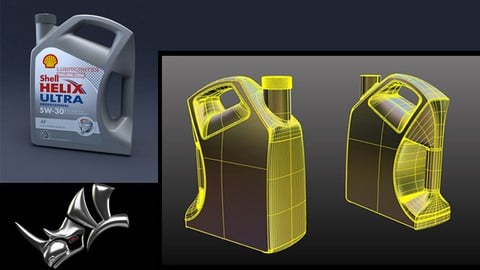
In this course, I will create 3 bottle designs , each example increasing in complexity. The purpose is to show how to surface properly on a typical project. In this case I will use a Jerry can , a detergent bottle and a motor oil bottle as subjects for my demos. This tutorial is more intended for those who have some basic familiarity with the Rhino environment as I will delve more on the surfacing and design aspect rather than understanding Rhino's basic commands.
After this course who will have an understanding on how to surface and get your model ready for prototyping.

 Udemy Discount
The discount is applied through our link. Open the course from here and Udemy's current promotional price is applied at checkout on most courses, no code to type.
Some courses are excluded from Udemy's promotions. If the price does not drop, clear your browser cookies and use the button again.
Instructor Details

- 4.7 Rating
 264 Reviews
Alexandre Galin
I bring over 25 years of industrial design experience, mainly in the aerospace industry. I also taught for more than seven years Rhino 3D at UQAM (University of Quebec in Montreal), sharing what I love about surfacing and design.
I’ve worked extensively with surfacing, prototyping, rendering, and building mock-ups.
Whether you’re just starting out or want to sharpen your skills, come learn with me—I’ll help you become confident and skilled in surfacing design using Rhino 3D.
 More courses by Alexandre Galin

Rhino 3D FOUNDATION CLASS Beginner Level to Advanced Level (2025)
4.7 (8,338 Reviews)
 Provider: Udemy
 Time: 32.5h
$17.99
More Graphic Design courses

Adobe InDesign - From Basics to Professional Level Designs (2024)
4.9 (320 Reviews)
- Provider: Udemy
- Time: 11.4h
$84.99

Shop Drawing & Details-Autodesk Revit 2025- for BIM Modelers
4.9 (300 Reviews)
- Provider: Udemy
- Time: 30.9h
$10.99

The Adobe Illustrator CC Mastery Course: Basics to Pro + AI (2026)
4.9 (268 Reviews)
- Provider: Udemy
- Time: 30.8h
$19.99


Software Architecture & System Design Practical Case Studies (2026)
4.8 (2,584 Reviews)
- Provider: Udemy
- Time: 4h
$15.99

Graphic Design Masterclass: Design 40+ Projects in Photoshop (2025)
4.8 (668 Reviews)
- Provider: Udemy
- Time: 16.5h
$109.99
 Reviews

By T. Mike Curry on 6/4/2023
Very well done tutorial. The lessons are well paced and cover topics in a progression that is easy to comprehend. Creating the bottles may not seem difficult at first glance, but the techniques and methods taught definitely apply to more intermediate and advanced modelling. This course really helped me improve my skills. Great tutorial!
By Matty Krosschell on 4/9/2022
This course Gives you Things you Can't get In many Free tutorials It Shows you how to actually Use NURBS In a practical way and make a shape that is non Orthogonal the one thing to Improve Is you could show how to Duplicate border as well Instead of just Duplicate Edge Duplicate border is so much Less Frustrating when you need a Border Edge with lots of tiny parts and don't want to pick them with the cursor of course you will need Duplicate Edge Sometimes To so keep that in
By Art Brown on 2/21/2022
This is a great course. It is really useful that each mini project is a similar product, but gradually increases the surfacing and modeling complexity. It is also great that the instructor often shows several surfacing methods of achieving specific features. It is an excellent demonstration on how to resolve common modeling issues when you encounter problematic surfaces. Highly recommended course and instructor!
By Wade Shepherd on 10/4/2021
This course had far more depth than I ever expected and I'm glad I purchased it. If I can find one fault it would be on the last lesson, near the end. Alexandre did some resurfacing and did not have a video of it. I really needed to see his technique because I'm uncertain on how to achieve the same results. But aside from that there is a wealth of knowledge in this if you are learning Rhino. I feel this was a great couse to take right after the Rhino 3d begginer to advanced level course.
By Stephen Copeland on 8/21/2020
I have gathered enough information now to feel confident to tackle anything, its just trying to remember which tools are needed. The last model is a real test to get it flowing, and i am happy with my progress. Great explanations through the course, he picks up the pace towards the end, but by then you feel you have gained enough to steadily work through it. Very good instructor, very enjoyable course. I hope Alex develops some more complicated models. Can't wait to start the Spitfire!
By Stephen L. Bradley on 6/21/2020
This was a good follow up to the initial Rhino course. Like the watch in the first course, I like seeing a project taken from its initial phases through the final rendering, seeing each step along the way. I like how multiple methods of achieving a result were presented. Now to move on and do the course on how to model a Spitfire aircraft. My one suggestion is the need for an index for these lectures that summarizes what is in each lecture so that later I can come back to certain lectures to review commands or steps taken. This could also be done by extending each lecture's title to include what the lecture contains. Many thanks for creating a very comprehensive intermediate course on Rhino.
By Tom on 1/4/2020
I was a mediocre Level 2 Rhino user, although I was able to build some models I needed to create for my clients, those models were full of imperfections, such as naked edges, water tight seal solid failure, surfaces being to complicated and so on. After taking this course and prior study of a beginner course also from this instructor, my fundamental skills has been improved that leads to a high successful rate of my current models. One good thing about his modeling style is he focuses on the crucial foundations like building curves, simplifying surfaces in an easy to learn manner. For those who find his style a bit long winded, use the 1.25x or higher speed button to shorten the section. If you are not a good level two user and want to improve your skills, I highly recommend this course.
By Wout Pijpers on 8/17/2019
Het beeld is vaak niet scherp. De kleine icoontjes en tekst zijn moeilijk leesbaar
By Martin Samuelsson on 2/11/2019
Previously to this tutorial I use to watch tutorials on Youtube. I also attempted to model a car from an ebook that I bought. However the car was out of my league and the format of an ebook was too rigid for me to understand (too many questions that were not answered by the author). This course is great for those that have started using Rhino and are a bit familiar with how it operates and such. The best thing with this course is that it shows multiple ways of modelling the same part. Which gives a deeper understanding. It also incorporate more strategic thinking than what I have seen in Youtube-tutorials. With that said, It could be a lot more of the strategic part. Since my attempts to model a car, I know a bit about creating perfectly smooth surfaces where there will be no unwanted seams/kinks visible when rendering. And this is not talked about here. The Course is great and I think it would have been even greater if the creator talked and explained more in detail when and why you would choose to connect surfaces in different ways.
By Juan Olvera Martínez on 2/6/2019
Gracias, este curso me ha parecido muy completo y sobre todo al hacer énfasis en el tema de"Continuidad en Superficies", en mi caso personal, este tema es el que me ha resultado de mayor dificultad; me he dedicado en tratar de comprender este tema, con el fin de lograr superficies "perfectas" ya que nunca antes me había enfrentado con este tópico. Con este curso me queda claro en mayor grado cómo lograrlo manejando Rhino y lo he puesto en práctica. Dos sugerencias: Ojalá el profesor pudiera hacer otro curso, aunque sea breve, de ejemplos prácticos y muy sencillos de Continuidad de Superficies, algo así titulado: " Seis ejercicios relámpago de Continuidad de Superficies en seis clases" y en cada ejercicio nos mostrara el uso de los comandos que hay en la barra de "creación de superficies". ("Seis" es un decir). Eso sería magnífico, sin profundizar en otra cosa mas que en la continuidad (G0, G1, G2....). Como segundo punto para Udemy, mi sugerencia es que habilitaran un espacio para exponer los trabajos que los aprendices realizamos gracias a los cursos que compramos, una especie de "Galería" para plasmar el avance que obtenemos, con un apartado donde se haga mención del curso, el instructor, el tiempo que llevó hacerlo y algún comentario extra. Es todo y mucho le agradezco y saludo.
 Quality Score
No CourseDuck member has rated this course yet. Taken it? Give each part a thumbs up or down.
Overall Score : 94 / 100
- Video Duration:
 9.5h
9.5h - Price: $89.99
- Provider: Udemy
- Updated:
 January 2021
 - Level:
 Intermediate
 - Language:
 English
 - Certificate:
 Yes
Yes
30-day money-back guarantee on most paid courses
Udemy Coupon Price Tracker
