
 Web Development
 Data Science
 Python
 SQL
SQL JavaScript
 Artificial Intelligence
 IT & Software
 IT Certifications
 Hacking
 AWS
AWS Arduino
 DevOps
 3D Modeling
 Graphic Design
 Photoshop
 Drawing
 Digital Painting
 UX Design
 Business
 Data Analysis
 Communication Skills
 Project Management
 Leadership & Management
 Human Resources
 Digital Marketing
 Social Media Marketing
 Marketing
 SEO
SEO Google Analytics
 Branding
 Excel
Excel Office Productivity
 SAP
SAP PowerPoint
 Microsoft Access
 SharePoint
 Finance & Accounting
 Trading & Investing
 Accounting
 Bitcoin
 Personal Finance
 Video Editing & Animation
 Photography
 Adobe Premier Pro
 Adobe Lightroom
 Personal Development
 Productivity
 Career Development
 Life Coaching
 Health & Fitness
 Meditation & Mindfulness
 Yoga
Yoga Music
Music Music Production
 Guitar
 Piano
Piano Singing
 Language Learning
 Teaching & Academics
 Engineering
 Math
Math Lifestyle
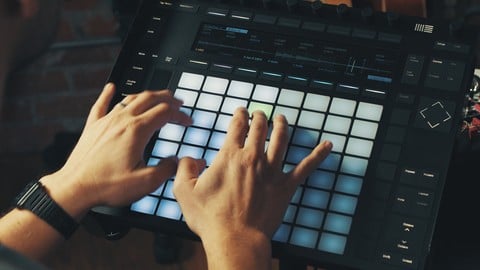
Ableton Push - Workflow and Production (Udemy.com)
Learn Push workflow and production techniques with Ableton Certified Trainer Mitch Lee. UPDATED FOR LIVE 10.1
Created by: Mitch Lee
Last updated March 2025
 What you will learn
- Program Drums
- Play melodies, chords and scales
- Sample
- Record and Loop Audio
- Arrange
- Mix
How it compares
Against the other 241 rated Udemy courses in Music Production on CourseDuck:
- Rating4.3 out of 5higher than 13% of them
- Reviews1,552#20 of 242 by number of reviews
- Length6.1 hourslonger than 69% of them
- Last updatedMarch 2025more recently than 58% of them
 Course Description
UPDATED FOR LIVE 10.1
Learn Push workflow and production techniques from Ableton Certified trainer and award winning producer Mitch Lee.
Learn to create and produce with the Ableton Push
Drum Programming
Notes, Chords and Scales
Sampling Workflow
Recording Audio
Arranging and Mixing
Understand production workflow
The Ableton Push has changed the way Ableton users produce and perform. Workflow is everything and understanding how best to maximize this instrument is what this course is all about.
Content and Overview
Drum Programming
Drum programming is one of the many strengths of the Ableton Push. You will learn how to program drums 3 different ways. We start with finger/pad drumming techniques and explain how to setup your loop lengths and quantize settings for best results. Then we create a house beat while explaining step sequencing with the Push. Finally we conclude with the Hybrid Technique of finger/pad drumming and step sequencing. The main workflow technique we showcase through all three methods is Subtractive Drum Programming.
Notes, Chords and Scales
The isometric keyboard on the Push allows users to create melodies with ease. The scale function creates a fast way to create melody or bass lines in any key or scale you desire. Learning a few different chord shapes will allow you to play many chords in any scale. The melodic step sequencer is another creative tool for creating baselines and melodic lines you might not normally make.
Sampling Workflow
With the latest 9.5 release of Live, Ableton has completely changed the sampling game for Push users. The upgrade to the simpler instrument has taken the sampling process on the Push to an incredible new level. Offering a number of new tools inside of simpler along with the ability to warp samples allows us to time stretch instantly and manipulate samples any way we please. Chopping samples is just the beginning, learn to sample fast, from vinyl and other formats.
Recording Audio
There are a number of Push users who also play other instruments like guitar and bass. Understanding how to record and loop with the Push is a real mystery for some users. Learn to how to use a foot pedal to punch in and out and record live instruments with the Push. Mitch also explains how to connect a hardware synth and control it with the Push.
Arranging and Mixing
The Push is an incredible arrangement tool. Learn how to setup your clips in Ableton and learn Mitch’s macro arrangement technique with the Push. Take your ideas and loops and make them into sections of your tracks fast and efficiently. Learn what mixing facilities are available to Push users. Being able to meter on the Push 2 has made it much easier to get your mixes to a place where you can fine tune and make your tracks sit properly. The Push turns into a tactile tool for adjusting and tweaking your tracks while processing and working with plugins and vsts.
Live Performance
A case study following artist Sergio Levels as he walks through his live performance setup and tricks and tips for integrating other hardware and devices.
Shortcuts
Over 15min of quick hitting shortcuts to make your workflow lightening fast.
Updates and Bonus Section
Brand new content for the Live 10.1 update added. Learn to make an incredible Selektor Drum Rack and watch how this workflow is a game changer.
What am I going to get from this course?
Over 40 lessons and over 6 hours of content!
Learn the Ableton Push from Ableton Certified Trainer and award winning producer Mitch Lee
Project files, drum racks and sample packs to help you follow along with the lessons
Created for beginners and Intermediate Push users
Workflow is at the heart of every lesson

 Udemy Discount
The discount is applied through our link. Open the course from here and Udemy's current promotional price is applied at checkout on most courses, no code to type.
Some courses are excluded from Udemy's promotions. If the price does not drop, clear your browser cookies and use the button again.
Instructor Details

- 4.3 Rating
 1,552 Reviews
Mitch Lee
Mitch Lee is an award winning film, tv and video game composer and producer. Mitch is also a certified Ableton Live Instructor and has a passion for breaking down and passing on music production skills and techniques.
Mitch has gone on to produce music for companies like Warner Brothers, Activision, Atari, ESPN, Adidas, Nissan, Lamborghini and many more.
 More Music Production courses

Electronic Music Production with Ableton Live (2025)
4.9 (2,479 Reviews)
 Provider: Udemy
 Time: 11.9h
$84.99

Garageband IOS (iPhone/iPad): The Complete Beginners Guide (2021)
4.9 (535 Reviews)
- Provider: Udemy
- Time: 3.5h
$10.99

How to Become a DJ - Learn How to Start DJing Online Today (2021)
4.8 (5,221 Reviews)
- Provider: Udemy
- Time: 10.8h
$17.99

Ultimate Sound Design: Mastering Sound Design (2026)
4.8 (1,998 Reviews)
- Provider: Udemy
- Time: 7.3h
$109.99


Ultimate Ableton Live 9 Complete: Parts 4, 5, & 6 (2026)
4.8 (512 Reviews)
- Provider: Udemy
- Time: 11.8h
$89.99
 Reviews

By Gene Potkay on 12/7/2022
Overall, quite a good course on Ableton Push 2. It could benefit from an update for Live 11 and slowing down in some sections. The session on the melodic step sequencer went way too fast to pick up. Its was more of a demo but not a tutorial. The Push 2 has a lot to offer and takes some serious time to pick up. The course content, detail and pace was generally quite good which certainly helps a great deal.
By Richard Harrington on 6/23/2022
Awesome so far. The instructor is clear and concise. The first section alone will give you a ton of things to play around with. Ended up taking me two days to get through it because I keep pausing to play around with the techniques. Very fun hands on course. I wish more instructors would take this approach instead of the common theme of giving a several hour extensive tour of every area in the user interface.
By Anthony Lee on 12/20/2020
Great course!
By Neil Rego on 12/6/2020
Very good buy this course
By Guven Oguz on 12/6/2020
Thank you for this well-designed course which is very useful for a newbie like me. Probably a two-part program (one for complete beginners and the other for intermediate users) could have been a much better idea, but still I am happy with this one. Recommended!
By Gregory D. Brown on 11/10/2020
I am absolutely positive that Mitch is a wizard using Ableton Push 2 I'm not saying that to be sarcastic at all. It's quite evident that he knows exactly how to navigate all of the various functions and controls. However as a Jazz Piano instructor of over 23 years, I can say for sure that the ability to play and the ability to teach are 2 different skill sets, with some overlap to be sure. I wanted to sound as positive as possible. I am a COMPLETE novice when it comes to Ableton Live and Push 2. Many times Mitch to his credit would say what he was doing, even why he was doing it. But he didn't break it all the way down to the simplest steps. For example, when explaining that at first build a complex drum track then begin to subtract from it. He didn't go into detail as to how he was doing it. He simply just did it, without deep explanation. Plenty of assumptions were made that I the student knew certain things, which I didn't. Another example. When he pressed the pad to lower a velocity, I could never get my push to do that. I'm sure it was something very simple that I wasn't doing, however as a novice I had no idea what it was. I think this tutorial would be ok for someone with some knowledge of push 2, but as for a total novice as myself, I feel too many intermediate steps were not included. So for a low level to medium level experience user I would give this tutorial 4 and a half stars but for a beginner, 2 and a half maybe 3.
By Regina Sayles on 11/9/2020
I'm pretty new to Ableton. I bought a Push 2 because it just seemed like I could do more if I had one and wow, was that the truth. I figured out a few things on my own when I got it, but this course has opened up a million possibilities and saved me hours of surfing on YouTube to find videos that teach this. Mitch is great!
By Mar Tin on 11/7/2020
So far, it has been really easy and fun to follow. Looking forward to completing the rest of the course.
By Djah Mso on 11/5/2020
Instructor talks too much. If anyone owns a push, they must at least already know about things like velocity. Just go straight to the point. It's looking more like a youtube video to me and it's for that reason I paid so I would avoid to much talk a little substance.
By Arun Kumar P on 11/4/2020
Beat drop team has done amazing job making this workflow. Learnt a lot of things. It needs multiple times to get use to it. The resources are so helpful. Thanks once again team. Great job.
By Simon Aston on 11/2/2020
Excellent Information, Hope to go through again to develop my Push 2 Skills. Thank You
By Nigel Pond on 11/1/2020
Not enough interaction. This is probably a criticism of Udemy rather than the course content itself. The course is more of a demo than training...
 Quality Score
No CourseDuck member has rated this course yet. Taken it? Give each part a thumbs up or down.
Overall Score : 86 / 100
- Video Duration:
 6.1h
6.1h - Price: $15.99
- Provider: Udemy
- Updated:
 March 2025
 - Level:
 All Levels
 - Language:
 English
 - Certificate:
 Yes
Yes
30-day money-back guarantee on most paid courses
Udemy Coupon Price Tracker
