
 Web Development
 Data Science
 Python
 SQL
SQL JavaScript
 Artificial Intelligence
 IT & Software
 IT Certifications
 Hacking
 AWS
AWS Arduino
 DevOps
 3D Modeling
 Graphic Design
 Photoshop
 Drawing
 Digital Painting
 UX Design
 Business
 Data Analysis
 Communication Skills
 Project Management
 Leadership & Management
 Human Resources
 Digital Marketing
 Social Media Marketing
 Marketing
 SEO
SEO Google Analytics
 Branding
 Excel
Excel Office Productivity
 SAP
SAP PowerPoint
 Microsoft Access
 SharePoint
 Finance & Accounting
 Trading & Investing
 Accounting
 Bitcoin
 Personal Finance
 Video Editing & Animation
 Photography
 Adobe Premier Pro
 Adobe Lightroom
 Personal Development
 Productivity
 Career Development
 Life Coaching
 Health & Fitness
 Meditation & Mindfulness
 Yoga
Yoga Music
Music Music Production
 Guitar
 Piano
Piano Singing
 Language Learning
 Teaching & Academics
 Engineering
 Math
Math Lifestyle
Arduino Step by Step Guide : Basic Level (Udemy.com)
Practical Hand on with verified circuit diagram and codes. Step by Step Guidance to make it easy for all age of students
Created by: Dr. D. D. Zala
Last updated November 2024
 What you will learn
- Step by Step guidance for Arduino Board
- Basics of Arduino and Electronic Components
- IDE Installation and drive issue resolve
- How to think and write a code for Arduino Board
- Solved Assignment Output
- Verified Circuit diagram and Codes for the Hands on
- Arduino connection with sensor DTH11 (Serial Monitor and Serial Plotter)
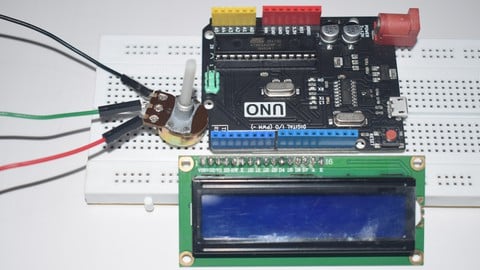
- Arduino connection with 16*2 LCD Display
- Arduino connection with Seven Segment Display
- Arduino connection with LED and Buzzer
- Conecpt of PWM and Analog to Digital Conversion
How it compares
Against the other 295 rated Udemy courses in Arduino on CourseDuck:
- Rating4.3 out of 5higher than 36% of them
- Reviews152#156 of 296 by number of reviews
- Length1.7 hoursshorter than 87% of them
- Last updatedNovember 2024more recently than 61% of them
 Course Description
Arduino is an open source platform used for building electronics projects. Arduino consists of both a physical programmable circuit board or microcontroller and a software, IDE (Integrated Development Environment) that runs on the computer. It is used to write and upload computer code to the physical board. Arduino board designs use a variety of microprocessors and controllers. The boards are equipped with sets of digital and analog input/output pins, USB connection which is used for loading programs from computers, power jack, reset button etc. A program written with the IDE for Arduino is called a sketch. The Arduino IDE supports the languages C and C++ using special rules of code structuring. It consists of only two functions, setup and loop. The setup function is used to initialize variables, input and output pin modes and other libraries needed in the sketch. After setup has been called, function loop is executed repeatedly in the main program. It controls the board until the board is powered off or reset. Arduino can interact with buttons, LEDs, motors, speakers, cameras, TV and smart phones etc. It can used for almost any electronics projects. The Arduino Tutorial effort for Arduino has been contributed by Prof. D D Zala.

 Udemy Discount
The discount is applied through our link. Open the course from here and Udemy's current promotional price is applied at checkout on most courses, no code to type.
Some courses are excluded from Udemy's promotions. If the price does not drop, clear your browser cookies and use the button again.
Instructor Details

- 4.3 Rating
 152 Reviews
Dr. D. D. Zala
Dr. D. D. Zala is an educator at Information and Communication Technology engineering branch. He is certified Cisco NetAcad Instructor.
He has done his graduation and Masters in Electronics and Communication and More than 15 Years of experience in electronics, Networking and Sensor Interfacing.
He is very enthusiastic and passionate about Electronics Projects. He has conducted Electronics Workshop, Electronic Practices and Sensor and Interfacing subject more than five time.
His expertise includes,
- Electronic Projects with Arduino and Raspberry Pi
- Computer Networks
- PCB Designing
- Sensor and Interfacing
- Network Practical (CCNA, Routing and Switching)
- Introduction to Cyber Security
 More Arduino courses


Learn to Build a Computer (PC) in 2026 - all types!
4.9 (245 Reviews)
 Provider: Udemy
 Time: 6.1h
$74.99

Raspberry Pi For Beginners - 2026 Complete Course
4.8 (3,105 Reviews)
- Provider: Udemy
- Time: 10.6h
$89.99

Ultimate Guide to Raspberry Pi : Tips, Tricks and Hacks (2023)
4.8 (2,363 Reviews)
- Provider: Udemy
- Time: 5.2h
$69.99

Mastering Microcontroller: STM32-LTDC, LCD-TFT, LVGL (MCU3) (2026)
4.8 (487 Reviews)
- Provider: Udemy
- Time: 8.1h
$79.99

Arduino Step by Step: Getting Started (2024)
4.7 (8,714 Reviews)
- Provider: Udemy
- Time: 21.4h
$159.99
 Reviews

By Fernand Chagnon on 4/11/2026
Yes, I used to do PLC programming, never had the opportunity to build system like this one. Presently retired so this will be a good refresher course
By Vadher Harshil on 10/16/2022
as ardinouno is an intresting topic , as this course help me a lot to understand this topic!!
By Rick Morgan on 6/25/2022
The narrators voice has an echo. The narrator can be difficult to understand due to his accent and talking quickly. He simply reads this slides aloud which is very boring and contrary to good teaching practices, Content is good, exsamples are helpful. Narrator made no attempt to start with a clean desktop or installation of his screen capture so much distracting material is on his example videos. This is a mediocre lesson series on this subject.
By Gohi.Dhruvrajsinh on 5/6/2022
it is very good course in which learned about how to program in arduino
By Reet Patel on 5/4/2022
it is so good to learn
By Elí David Martínez Carrión on 9/19/2021
The course is not out of the YT tutorials information, but the extra info the instructor gaves you is good to understand the sesions.
By Sailslack on 9/18/2021
Nice course for beginners.
By Yash Buddhdev on 6/24/2021
The course was very much helpful for me and learned alot new things and the concepts are very much clear to me now so Tysm for this opportunity of learning
By Nimish Gondaliya on 6/23/2021
this is good and helpful
By VIRAJ SEKHADA on 6/22/2021
Starting with this arduino basic course, which covers everything from the foundations to advanced level intricacies, is a good place to start for novices. It is really beneficial to me to repeat my knowledge.
 Quality Score
No CourseDuck member has rated this course yet. Taken it? Give each part a thumbs up or down.
Overall Score : 86 / 100
- Video Duration:
 1.7h
1.7h - Price: $19.99
- Provider: Udemy
- Updated:
 November 2024
 - Level:
 Beginner
 - Language:
 English
 - Certificate:
 Yes
Yes
30-day money-back guarantee on most paid courses
Udemy Coupon Price Tracker
