
 Web Development
 Data Science
 Python
 SQL
SQL JavaScript
 Artificial Intelligence
 IT & Software
 IT Certifications
 Hacking
 AWS
AWS Arduino
 DevOps
 3D Modeling
 Graphic Design
 Photoshop
 Drawing
 Digital Painting
 UX Design
 Business
 Data Analysis
 Communication Skills
 Project Management
 Leadership & Management
 Human Resources
 Digital Marketing
 Social Media Marketing
 Marketing
 SEO
SEO Google Analytics
 Branding
 Excel
Excel Office Productivity
 SAP
SAP PowerPoint
 Microsoft Access
 SharePoint
 Finance & Accounting
 Trading & Investing
 Accounting
 Bitcoin
 Personal Finance
 Video Editing & Animation
 Photography
 Adobe Premier Pro
 Adobe Lightroom
 Personal Development
 Productivity
 Career Development
 Life Coaching
 Health & Fitness
 Meditation & Mindfulness
 Yoga
Yoga Music
Music Music Production
 Guitar
 Piano
Piano Singing
 Language Learning
 Teaching & Academics
 Engineering
 Math
Math Lifestyle
Complete Microsoft Project Training & Certification (Udemy.com)
Microsoft Project Professional - Project Management Software
Created by: Vivek PMP
Last updated June 2023
 What you will learn
- Microsoft Project : Project Management Software
- Microsoft Project Software
- Project Schedule tracking & monitoring with Microsoft Project
- Project Cost tracking & monitoring with Microsoft Project
How it compares
Against the other 243 rated Udemy courses in Project Management on CourseDuck:
- Rating4.1 out of 5higher than 5% of them
- Reviews792#115 of 244 by number of reviews
- Length5.3 hourslonger than 64% of them
- Last updatedJune 2023earlier than 85% of them
 Course Description
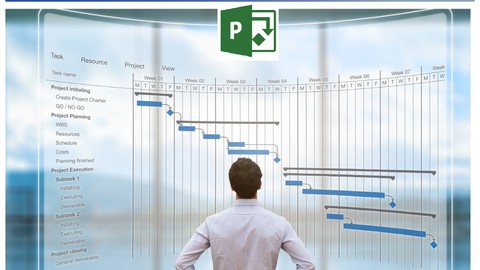
This course helps the participants to understand how to use Microsoft Project in the Project Management Body of Knowledge, (PMBOK® Guide) – Sixth Edition, Project management Institute, Inc., 2018 process. Building Project schedules, developing WBSs, and understanding Critical Path. Understand various report types and how to customize them Managing Resources and Multiple Projects. Resolve multi-project resource conflicts, keeping projects on track, develop baselines and Accurately represent project status.
Microsoft Project is the most user friendly and flexible project management tool . It also enables organizations to start and deliver the intended business value. With this project management software, project managers can develop a plan, assign resources to tasks, track progress, manage the budget, and analyze workloads. You can effectively manage your human resources by tracking their tasks. Importantly, you can make data driven decisions by equipping team members with the information they need to stay informed and make better decisions.
Topics covered :
1. Introduction to Project Management
2. Introduction to MS-Project
3. Introduction to Calendar, Types Calendars & Calendar Creation
4. Task types & Relationship types
4. Project Scheduling : Critical Part
5. Work Breakdown Structure
6. Introduction of Constraints, Types of Constraints & Application of Constraints in Project with MS Project
7. Define Resources, Types of Resources & Assign Resources. Calculate Project Budget
8. What is Resource Analysis and Levelling. How to use Resource Analysis & Levelling in MS Project to use resources efficiently.
9. Project Updating with different methods with MS Project
10. Project Tracking with Earned Value Analysis in MS Project with Practical example
11. Filters & Groups in MS Project software
12. Create Multiple Projects & How to track Multiple Projects with one Master MS Project file
13. Customizing & Formatting in MS Project software
14. Reports generation in MS Project Software

 Udemy Discount
The discount is applied through our link. Open the course from here and Udemy's current promotional price is applied at checkout on most courses, no code to type.
Some courses are excluded from Udemy's promotions. If the price does not drop, clear your browser cookies and use the button again.
Instructor Details

- 4.1 Rating
 792 Reviews
Vivek PMP
Mr Vivek has more than 22+ years of industry experience in Project & Quality Management in well know Automotive and Non-automotive industries.
His area of specialization includes Project Management, Six Sigma, New product development, Supplier quality assurance, New Supplier development, Supply Management and Supply chain management.
He possesses excellent negotiation, organizational, relationship management, problem solving and interpersonal skills with cross-cultural adaptation and creative abilities.
Training Portfolio :
Six Sigma / PMP & CAPM Training / Primavera P6 / MS Project / Design Thinking / Advance Excel / AI in Procurement & Supply Chain Management/ Soft Skills etc.
Professional Qualification :
Bachelor of Engineering
MBA (Finance)
Doctorate in Agile Procurement & Supply Chain
PMI - PMP Certified
Six Sigma Black Belt Certified
Scrum Fundamental Certified
Design Thinking Certified
Certified Internal Auditor
 More courses by Vivek PMP

Complete Primavera P6 Training & Certification (2026)
4.4 (3,268 Reviews)
 Provider: Udemy
 Time: 6.8h
$10.99
Complete Microsoft Advanced Excel Certification (2023)
4.4 (1,044 Reviews)
- Provider: Udemy
- Time: 9.2h
$69.99
More Project Management courses

AI Project Management 2026: Complete Google Gemini Edition
4.9 (182 Reviews)
- Provider: Udemy
- Time: 8.1h
$39.99

Zero to PMP: Master Project Management for PMP Certification (2026)
4.8 (15,518 Reviews)
- Provider: Udemy
- Time: 36.5h
$159.99
60 PDUs Full PMP Renewal Course. Renews PMP, CAPM, PMI-ACP (2025)
4.8 (8,810 Reviews)
- Provider: Udemy
- Time: 30.2h
$11.99
Microsoft Project Course Complete, 2016, 2019, 2021 6 PDUs
4.8 (4,331 Reviews)
- Provider: Udemy
- Time: 6.4h
$12.99

PMBOK® Guide 7: Everything You Need to Know (2025)
4.8 (359 Reviews)
- Provider: Udemy
- Time: 6.6h
$19.99

 Reviews

By Boobalan D on 5/14/2026
Microsoft Project Training is very useful for the beginner to start with. You can add quiz for each session in addition to assignment. Modifying the existing report to be covered, protection of file to be covered.
By Neil Alan on 4/16/2026
There is a lot of background noise in the recording. Hearing a baby scream in the background is not conducive to concentration. Some of the examples are pretty slow. I'd like to cover more ground in the same amount of time.
By Manoj Raghav on 8/27/2025
I feel empowered, post completion of the course, As I have recently cleared PMP in April 2025 & now planning to make my second career move in the same, post a long and enriching Corporate leadership experience. This will surely help me in building block for my upcoming PM role. Thank you so much.
By Vipin Sharma on 5/10/2025
Dry helpful and clear, I learn all the topics on mobile so won’t be able to do exercise along with the topics, if the video will be available So that I can practice more.
By Udemy User on 5/9/2025
I wish i knew how to send my questions quickly to Mr, Vivek instead of dealing with a robot...or look at questions/answers..I dont have the time ..its total fustration..dont need it in my life...It should be easy accessible to send questions to Vivek....Its not a pleasant experience.
By Kaunda Mwewa on 4/3/2025
The course has been so enlightening this far. Its amazing how much time may be saved when the whole project in planned and executed in the MS Project soft ware. The previous lesson has been interesting for me personally. The WBS creation is also another amazing part of this software I have learnt.
By Udemy User on 4/2/2025
This Microsoft Project course was amazing and extremely helpful! It provided clear, step-by-step guidance, making it easy to understand and apply the concepts. The instructor explained everything in a structured way, and the practical exercises helped reinforce my learning. Highly recommended for anyone looking to master Microsoft Project!!
By Karthik Viswanathan on 7/3/2024
The course content is good and is as per what I had expected. However I am unable to understand the Assessment format. That need some improvement . Rather than written assignment if it is based on direct practical, it will be useful.
By Rachel Hatcher on 8/23/2023
I recently completed the training course, and I'm happy with the experience. The content was well-structured and presented in an engaging manner that held my attention throughout. The instructor's expertise was evident, and he was able to explain complex concepts in a clear and concise way. The interactive exercises and real-world examples provided practical insights that I can readily apply. The course exceeded my expectations, and I feel more confident and equipped in the subject matter. I highly recommend this training to anyone seeking to enhance their skills and knowledge in this field.
By Wangchuk Chungyalpa on 8/5/2023
Awesome Course! I want to thank the tutor for providing the essence of the MS Project Software with clear lucid examples and slides. The Video tutorials average 18mins to 25mins which makes it not too tiring. He focuses on the essence of performing tasks on the software and it is incredible! I have been trying to learn MS Project by myself using a book and it gets very confusing and despite weeks of preparation understanding was fragmented. One word of caution: This requires a pre knowledge of Project Management and as an instructor of Project management - for me understanding concepts was not where the challenges were but for absolute beginners it is advised to have supplementary materials although the instructor does a great job with lucid examples. Absolutely worth the money! Thank you for providing the course.
 Quality Score
No CourseDuck member has rated this course yet. Taken it? Give each part a thumbs up or down.
Overall Score : 82 / 100
- Video Duration:
 5.3h
5.3h - Price: $10.99
- Provider: Udemy
- Updated:
 June 2023
 - Level:
 All Levels
 - Language:
 English
 - Certificate:
 Yes
Yes
30-day money-back guarantee on most paid courses
Udemy Coupon Price Tracker
