
 Web Development
 Data Science
 Python
 SQL
SQL JavaScript
 Artificial Intelligence
 IT & Software
 IT Certifications
 Hacking
 AWS
AWS Arduino
 DevOps
 3D Modeling
 Graphic Design
 Photoshop
 Drawing
 Digital Painting
 UX Design
 Business
 Data Analysis
 Communication Skills
 Project Management
 Leadership & Management
 Human Resources
 Digital Marketing
 Social Media Marketing
 Marketing
 SEO
SEO Google Analytics
 Branding
 Excel
Excel Office Productivity
 SAP
SAP PowerPoint
 Microsoft Access
 SharePoint
 Finance & Accounting
 Trading & Investing
 Accounting
 Bitcoin
 Personal Finance
 Video Editing & Animation
 Photography
 Adobe Premier Pro
 Adobe Lightroom
 Personal Development
 Productivity
 Career Development
 Life Coaching
 Health & Fitness
 Meditation & Mindfulness
 Yoga
Yoga Music
Music Music Production
 Guitar
 Piano
Piano Singing
 Language Learning
 Teaching & Academics
 Engineering
 Math
Math Lifestyle
Create 3D Game Characters: No modeling or rigging required (Udemy.com)
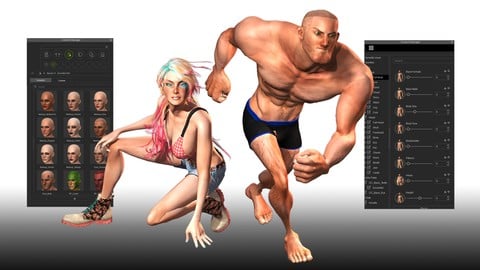
Create and animate professional-level, 3D game characters without any experience in modeling, sculpting or rigging.
Created by: Reallusion Inc
Last updated November 2015
Our take
Based on the ratings of 881 students, a sample of their written reviews and the syllabus, as the course stood in November 2015. No course pays to be reviewed.
This is a free, 3.1 hour course from Reallusion, the company behind iClone and Character Creator, showing how to build and animate a 3D game character without any modeling or rigging skills. Across 15 lectures it covers building a character in Character Creator, animating it in iClone, and exporting through 3DXchange into Unity or Unreal Engine. It suits indie developers, teachers, and previz artists who want a character in a game engine quickly, not people who want to understand the underlying 3D art.
Reviewers say the pipeline itself is genuinely useful and that Reallusion's instructor explains the workflow clearly when the pace slows down enough to follow. A couple of reviewers say the steps still apply to newer versions of iClone and Character Creator years later. The complaints cluster around speed and assumptions: multiple reviewers say the instructor zips through terms like diffuse and ambient without explaining them, and a few say the course assumes you already own the software and know the interface, so the setup itself is a mystery. One reviewer suggested splitting the Unity and Unreal sections into two separate courses.
At 3.1 hours and free, this is a low-commitment way to see whether the iClone pipeline fits a project before committing to a longer course. It has not been updated since 2015, so expect some visual mismatch with current software, though a couple of recent reviewers confirm the core steps still hold up. Worth watching for the concept and the export workflow, less useful as a first introduction to the software itself.
Pros
- Free course covering the full pipeline from character creation to export
- Shows real exports into both Unity and Unreal Engine, not just theory
- A couple of reviewers confirm the steps still apply to newer iClone and Character Creator versions
- Rated 4.5 from 881 reviews, with most ratings at 4 or 5 stars
Cons
- Not updated since 2015, so the interface shown looks dated
- Assumes you already have the software installed and know the basics
- Moves quickly through terms and steps without much explanation
The instructor is top-notch! But this tutorial is outdated
Listed as All Levels, but reviewers say it really suits people who already have the software installed and some familiarity with it.
 What you will learn
- Create custom 3D Characters
- Morph custom 3D Characters
- Create clothing for 3D Characters
- Animate Full-body 3D Characters
- Audio lip-sync 3D Characters
- Export 3D Characters to game engines
Course content
4 sections · 15 lectures · 3.1 hours of video
- 1Introduction to the iClone Game Character Design Platform1 lecture · 2 min
- 2Character Creator to Unity3D5 lectures · 50 min
- 3iClone Animation to Unity3D4 lectures · 26 min
- 4Character Creator to Unreal Engine5 lectures · 1.9 hours
Who it is for
The instructor says it suits
- This course is designed for ANYONE regardless of their age, artistic or animation experience. But it is mainly designed for indie game developers, game studios and app creators. Teachers, Students, 3D Animators, video producers, previz artists, and movie makers can also greatly benefit from this course.
What you need before you start
- Download and install iClone , 3DXchange , and Character Creator Software - TRIAL, PRO or PIPELINE
- iClone 3D Game Character Design Platform - download additional free characters and projects to test the pipeline process yourself
- Get iClone with a limited-time discount code "UdemyiC2019"
How it compares
Against the other 21 rated Udemy courses in 3D Game Development on CourseDuck:
- Rating4.5 out of 5higher than 42% of them
- Reviews881#5 of 22 by number of reviews
- Length3.1 hoursshorter than 76% of them
- Last updatedNovember 2015earlier than 90% of them
 Course Description
•This course is designed to teach anyone how to create professional 3D game characters and animations without having to spend months, or years, learning the ins-and-outs of other complicated 3D software. In just weeks, you will be able to get ahead by learning to exploit the power of a real-time 3D engine, in order to maximize your time and project completion. 100% GUARANTEE!
•Different from other 3D tools, the Character Creator tool and iClone are designed for instant creation and visualization feedback. Their unique real-time animation engine give you 10 x faster production speed. Create and morph game characters in minutes with the Character Creator tool, then send them to iClone for fast and easy full-body animation prior to exporting them via the 3DXchange converter to Unity, Unreal or any other video game engine or 3D applications.
•There are free trial versions for iClone 6 PRO, and 3DXchange Pipeline, so users are welcome to download them all in order to go through the entire course. The Character Creator tools is 100% FREE.
•Besides the free tools, students can also download free sample characters and projects to test out the pipeline process themselves. Just visit the iClone Game Character Design Platform page.

 Udemy Discount
The discount is applied through our link. Open the course from here and Udemy's current promotional price is applied at checkout on most courses, no code to type.
Some courses are excluded from Udemy's promotions. If the price does not drop, clear your browser cookies and use the button again.
Instructor Details

- 4.5 Rating
 881 Reviews
Reallusion Inc
Headquartered in Silicon Valley, Reallusion is a leader in the development of 3D cinematic animation tools for consumers, students and professionals. Recognized as an industry pioneer, the company provides consumers with easy-to-use avatar animation, facial morphing and voice lip-sync solutions for real-time 3D filmmaking and previsualization for professional post-production. Reallusion's core technologies are widely used by consumers, educators, gamers and filmmakers to ready their desktop and mobile devices with a total real-time animation studio that plugs-in to the gamer mentality with videogame-like play-to-create technology.
These focused animation courses were created with novice animation users in mind. They were designed to quickly teach any person, from any age, education and background experience to create, animate, modify and export their customized animations in a fraction of the time that it would take with other applications. All lectures were created by highly skilled professionals that have years of experience in creating short and focused, topic-based tutorials for easy following and understanding. Learners can rest assure that each lecture is designed to focus on each topic in order to save time and maintain attention.
 More 3D Game Development courses
Create a 3D Endless Runner from Scratch - Unity 6 Compatible (2025)
4.7 (379 Reviews)
 Provider: Udemy
 Time: 9.9h
$79.99

Learn to Program & Model Procedural Cities in Unity/Blender (2024)
4.7 (148 Reviews)
- Provider: Udemy
- Time: 16.4h
$74.99

Procedural Terrain Generation with Unity (2025)
4.6 (1,109 Reviews)
- Provider: Udemy
- Time: 29.6h
$11.99
How to Make a Retro Style 3D FPS in the Godot Game Engine (2024)
4.6 (1,097 Reviews)
- Provider: Udemy
- Time: 12.1h
$11.99

 Reviews

By Fernando Soares on 5/27/2020
The beginning is a little old but it gets better at section 2. But section 1 still good information even though I have Iclone 7 now it is pretty much the same info. But the 5 stars is for pretty much the section 4 alone! Thank you!
By Eric Love on 5/11/2020
Was able to apply what I learn here to the latest iClone 7, CC3, and 3DXchange 7 software. As an prerequisite, make sure you watch the "Getting started in 3D Animation" course first to understand what is being taught in this video. Buying the software is really worth the investment for character creation and animation. In other words, it will save you a lot of time with character creation and animation. You can use the time that you are saved to create other types of 3D assets in Blender!!!!
By Barret Chin on 3/30/2020
Confusing layout of the course but I assume it's designed whether you want to understand how to create a character via iClone for Unity or Unreal and I have just skipped to the Unreal sections. Aside from that, it is straight to the point going through overall features of iClone, Character Creator and 3DXChange to get it into the Unreal Engine by going through a practical example.
By YGregory11 on 2/15/2020
It was a good match, but I'd prefer to learn more about Character Creator's different functions and more explanations about the different tools. The instructor moved through terms like diffuse, ambient, etc. without much explanation. The overall information and pace were great though.
By Robert Sharp on 2/8/2020
Good overview. The sections on UE4 blueprints for motion goes very quickly. As the instructor says, there are additional tutorials that cover the subject. I'll also need to check if there are many changes in newer versions of iClone.
By Thomas Franklin on 9/19/2019
I think it should have been two different courses, one for Unity3D and one for Unreal Engine 4, and should have gone more into depth about setup and configuring the characters and bring them into and back out of Unreal Engine 4. Just a thought. It did provide useful info though but could have been better.
By Tamatha Campbell on 11/17/2017
The instructors speak well, and go into enough detail that someone who has never done any animation before can get a good result quickly and easily. (I mean, *of course* there's time and work involved in doing an animated character, but you won't get confused about how to do it on your first try if you take this course.) Also, there's a fairly comprehensive walk-through for importing a new character into two different engines... including how to check for and correct errors and minor issues. Trouble-shooting seems to be left out of most courses, but there is some included in this one.
By Chris Sykes on 2/27/2017
I like that it covered both Unity and Unreal (I have Unreal). I was not sure it was going to be both, but I clicked through and saw it was for Unreal as well. I find these most helpful because I can hit pause, go into Unreal and then switch back when I have completed the task at hand.
By Alberto Martí Rodríguez on 11/16/2016
Porque está muy detallado y muy bien explicado. Funcionamiento del iClone Character y su exportador a FBX para cada motor, ya sea Unity o Unreal Engine. Además de todas las funcionalidades del programa que son inmensas, explican súper detalladamente los problemas o añadidos que hay que hacer para cada motor gráfico que vayas a utilizar. Bravo por el curso y por el software!!!
By William Brian Bochat on 1/27/2016
I was skeptical at first. Many programs offer "easy to use interface" intuitive design" and "beginners to pros can use this program" but none have been as easy to learn and use right off the bat like this. This course takes you right into the action and shows you how truly intuitive the program is and how easy it is to create a game ready character in minutes. The instructors were easy to understand and thoughtful about their instruction. Thank you gentlemen well done.
 Quality Score
No CourseDuck member has rated this course yet. Taken it? Give each part a thumbs up or down.
Overall Score : 90 / 100
- Video Duration:
 3.1h
3.1h - Price: Free
- Provider: Udemy
- Updated:
 November 2015
 - Level:
 All Levels
 - Language:
 English
 - Certificate:
 No
No - Lectures:15 in 4 sections
- Students:48,700
- Subtitles:1 language
Udemy Coupon Price Tracker
