
 Web Development
 Data Science
 Python
 SQL
SQL JavaScript
 Artificial Intelligence
 IT & Software
 IT Certifications
 Hacking
 AWS
AWS Arduino
 DevOps
 3D Modeling
 Graphic Design
 Photoshop
 Drawing
 Digital Painting
 UX Design
 Business
 Data Analysis
 Communication Skills
 Project Management
 Leadership & Management
 Human Resources
 Digital Marketing
 Social Media Marketing
 Marketing
 SEO
SEO Google Analytics
 Branding
 Excel
Excel Office Productivity
 SAP
SAP PowerPoint
 Microsoft Access
 SharePoint
 Finance & Accounting
 Trading & Investing
 Accounting
 Bitcoin
 Personal Finance
 Video Editing & Animation
 Photography
 Adobe Premier Pro
 Adobe Lightroom
 Personal Development
 Productivity
 Career Development
 Life Coaching
 Health & Fitness
 Meditation & Mindfulness
 Yoga
Yoga Music
Music Music Production
 Guitar
 Piano
Piano Singing
 Language Learning
 Teaching & Academics
 Engineering
 Math
Math Lifestyle
Create Business Applications with AppSheet (Udemy.com)
A Basic Guide to Build Data Driven Mobile Apps & Web-Apps in Minutes
Created by: Santiago Uribe Montoya
Last updated August 2019
Our take
Based on the ratings of 5,083 students, a sample of their written reviews and the syllabus, as the course stood in August 2019. No course pays to be reviewed.
A free, one hour overview of AppSheet, Google's no-code app builder, taught by Santiago Uribe Montoya with two co-instructors. The six sections run from connecting a spreadsheet as a data source through UX, automation, security and publishing, in 36 short lectures, 16 of them text articles. It suits office workers who already live in Google Sheets or Excel and want to see what AppSheet can do before committing real time to it. It is not for anyone hoping to finish with a polished, working app.
Reviewers, over 5,000 of them for a 4.4 average, mostly call it a clear, easy starting point, and a couple say they felt ready to go learn the advanced material elsewhere. The complaints are consistent. Three star reviews say it only touches the surface, skips styling and colour options, and shows features rather than walking through building one app step by step. One recent two star review points out the screens use AppSheet's old editor, which is fair: the last update was August 2019. One reviewer notes there is no way to ask the instructor questions, and another wished for captions and a search box after failing to find a lecture the narration promised.
It costs nothing and takes an hour, so the value question is easy. It shares a category page with Kotlin and Jetpack Compose courses, and it is the only option there for people who will never write code. Take it as a product tour, expect the interface to look different from the current AppSheet editor, and plan on another resource if you need to actually ship something.
Pros
- Free and only an hour, so it costs nothing to find out if AppSheet fits your problem
- Clear step-by-step structure across data, UX, automation, security and publishing
- Reviewers say it left them comfortable moving on to more advanced AppSheet material
- Taught by a practitioner who builds AppSheet apps for businesses, with two co-instructors
Cons
- Last updated August 2019, so the screens show AppSheet's old editor
- Shows features rather than building one app end to end; styling is barely covered
- No way to ask the instructor questions, and one reviewer wanted captions and a search option
One of the best product overview trainings I've taken. This course gave me a full glimpse of the possibilities and controls of the app, but didn't waste my time with details I would forget anyway!
Genuinely beginner. Comfort with Excel or Google Sheets is the only real prerequisite; no coding at all.
 What you will learn
- You'll learn how to get started and publish data-driven mobile apps with AppSheet
- You'll learn the design principles of data-driven apps
- You'll learn how to manage mobile apps, starting with data structure, applying different behaviors in the app, and then manage publishing and access
- You'll learn how to add maps to your apps
- You'll learn how to add image galleries to your apps
- You'll learn how to create a database mobile app
Course content
6 sections · 36 lectures · 1 hour of video 16 articles
- 1Introduction 1 free preview1 lecture · 3 min
- 2Working with data 2 free previews8 lectures · 18 min
- 3Define the UX of your app12 lectures · 19 min
- 4Behaviors & Automation7 lectures · 12 min
- 5Keeping apps secure4 lectures · 6 min
- 6Managing and publishing your apps4 lectures · 3 min
Who it is for
The instructor says it suits
- Anyone that wants to create mobile apps without having to write code.
- People who have data in spreadsheets and want to manage access to the data from multiple devices and by multiple users
- Anyone interested in mobile app creation
What you need before you start
- You should be knowledgable of spreadsheet software like Excel, Google Sheets, or Smartsheet. Database knowledge is also applicable.
- We'll teach you how to create mobile apps with AppSheet, so some general knowledge of the AppSheet platform is helpful.
How it compares
Against the other 149 rated Udemy courses in Mobile Development on CourseDuck:
- Rating4.4 out of 5higher than 42% of them
- Reviews5,083#3 of 150 by number of reviews
- Length1 hourshorter than 98% of them
- Last updatedAugust 2019earlier than 81% of them
 Course Description
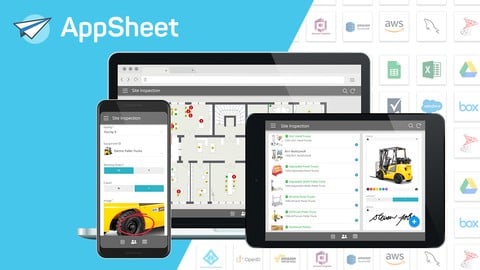
Learn how to build mobile, tablet & browser applications without using any code, and how to solve a variety of workflow & automation scenarios for your business.
This beginner-level course walks new app creators through the process of defining & connecting data sources, customizing app interfaces, incorporating basic layers of automation, generating notifications & reports, and deploying apps to teams of users.
Learn how to incorporate features like:
Data Collection
Barcode Scanning
Image & Signature Capture
GPS & Maps
Offline Functionality
Calendars, Charts & Image Galleries
To help support common scenarios such as:
Perform Inspections & Surveys
Manage Field Service Teams
Automate Team Notifications
Build Analytics Dashboards & Reports
Control & Update Inventory
Share Team Resources

 Udemy Discount
The discount is applied through our link. Open the course from here and Udemy's current promotional price is applied at checkout on most courses, no code to type.
Some courses are excluded from Udemy's promotions. If the price does not drop, clear your browser cookies and use the button again.
Instructor Details

- 4.4 Rating
 5,083 Reviews
Santiago Uribe Montoya
I help businesses digitize processes through mobile apps using the AppSheet platform.
I've worked with customers creating hundreds of apps big and small, from trucking dispatch to inspections and scheduling.
My goal is to teach people how to digitize the processes they otherwise would not be able to if they had to rely on developers or learning how to write code.
 More Mobile Development courses

Flutter Mobile App: Build Chatbot with Firebase & Gemini AI (2026)
4.9 (775 Reviews)
 Provider: Udemy
 Time: 13.8h
$19.99


Android MVVM Architecture complete course (2026)
4.7 (890 Reviews)
- Provider: Udemy
- Time: 3.4h
$74.99

Android App's Development Masterclass - Build 2 Apps - Java (2023)
4.7 (271 Reviews)
- Provider: Udemy
- Time: 7.8h
$39.99

The Best React Native Course 2026 (From Beginner To Expert)
4.6 (735 Reviews)
- Provider: Udemy
- Time: 24.3h
$19.99

The Ultimate 70+ Hours iOS Development Bootcamp (2025)
4.6 (672 Reviews)
- Provider: Udemy
- Time: 74.2h
$84.99
 Reviews

By Ignacio Machin on 11/25/2025
It's not a course, just a quick read-out overview of some functionalities using the old UX. It's not really engaging either but if you know absolutely nothing and want to know what is AppSheet about, give it a go.
By Raed Thabet Abdu Abdullah on 1/25/2025
This course was an excellent match for me. It provided clear, step-by-step instructions that were easy to follow, even for someone new to AppSheet. The practical examples and hands-on approach made it engaging and effective. I now feel confident creating business applications using Google Sheets and AppSheet. Overall, it was a great learning experience!
By Al Roche on 10/8/2024
This was a great course and kind of easy to follow. Just wish there were captions allowed and a search option. As an example, you mentioned the "Ref" column type and said something about more on this later and yet I was never able to find the more on this later portion. Maybe it's just me..! Thank you for all this hard work!!
By Jay Chopra on 10/31/2020
We have been evaluating outsystems and came across appsheet. looking forward to build a small app to get started so we can use appsheet to build all our apps. Could you please et me know if we need to pay min of $50 for each app per month that we build?
By B Jacobs on 9/10/2020
This was very useful information, and will enable me to actually enhance my app. It would be an added advantage to have an ebook copy of this course, for future reference when dealing with some of the functions learned in this course. Thank you very much for the opportunity of getting this formal short course from experts.
By Vanessa Chan on 4/28/2020
Additional examples and slightly more descriptive explanations needed. For me it was confusing as i had to repeat the video a few times before grasping the content. Overall good experience.
By Darren Friel on 4/2/2020
Yes, this is exactly what I need. As a small business owner I know our business inside-out & I know what we need. We do have all the information already on spreadsheets so I'm also excited to get started. This course has given me the tools I need to build our custom app specifically for our company. The course was presented in a very efficient, practical & relevant way. Time to get started... :)
By Joseph Kinuthia on 3/14/2020
This course has done a good job to cover everything you need to get started with App Sheet. Kudos. One thing to note though is that some videos took a while to optimize to the right resolution hence appearing blurry. Though I'm not sure if it was my internet connection, the learning platform or the course itself. All in all I highly recommend this course to anyone just starting out on app sheets.
By Rafael Garcia on 2/28/2020
I'm still learning the process of using Appsheet to create an app. I want to create an app that allows a certain group of users input data (wins/loses etc) and that the app calculate the average and rank the user based on that information.
By Robert on 2/5/2020
Very helpful. Excited to get started! Would have like to see what more info on the columns like for example what the "label" toggle with does right next the "key" toggle switch. Ill watch again just in case I missed some things.
 Quality Score
No CourseDuck member has rated this course yet. Taken it? Give each part a thumbs up or down.
Overall Score : 88 / 100
- Video Duration:
 1h
1h - Price: Free
- Provider: Udemy
- Updated:
 August 2019
 - Level:
 Beginner
 - Language:
 English
 - Certificate:
 No
No - Lectures:36 in 6 sections
- Students:41,400
- Subtitles:1 language
Udemy Coupon Price Tracker
