
 Web Development
 Python
 SQL
SQL JavaScript
 Data Science
 Artificial Intelligence
 IT & Software
 IT Certifications
 Hacking
 Arduino
 AWS
AWS 3D Modeling
 Graphic Design
 Photoshop
 Drawing
 Digital Painting
 UX Design
 Business
 Data Analysis
 Communication Skills
 Project Management
 Leadership & Management
 E-Commerce
 Digital Marketing
 Social Media Marketing
 Marketing
 SEO
SEO Google Analytics
 Branding
 Office Productivity
 Excel
Excel Finance & Accounting
 Bitcoin
 Video Editing & Animation
 Photography
 Adobe Premier Pro
 Adobe Lightroom
 Personal Development
 Health & Fitness
 Music
Music Guitar
 Teaching & Academics
 Language Learning
 Engineering
 Lifestyle
Drawing Characters with Photoshop and Illustrator CC (Udemy.com)
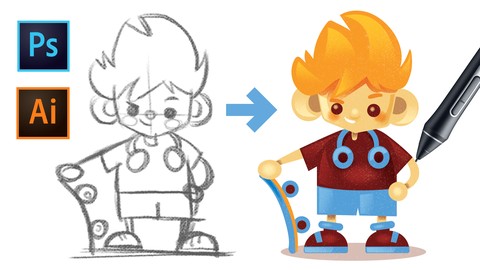
Learn to draw characters with Adobe Photoshop and turn them into vector illustrations using Adobe Illustrator
Created by: Martin Perhiniak
Last updated December 2018
 What you will learn
- Come up with their own character concepts
- Render their concepts in Adobe Illustrator
- Produce vector artwork that can be used both on web, print and animation
- Create characters confidently applying design principles and best practices used by professionals
 Course Description
Learn to create and illustrate your very own characters like a creative professional with this project-based course. It will provide you with working files and a step by step workflow that you will be able to follow.
Master all the methods professional character artists use and apply then to your projects. Whatever character design project you decide to take on next you will know exactly where to start, what to do and have the technical confidence to create great work.
“Great course! It's very interesting to see how a project like this goes from start to completion. The explanations are clear and concise. I love it.”
Alain Berthelot
Learn the methods and techniques required for drawing characters from two creative professionals: concept artist Almu and graphic designer Martin who work on this project as a team. Each of them have different set of professional skills and best practices to share with you.
You will mainly be working in Adobe Photoshop and Illustrator, however the skills you learn can be easily transferred into other pieces of software you might want to work in. It’s useful to have basic knowledge of Photoshop and Illustrator to make the most of this course.
A closer look at what you will learn:
The first chapter will welcome you to the course and walk you through the brief Martin and Almu will be working on together.
The second chapter is all about the Concept Stage, where you will learn about style, shape, proportions, silhouettes and loads more. Almu will be walking you through her process of refining character concepts using Adobe Photoshop and applying all the important aspects and principles of good character design.
Then it’s on to the design stage, where Martin will continue with the finished concept art and turning them into vector artwork using Adobe Illustrator. In this chapter you will learn about features and techniques like adding colour, detail, shading and loads more.
In the conclusion to the course you will learn the correct and professional way to export your working files ready to be used for both print and web.
About the instructors:
Martin is an Adobe Certified Instructor and has been working in the industry as a Graphic Designer for more than 10 years for clients like Pixar’s Cars and Toy Story and Mattel’s Hot Wheels. He has not only developed his own successful career and business but has helped others on the way to doing the same.
Almu is a storyboard artist, visual development and concept artist with a passion for stories. She has worked as visual development artist for animation films and TV series, as well as concept artist and storyboard artist for the VFX industry for clients like Disney and LucasArts.
This course includes:
25 Videos
2.5 Hours of learning content
Downloadable project files
Completion certificate upon finishing the entire course
Who will find it useful:
Perfect for anyone who is passionate about illustration and wants to develop their skills.
Anyone who wants to develop their own characters and work as Concept or Character artists.
Existing illustrators who want to get more involved with character design.
Those who would like to learn more about drawing in Illustrator and Photoshop.
“This course made me aware of loads of things you can do with Illustrator that I've never realised before, despite having used it for years. I loved the section taught by Martin’s co-instructor, which gave insight into giving your characters a personality. That was really eye-opening!”
Sue Moseley
Skills you will gain:
Coming up with and sketching unique and engaging characters
Creating characters confidently applying design principles and best practices used by professionals
Producing vector artwork that can be used both on web, print and animation
Creating character illustrations ready to be sold as stock assets
Ready to start creating your own awesome characters? Enroll to this course now and get started!

 Udemy Discount
The discount is applied through our link. Open the course from here and Udemy's current promotional price is applied at checkout on most courses, no code to type.
Some courses are excluded from Udemy's promotions. If the price does not drop, clear your browser cookies and use the button again.
Instructor Details

- 4.2 Rating
 148 Reviews
Martin Perhiniak
Martin is a graphic designer and an Adobe Certified Instructor. He was a presenter at Adobe MAX the ultimate creative in 2018 and was recently voted one of the top 10 Adobe instructors in the world. Over 100,000 students are studying from his online courses from over 200 countries.
As a designer and illustrator he worked for companies like Pixar, BBC, Mattel and as an instructor taught teams at Google, Ben&Jerry's, House of Lords and Oxford University Press.
 More courses by Martin Perhiniak
Graphic Design Theory - Psychology of Design (2024)
4.4 (1,467 Reviews)
 Provider: Udemy
 Time: 1.7h
$64.99
Graphic Design Theory - Color & Contrast (2022)
4.5 (1,198 Reviews)
- Provider: Udemy
- Time: 1.4h
$69.99
More Digital Painting courses

Character Art School: Complete Coloring & Painting (2026)
4.8 (6,042 Reviews)
- Provider: Udemy
- Time: 19.5h
$34.99



Procreate Masterclass: Digital Drawing on the iPad (2023)
4.8 (1,744 Reviews)
- Provider: Udemy
- Time: 18.2h
$94.99


Digital painting with Krita 5.0 intermediate level (2022)
4.8 (271 Reviews)
- Provider: Udemy
- Time: 6.8h
$79.99
 Reviews

By Gabrielle Nadeau on 3/2/2021
It's an excellent course, to the point. I learned good tips to improve a basic drawing, adding effects and textures. And i learned different methods of drawing within illustrator which have been very useful.
By Alena Polyarush on 1/18/2021
I really would have enjoyed a more detailed explanation of photoshop drawings. the Illustrator job is pretty cool, but at the begining I felt like many parts were missing
By Petra Barnes on 8/11/2020
informativ. manche Sachen nicht so einfach nachzumachen, weil eine andere Version von Illustrator genutzt wurde oder weil die Werkzeuge nicht an der gleichen Stelle zu finden waren. ansonsten gut.
By Maria Sharova on 5/14/2020
Курс достаточно короткий, но в сжатой форме даёт всю необходимую информацию для создания персонажей. Ещё мне нравится то, что персонажи в итоге отрисованы в векторе - сейчас это востребованная техника в иллюстрации. Я сделала выбор в пользу этого курса именно из-за Adobe Illustrator и узнала новые интересные фишки в создании и украшении плоских персонажей.
By Maartje Simons on 5/6/2019
It is a nice course and I've learned a lot. The only thing that I missed was some downloads to make it easier to practice along with the course. Like the texture that is used, I didn't had something similar myself, so had to look for something first before I could along.
By Putsada Sriphet on 3/3/2019
I am a fan of Martin. I love his teaching that best in explanation of all my curiosity. Would love to learn from other courses if he teaches of the iPad drawing or Procreated or Affinity.
By Sue Moseley on 11/26/2018
I have used Illustrator in the past, but not in recent years, so I took Martin's Illustrator Masterclass and loved his teaching, so decided to get this course as well. His teaching in this course is equally as excellent as his other course - very clear and made me aware of loads of things you can do with Illustrator that I've never realised before, despite having used it for years. I loved the section taught by his co-instructor, which gave insight into giving your characters a personality. That was really eye-opening. and I would love a whole in-depth course on that.
By James Coleman on 10/26/2018
I gave Martin's master class 5 stars but after finishing this, I was a little disappointed as the lessons were short and I felt as if the exercises were partially complete. I would love to learn more about the process of shading characters and using textures. Maybe this was one of his first courses and has since improved but this definitely wasn't what I expected. I will say that he is one of my favorite instructors that I've taken a class from on Udemy. Just wish this were more in-depth.
By Ruta Babelyte on 9/14/2018
Nice, short course if you want to see the process of creating a charecter from the beggining to the end. Step by step, easy to follow. However, explanations about design process and thinking behid it is not too detail. I would have liked to see longer videos on sketching and the whole thinking behind with reflection what works what doesn't and why. Technical part with converting the designs to vector graphics was understandable and to the point. However I would worry that texturing and opacities might not translate well to After Effects and the file might become heavy to animate. It would be nice to know how to go around it without loosing the quality.
By Vanessa Johan on 8/2/2018
This is not my first course by mr. Perhiniak. My previous one i purchased was Illustrator CC masterclass because I wanted to know all the new features (I jumped from CS5 to CC. Way too left behind). I like this course as much as the previous one. Mr Perhiniak explained very clear and calmly. Nevertheless, since many of the people who enroll for a course seem to think that all courses are for beginners, I'll have to let you know here: if you are an absolute beginner to Adobe Illustrator, this course is not for you. So, before complaining that this is not a beginner friendly, read the description first
 Quality Score
No CourseDuck member has rated this course yet. Taken it? Give each part a thumbs up or down.
Overall Score : 84 / 100
- Video Duration:
 1.8h
1.8h - Price: $39.99
- Provider: Udemy
- Updated:
 December 2018
 - Level:
 Intermediate
 - Language:
 English
 - Certificate:
 Yes
Yes
30-day money-back guarantee on most paid courses
Udemy Coupon Price Tracker
