
 Web Development
 Data Science
 Python
 SQL
SQL JavaScript
 Artificial Intelligence
 IT & Software
 IT Certifications
 Hacking
 AWS
AWS Arduino
 DevOps
 3D Modeling
 Graphic Design
 Photoshop
 Drawing
 Digital Painting
 UX Design
 Business
 Data Analysis
 Communication Skills
 Project Management
 Leadership & Management
 Human Resources
 Digital Marketing
 Social Media Marketing
 Marketing
 SEO
SEO Google Analytics
 Branding
 Excel
Excel Office Productivity
 SAP
SAP PowerPoint
 Microsoft Access
 SharePoint
 Finance & Accounting
 Trading & Investing
 Accounting
 Bitcoin
 Personal Finance
 Video Editing & Animation
 Photography
 Adobe Premier Pro
 Adobe Lightroom
 Personal Development
 Productivity
 Career Development
 Life Coaching
 Health & Fitness
 Meditation & Mindfulness
 Yoga
Yoga Music
Music Music Production
 Guitar
 Piano
Piano Singing
 Language Learning
 Teaching & Academics
 Engineering
 Math
Math Lifestyle
How to automate active directory labs for pentesting (Udemy.com)
How to automate active directory based demo labs for pentesting, hacking and training requirements
Created by: Rajganesh Pandurangan
Last updated January 2021
 What you will learn
- Build a home lab for practicing Active Directory and hacking skills
- How to automate active directory based demo labs for pentesting, hacking and training requirements?
- Learn how to setup Hyper-V in Windows 10
- Learn how to setup a domain controller
- Learn how to set up Active Directory
- How to join systems to a Domain
- Learn how to setup DHCP server
- Learn how to install PFsense router/firewall and how to configure firewall rules
- How to secure host system from Virtual machines using PFSense
- Basic networking concepts
- Learn about Group Policy Objects
- How to create local users using a GPO
- How to creating security related group policies
- Learn to use AutomatedLab Powershell tool to automate labs.
How it compares
Against the other 848 rated Udemy courses in IT Certifications on CourseDuck:
- Rating4.5 out of 5higher than 43% of them
- Reviews2,016#183 of 849 by number of reviews
- Length4.4 hoursshorter than 71% of them
- Last updatedJanuary 2021earlier than 92% of them
 Course Description
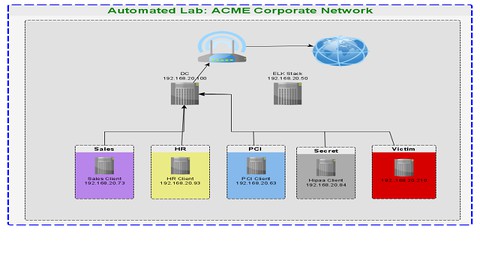
This course will show how to create windows based lab environments for hacking and training demos, learn active directory, software testing in various operating systems and many other use cases. We will use Windows 10 as the host operating system and install the lab using Hyper-V hypervisor. AutomatedLab which uses powershell will be used for setting up this lab. Lab will have Active Directory, Multiple VMs, Router, etc. We'll also install variety of software using Chocolatey framework. Once the script is developed, the labs will be created without user intervention. it's simple to destroy and relaunch the labs. As part of this course, you will learn how to:
* Install Hyper-V
* Install AutomatedLab tool
* Download ISOs
* Create simple VMs with Internet Access
* Create Complex Lab with Active Directory
* Perform various activities in the VMs
* Install Chocolatey and Sysmon

 Udemy Discount
The discount is applied through our link. Open the course from here and Udemy's current promotional price is applied at checkout on most courses, no code to type.
Some courses are excluded from Udemy's promotions. If the price does not drop, clear your browser cookies and use the button again.
Instructor Details

- 4.5 Rating
 2,016 Reviews
Rajganesh Pandurangan
Hello All
I'm a security expert with over two decades of security consulting experience. Some of my skills are listed below:
Windows Security Expert – Both offensive and defensive techniques
Performed Network pentesting, security code reviews and application risk assessments for customer facing applications at Fortune 100 companies.
Lead and manage security consultants at U.S.Bank to improve security posture of applications, networks, and Mobile applications.
Delivered several million dollars of security services and technology for clients in the financial, retail, healthcare, manufacturing, and utilities sectors.
Performed Red team hacking for many Fortune 500 companies
Introduced security risk assessments and threat modeling techniques into the organization.
Acted as technical authority on security for numerous RFPs and during contract negotiations.
Participated in many PCI Assessments for many small, large and multinational companies and performed gap analysis, consultation, and development of customized solutions.
Audited applications written in multiple languages, including Java/JSP, VB.NET, ASP.NET, C#, C/C++, PHP.
Web Penetration testing to prove Software Security Vulnerabilities with IBM AppScan, Burp Professional, Paros and Manual Fuzzing and Penetration Testing with AppScan and Firefox plug-ins.
 More IT Certifications courses

Master Splunk Enterprise Administration: Certification Prep (2024)
5.0 (154 Reviews)
 Provider: Udemy
 Time: 1.8h
$59.99

Cisco Troubleshooting Labs For CCNA, CCNP, and CCIE Students (2026)
4.9 (819 Reviews)
- Provider: Udemy
- Time: 6.8h
$10.99

CCNA Cyber Ops Tools: Sec Onion, Wireshark, and Kali Linux (2025)
4.9 (292 Reviews)
- Provider: Udemy
- Time: 4.5h
$10.99

ISTQB Certified Tester - Foundation Level latest Version (2025)
4.9 (224 Reviews)
- Provider: Udemy
- Time: 9.5h
$19.99

CompTIA Tech+ FC0-U71 Prep Hands-on training, Practice Exam (2026)
4.9 (132 Reviews)
- Provider: Udemy
- Time: 7.6h
$11.99

Cisco CCNA 200-301 – The Complete Guide to Getting Certified (2026)
4.8 (90,672 Reviews)
- Provider: Udemy
- Time: 42.7h
$19.99
 Reviews

By Peter Youssef Gabra on 12/23/2020
awesome practical implementation to each piece of information, you're really appreciated. every review my knowledge being leveraged and my technical experience has enhanced. hoping you the best ever, looking for more tutorials to deepen my knowledge, experience and hence joining a reputable organization as Dell, HP, Google to prove my identity and technical skills.
By Mike Abebe on 8/6/2020
It was definitely an easy to flow short course however i found that you could have delivered it a lot more better than what you have done. I think there is an assumption in your part that your audience know about the subjects, and there were lots of parts in the course where you have failed to explain or describe your action or how you got to that point. I wish you can tidy it up and present it again or consider the feed back on your next project. Finally thank you ever so much for taking time out and sharing your knowledge it goes with out saying for people like you, you are simply a star. I sincerely hope you took the constructive criticism on a positive note I look forward to see another course of yours very soon.
By Anonymized User on 4/26/2020
Good information but there are some bits missing from the videos such as during DC setup the domain name completion is missing which stops the course while you work out whats gone wrong. I might be being fussy but I would like to see a few less "This is what should happen" and sounding a little more confident around which screens will show next. Good course though and I learned a lot
By John Norrie on 9/30/2019
Well, I've just started, and so far I'm quite interested to continue to learn what comes next. So, I think its good content so far. The explanations are clear, and the demonstration can be replicated - that's good enough for me. I'll say I really did learn something - I'm halfway and still interested. Thanks Raj. Wow, I'm truly satisfied as a beginner. Learning the different group policies and even troubleshooting some errors - every aspect was truly helpful. Thank you so much Raj. This course is truly rewarding for a beginner.
By Edgar Rmz on 6/24/2019
Good course, a little quick in some classes, but in general understandable and very interesting, it is recommended if you want to learn more about Servers and virtual modes. Buen curso, un poco de rápido en algunas clases, pero en general entendible y muy interesante, se recomienda si quieres aprender mas sobre Servers y modos virtuales.
By Pruthvi Varma on 1/23/2019
Raj, thank you so much. I am glad I enrolled to the course. I have learned a lot from this course and would like to learn more. Please enlist of the courses you have for me related to Networking, Windows Administrator Courses which could be really helpful for my career growth. Thank you once again.
By Arshad Ayub on 9/24/2018
Good for someone who already knows IT. Some better explaining needs to be made about some of the clicks made, but no reason was given as to why. OK, now my final thoughts of the course. At the end of it all, it was an excellent training package. There is a part in the course that is missing. The area where you need to create a new forest. I had to YouTube it to find out how to do it. But after that, it was all good. It's a good course for those who have little to no experience in using Hyper-V and Windows Server. Thanks goes out to Raj for bringing us this course and I hope to see more from him in the future. Perhaps, a more detailed course on Windows Server and security policies. Regards Arshad Ayub
By Junior Shepherd on 9/3/2018
Started out extremely well and then things started going downhill after the PFSense video. It seems the instructor experienced some technical difficulties and certain parts of the video would not load on udemy.com Further down in the course the instuctor seemed to not be sure about joining the domain via the Windows 7 client. I was able to join my domain at the first try with no problems! The instructor is very knowledgeable, but a better job could be done at cleaning up some of the errors on the course. I highly suggest that some of the videos be reuploaded for the benefit of the students, or the course updated to reflect Server 2016 gen2 machines. Otherwise I learned a lot! Hey it was free so I didn't have to pay a dime.
By Gokul G on 5/29/2018
Awesome!!!! Eventhough this is a 2 hour course, I took a complete day to follow and practice, but it is worth it. Learnt so much in one course, coz I did not know any of it. This is one of the best courses I have taken recently, and It is free!! What more could one ask for? I am looking forward to see more courses from him, if they are as good as this one, I will buy them as well.
By Reginald Singh on 2/19/2018
Each and every step was walked through with demonstrating troubleshooting steps, those looking to transit from Virtualbox or VMWare to Hyper-V manager, it's a perfect hands-on. IP pools and GPO's are walked through for IT administration then there are some Network security modules in the curriculum that makes the course the most comprehensive that I've come across so far. However, I would like to see a section added where a networked printer is linked via the pfsense box.
 Quality Score
No CourseDuck member has rated this course yet. Taken it? Give each part a thumbs up or down.
Overall Score : 90 / 100
- Video Duration:
 4.4h
4.4h - Price: $69.99
- Provider: Udemy
- Updated:
 January 2021
 - Level:
 Beginner
 - Language:
 English
 - Certificate:
 Yes
Yes
30-day money-back guarantee on most paid courses
Udemy Coupon Price Tracker
