
 Web Development
 Data Science
 Python
 SQL
SQL JavaScript
 Artificial Intelligence
 IT & Software
 IT Certifications
 Hacking
 AWS
AWS Arduino
 DevOps
 3D Modeling
 Graphic Design
 Photoshop
 Drawing
 Digital Painting
 UX Design
 Business
 Data Analysis
 Communication Skills
 Project Management
 Leadership & Management
 Human Resources
 Digital Marketing
 Social Media Marketing
 Marketing
 SEO
SEO Google Analytics
 Branding
 Excel
Excel Office Productivity
 SAP
SAP PowerPoint
 Microsoft Access
 SharePoint
 Finance & Accounting
 Trading & Investing
 Accounting
 Bitcoin
 Personal Finance
 Video Editing & Animation
 Photography
 Adobe Premier Pro
 Adobe Lightroom
 Personal Development
 Productivity
 Career Development
 Life Coaching
 Health & Fitness
 Meditation & Mindfulness
 Yoga
Yoga Music
Music Music Production
 Guitar
 Piano
Piano Singing
 Language Learning
 Teaching & Academics
 Engineering
 Math
Math Lifestyle
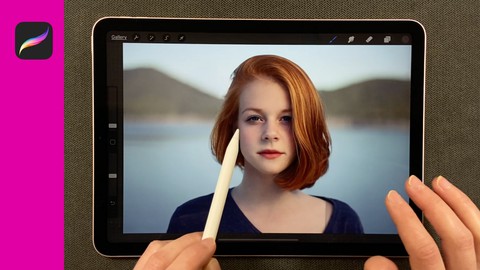
How to Edit Photos in PROCREATE for Beginners! Pixel Perfect (Udemy.com)
Professionally Edit / Touch Up / Fix Photos in Procreate App. Stunning Results. Fraction of the Cost of Other Softwares.
Created by: Kristina Nelson
Last updated July 2021
 What you will learn
- Learn How to Edit / Touch Up / Fix Photos in PROCREATE for Beginners
- Improve Skin, Deepen Lip Color and Embellish Hair on a Person with Procreate
- Add 2D Graphics and Text to 3D Objects in a Photo with Procreate
- Apply a Duotone Effect or Gradient Layer Over a Photo with Procreate
- Change A Specific Color On An Object Using the Multiply Mode on a Photo with Procreate
- Create a Custom Filter Overlay on Your Photos with Procreate
- Create the Illusion of Smoke in a Photograph with Procreate
- Easily Change the Color of Multiple Parts of an Object Using Color Adjustments with Procreate
- How to Create a New Backdrop for an Object with Procreate
- Make Eyes, Face and Hair Colors Come Alive to Enhance a Person's Face with Procreate
- Paint Shadows, Lights and High Lights with the Soft Brush with Procreate
- Remove Objects in a Photo with Procreate
How it compares
Against the other 175 rated Udemy courses in Digital Painting on CourseDuck:
- Rating4.7 out of 5higher than 76% of them
- Reviews52#147 of 176 by number of reviews
- Length3.5 hoursshorter than 53% of them
- Last updatedJuly 2021more recently than 53% of them
 Course Description
Learn Photo Editing in PROCREATE APP for Beginners!
In this beginners course you’ll learn how to professionally EDIT / FIX / TOUCH UP and create EFFECTS on photos in the Procreate App with stunning results at a fraction of the cost of other photo editing softwares.
Create custom adjustments easily. Add, remove, adjust, fix, enhance and embellish! Use Procreate - it’s an amazing tool to edit photographs with professional results.
You’ll enjoy a generous amount of projects to work on to practice the techniques shared. Pixel perfect!
DESCRIPTION
This course is designed to help users replace expensive photo editing software for those who need to edit photos with professional results but seek an economical way to do it with the same results. Plus, it is a highly enjoyable process - the app makes the edits and touch-ups fun and easy.
Few people realize the power of Procreate to edit photos. Why? Because it is traditionally used as a drawing/painting app.
WHY USE PROCREATE TO EDIT PHOTOS?
Procreate is intuitive, easy to use, user-friendly and an amazing tool to edit/fix photos at the pixel level. It is A TREMENDOUSLY underutilized tool in the marketplace for this function.
I share my photo editing knowledge to help users make the switch to this economical and amazing app! You’ll learn photo editing techniques through a wide range of projects. You can download the provided photos with the lessons to make sure you remember the knowledge you learn.
After this course, you’ll have a solid foundation of editing/retouching photos. Whether it is to eliminate wrinkles or blemishes from your model’s skin, get rid of dust, smooth a rough surface, create a boca effect, mask layers, enhance colors, increase contrast, add special filter effects…you can do it ALL in procreate.
All it takes is a little time to learn how to do it. You’ll be able to follow along with me in the videos using exercise files that are available for download so you can practice what you’re learning.
BASIC KNOWLEDGE OF PROCREATE APP IS HELPFUL
I highly suggest taking a course on the basics of Procreate before taking this course to make things easier.
COURSE REQUIREMENTS
Apple iPad or iPad Pro that Supports Apple Pencil or Apple Pencil 2
An Apple Pencil or Apple Pencil 2 Stylus for your iPad
The ProCreate Art App from the Apple App Store (latest version is recommended)
A desire to learn how to edit/touch up photographs in Procreate App.
Basic Knowledge of How to Use Procreate App (Watch Any Intro Video to Procreate App Online)
WHO THIS COURSE IS FOR
Professionals and individuals who desire to edit / touch up / fix photos in limitless ways and at a fraction of the cost of other softwares/apps. This course is ideal for people who have some knowledge of Procreate and would like to add to their skills knowledge of its photo editing capabilities.
I highly recommend my students take a beginner/basic Procreate course before taking this one. Although I give some info on the Procreate app features, it is assumed you are familiar enough with the app to be able to catch on to the concepts shared and the techniques used.
What you’ll learn
Learn How to Edit / Touch Up / Fix Photos in PROCREATE for Beginners
Improve Skin, Deepen Lip Color and Embellish Hair on a Person
Add 2D Graphics and Text to 3D Objects in a Photo
Apply a Duotone Effect or Gradient Layer Over a Photo
Change A Specific Color On An Object Using the Multiply Mode on a Photo
Create a Custom Filter Overlay on Your Photos
Create the Illusion of Smoke in a Photograph
Easily Change the Color of Multiple Parts of an Object Using Color Adjustments
How to Create a New Backdrop for an Object
Make Eyes, Face and Hair Colors Come Alive to Enhance a Person's Face
Paint Shadows, Lights and High Lights with the Soft Brush
Remove Objects in a Photo
Remove and Reduce Wrinkles Professionally & Beautifully in a Photo
Seamlessly Put Two Photos Together
Whiten Yellow Teeth with Procreate
Make A Black and White Background
Easily Recolor Photos

 Udemy Discount
The discount is applied through our link. Open the course from here and Udemy's current promotional price is applied at checkout on most courses, no code to type.
Some courses are excluded from Udemy's promotions. If the price does not drop, clear your browser cookies and use the button again.
Instructor Details

- 4.7 Rating
 52 Reviews
Kristina Nelson
Kristina Joy
Kristina Joy Nelson attended the Minneapolis College of Art & Design. After graduating she took a position teaching English and art at the Lincoln School in Guadalajara, Mexico. Her passion for design and creativity continued when she returned to the United States. She now works as a designer, copywriter and artist in Northern Minnesota.
 More Digital Painting courses

Character Art School: Complete Coloring & Painting (2026)
4.8 (6,042 Reviews)
 Provider: Udemy
 Time: 19.5h
$34.99



Procreate Masterclass: Digital Drawing on the iPad (2023)
4.8 (1,744 Reviews)
- Provider: Udemy
- Time: 18.2h
$94.99


Digital painting with Krita 5.0 intermediate level (2022)
4.8 (271 Reviews)
- Provider: Udemy
- Time: 6.8h
$79.99
 Reviews

By Marilyn Smith on 1/4/2026
The instructor goes at a pace wher I am able to understand and follow along with her.
By Lisa Henley on 12/1/2025
yes instructor has a pleasant vice and video is clear
By Peter Klopp on 10/4/2025
A nice bag of tricks for photo editing, but also useful for art work in Procreate!
By Dianne Goode on 2/18/2025
So glad I found this course! My interest is editing photos, but most Procreate tutorials are about how to draw and paint. They helped me learn the tools but really didn't address the techniques I needed.
By Biffi Daniele on 11/26/2024
Forse un pochino frettolosa … ma poco poco
By Cody Quan on 3/24/2024
Wanted to message and find out if this would be the course for me - unfortunately I couldn't find that. However 2 minutes into the first course I confirmed that this is what I need for the project I am taking on! Thank you, looking forward to going through the entire thing! Cheers
By Pamela Stevenson on 10/16/2023
Great course! I learned a lot. I look forward to more courses from you.
By Louise Thostrup on 7/27/2023
There was a tiny mistake in the 21. part I video, where a small portion of the lesson was repeated. That is the only thing I have to say that is bad. Everything else is just great. She has a very pleasant voice that I love listening to and she explains everything in detail and is going about it in a slow, but not too slow, maner, so everybody can follow along perfectly.
By anna Kirkpatrick on 2/1/2023
Great course! I’ve learned so much more about Procreate and the process of editing photos. Super happy I found this.
By Amie Fox on 10/26/2022
Thank you! Learned a lot from this course! Everything was explained really well for a beginner.
 Quality Score
No CourseDuck member has rated this course yet. Taken it? Give each part a thumbs up or down.
Overall Score : 94 / 100
- Video Duration:
 3.5h
3.5h - Price: See price on Udemy
- Provider: Udemy
- Updated:
 July 2021
 - Level:
 Beginner
 - Language:
 English
 - Certificate:
 Yes
Yes
30-day money-back guarantee on most paid courses
Udemy Coupon Price Tracker
