
 Web Development
 Data Science
 Python
 SQL
SQL JavaScript
 Artificial Intelligence
 IT & Software
 IT Certifications
 Hacking
 AWS
AWS Arduino
 DevOps
 3D Modeling
 Graphic Design
 Photoshop
 Drawing
 Digital Painting
 UX Design
 Business
 Data Analysis
 Communication Skills
 Project Management
 Leadership & Management
 Human Resources
 Digital Marketing
 Social Media Marketing
 Marketing
 SEO
SEO Google Analytics
 Branding
 Excel
Excel Office Productivity
 SAP
SAP PowerPoint
 Microsoft Access
 SharePoint
 Finance & Accounting
 Trading & Investing
 Accounting
 Bitcoin
 Personal Finance
 Video Editing & Animation
 Photography
 Adobe Premier Pro
 Adobe Lightroom
 Personal Development
 Productivity
 Career Development
 Life Coaching
 Health & Fitness
 Meditation & Mindfulness
 Yoga
Yoga Music
Music Music Production
 Guitar
 Piano
Piano Singing
 Language Learning
 Teaching & Academics
 Engineering
 Math
Math Lifestyle
iPhone Photography: How to shoot and edit creative photos (Udemy.com)
Learn how to shoot and edit creative photos solely on your iPhone.
Created by: Amelie Satzger
Last updated October 2020
 What you will learn
- Learn how to get inspiration on a daily basis
- Learn different composition rules, that help you create more oustanding photos
- Learn how to use colors intentionally in your images
- Learn techniques how to communicate your creative ideas better with your team or clients
- Find out what equipment is useful to invest in (but also what not to!)
- Learn tricks how to shoot on an iPhone
- Learn which apps to use for editing
- Step by step guide how to edit
How it compares
Against the other 275 rated Udemy courses in Photography on CourseDuck:
- Rating4.3 out of 5higher than 20% of them
- Reviews69#206 of 276 by number of reviews
- Length1.9 hoursshorter than 66% of them
- Last updatedOctober 2020earlier than 62% of them
 Course Description
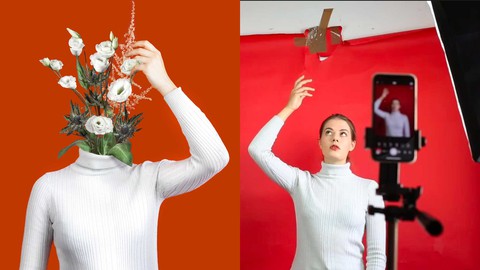
Want to create compelling, creative, and conceptual photos? Learn how using a camera you already have in your pocket: your phone!
Have you ever wondered how to shoot creative photos with your iPhone? How to get the inspiration and how to edit them without an expensive software? Then this course is for you!
In this two hour class you will join me to learn how to create conceptual images with your iPhone, that will definitely catch your viewers eyes! Not only will we discuss practices that will help you to create more regularly but also the setup and apps that help you to create with more ease.
You will follow me behind the scenes and I’ll show you step by step how I shoot a brand new conceptual image. You’ll learn how to edit your image solely on your iPhone with all free software and how to communicate your ideas better with your clients.
In thought-through lessons with many examples you will learn:
How to make your creative juices flow and get an amazing idea
How to compose your image
How to find the right colors for your concept
How to communicate your ideas with your team or clients
What equipment is useful to invest in
Tricks how to shoot on an iPhone
Which apps to use for editing
Step by step guide how to edit
Whether you’re a beginner, enthusiast or professional, who wants to learn more about iPhone photography, this class is a great place to start! You don’t need any extra equipment beside your phone and the lessons are designed for any skill level. Also you’ll find a lot of useful resources that’ll help to create awesome images yourself, as well as the image I am shooting to follow right along with my editing steps.
So let’s get started! Can’t wait to see what you create!

 Udemy Discount
The discount is applied through our link. Open the course from here and Udemy's current promotional price is applied at checkout on most courses, no code to type.
Some courses are excluded from Udemy's promotions. If the price does not drop, clear your browser cookies and use the button again.
Instructor Details

- 4.3 Rating
 69 Reviews
Amelie Satzger
Hi, my name is Amelie.
I am a photo artist and art director from Munich. Last year I was chosen to be one of the nine Adobe Creative Residents in 2019/2020.
My pictures are widely known for their colorful, surrealistic touch. Inspired by books, lyrics and words in total, I am able to abstract and visualize them into new artworks.
My work was already shown at numerous exhibitions and art fairs such as the "Fotofever" in Paris, the „United Photo Industries Gallery“ in New York and the „Galerie Courcelles Art Contemporain“ in Paris. Besides that I give workshops and talks at conferences and events and love to share my passion and knowledge with you guys.
 More courses by Amelie Satzger

Photoshop on iPad: Learn Photoshop Retouching on the iPad (2023)
4.5 (108 Reviews)
 Provider: Udemy
 Time: 2.4h
$10.99
More Photography courses
Masterclass In Photography PART 4: Composition And Light (2024)
4.9 (181 Reviews)
- Provider: Udemy
- Time: 2.8h
$24.99
Masterclass In Photography PART 3: Creative Lens & Colour (2024)
4.9 (132 Reviews)
- Provider: Udemy
- Time: 2.1h
$24.99
Portrait Photography: Classic & Modern Photo Style (2024)
4.9 (125 Reviews)
- Provider: Udemy
- Time: 2.5h
$19.99

Film using ANY Camera! Basics of Shooting Video Correctly (2019)
4.8 (2,632 Reviews)
- Provider: Udemy
- Time: 3.2h
$19.99

Drone Photography | Shoot Professional Photos With Any Drone (2019)
4.8 (2,569 Reviews)
- Provider: Udemy
- Time: 2.1h
$12.99
 Reviews

By Amara T Malik on 1/2/2024
It wasn't what I expected.
By Bridget on 5/31/2021
good lecture basic info
By Brian Smith on 4/19/2021
At the outset she mentioned that she would let us know which apps ahe used sn she didn’t
By Fajer Alansari on 12/5/2020
thank you so much I like your way in editing
By Patricia Reiners on 10/4/2020
Wow! amazing course! Amelie is a super engaging and professional teacher and it was super helpful that she showed every step of the process. Great course! Thanks for all those insights
By Julie Ik on 10/3/2020
Excellent, the teacher is so creative! It was a lot of fun doing this course - I feel so inspired :)
By Leon Dietenberger on 10/3/2020
I definetly recommend this cours! I found it very inspiring and easy to follow as Amelie is a very nice teacher. THANK YOU
By Bernd Eimannsberger on 10/3/2020
Amelie explains the content very well and interesting. She is very creative and gives me great ideas I will use in my next projects. Watching this course was very helpful! Great course, well done!
By Inga Breunig on 10/3/2020
Absolutely inspiring and motivating! I really enjoy to learn about the creative proceeding from this extremely talented and sympathetic teacher starting from the idea up to the final picture. Excellent course! Hope to see even more classes from Amelie!
By Sophia Carrara on 10/3/2020
This is one of my favorite courses! I really liked how she explained it step by step. The pace was very pleasant and everything was easy to understand. The course is in general very entertaining and fun to watch. I feel very inspired and can recommend it for all levels.
 Quality Score
No CourseDuck member has rated this course yet. Taken it? Give each part a thumbs up or down.
Overall Score : 86 / 100
- Video Duration:
 1.9h
1.9h - Price: $44.99
- Provider: Udemy
- Updated:
 October 2020
 - Level:
 All Levels
 - Language:
 English
 - Certificate:
 Yes
Yes
30-day money-back guarantee on most paid courses
Udemy Coupon Price Tracker
