
 Web Development
 Data Science
 Python
 SQL
SQL JavaScript
 Artificial Intelligence
 IT & Software
 IT Certifications
 Hacking
 AWS
AWS Arduino
 DevOps
 3D Modeling
 Graphic Design
 Photoshop
 Drawing
 Digital Painting
 UX Design
 Business
 Data Analysis
 Communication Skills
 Project Management
 Leadership & Management
 Human Resources
 Digital Marketing
 Social Media Marketing
 Marketing
 SEO
SEO Google Analytics
 Branding
 Excel
Excel Office Productivity
 SAP
SAP PowerPoint
 Microsoft Access
 SharePoint
 Finance & Accounting
 Trading & Investing
 Accounting
 Bitcoin
 Personal Finance
 Video Editing & Animation
 Photography
 Adobe Premier Pro
 Adobe Lightroom
 Personal Development
 Productivity
 Career Development
 Life Coaching
 Health & Fitness
 Meditation & Mindfulness
 Yoga
Yoga Music
Music Music Production
 Guitar
 Piano
Piano Singing
 Language Learning
 Teaching & Academics
 Engineering
 Math
Math Lifestyle
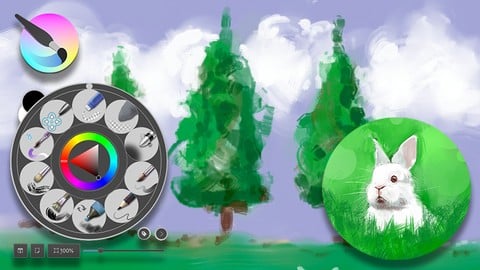
Krita QuickStart: for Digital Painting and Animation (Udemy.com)
Learn to paint digitally and animate using the free open source software. Now with 2023 update!
Created by: Aaron Porter
Last updated June 2023
 What you will learn
- Students will learn how to draw and paint digitally as well as animate in the free open source software.
How it compares
Against the other 175 rated Udemy courses in Digital Painting on CourseDuck:
- Rating4.4 out of 5higher than 26% of them
- Reviews167#83 of 176 by number of reviews
- Length10.4 hourslonger than 82% of them
- Last updatedJune 2023more recently than 71% of them
 Course Description
Krita is a free open source software that can be used for digital painting by both professional and amateur artists. You can also animate in Krita. Many courses bombard you with tons of information up front when all you want to do is get to work. Krita can have a very short learning curve if all you want to do is paint digitally in a natural and intuitive way. After you dive in and begin creating, you can then come back to the course and learn the finer details of digital painting as well as some tips and tricks that can speed up your work flow. You can use many of the techniques taught in Krita in other software as well. Then I will show you how to animated using Krita's timeline.
This course was originally 6 hours long and was created in 2019. It has been updated in 2023 to focus more on digital painting in a traditional oil painting style. So if you want the newest content look for the section labeled Update 2023 in section 7.
Here are some of the areas covered:
• Pop-up Pallet
• Painting Still Lives
• Mixing Colors
• Working with Textures
• Installing Brushes
• Creating Brush Groups
• Painting on Multiple Layers

 Udemy Discount
The discount is applied through our link. Open the course from here and Udemy's current promotional price is applied at checkout on most courses, no code to type.
Some courses are excluded from Udemy's promotions. If the price does not drop, clear your browser cookies and use the button again.
Instructor Details

- 4.4 Rating
 167 Reviews
Aaron Porter
Aaron is a New York based freelance graphic artist and instructor. He has a Bachelors Degree in Scientific Illustration and a Masters Degree in Painting.
Aaron worked in the newspaper industry creating graphics and illustrations for 18 years. He has is a part time digital art instructor at a pair of Community Colleges where he teaches Digital Imaging (Photoshop), Digital Illustration (Illustrator) and Photography.
He is also an Adobe Certified Expert in Photoshop.
As a freelancer he works for clients around the world creating illustrations, infographics, animated explainer videos, photo composites and retouching photos.
 More Digital Painting courses

Character Art School: Complete Coloring & Painting (2026)
4.8 (6,042 Reviews)
 Provider: Udemy
 Time: 19.5h
$34.99



Procreate Masterclass: Digital Drawing on the iPad (2023)
4.8 (1,744 Reviews)
- Provider: Udemy
- Time: 18.2h
$94.99


Digital painting with Krita 5.0 intermediate level (2022)
4.8 (271 Reviews)
- Provider: Udemy
- Time: 6.8h
$79.99
 Reviews

By Viktoria V. on 9/22/2025
This is a very detailed course on how to use Krita, covering the most important aspects step by step. It’s perfect for complete beginners, with clear and easy-to-follow explanations.
By Liang Alfaro on 6/28/2024
I think the course had a fair price ( I paid around 16$) for what it shows you until now and I would recommend the course and not any YouTube videos because the course is way more detailed than the videos
By V. Nadine Callan on 12/4/2022
It is clear the instructor is passionate about his art. The course is good for people coming back to drawing/painting *cough* 30+ years after highschool. As a refresher it was informative. I purchased the course to learn about animating in Krita It really does get off to a good start.
By David York on 8/23/2022
Concerning that has not been updated to 5.x as some keys strokes seem changed. Also though he tries to include WIndows users in the discussion, there is some obvious re-interpretation deficiencies in the discussion. Over-all is helpful as a beginner.
By Kathy Hall on 7/19/2022
He made everything very understandable. Sometimes he would do things without explaining but he is much better at dumbing it down for me than other presenters.
By Alexander Duerre on 4/20/2022
Yes, this is an ideal tutorial for me just getting started out with digital art. I have drawn quite a bit in my life but never took a leap into digital software until now. I now feel confident in my ability to use the basic features and put at least a decent-looking digital piece together.
By Frederick L. Sims on 1/29/2022
I am Finding the instructor is giving me what I needed. His classroom experience is showing in his presentation of the material. Since hardly anything is perfect I will add that I did at a time or two wish he had given a little more detail about which device he was using to actually draw. For example on the color apple session there were times when I wondered was he painting with the mouse or pen. Finally let me say he is valuable and entertaining.
By Jason Decker on 3/21/2021
Amazing Course! Aaron is so knowledgeable in Krita, and the Animation segment is what really inspired me & drove me to this course. I feel more comfortable doing Animation now and Free drawn GFX. Thank you!
By Loe van Kan on 10/5/2020
Voldoende vaart, informatief, goede techniek zonder te precies te zijn, Voor mij verhelderend en nuttig. Ik heb ervaring met traditionele technieken en wil digitaal gaan werken. Deze cursus heeft mij een uitstekende opstap geboden waarmee ik snel door de basis kon gaan. Ik heb lange tijd geworsteld met Krita en Gimp en mijzelf het nodige eigen gemaakt, maar ik ben heel blij met deze cursus. Het heeft mijn vaardigheid en plezier een enorme boost gegeven.
By Élisabeth Bernier-Banville on 5/30/2020
Explaining the basics without wasting too much time on describing all the brushes; like the teacher said, we can instinctively figure out most of the brushes by their thumbnails alone, so going over one by one would be too much. Getting a bigger overview of the program itself, the way to navigate the settings and accessing different tools is much more relevant to me, so I highly appreciate that. My only recommendation to improve it would be to tone down the music's volume in the first two videos of section 1; it was a good setting for the atmosphere, but it was almost on equal level with the teacher's talk itself, which was just a little distracting. I'm looking forward to seeing the rest, thank you!
 Quality Score
No CourseDuck member has rated this course yet. Taken it? Give each part a thumbs up or down.
Overall Score : 88 / 100
- Video Duration:
 10.4h
10.4h - Price: $64.99
- Provider: Udemy
- Updated:
 June 2023
 - Level:
 Beginner
 - Language:
 English
 - Certificate:
 Yes
Yes
30-day money-back guarantee on most paid courses
Udemy Coupon Price Tracker
