
 Web Development
 Data Science
 Python
 SQL
SQL JavaScript
 Artificial Intelligence
 IT & Software
 IT Certifications
 Hacking
 AWS
AWS Arduino
 DevOps
 3D Modeling
 Graphic Design
 Photoshop
 Drawing
 Digital Painting
 UX Design
 Business
 Data Analysis
 Communication Skills
 Project Management
 Leadership & Management
 Human Resources
 Digital Marketing
 Social Media Marketing
 Marketing
 SEO
SEO Google Analytics
 Branding
 Excel
Excel Office Productivity
 SAP
SAP PowerPoint
 Microsoft Access
 SharePoint
 Finance & Accounting
 Trading & Investing
 Accounting
 Bitcoin
 Personal Finance
 Video Editing & Animation
 Photography
 Adobe Premier Pro
 Adobe Lightroom
 Personal Development
 Productivity
 Career Development
 Life Coaching
 Health & Fitness
 Meditation & Mindfulness
 Yoga
Yoga Music
Music Music Production
 Guitar
 Piano
Piano Singing
 Language Learning
 Teaching & Academics
 Engineering
 Math
Math Lifestyle
Learn to Design Your Own Boards (Udemy.com)
Design a board in 15 hours. Step-by-Step tutorial based on Arduino project (Altium)
Created by: Robert Feranec
Last updated April 2020
Our take
Based on the ratings of 3,064 students, a sample of their written reviews and the syllabus, as the course stood in April 2020. No course pays to be reviewed.
This is a 14.6 hour, 137 lecture course built around one project: redrawing and improving an Arduino Uno reference schematic in Altium Designer, then routing the PCB and generating every file needed to actually manufacture it. Robert Feranec, who has designed motherboards for Intel and AMD chips and runs a hardware YouTube channel with millions of views, teaches it. It suits college students chasing a resume line, junior engineers new to Altium, and hobbyists who have only ever used breadboards and want to turn a circuit into a real board.
Reviewers consistently praise how detailed and hands on it is: one calls it spoon fed in the best sense, another says it is the only PCB course on Udemy worth taking. Students single out how detailed every step is and repeatedly praise Feranec himself, with one reviewer calling him one of the best instructors they have ever had and another recommending his other PCB courses too. The complaints are narrower. One reviewer flags the language and accent as an adjustment at first, and a 2025 review calls parts of the course repetitive and says some steps feel dated since Altium's interface has moved on since 2020, though a 2024 review says the same material still translates fine to newer Altium versions.
The course was last updated in April 2020, so expect some clicking around that does not match the current Altium UI exactly, even though most reviewers say it still holds up. At 4.7 stars across 3064 reviews and a Bestseller badge, it is a safe pick if your goal is finishing one real board rather than sampling many small demos. Anyone wanting deep high speed layout work should look at Feranec's Advanced PCB Layout course instead.
Pros
- Builds one complete board from schematic through manufacturing files
- Covers Gerbers, BOM, assembly drawings and Pick and Place output
- Feranec's step by step teaching style gets called spoon fed by name
- 137 lectures across 14.6 hours give real depth on component creation
Cons
- Last updated in 2020, so parts of the Altium interface have since changed
- One reviewer found parts of the course repetitive and tiring by the end
- One reviewer says the language and accent take some adjustment to follow
Listed as All Levels, but it really assumes zero Altium experience and walks beginners through every click.
 What you will learn
- After this course, you will design your own Arduino like board.
Course content
7 sections · 137 lectures · 15 hours of video
- 1Drawing Schematic and Creating Libraries 2 free previews79 lectures · 7.8 hours
- 2Finishing Schematic6 lectures · 31 min
- 3PCB Placement12 lectures · 1.3 hours
- 4PCB Layout 1 free preview20 lectures · 3.5 hours
- 5Manufacturing documentation14 lectures · 1.2 hours
- 6Bringing your board to life5 lectures · 16 min
- 7Thank you1 lecture · 1 min
Who it is for
The instructor says it suits
- College / University students: During this course you will learn how to work in Altium Designer. Altium is one of the most used software in companies which are designing electronic boards or products. Knowing how to work in Altium can give you an advantage when applying for a job. As a college / university student, you may be able to get a free license of Altium Designer.
- Junior / Senior hardware design engineers: During this course you will go through complete process of designing an electronic board. You will learn all the steps exactly the way as they are done in a professional company. After this course you will know everything essential to use Altium Designer in your job. This course can be very useful when you are starting with Altium Designer or when you are
- Beginners, Hobbyists: If you build your own electronic circuits using wires or breadboards and you have ever wanted to transfer your circuits into a real board or real product, this course can help you. During this course you will learn how you can design your own boards.
What you need before you start
- You will need Altium Designer software. If you are a college / university student, ask Altium for a student license. In many countries the student license is free.
How it compares
Against the other 295 rated Udemy courses in Arduino on CourseDuck:
- Rating4.7 out of 5higher than 90% of them
- Reviews3,064#13 of 296 by number of reviews
- Length14.6 hourslonger than 89% of them
- Last updatedApril 2020earlier than 81% of them
 Course Description
Learning a basic board design is essential for everyone who would like to work in electronics or who would like to design electronic boards or products. Learning board design in the right software can open you door into many companies, help you to get a well paid job and can be used to design very complex and advanced boards.
Design a Real Board and Learn Essentials of Using Altium Designer
- Draw your own schematic
- Route your PCB and do layout
- Generate documentation needed to manufacture your PCB
Altium Designer is a Powerful Software
During this course you will learn how to use Altium Designer software. Altium Designer is a professional software used to design all kind of boards, from very simple ones to motherboards or servers. It is one of the most used software for electronic design. Learning Altium is useful for everyone planning or already working in electronics.
Contents and Overview
You will start with Arduino Uno reference schematic. You will learn how to re-draw the schematic, modify it, you will learn how to improve it and how to do PCB layout. The course videos are step-by-step and even if you are new in electronics or you have never used Altium Designer before, by repeating these steps, you will design your own board. By the end of this course, you will create all the necessary documents needed to manufacture the board.
Within 15 hours you will learn how to:
- Draw schematic, including tips for component selection and important circuits
- Create components, draw schematic symbols and footprints
- Place components into your PCB
- Route PCB and useful tips about layout
- Create 3D model of your board
- Create board variants with different components fitted / not fitted
- Create Bill of Material (BOM)
- Create assembly drawings showing position of components on the board
- Generate Gerbers, Pick and Place, Drill file and other files needed for manufacturing
- Prepare professional documents needed to manufacture your PCB and assemble your board
- Bring your board to life, flash firmware and run a simple LED Blinky example
For everyone interested, the manufacturing documents created during this course can be used to build your board. Simply use PCB manufacturing data to get your PCB, buy components from Digikey and solder them by yourself.
Enjoy this course :)

 Udemy Discount
The discount is applied through our link. Open the course from here and Udemy's current promotional price is applied at checkout on most courses, no code to type.
Some courses are excluded from Udemy's promotions. If the price does not drop, clear your browser cookies and use the button again.
Instructor Details

- 4.7 Rating
 3,064 Reviews
Robert Feranec
Robert has designed motherboards based on Intel, AMD, VIA processors. His Youtube hardware design videos have over 7 million views. Robert also teaches Schematic Design and PCB Layout at FEDEVEL Academy.
Other Robert's courses
- Advanced PCB Layout (includes high speed layout)
- Advanced Hardware Design (Schematic & PCB Design Course)
- Learn Altium Essentials (Switching Power Supply Design Course)
- Learn the Essentials of creating uBoot, Linux and YOCTO
- Learn OrCAD & Allegro Essentials
Open Source Hardware Development
All Robert's courses are based on real projects. This way, everyone has an opportunity to practice and learn on real boards. Robert has lead and supported development of several Open Source boards used in his courses:
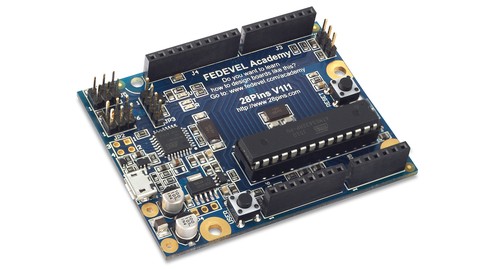
- 28Pins: Based on Arduino Project
- iMX6Rex: Boards based on iMX6 1.2GHz ARM CPU
- OpenRexKit: Education kit to learn programming and electronics
 More Arduino courses


Learn to Build a Computer (PC) in 2026 - all types!
4.9 (245 Reviews)
 Provider: Udemy
 Time: 6.1h
$74.99

Raspberry Pi For Beginners - 2026 Complete Course
4.8 (3,105 Reviews)
- Provider: Udemy
- Time: 10.6h
$89.99

Ultimate Guide to Raspberry Pi : Tips, Tricks and Hacks (2023)
4.8 (2,363 Reviews)
- Provider: Udemy
- Time: 5.2h
$69.99

Mastering Microcontroller: STM32-LTDC, LCD-TFT, LVGL (MCU3) (2026)
4.8 (487 Reviews)
- Provider: Udemy
- Time: 8.1h
$79.99

Arduino Step by Step: Getting Started (2024)
4.7 (8,714 Reviews)
- Provider: Udemy
- Time: 21.4h
$159.99
 Reviews

By Mohammad Abdullah on 10/13/2022
First of all I would like to thank Robert for such an excellent tutorial. It helps anyone who doesn't have any experience in this field like me. This step by step tutorial helped me a lot to get confidence about PCB layout design process from scratch. Although, I faced some problem because of the AD version but it is manageable. sometimes he explained about some theories/reasons where needed, he did some mistakes intentionally which are explained later so that we can understand it properly. In short, excellent course, amazing instructor. I wish you all the best.
By Syed Ali Ahmed on 7/5/2021
A very good course to begin with Altium Designer. It covers all the basic points that you need to know in order to design a simple PCB. However, this course is some years old (3-4 years) which makes a little difficult to follow Robert in the beginning if you are using latest Altium Designer Version. Thanks Robert for the course!
By Álvaro José Ávila-Casanova Ureña on 8/18/2020
He gives really good advices and tips about board design and a little bit EE stuffs. All the videos are plenty of details. From my experience, the knowledge of this course gives you enough skills to face your next projects being self-condifence because After all videos you got used to the tools of Altium and learned where to check more information to fix new design problems.
By Sivaramakrishnan on 4/3/2020
This is a great point to kick-start your PCB designing experience. As a beginner, it has helped me in understanding on how to use a PCB designing tool. I also think that this might not be suitable for experienced designers, as this particular course is very much oriented towards the simple/basic concepts. Note that the instructor has content being delivered at The Fedevel academy, where it is much more professional.
By Moises Dominguez on 9/6/2019
This course is pure gold to introduce you to PCB design using Altium. Robert knows exactly how to share his knowledge and expertise. The course may be somehow basic if you are familiar with PCB design, but still, Robert will give you a lot of great advises. I highly recommend it. Thanks for creating this course, I will definitely take another of his courses on Fedevel Academy
By Samuel Osafehinti on 1/26/2019
The course is phenomenal for anyone just starting to try out Altium Designer. I just completed the course and it is very very very fulfilling. I learnt a tremendous amount of information and I'm very confident in using Altium Designer now. I can feel the enormous power flowing thru my veins.... I'm blown away. Very detailed (and my oh my.... very very detailed...) and patient explaining. I could never have learnt what Ive learnt anywhere else. Thanks Robert.
By Miguel Osuna on 11/6/2018
It is a course that really helps you understand all the fundamentals of PCB design, highly recommended for those who want to start in the area of hardware design. I thank Robert for the way he designed everything, providing and solving each of the doubts I had.
By Roberto Aguilar Gómez on 3/23/2018
Excellent course, very practical and useful for anyone that are learning Altium. I think it's the best altium course I had realissed, for its high practical content, in special to design library componets and to use 3D models, and the seccion of output documentation (boms, gerbers, output files) is very completely. Thanks R. Feranec for this course, now, I will design my own PCB boards in Altium with more security and learning, thanks.
By Kai Chin LIM on 11/19/2017
It is definitely the best tutorial for PCB drawing with Altium. Learned a lot from the instructor. The value of the tutorial is how the instructor illustrate some possible (basic but critical) problems faced by most beginners and provides a lot of useful solutions for the problems. The minor suggestion from me is the instructor can be going into more details on the environment configuration or tricks on short cut key/mouse to use some of the functions on Altium- as I failed to replicate some actions shown on the videos. All in all still the best tutorial.
By Bryan Weber on 9/13/2017
I believe the explanation is great. I can rewind and review when I want. This instruction has been the best. Very happy with the quality. Update: I am at a point in the course where Robert is making finishing up touches on the traces and layout of the PCB. I was not able to get the overall layout done exactly as he did. He is now making traces wider in places that I cannot widen due to how I laid out my board. I would have to make major changes to my layout to accommodate the wider traces. I would like to see a video, or something, early on that shows the board with the narrow traces and the completed board with all the trace modifications. Something that lets the student know that these changes will be made at the end and allow the student to make room for these changes or just put the wider traces in the design rules and lay it out that way in the first time. I still believe the course is great overall!!
 Quality Score
No CourseDuck member has rated this course yet. Taken it? Give each part a thumbs up or down.
Overall Score : 94 / 100
- Video Duration:
 14.6h
14.6h - Price: $129.99
- Provider: Udemy
- Updated:
 April 2020
 - Level:
 All Levels
 - Language:
 English
 - Certificate:
 Yes
Yes - Lectures:137 in 7 sections
- Students:14,000
- Subtitles:1 language
- Udemy badge:Bestseller
30-day money-back guarantee on most paid courses
Udemy Coupon Price Tracker
