
 Web Development
 Data Science
 Python
 SQL
SQL JavaScript
 Artificial Intelligence
 IT & Software
 IT Certifications
 Hacking
 AWS
AWS Arduino
 DevOps
 3D Modeling
 Graphic Design
 Photoshop
 Drawing
 Digital Painting
 UX Design
 Business
 Data Analysis
 Communication Skills
 Project Management
 Leadership & Management
 Human Resources
 Digital Marketing
 Social Media Marketing
 Marketing
 SEO
SEO Google Analytics
 Branding
 Excel
Excel Office Productivity
 SAP
SAP PowerPoint
 Microsoft Access
 SharePoint
 Finance & Accounting
 Trading & Investing
 Accounting
 Bitcoin
 Personal Finance
 Video Editing & Animation
 Photography
 Adobe Premier Pro
 Adobe Lightroom
 Personal Development
 Productivity
 Career Development
 Life Coaching
 Health & Fitness
 Meditation & Mindfulness
 Yoga
Yoga Music
Music Music Production
 Guitar
 Piano
Piano Singing
 Language Learning
 Teaching & Academics
 Engineering
 Math
Math Lifestyle
Office 365 modern SharePoint sites for beginners (Udemy.com)
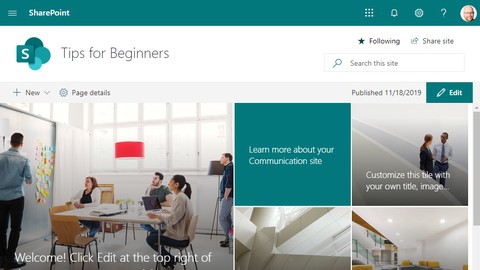
SharePoint modern sites explained. All videos are a practical exercise, showing SharePoint features in action.
Created by: Velin Georgiev
Last updated November 2019
 What you will learn
- The SharePoint sites are confusing initially. I designed this course for humans with no technical knowledge.
- You will learn what a modern SharePoint site is.
- You will learn how to create content-rich SharePoint site pages.
- You will learn how to share a SharePoint site with different users.
- You will learn how to apply themes and branding for a modern SharePoint site.
- You will learn how to manage files and data within the SharePoint site.
- This course is a perfect fit for SharePoint site owners.
How it compares
Against the other 38 rated Udemy courses in SharePoint on CourseDuck:
- Rating4.2 out of 5higher than 13% of them
- Reviews606#16 of 39 by number of reviews
- Length3.4 hoursshorter than 68% of them
- Last updatedNovember 2019more recently than 50% of them
 Course Description
In this course, you will learn how to work with Office 365 modern SharePoint Online sites. I made the course for users that have never worked with SharePoint before or users that would like to improve their productivity and become an Office 365 power user. I demonstrate different features like creation of site pages, working with files, branding your site, sharing it with others, and more. I demo them directly, working with a SharePoint site in most of the lectures. Since this is Office 365 SharePoint online course, I do not cover SharePoint on-premise 2013, 2016, and 2019 versions.

 Udemy Discount
The discount is applied through our link. Open the course from here and Udemy's current promotional price is applied at checkout on most courses, no code to type.
Some courses are excluded from Udemy's promotions. If the price does not drop, clear your browser cookies and use the button again.
Instructor Details

- 4.2 Rating
 606 Reviews
Velin Georgiev
Velin is a Microsoft Most Valuable Professional (Microsoft MVP), currently working as a technical architect with a focus on designing SharePoint Online and Office 365 applications. He loves to share his expertise with the communities, and he is always keen to learn new stuff. He is a frequent contributor to SharePoint Patterns and Practices (PnP) and a member of the SharePoint PnP Core Team where is mainly focused on the Office 365 CLI and the SharePoint Framework. He is passionate about good coding practices, automation, and in search of better ways for teamwork that could improve team collaboration.
You will see him speaking on SharePoint conferences and events. He posts regularly to his blog. Tweets from @VelinGeorgiev and works on multiple GitHub projects.
 More SharePoint courses



SharePoint 2013 Administration + 25+ Practice Tests
4.6 (467 Reviews)
 Provider: Udemy
 Time: 13.9h
$49.99

Mastering Microsoft 365 SharePoint Online: Essential Guide (2026)
4.5 (12,189 Reviews)
- Provider: Udemy
- Time: 9.2h
$84.99

SharePoint - Complete Guide to Microsoft SharePoint Online (2025)
4.5 (10,744 Reviews)
- Provider: Udemy
- Time: 15h
$84.99

 Reviews

By Tobias Straub on 6/29/2022
Content was quite useful. However, it feels like the teacher didn't have a proper script to follow in the videos. Too often confused by the behavior of the site, switching between browsers etc.
By Anonymized User on 8/31/2021
As a novice to SharePoint, this course is at my level of experience and understanding of terminology. This is good for beginners to the SharePoint application but you need to have a basic understanding of computers, Microsoft Office, and browsers.
By Denis Beary on 8/21/2021
Very easy way of learning. The instructor demonstrates as if it is his first time using Sharepoint (maybe it is!!!) and is answering my questions in advance as he navigates.
By Calvary-IT AJA on 7/20/2021
As a network administrator with no Sharepoint exposure I came into this course with no fundamental knowledge. In choosing this course I now have a better understanding of sharepoint and the basics on what can be done. Recommended.
By Anonymized User on 5/21/2021
course was helpful, taught me several things I didn't know. Would have loved to learn a bit more about calendar - can it be edited from Outlook and can I bulk upload events. Also, does the publish date update when a page is republished.
By Zinue Cisneros on 3/11/2021
I did learn quite a bit but there were some redundant parts (i.e. upload a video, upload a word doc, upload powerpoint, upload excel, etc.) But other than that it was great!
By Shree Shan on 3/3/2021
all essentials were covered..I played at 2 speed most, switch regular where I needed more clarifications..
By Cathie Huckins on 3/1/2021
This course was quite informative and pretty easy to follow. There is a LOT to be learned within SP, and I feel like I have a much better handle on getting my own Team's site up and running now.
By Maryjane Ibemere on 11/24/2020
It's practical, straight to the point and it shows how to build latest office 365 SharePoint websites from the scratch.
By Richard Brennan on 12/3/2019
The course was good and useful although it concentrated on communication sites. Also, the author mentioned that he would be reviewing various menu items that he did not get around to.
 Quality Score
No CourseDuck member has rated this course yet. Taken it? Give each part a thumbs up or down.
Overall Score : 84 / 100
- Video Duration:
 3.4h
3.4h - Price: $44.99
- Provider: Udemy
- Updated:
 November 2019
 - Level:
 Beginner
 - Language:
 English
 - Certificate:
 Yes
Yes
30-day money-back guarantee on most paid courses
Udemy Coupon Price Tracker
