
 Web Development
 Data Science
 Python
 SQL
SQL JavaScript
 Artificial Intelligence
 IT & Software
 IT Certifications
 Hacking
 AWS
AWS Arduino
 DevOps
 3D Modeling
 Graphic Design
 Photoshop
 Drawing
 Digital Painting
 UX Design
 Business
 Data Analysis
 Communication Skills
 Project Management
 Leadership & Management
 Human Resources
 Digital Marketing
 Social Media Marketing
 Marketing
 SEO
SEO Google Analytics
 Branding
 Excel
Excel Office Productivity
 SAP
SAP PowerPoint
 Microsoft Access
 SharePoint
 Finance & Accounting
 Trading & Investing
 Accounting
 Bitcoin
 Personal Finance
 Video Editing & Animation
 Photography
 Adobe Premier Pro
 Adobe Lightroom
 Personal Development
 Productivity
 Career Development
 Life Coaching
 Health & Fitness
 Meditation & Mindfulness
 Yoga
Yoga Music
Music Music Production
 Guitar
 Piano
Piano Singing
 Language Learning
 Teaching & Academics
 Engineering
 Math
Math Lifestyle
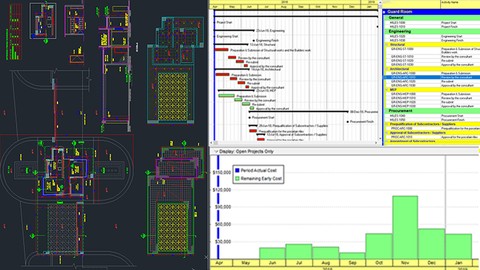
Primavera P6: Planning & Scheduling Construction Case Study (Udemy.com)
Master the Primavera P6 software from Scratch with a Complete Planning & Scheduling Construction case study -Primavera
Created by: Construction Project Management Guru (PSP
Last updated October 2019
 What you will learn
- Build a Schedule even with minimum data.
- Create a Construction Schedule Professionally from Scratch.
- Think as a planner and/or a scheduler.
- Analyze the Construction documents to produce a schedule that will get the team buy-in.
- Apply the planning and scheduling knowledge into the Primavera P6
How it compares
Against the other 459 rated Udemy courses in Office Productivity on CourseDuck:
- Rating4.3 out of 5higher than 18% of them
- Reviews728#169 of 460 by number of reviews
- Length5.4 hourslonger than 59% of them
- Last updatedOctober 2019earlier than 87% of them
 Course Description
Primavera P6 is a tool like no other when it comes whenever you think about planning and scheduling. Usually, it is hard to match what you have learned in a course with the REAL LIFE!. Most of the courses out there don't do this - they give you knowledge and you might not know how to use it. This course is different!! It is with a real Construction Case Study from scratch.
No need to do this anymore. The course is created to teach you Primavera P6 with a real life construction case study. Not only that, you will learn the planning and scheduling skills and see how it is applied in Primavera P6. Planning and scheduling is not an easy task, it is one of the most important tasks in the project management. So Is Primavera P6 related with planning and scheduling? Is Primavera P6 related to Project Management? Is Primavera P6 has anything to do with the success of the project?
The answer to all of these questions is YES, YES and YES!!, but how? - Primavera P6 is a tool and you can say it is a smart tool! It is a tool that helps you in the planning and scheduling process of the project. It is an amazing tool when it comes to monitoring and controlling. But, always remember that Primavera P6 is just a tool. To operate this tool you have to know minimum skills for planning and scheduling. So, what does Primavera P6 do? What will you get from such course?
Primavera P6 allows you to organize and manage the project ahead visually. You will breakdown the project into activities and create activity list in the Primavera P6. It allows you to manage the project scope, resources and it is beautiful in illustrating the time claims. Always remember that planning and scheduling is a knowledge area that can be easily represented using an amazing tool such as Primavera P6.
Construction projects are never easy. That's why this course has taken a construction case to carefully study it and make a schedule.
Planning is a vital project phase and it would take an enormous amount of time if it is done manually. Primavera P6 helps you in doing so. You have to understand the main concepts of planning first to plan any project successfully.
The course has taken a construction case example, but you might tailor it to your needs as well. You will get a taste of how planning and scheduling are done in construction projects with a step by step instructions for building a schedule.
A lot of projects if planned correctly will save a lot of time and cost to your organization. Always remember that Primavera P6 is only a tool to apply the planning and scheduling knowledge. This means you have to have a minimum knowledge on planning and scheduling; How to plan for projects.
By the end of the course you will learn that to plan any project successfully you should have a great tool. Primavera P6 is that tool. Primavera P6 helps you in the planning phase of any project. You will also get to know how a construction schedule is created with the minimum data. You will get insights in the construction schedule.
After successful completion of the course, you will be able to create a schedule cost and resource loaded from scratch, monitor the schedule, review a schedule, generate reports, understand planning and scheduling concepts and easily create your own construction schedule.
Planning is a vital project phase and it would take an enormous amount of time if it is done manually. Primavera P6 helps you in doing so. You have to understand the main concepts of planning first to plan any project successfully.
Main Topics: Planning and scheduling using Primavera P6, Construction Schedule, Construction Planning, Construction Scheduling, Construction Plan, Construction time frame, Construction Time Management, Construction Projects, Construction Management, Construction Monitoring, Construction Control, Oracle Primavera, Project Management using Primavera, Primavera P6 Schedule, Planning and Scheduling output, Primavera P6 course, Scheduling with Primavera course, Planning with Primavera course, Oracle Primavera course

 Udemy Discount
The discount is applied through our link. Open the course from here and Udemy's current promotional price is applied at checkout on most courses, no code to type.
Some courses are excluded from Udemy's promotions. If the price does not drop, clear your browser cookies and use the button again.
Instructor Details

- 4.3 Rating
 728 Reviews
Construction Project Management Guru (PSP
Planning Guru is a symbol we use to make you one.
Collectively, we have studied the fields of engineering and management from various colleges. Our specific experiences may have differed, but we all have one thing in common: a knack for professionalism and a deep knowledge of what it takes to succeed.
We have worked in numerous large construction projects, ranging from multi-use complexes, medical cities and private villas, all with a vibrant passion for proper management. Our gratefulness extends to the many teams we have worked with, all of whom have helped us create and redefine our vast array of knowledge that has filled in the gaps in the industry.
We want to fill the gap in the project control professionals through our courses in projects control, Excel Charts, Excel Analytics, Excel Dashboards, Power Pivot, and Power Query and pivot tables
We are also accredited as a professional schedulers and planners from PMI (PMI-SP) and AACE International (PSP).
For sure we are Primavera and Excel specialists.
Our favorite mottoes summarizes what we’re all about: “Fail to plan is planning to fail.” & "The most important asset a planner can have is Knowledge"
 More Office Productivity courses

AI-Powered Social Media Management: From Beginner to Pro (2025)
5.0 (211 Reviews)
 Provider: Udemy
 Time: 1.1h
$19.99

Microsoft Excel + AI: Go From Data Analysis to Visualization (2026)
4.9 (276 Reviews)
- Provider: Udemy
- Time: 3.8h
$10.99


Complete Introduction to Google Sheets Pivot Tables (2026)
4.8 (3,570 Reviews)
- Provider: Udemy
- Time: 2.9h
$64.99


Microsoft Excel - Managing Personal Finances with Excel (2024)
4.8 (810 Reviews)
- Provider: Udemy
- Time: 3h
$19.99
 Reviews

By Suhaib Elfadil Abdalkhalig Omer on 8/20/2022
A very nice way to teach, especially with people who have business and do not have time to attend lectures in institutes. According to my perception and experience, I think it is a very good system and achieves the desired results. My sincere thanks and appreciation.
By Abdulrahman Hammanjoda Abana on 12/21/2021
This course is exactly what i have been looking for, its absolutely great though i was confused from the start because the instructor have this habit of skipping some processes but its been an amazing course.
By Berkan Alper Kaya on 10/7/2020
That was a good lesson that you can learn not only activities but also filters, view log ect. But the lecturer needs to cut some of the parts that he did wrong. Especially there is one whole lesson in which he tries to find what he did wrong. And I was expecting .xer file after every lesson not essencial but I would like to compare his and my project.
By Danielle Nastyn on 12/2/2019
I liked being able to see a project from start to finish. I think it helped me better understand this program. It was also nice to see the little tips and tricks available.
By Devendra Mandlik on 9/8/2019
Course content is specific,precise,effective and really help me in improving my schedule preparation approach.Kindly add unit on % work completion with respect to labour co efficient and project cash flow and S curve preparation with Primavera.waiting for EOT/Delay and Disruption with primavera in details.
By Terry L Alexander on 6/1/2019
Pretty good course, but why does the instructors username have to be so long. Make it sweet and simple. Makes for a very unappealing certificate. Also needs to be updated a bit more, as there were some minor discrepancies with the most current version of P6 and the version utilized in the videos.
By Tofik Nazirov, PhD on 1/4/2019
Good and useful course. I learned some new useful things for myself. Feels professional lecturer. However, I have several wishes for the future, which I think can increase the effectiveness of the course. Here they are. 1. Lecture 33 from section 2 is not completely clear. I think it would be better if the lecturer explained when it would be necessary to use this or that kind of constrains. 2. Lecture 35 of section 2. The lecturer began without a clearly set goal and could not convey his point to the listener. It would not be better to prepare in advance and bring the lecture to the end without any problems. In my opinion it would be better if the lecturer removed this lecture from the cycle. 3. Lecture 37 from section 2. One could also literally briefly mention another way to import resources into P6 from Excel in one click. I mean the SDK for P6. 4. Lecture 43 of section 2. From this lecture, unfortunately, it is not entirely clear what Leveling Resources is and why it is needed. 5. It would be nice to also include in this course brief information about some of the P6 functions, such as Global Change and UDF (User Defined Fields). 6. Wish for the future. I understand that the subtitles are generated automatically. Therefore, some of them contain words that are not relevant to the topic. Sometimes, unfortunately, it is even difficult to understand the meaning of a sentence from this text. It would be nice if the lecturer edited and corrected automatically generated text.
By Umar Faruq Habibu on 11/23/2018
The course is well compile and presented. I got a helpful tip on how to allocate my resources all at once. I will definitely recommend this course for beginners
By Geetha Ravi on 10/6/2018
This course is good for someone who is just stepping into planning has never worked on P6, i would have liked if there was more stress on updating schedule and dealing with the float adjustments after the update. Also there could have been better explanation on % complete types.
By Gebra Lasway on 6/20/2018
"I recommend the Primavera P6 course to anyone who wants to start a career in project planning and scheduling. It can be applied to the scheduling of activities for any discipline. The course introduced me to a better methodology on how to approach the project scheduling task in a systematic way. The instructor is fabulous! His knowledge above and beyond the training was great, very kind, and patient Great work Mr KK
 Quality Score
No CourseDuck member has rated this course yet. Taken it? Give each part a thumbs up or down.
Overall Score : 86 / 100
- Video Duration:
 5.4h
5.4h - Price: $19.99
- Provider: Udemy
- Updated:
 October 2019
 - Level:
 All Levels
 - Language:
 English
 - Certificate:
 Yes
Yes
30-day money-back guarantee on most paid courses
Udemy Coupon Price Tracker
