
 Web Development
 Data Science
 Python
 SQL
SQL JavaScript
 Artificial Intelligence
 IT & Software
 IT Certifications
 Hacking
 AWS
AWS Arduino
 DevOps
 3D Modeling
 Graphic Design
 Photoshop
 Drawing
 Digital Painting
 UX Design
 Business
 Data Analysis
 Communication Skills
 Project Management
 Leadership & Management
 Human Resources
 Digital Marketing
 Social Media Marketing
 Marketing
 SEO
SEO Google Analytics
 Branding
 Excel
Excel Office Productivity
 SAP
SAP PowerPoint
 Microsoft Access
 SharePoint
 Finance & Accounting
 Trading & Investing
 Accounting
 Bitcoin
 Personal Finance
 Video Editing & Animation
 Photography
 Adobe Premier Pro
 Adobe Lightroom
 Personal Development
 Productivity
 Career Development
 Life Coaching
 Health & Fitness
 Meditation & Mindfulness
 Yoga
Yoga Music
Music Music Production
 Guitar
 Piano
Piano Singing
 Language Learning
 Teaching & Academics
 Engineering
 Math
Math Lifestyle
Raspberry Pi PICO an introduction with MicroPython (Udemy.com)
This course is an introduction to Raspberry Pi PICO | PICO W is introduced | Sensors | Robotics| IoT | MicroPython |
Created by: Harish Kondoor
Last updated December 2022
 What you will learn
- Raspberry Pi PICO
- Raspberry Pi PICO W is introduced
- MicroPython coding
- Interfacing and understanding sensors
- Robotics
- MIT app Inventor - Bluetooth App for Android phone
- Circuit diagrams and resource code
- web server -IoT
- Python 3 syntax
How it compares
Against the other 295 rated Udemy courses in Arduino on CourseDuck:
- Rating4.3 out of 5higher than 36% of them
- Reviews111#187 of 296 by number of reviews
- Length4.7 hoursshorter than 53% of them
- Last updatedDecember 2022earlier than 57% of them
 Course Description
Micropython is a lightweight version of Python 3 programming language designed for microcontrollers with a minimum of 256KB of ROM and 16KB of RAM. MicroPython supports chips like ESP32,ESP8266,STM32,nRF52,W600, RP2040 etc.
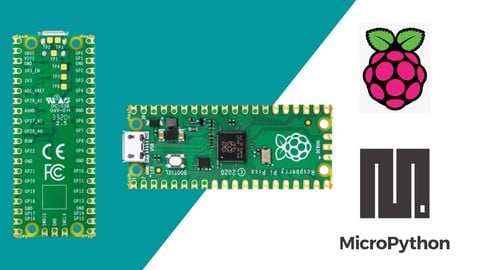
Raspberry Pi RP2040 is a new microcontroller based on ARM M0+ architecture. Which is developed completely Raspberry PI foundation. MIcroPython coding is easy for students who want to learn the embedded systems.
This course mainly covers the basics of MicroPython with different sections, Python 3 syntax, GPIO controlling, and will update with more robotics projects soon. Students can expect regular updates on RPi PICO with MicroPython.
In this course, the software used is free of cost.
Features of the board
RP2040 microcontroller chip designed by Raspberry Pi in the United Kingdom.
Dual-core Arm Cortex M0+ processor, the flexible clock running up to 133 MHz.264KB of SRAM, and 2MB of onboard Flash memory.The castellated module allows soldering directly to carrier boards. USB 1.1 with device and host support. Low-power sleep and dormant modes. Drag-and-drop programming using mass storage over USB. 26 × multi-function GPIO pins.2 × SPI, 2 × I2C, 2 × UART, 3 × 12-bit ADC, 16 × controllable PWM channels. Accurate clock and timer on-chip. Temperature sensor. Accelerated floating-point libraries on-chip. 8 × Programmable I/O (PIO) state machines for custom peripheral support.

 Udemy Discount
The discount is applied through our link. Open the course from here and Udemy's current promotional price is applied at checkout on most courses, no code to type.
Some courses are excluded from Udemy's promotions. If the price does not drop, clear your browser cookies and use the button again.
Instructor Details

- 4.3 Rating
 111 Reviews
Harish Kondoor
Harish Kondoor has more than 5 years of experience in the field of STEM education. Mainly focused on robotics, 3D printing, and IoT. He is the founder of Umydo Solutions based in Bangalore, India. He helped different institutions to set up the STEM labs. The main hobbies are to create DIY projects and learn new technologies
 More Arduino courses


Learn to Build a Computer (PC) in 2026 - all types!
4.9 (245 Reviews)
 Provider: Udemy
 Time: 6.1h
$74.99

Raspberry Pi For Beginners - 2026 Complete Course
4.8 (3,105 Reviews)
- Provider: Udemy
- Time: 10.6h
$89.99

Ultimate Guide to Raspberry Pi : Tips, Tricks and Hacks (2023)
4.8 (2,363 Reviews)
- Provider: Udemy
- Time: 5.2h
$69.99

Mastering Microcontroller: STM32-LTDC, LCD-TFT, LVGL (MCU3) (2026)
4.8 (487 Reviews)
- Provider: Udemy
- Time: 8.1h
$79.99

Arduino Step by Step: Getting Started (2024)
4.7 (8,714 Reviews)
- Provider: Udemy
- Time: 21.4h
$159.99
 Reviews

By Daniel A. Morales on 1/26/2026
A bit more focus on camera work, and it would be perfect. Slow down in the explanations so it can settle in for us. thanks.
By Bruce Lavoie on 2/11/2025
I really like this class, the content was really direct and I was able to go from knowing little to starting my first project in almost no time.
By Robert Sinclair on 1/4/2025
The instructor is not really teaching much about the RPP. A very brief intro to MicroPython and not much about the device.
By Bello Oladele Kamoru on 10/18/2024
please update the course to raspberry pi pico w. I ❣️ the course
By Joydeep Rudra on 6/24/2024
I learnt what I wanted to learn from this course. The explanation provided is good. The only improvement I would suggest is that articulation could have been better. For example, instead of saying next video, say next lesson.
By DAN AHKS on 4/3/2024
Clear Pres. good topics
By Tim Albin on 8/25/2023
I can follow and understand the code and what the code is doing when program is running.
By Walter Gabriel Diez on 2/21/2022
Very clear in concepts. the course covers RPI Pico and some hardware like motors, blue tooth devices, and apps.
By VAISHNAVI V on 4/20/2021
So far the course is good.Explanations are simple to understand.Recommended for beginners.
By Johannes van Schalkwyk on 3/22/2021
A good kickstart to get you going with the RPi Pico and MicroPython. Some concepts could have been explained in more detail but then it might loose its value as a kickstart to get you thinking about the potential of the environment.
 Quality Score
No CourseDuck member has rated this course yet. Taken it? Give each part a thumbs up or down.
Overall Score : 86 / 100
- Video Duration:
 4.7h
4.7h - Price: $54.99
- Provider: Udemy
- Updated:
 December 2022
 - Level:
 Beginner
 - Language:
 English
 - Certificate:
 Yes
Yes
30-day money-back guarantee on most paid courses
Udemy Coupon Price Tracker
