
 Web Development
 Data Science
 Python
 SQL
 JavaScript
 Software Development
 IT & Software
 IT Certifications
 Hacking
 Microsoft Azure
 AWS
 Arduino
 3D Modeling
 Graphic Design
 Photoshop
 Drawing
 Digital Painting
 UX Design
 Business
 Data Analysis
 Communication Skills
 Project Management
 Leadership & Management
 Human Resources
 Digital Marketing
 Social Media Marketing
 Marketing
 SEO
 Google Analytics
 Branding
 Excel
 Office Productivity
 SAP
 PowerPoint
 Microsoft Copilot
 Microsoft Access
 Finance & Accounting
 Trading & Investing
 Accounting
 Bitcoin
 Personal Finance
 Video Editing & Animation
 Photography
 Adobe Premier Pro
 Adobe Lightroom
 Personal Development
 Productivity
 Career Development
 Life Coaching
 Health & Fitness
 Yoga
 Meditation & Mindfulness
 Music
 Music Production
 Guitar
 Piano
 Singing
 Teaching & Academics
 Engineering
 Language Learning
 English Language
 Math
 Lifestyle
SharePoint Online Customization and Development Toolset (Udemy.com)
Overview of SharePoint Online Customization Blocks
Created by: Alex Terentiev
Last updated June 2020
 What you will learn
- High-level understanding of available customization blocks for SharePoint Online
- Ability to make a decision which customization tool to use to solve a business problem
How it compares
Against the other 57 rated Udemy courses in SharePoint on CourseDuck:
- Rating4.0 out of 5higher than 3% of them
- Reviews74#43 of 58 by number of reviews
- Length1.5 hoursshorter than 87% of them
- Last updatedJune 2020earlier than 50% of them
 Course Description
The course describes a place of SharePoint in Modern Office 365 and Microsoft ecosystem.
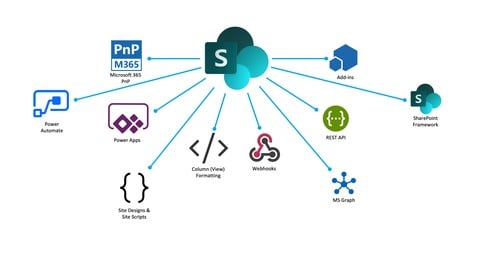
It provides high-level overview of the building blocks that are available for a developer, power user or administrator in SharePoint Online.
The course overviews:
SharePoint Add-ins
SharePoint Framework
SharePoint REST API
Microsoft Graph
SharePoint Webhooks
Site Designs and Site Scripts
Column and View Formatting
Microsoft PowerApps
Microsoft Power Automate
SharePoint PnP
Additional tools like Office UI Fabric, MS Graph Toolkit, etc.
By end of the course you'll be familiar with available building block, when and where to use them. And will be capable of making high-level architectural decisions for solving your business goals.

 Udemy Discount
The discount is applied through our link. Open the course from here and Udemy's current promotional price is applied at checkout on most courses, no code to type.
Some courses are excluded from Udemy's promotions. If the price does not drop, clear your browser cookies and use the button again.
Instructor Details

- 4.0 Rating
 74 Reviews
Alex Terentiev
Alex has been working with SharePoint for more than 10 years, focusing on building custom SharePoint/Office 365 solutions. He is leading development of various SharePoint products, being used by hundreds of companies all over the world. Having very strong background in front-end development, he is riding the modern web development wave and helping community with learning latest development techniques. Alex is a regular contributor to SharePoint Patterns and Practices and presenter during SharePoint Dev PnP Community calls. Three times awarded during invite-only SharePoint Dev Kitchen events hosted by Microsoft SharePoint Product Team: March 2017, July 2018, and October 2019. 2017 European SharePoint Community Award Finalist.
 More SharePoint courses

SharePoint 2013 Complete Training
4.6 (8,396 Reviews)
 Provider: Udemy
 Time: 5.2h
$13.99
Original price
SharePoint 2013: End User
4.6 (469 Reviews)
- Provider: Udemy
- Time: 4.8h
$12.99
Original price
SharePoint 2013 Administration + 25+ Practice Tests
4.6 (467 Reviews)
- Provider: Udemy
- Time: 13.9h
$11.99
Original price
Mastering Microsoft 365 SharePoint Online: Essential Guide (2026)
4.5 (12,189 Reviews)
- Provider: Udemy
- Time: 9.2h
$11.99
Original price
SharePoint - Complete Guide to Microsoft SharePoint Online (2025)
4.5 (10,744 Reviews)
- Provider: Udemy
- Time: 15h
$11.99
Original price
SharePoint Online for Users (2024)
4.5 (3,965 Reviews)
- Provider: Udemy
- Time: 3.2h
$13.99
Original price  Reviews

By Stefan Zaruba on 8/7/2023
Course gave a good overview on what to work on next
By Dirk-Andre Ehlers on 6/15/2023
Die Aussprache war zu undeutlich und zu schnell. Dadurch sind auch die Untertitel höchstens zur Belustigung geeignet.
By mahesh pullareddy on 7/15/2022
wonderful fast introduction and gets you up and running soon.. Than 20 hours of listening to slow, boring lectures.
By Carlos Angulo on 3/3/2022
The lesson is great but the instructor could slow down some as most of us are trying follow everything he is doing between several platforms ie; AZURE
By Juan Pacheco on 10/11/2021
Excellent overview for anyone entering the field of Sharepoint in Microsoft 365 no matter what position you hold or hope to hold.
By David Warns on 3/4/2021
The course contains all the information I was interested in. Our company is looking for some line of business customizations on top of SharePoint. And for me it was great to go through the tools I can use.
By Martin Panton on 7/27/2020
A great course if you already know which applications to use and how to progress forward. I'm a total beginner and was totally lost. It would have been good to have a starting section explaining how to set everything up step by step and how it works so each of the following sections could then easily be used.
By Tamirat Haliemariam on 7/19/2020
he is too fast.I don't understand what he talking about. Please slow down.
By Maithri Ballal on 6/23/2020
This is an excellent starting point for learning SharePoint development skills.
By Anatol S on 6/21/2020
It's a great intro course if you work with SharePoint and out of the box functionality is not enough for you or you want to know what's new in SharePoint (and Office 365) development but you may have missed it. Alex did a wonderful job going through all the options and explaining what to use when getting just deep enough in his examples to provide technical insights but keep it straightforward and easy to understand.
 Quality Score
No CourseDuck member has rated this course yet. Taken it? Give each part a thumbs up or down.
Overall Score : 80 / 100
- Video Duration:
 1.5h
- Price: $34.99
- Provider: Udemy
- Updated:
 June 2020
- Level:
 Beginner
- Language:
 English
- Certificate:
 Yes
30-day money-back guarantee on most paid courses
Udemy Coupon Price Tracker
