
 Web Development
 Data Science
 Python
 SQL
SQL JavaScript
 Artificial Intelligence
 IT & Software
 IT Certifications
 Hacking
 AWS
AWS Arduino
 DevOps
 3D Modeling
 Graphic Design
 Photoshop
 Drawing
 Digital Painting
 UX Design
 Business
 Data Analysis
 Communication Skills
 Project Management
 Leadership & Management
 Human Resources
 Digital Marketing
 Social Media Marketing
 Marketing
 SEO
SEO Google Analytics
 Branding
 Excel
Excel Office Productivity
 SAP
SAP PowerPoint
 Microsoft Access
 SharePoint
 Finance & Accounting
 Trading & Investing
 Accounting
 Bitcoin
 Personal Finance
 Video Editing & Animation
 Photography
 Adobe Premier Pro
 Adobe Lightroom
 Personal Development
 Productivity
 Career Development
 Life Coaching
 Health & Fitness
 Meditation & Mindfulness
 Yoga
Yoga Music
Music Music Production
 Guitar
 Piano
Piano Singing
 Language Learning
 Teaching & Academics
 Engineering
 Math
Math Lifestyle
Visually Stunning Microsoft Excel Dynamic Dashboard Course (Udemy.com)
Become an Excel Dashboard Expert : 11 Basic, 3 Intermediate and 4 Advanced Level Dynamic Dashboards without any VBA code
Created by: The Dronaachaarya
Last updated January 2019
 What you will learn
- The Art of creating Visually Stunning Excel Dashboards.
- You will start with 11 Basic Level Dashboards and gradually move to 3 Intermediate and 4 Advanced Level Charts.
- Practicing the charts along with the course will make you a Master of MS Excel Dashboards.
How it compares
Against the other 355 rated Udemy courses in Excel on CourseDuck:
- Rating4.6 out of 5higher than 63% of them
- Reviews324#255 of 356 by number of reviews
- Length6.8 hourslonger than 56% of them
- Last updatedJanuary 2019earlier than 79% of them
 Quality Score
Overall Score : 92 / 100
 Course Description
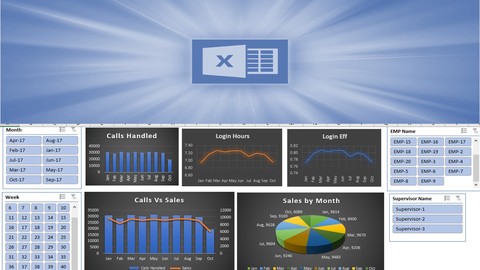
This course teaches you to create well-designed dynamic Excel dashboards so you and your colleagues can see trends and make quick decisions informed by data.
By participating in this Microsoft Excel Dashboard course you'll gain the widely sought after skills necessary to effectively analyze large sets of data.
In this topic, we’ll discuss how to use multiple PivotTables, PivotCharts and PivotTable tools to create a dynamic excel dashboards. Then we'll give users the ability to quickly filter the data the way they want with Slicers and a Timeline, which allow your PivotTables and charts to automatically expand and contract to display only the information that users want to see. In addition, you can quickly refresh your dashboard when you add or update data. This makes it very handy because you only need to create the excel dashboard report once.
You will start with 11 Basic Level Excel Dashboards and gradually move to 3 Intermediate and 4 Advanced Level dashboard. Practicing the dashboard along with the course will make you a Master of Microsoft Excel Dashboards.

 Udemy Discount
The discount is applied through our link. Open the course from here and Udemy's current promotional price is applied at checkout on most courses, no code to type.
Some courses are excluded from Udemy's promotions. If the price does not drop, clear your browser cookies and use the button again.
Instructor Details

- 4.6 Rating
 324 Reviews
The Dronaachaarya
Dronaachaarya is a group of passionate teachers who are dedicated to Quality Online Education. We know that learning is easier when you have an excellent teacher. That's why most of our educators have achieved an advanced degree in their field. Our faculty are passionate about the subjects they teach and bring this enthusiasm into their Online Courses.
The Major Focus of Dronaachaarya Teachers is to embrace the pursuit of excellence both inside and outside the classroom. We encourage critical thinking and emphasize the learning process over rote memorization.
 Related courses


Microsoft Excel Data Analysis - Learn How The Experts Use It (2026)
5.0 (5,696 Reviews)
 Provider: Udemy
 Time: 3h
$39.99

 Reviews

By Sanjay S Mhaskar on 10/19/2020
Were soft spoken Good to understand the language properly Teaching is very high grade keep it up Thanks
By Harlan Russell on 9/11/2020
So far it is specific, concise and straightforward.
By Ankit Sharma on 7/9/2020
Wonderful
By Surendra Puranmal Maurya on 6/19/2020
Good Teaching and advance learning for Chart preparation.... Awesome..
By Rene Fritz on 6/17/2020
It is perfect for me. I am learning so much.
By Hafsah Hussain on 6/14/2020
I've learnt a lot through this course and keep referring back to it every time I need to work on a new dashboard or do a new report.
However, the sound quality isn't great which is why I am rating it 4 stars, else it would definitely deserve 5 stars!
By Nikhil p kaswankar on 5/20/2020
good
By Alejandro Ruiz on 5/18/2020
Ok
By SHAIBUL HOQUE MAZUMDER on 5/14/2020
Actually I have to create financial accounting Deshboard, I expect it will be better for me.
By Dr. Sheetal Khera on 4/9/2020
The Dashboards are wonderful and I can really make some powerful presentations using the techniques learned. Great !!!
By Virat Ahuja on 4/3/2020
Good course with very good handy resources to learn. I liked the course so far.
By Bernard Sessoms on 3/27/2020
The content is great but my issues are that the instructor uses a lot of functions,vlookup ect. It needs to be a download for these formulas and the reason why it was used.
- Video Duration:
 6.8h
6.8h - Price: $64.99
- Provider: Udemy
- Updated:
 January 2019
 - Level:
 All Levels
 - Language:
 English
 - Certificate:
 Yes
Yes
30-day money-back guarantee on most paid courses
Udemy Coupon Price Tracker
