
 Web Development
 Data Science
 Python
 SQL
SQL JavaScript
 Artificial Intelligence
 IT & Software
 IT Certifications
 Hacking
 AWS
AWS Arduino
 DevOps
 3D Modeling
 Graphic Design
 Photoshop
 Drawing
 Digital Painting
 UX Design
 Business
 Data Analysis
 Communication Skills
 Project Management
 Leadership & Management
 Human Resources
 Digital Marketing
 Social Media Marketing
 Marketing
 SEO
SEO Google Analytics
 Branding
 Excel
Excel Office Productivity
 SAP
SAP PowerPoint
 Microsoft Access
 SharePoint
 Finance & Accounting
 Trading & Investing
 Accounting
 Bitcoin
 Personal Finance
 Video Editing & Animation
 Photography
 Adobe Premier Pro
 Adobe Lightroom
 Personal Development
 Productivity
 Career Development
 Life Coaching
 Health & Fitness
 Meditation & Mindfulness
 Yoga
Yoga Music
Music Music Production
 Guitar
 Piano
Piano Singing
 Language Learning
 Teaching & Academics
 Engineering
 Math
Math Lifestyle
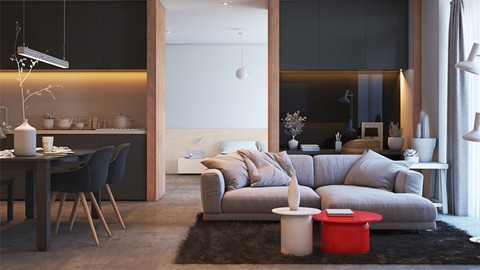
3Ds MAX + VRAY 5 + Interior 3D Rendering (Udemy.com)
From Beginner to Advanced: Lighting, Material and Rendering
Created by: Hossein mashayekhi
Last updated November 2020
 What you will learn
- Camera placement and setting to achieve high quality renders
- Installment of different types of natural and artificial lights (VRAY SKY, VRAY Light etc ...) and optimal setting and adjustment tips
- Render setup tips to get realistic and sharp looking interior renders
- Creating different materials such Wood, Concrete, Plastic, Metal, Cloth etc.. and using black and white maps to manipulate the color, reflection, glossiness etc ...
- Using the most important maps such as Fall Off, Displacement, Reflect, Refract, Color Correction, Mix and Bump and manipulating the glossiness, opacity, diffuse color etc...
- How to add background scenery behind the windows for interior renders
- How to manipulate the lights to achieve great contrast and sharp looking shadows
- How to set temperature-based colors in the scene
- Removing noise from interior renders
- How to create and use VRAY 2sidemtl for table lamps
How it compares
Against the other 545 rated Udemy courses in 3D Modeling on CourseDuck:
- Rating4.3 out of 5higher than 15% of them
- Reviews175#342 of 546 by number of reviews
- Length3.8 hoursshorter than 67% of them
- Last updatedNovember 2020earlier than 68% of them
 Course Description
As a 3D artist I am quite familiar with all the pitfalls and difficulties of learning how to work with 3Ds Max and VRAY 5, and my objective for this course is to use my experience in the field to present some of the most essential and useful techniques which could help you in your own projects. As a general rule, I always make use of simplicity and clarity in my tutorials and additionally for this workshop I have tried my best to transfer some of the most important points in VRAY and Interior design and rendering in as short of a time as possible. I have also included my own go-to setting parameters to achieve the best interior renders possible, and explaining the most effective options that are crucial for having the most realistic renders.
One of the biggest problems that 3D artists face is that they do not know what type of render setup to use in their scenes for both their test renders and the final render. Furthermore, they do not know how to light their interior scenes properly to achieve a realistic atmosphere and also take fast renders during their project. They may also have difficulties creating their required materials resulting in a very unnatural-looking render with objects that do not resemble real-life at all.
In a nutshell, in this course I have tried to familiarize you with the easiest and yet the most helpful methods used to place and setup your cameras in your scene in a that you will have an easy time advancing the next phases of your projects. I sincerely believe that if the cameras are placed and adjusted properly, a big portion of the work is done because they play a big role in helping achieve realistic renders that would make the untrained eye doubt whether they are an actual photo or a render. The shared optimal setting for camera setting parameters that I share with you, regardless of what version of 3Ds MAX or VRAY you're using, will help you take the best renders possible.
Next, you will learn all the required tips and techniques to implement both natural and artificial lights in your scene so that you could have a great contrast in the scene. These tips, some of which would defy and challenge the popular beliefs regarding lighting essentials, will help you get the best-looking renders really quickly.
After that we will move on to creating, changing and assigning materials to our objects in a normal interior scene. There are a lot of 3D artist who have taken several courses in 3D design but yet struggle when it comes to creating realistic and life-like materials in their projects. The problem arises from their lack of knowledge in all the different options and maps used when working with the material editor. In this course, I will take you through a step by step and simple review of those maps and options that could just revolutionize your idea of material design and manipulation which will ultimately bring about realistic objects. Additionally, you will learn how to combine several textures and maps to create complex objects.
Next, you will learn how to adjust the different parameters in the frame buffer and render setup so that you would not have to use any third-party software like photoshop etc... as a post-production method to elevate and embellish your final renders. A lot of the published renders in the field lack the required sharpness and realism that could the project to the next level, and that is the reason a lot of 3D artists have gone on to use other software to improve their renders. In this workshop I will teach you to take multiple renders without any limitation as to the suitable camera angles and you will not be needing to add anything to your final renders at all.
Finally, I will take you through some of the most useful and important features of VRAY 5 such as downloading, installing and implementing a material library that could provide you with a list of great readily-available materials and textures for your work. Also, I will teach you how to change any light parameter in your scene without taking multiple renders or interactive ones, simply using the newly added feature in VRAY 5 called Light MIX.

 Udemy Discount
The discount is applied through our link. Open the course from here and Udemy's current promotional price is applied at checkout on most courses, no code to type.
Some courses are excluded from Udemy's promotions. If the price does not drop, clear your browser cookies and use the button again.
Instructor Details

- 4.3 Rating
 175 Reviews
Hossein mashayekhi
I'm Hossein Mashayekhi! With over 12 years of experience in architecture and 3D visualization, I've had the pleasure of teaching more than 20,000 students worldwide. My passion lies in helping aspiring architects and designers master the art of creating realistic and impactful visualizations.
Through my courses, you'll learn practical techniques and workflows using industry-standard tools such as 3ds Max, V-Ray, Corona, Unreal Engine, AutoCAD, and Photoshop. Whether you're a beginner or an advanced user, my step-by-step teaching style ensures you can easily follow along and apply the knowledge to your projects.
Join me on this exciting journey to elevate your architectural visualization skills and bring your creative ideas to life!
 More 3D Modeling courses

3D Printing with " Ultimaker CURA Slicer- Start to finish" (2025)
4.9 (192 Reviews)
 Provider: Udemy
 Time: 1h
$34.99

Girl and the Dog Creation in Zbrush for Intermediate Level (2020)
4.9 (173 Reviews)
- Provider: Udemy
- Time: 48.8h
$59.99



Blender Character Creator for Video Games (2026)
4.8 (9,160 Reviews)
- Provider: Udemy
- Time: 34.3h
$159.99

Master SOLIDWORKS 3D CAD using real-world examples (2022)
4.8 (2,451 Reviews)
- Provider: Udemy
- Time: 18.9h
$69.99
 Reviews

By Sophie Duhaime on 5/2/2024
infos are not up to date.
By Aayush Bharti on 12/22/2021
if you're a beginner then you should choose this course, everything explained in this course beautifully and easily and it was a good match for me
By Sandeep Bhajan on 10/2/2021
Very good Interior course and on latest software like vray 5. I really want this type of course from the same instructor
By Sujeet Singh on 9/13/2021
Nice, but I was hoping to get more information about the render setup. Thank you so much☺
By Etien Hoxha on 8/11/2021
It's a great lesson, very detailed and slow paced to completely understand every taken action and the reason behind it.
By Sachin Malik on 6/25/2021
I'm beginning to trust the tutor :) I'm learning professional techniques which will give me more realistic renders in my job
By Oleksandra Shumakova on 2/26/2021
This is amazing course! Wow
By Nadia Badenhorst on 2/24/2021
I really found this course informable and useful.
By Odi Retu on 1/24/2021
I love this course, its very helpfull , i hope you can make another course about 3ds max+vray rendering ,,,,ThankYOu ,,,,,
By Andri Lee on 10/27/2020
This courses is very perfect !!! What i looking for the answer in this courses !!! And this courses is easy to understand.. I need more course like the modeling, another trick material with vray. Thanks !
 Quality Score
No CourseDuck member has rated this course yet. Taken it? Give each part a thumbs up or down.
Overall Score : 86 / 100
- Video Duration:
 3.8h
3.8h - Price: $19.99
- Provider: Udemy
- Updated:
 November 2020
 - Level:
 All Levels
 - Language:
 English
 - Certificate:
 Yes
Yes
30-day money-back guarantee on most paid courses
Udemy Coupon Price Tracker
