
 Web Development
 Data Science
 Python
 SQL
SQL JavaScript
 Artificial Intelligence
 IT & Software
 IT Certifications
 Hacking
 AWS
AWS Arduino
 DevOps
 3D Modeling
 Graphic Design
 Photoshop
 Drawing
 Digital Painting
 UX Design
 Business
 Data Analysis
 Communication Skills
 Project Management
 Leadership & Management
 Human Resources
 Digital Marketing
 Social Media Marketing
 Marketing
 SEO
SEO Google Analytics
 Branding
 Excel
Excel Office Productivity
 SAP
SAP PowerPoint
 Microsoft Access
 SharePoint
 Finance & Accounting
 Trading & Investing
 Accounting
 Bitcoin
 Personal Finance
 Video Editing & Animation
 Photography
 Adobe Premier Pro
 Adobe Lightroom
 Personal Development
 Productivity
 Career Development
 Life Coaching
 Health & Fitness
 Meditation & Mindfulness
 Yoga
Yoga Music
Music Music Production
 Guitar
 Piano
Piano Singing
 Language Learning
 Teaching & Academics
 Engineering
 Math
Math Lifestyle
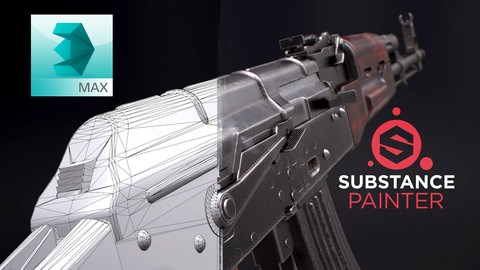
3DSMax 2016 & Substance Painter for Videogame Production (Udemy.com)
Start your 3D Artist career today and learn how to create top quality game art with the help of a Senior 3D Artist.
Created by: Tim Bergholz
Last updated May 2016
 What you will learn
- Learn and apply all aspects of creating high quality game art.
- Understand 3Ds Max with the Basics & Beyond Chapter and be able to model and unwrap efficiently in the following hours featuring the AKM.
- Create textures as close to photorealism as possible for video game standards with Substance Painter.
- Make your portfolio shine by creating renders with Marmoset Toolbag 2 and post process them in Photoshop to get that extra edge out of it.
- Final high-poly AKM .OBJ file for reference; 7.62 cartridge .OBJ / Max file for reference; Essential reference images; Pivot Script for 3Ds Max; My shortcut file for 3Ds Max Checker-pattern texture for unwrapping; Procedural wood substance for texturing; Diamond pattern normal map
How it compares
Against the other 545 rated Udemy courses in 3D Modeling on CourseDuck:
- Rating4.4 out of 5higher than 26% of them
- Reviews204#309 of 546 by number of reviews
- Length17.6 hourslonger than 83% of them
- Last updatedMay 2016earlier than 97% of them
 Course Description
Are you thinking about a 3D artist career in the video game industry? This tutorial will help you understand and apply all aspects of creating high quality game art. Learn 3Ds Max with the Basics & Beyond Chapter and how to model and unwrap efficiently in the following hours featuring the AKM. Create textures as close to photo realism as possible with Substance Painter and make the portfolio shine by creating renders with Marmoset Toolbag 2. At the end we are going to post process those renders in Photoshop to get that extra edge out of it. This Course has it all.
Software used: 3Ds Max 2016, Photoshop, Substance Painter and Marmoset Toolbag 2.
Important: the modeling part of the tutorial makes heavy use of the "chamfer" modifier which is only available in 3Ds Max 2015 and 2016. If you have an older version of 3Ds Max you can instead google for a third party modifier called "quad chamfer".

 Udemy Discount
The discount is applied through our link. Open the course from here and Udemy's current promotional price is applied at checkout on most courses, no code to type.
Some courses are excluded from Udemy's promotions. If the price does not drop, clear your browser cookies and use the button again.
Instructor Details

- 4.4 Rating
 204 Reviews
Tim Bergholz
Instructor Biography
Hi everyone! ??I'm Tim - Sr. 3D Artist with 14 years of industry experience having worked on numerous games at Crytek, Ubisoft and Digital Extremes as well as being my own boss at ChamferZone which is centered around creating tutorials and 3D assets. In my tutorials I'll show you every step for creating AAA quality 3D Game Art to get you industry ready too! ??
 More 3D Modeling courses

3D Printing with " Ultimaker CURA Slicer- Start to finish" (2025)
4.9 (192 Reviews)
 Provider: Udemy
 Time: 1h
$34.99

Girl and the Dog Creation in Zbrush for Intermediate Level (2020)
4.9 (173 Reviews)
- Provider: Udemy
- Time: 48.8h
$59.99



Blender Character Creator for Video Games (2026)
4.8 (9,160 Reviews)
- Provider: Udemy
- Time: 34.3h
$159.99

Master SOLIDWORKS 3D CAD using real-world examples (2022)
4.8 (2,451 Reviews)
- Provider: Udemy
- Time: 18.9h
$69.99
 Reviews

By Keita Takase on 5/25/2026
英語がわからなくても理解できるほど説明が丁寧でわかりやすかったです。
By Toby Milton on 3/23/2025
some of the keybins / hotkeys in his file don't work
By Jason Abete on 9/7/2021
Before using the keyboard short cuts he should show where the buttons are on screen and even use those buttons from time to time just to reinforce where they are and explain what they do. He should also explain why he does some of the things he does because there are multiple ways of doing things.
By Max L on 12/21/2020
Excellent teacher. Tons of useful tips and tricks included in this course.
By Yunus Emre Morgil on 10/31/2020
Tim abi çok teşekkürler harika bir kurstu.
By Andrea Bianchi on 12/23/2019
interessante si scopre sempre qualcosa di nuovo
By Vitor Saito on 10/12/2019
Really like it. It's amazing how Tim doesn't take any breath, he is unstoppeble and precise in terms of words and technics.
By Andre Bertozzo on 7/19/2019
Recomendo muito este curso, ele aborda tudo que um intermediário em modelagem precisa saber, ou até mesmo um iniciante, são lições bem atualizadas para o mercado de modelagem para jogos. compre e você não irá se arrepender! I highly recommend this course, it covers everything that a 3D artist needs to know, or even a beginner, these tutorials are up-to-date lessons for the 3d gaming market. buy it and you will not regret it!
By 최영진 최 on 6/25/2017
Really great in explain skills or reasons.
By Robert Hotton on 4/11/2016
Great course! I found it quite challenging, but I feel like I've learnt a lot. Tim really goes into incredible detail with both the model and the texturing phases, but be warned... he's clearly a very talented modeller, but he moves along at lightning speed!
 Quality Score
No CourseDuck member has rated this course yet. Taken it? Give each part a thumbs up or down.
Overall Score : 88 / 100
- Video Duration:
 17.6h
17.6h - Price: $22.99
- Provider: Udemy
- Updated:
 May 2016
 - Level:
 All Levels
 - Language:
 English
 - Certificate:
 Yes
Yes
30-day money-back guarantee on most paid courses
Udemy Coupon Price Tracker
