
 Web Development
 Data Science
 Python
 SQL
SQL JavaScript
 Artificial Intelligence
 IT & Software
 IT Certifications
 Hacking
 AWS
AWS Arduino
 DevOps
 3D Modeling
 Graphic Design
 Photoshop
 Drawing
 Digital Painting
 UX Design
 Business
 Data Analysis
 Communication Skills
 Project Management
 Leadership & Management
 Human Resources
 Digital Marketing
 Social Media Marketing
 Marketing
 SEO
SEO Google Analytics
 Branding
 Excel
Excel Office Productivity
 SAP
SAP PowerPoint
 Microsoft Access
 SharePoint
 Finance & Accounting
 Trading & Investing
 Accounting
 Bitcoin
 Personal Finance
 Video Editing & Animation
 Photography
 Adobe Premier Pro
 Adobe Lightroom
 Personal Development
 Productivity
 Career Development
 Life Coaching
 Health & Fitness
 Meditation & Mindfulness
 Yoga
Yoga Music
Music Music Production
 Guitar
 Piano
Piano Singing
 Language Learning
 Teaching & Academics
 Engineering
 Math
Math Lifestyle
Android Material UI Design Masterclass with Adobe Xd (Udemy.com)
Learn to Design Mobile Apps following the guidliness of Material System Design using Adobe Xd.
Created by: Stefan Jovanovic
Last updated September 2020
 What you will learn
- Material Design
- Material Design for Android platform
- Adobe Xd
- Working with Vector softwares
- UI Design
- UX Design
- Prototyping
How it compares
Against the other 413 rated Udemy courses in Graphic Design on CourseDuck:
- Rating4.5 out of 5higher than 49% of them
- Reviews305#158 of 414 by number of reviews
- Length6.7 hourslonger than 63% of them
- Last updatedSeptember 2020earlier than 84% of them
 Course Description
Did you know that in the last few years there is a high demand for UI Designers? The median UI designer salary in the U.S. is $70,000/year for entry-level, and $95,000/year for a seasoned UI Designer. That's totally understandable when you think about it. UI Designers and software engineers are the ones who create something out of nothing. Their imagination, creativity, positive-mindset skill-set and experience deserve to be awarded for pushing high quality and popular products on the market. Knowing that, now it's the right time for you to take things into your own hands and start working towards that goal.
This course will provide you with all the necessary knowledge needed to start building your career as UI designer. In this course we will design an Android Application following all Material Design Guidelines. You'll learn not just how to create beautiful design but also the fundamentals, rules and Guidelines of Material System in general.
So what is this so called Material Design?
Material is a design system created by Google to help teams build high-quality digital experiences for Android, iOS, Flutter, and the web. Material Design is inspired by the physical world and its textures, including how they reflect light and cast shadows. Material surfaces re-imagine the mediums of paper and ink.
We are going to cover Material Design which in this course is primarily focused on Android platform, but the things we learn can also be applied to other platforms as well, with just slight modifications.
So what are we going to design you might be asking?
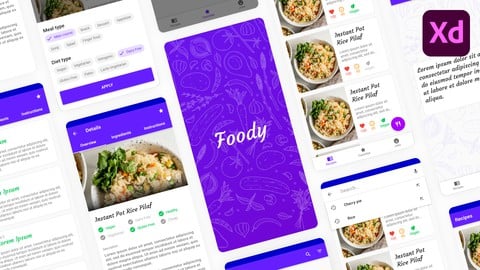
Well we are going to create a simple and elegant design for Food Recipes application. We are going to design up to 17 different screens with various material design components like Top app bar, banners, bottom navigation, buttons, floating action buttons, cards, chips, dialogs, menus, snackbars, bottom sheets, tabs and more.
You'll learn how to apply Material Design color System to your project, how to combine different fonts in your project and choose typography type scale system. The type scale is a combination of thirteen font styles that are supported by the type system.
As a design tool we are going to use Adobe Xd. And That's one of the best FREE vector software's out there, with simple, easy to use and user friendly interface. The knowledge you gather throughout this course with Adobe Xd can also be applied to many different areas of graphic design. You can use Adobe Xd for UI/UX design, to design mobile, web, desktop applications, logos, banners, illustrations and basically everything you could think of.
And at the end of this course as a bonus I'm going to show you the basics of prototyping with Adobe Xd. You will learn how to give your design a life with transition animations. Even if prototyping is not in a scope of this course, I'm going to show you some prototyping fundamentals as well.
So what are you waiting for, start learning and improving your skills right away, there is no need for delay.

 Udemy Discount
The discount is applied through our link. Open the course from here and Udemy's current promotional price is applied at checkout on most courses, no code to type.
Some courses are excluded from Udemy's promotions. If the price does not drop, clear your browser cookies and use the button again.
Instructor Details

- 4.5 Rating
 305 Reviews
Stefan Jovanovic
Hi, my name is Stefan Jovanović. I’m a Kotlin Multiplatform developer, designer and technology enthusiast. Love working on a new and exciting projects, sharing my knowledge with others, and always willing to learn more.
I believe that permanent education is the key to success. I’ve been working as a developer/designer for 6 years so far.
Have a lots of projects on my mind. I will be creating many useful courses in the future, and hope to hear from you as you enroll in one of them!
Kind regards
 More courses by Stefan Jovanovic
Compose Multiplatform (Android/iOS) - Mobile App Development (2026)
4.5 (780 Reviews)
 Provider: Udemy
 Time: 6.8h
$64.99
Build Modern Android App with REST API and Ktor Server (2025)
4.4 (556 Reviews)
- Provider: Udemy
- Time: 16.5h
$74.99

Compose Multiplatform - iOS/Android Development with Kotlin (2026)
4.3 (538 Reviews)
- Provider: Udemy
- Time: 2.3h
$64.99

To-Do App & Clean Architecture -Android Development - Kotlin (2022)
4.3 (520 Reviews)
- Provider: Udemy
- Time: 4.6h
$74.99

Programming with Kotlin - Masterclass | Complete Course (2025)
4.3 (466 Reviews)
- Provider: Udemy
- Time: 14.4h
$74.99

Google Maps SDK for Android with Kotlin | Masterclass (2023)
4.5 (290 Reviews)
- Provider: Udemy
- Time: 7.7h
$64.99
More Graphic Design courses

Adobe InDesign - From Basics to Professional Level Designs (2024)
4.9 (320 Reviews)
- Provider: Udemy
- Time: 11.4h
$84.99

Shop Drawing & Details-Autodesk Revit 2025- for BIM Modelers
4.9 (300 Reviews)
- Provider: Udemy
- Time: 30.9h
$10.99

The Adobe Illustrator CC Mastery Course: Basics to Pro + AI (2026)
4.9 (268 Reviews)
- Provider: Udemy
- Time: 30.8h
$19.99


Software Architecture & System Design Practical Case Studies (2026)
4.8 (2,584 Reviews)
- Provider: Udemy
- Time: 4h
$15.99

Graphic Design Masterclass: Design 40+ Projects in Photoshop (2025)
4.8 (668 Reviews)
- Provider: Udemy
- Time: 16.5h
$109.99
 Reviews

By Anonymized User on 2/4/2023
I have learnt more on this. Thank you so much. Your project is not opening on lower version of XD and color selection material link is obsolete. I enjoyed this learning material. As an android developer, I just started learning your android course, over the flow I got to know the design is available for learning just came fill my brain with designs.
By Emwi Jamieson on 8/12/2022
This course was very insightful for anyone interested in learning about designing an app for an android mobile device. The instructor clearly explains everything at a decent speed and it's also very nice if you want to try and design the application along side the instructor. I would however suggest that an offline icon gallery be provided if you want to go long with the design course, due to my struggles of finding some of the icons, mainly the vegan leaf.
By Kristjan Gudjonsson on 9/8/2021
Course very well suited for people who want to kickstart android design with a professional tool. Very good teacher who explains well in a meticulous way but not too detailed, one thing that I found annoying at first was to go back and correct mistakes made in earlier lectures, but then I realized that this is what happens when you are designing and it is good to know what to do when you need to correct your mistakes. Course helped me a lot and I will be a lot more efficient now for my app designs.
By Samantha Spencer on 5/3/2021
This course helped me a lot as I am working on a project that involves material design. It helped me a lot to understand the guidelines that Material design sets for you as well as how to implement it! I definitely recommend this course and I'm definitely going to refer back to it for the next few projects.
By Stefanie Vogel on 5/3/2021
For me this course was not a good match, because I already know how to use the Material documentation. It would helped me more, if there would be less of just reading through and more of practical knowledge.
By O M on 1/10/2021
Have you ever felt that you didn't feel fully learned from your school course Android that you really missed about UI? Have you ever heard material.io and google design website and thought about to read all and try it on your app but you felt that will take for ages? Well, this course fits for you! Stefan is teaching you how to work with Adobe xD and trust me it is not that complex like working with other programs! I have worked the latest edition and it worked fine. This course took me around 2 days (inclusive pause). I really like how he split a lot of videos that it is not more than 30 min. It was really fun to learn from him. One thing I really wish that I skip downloading some icons and pictures from the network, maybe you should make a file, a package so that we can use directly without googling it. I recommend you to speed up 1.25, nothing wrong with his voice it just... I had no patience! And now I feel more relaxed, confident, I mean I am not actually a designer just a programmer but imagine when you are going to apply for a job, you are not showing your app with programming instead you showing a bit a design so it doesn't look like a newbie. I strongly suggest you study this course! Can you imagine I have read almost the whole page of material.io? Finally!! Goal Achieved!
By Melanie Falk on 12/9/2020
I would have wished that not so much is read out by Material Design. The practical part was always quite fast, so there might have been some tips that you should consider when designing or if you use a shortcut in XD besides the standard shortcuts you know. But since I already have some previous knowledge, I could follow very well.
By Constantin Shafranski on 9/13/2020
I really want to recommend on Stefan Jovanovic's courses. He is definitely knowledgeable and updated with the concepts of developing modern looking UI's according to the Material Design guidelines. I think the biggest thing I take with me from this course is the ability of how read correctly the Material Design official documentation and how to implement it in the right way. Although I think that maybe some people would have some hard time to watch videos that most of them are just reading the documentation, for me it was one of the most important things in this course. Also, I want to recommend on Stefan Jovanovic's YouTube channel, he got there very awesome videos that helped me more than once. THANKS a lot Stefan, waiting forward for more stuff from you!
By Edgar Palic on 9/9/2020
I watched on 2x speed and was able to understand everything perfectly. It would have been a nice bonus to have the videos in 1080p resolution because I had slight trouble seeing all the small numbers and characters from where I was sitting (1.5-2m away from screen). But overall I learned a lot regarding the android material design which I had no prior knowledge of.
By Rahul Jha on 9/3/2020
Before enrolling in this course I was just a novice didn't know much about Adobe XD and material designing but after enrollment I must say that I chose the right person to make me understand the UI Designing & Prototyping. I'm so glad that I got this great Content at free of cost and all credit goes to Stefan Jovanovic's YT Channel . I was little bit confident about my designing part before learning this course but my man I've to say that after watching few videos I got to learn more and I even gone into much deeper surface and now I can design my applications with much better UI. This course is amazing but the only flaw is that sometimes Adobe XD throwing some erroneous bugs that get on my nerves and then I just had to restart this application to get it working fine again.
 Quality Score
No CourseDuck member has rated this course yet. Taken it? Give each part a thumbs up or down.
Overall Score : 90 / 100
- Video Duration:
 6.7h
6.7h - Price: $64.99
- Provider: Udemy
- Updated:
 September 2020
 - Level:
 Beginner
 - Language:
 English
 - Certificate:
 Yes
Yes
30-day money-back guarantee on most paid courses
Udemy Coupon Price Tracker
