
 Web Development
 Data Science
 Python
 SQL
SQL JavaScript
 Artificial Intelligence
 IT & Software
 IT Certifications
 Hacking
 AWS
AWS Arduino
 DevOps
 3D Modeling
 Graphic Design
 Photoshop
 Drawing
 Digital Painting
 UX Design
 Business
 Data Analysis
 Communication Skills
 Project Management
 Leadership & Management
 Human Resources
 Digital Marketing
 Social Media Marketing
 Marketing
 SEO
SEO Google Analytics
 Branding
 Excel
Excel Office Productivity
 SAP
SAP PowerPoint
 Microsoft Access
 SharePoint
 Finance & Accounting
 Trading & Investing
 Accounting
 Bitcoin
 Personal Finance
 Video Editing & Animation
 Photography
 Adobe Premier Pro
 Adobe Lightroom
 Personal Development
 Productivity
 Career Development
 Life Coaching
 Health & Fitness
 Meditation & Mindfulness
 Yoga
Yoga Music
Music Music Production
 Guitar
 Piano
Piano Singing
 Language Learning
 Teaching & Academics
 Engineering
 Math
Math Lifestyle
Blender Essentials: 3D Modeling and Animation for Beginner (Udemy.com)
Learn the fundamentals of Blender 3D. Create beautiful low poly 3D models and animate them and much more.
Created by: Bevel Studio
Last updated January 2026
 What you will learn
- Learn the fundamentals of Blender 3D such as the interface, navigation, workspaces, modes etc.
- Learn to work with Objects, Object Mode tools, Coordinate System, viewport shading etc
- Learn the essentials of 3D modeling with lots of practice, 3D mesh elements, common modeling tools.
- Learn how to create materials, how to use textures and UVs and more about shading.
- Learn how to correctly render your artwork. Learn how to create environments, light the scene, set up cameras and render
- Learn the Essentials of 3D animation. Keyframing, rigging, camera animation, rendering animated videos etc.
- Create projects ranging from very simple to 'not so simple'.
How it compares
Against the other 545 rated Udemy courses in 3D Modeling on CourseDuck:
- Rating4.6 out of 5higher than 56% of them
- Reviews305#242 of 546 by number of reviews
- Length15 hourslonger than 80% of them
- Last updatedJanuary 2026more recently than 85% of them
 Course Description
** Course is updated and compatible with Blender 5 **
Hello and welcome to Blender Essentials. 3D Modeling and Animation for Beginners course.
First of all, if you are reading this, a huge thank you for checking out our course!
What you learn in this course?
- The fundamentals of Blender. The interface, navigation, objects and essential tools for working with them
- 3D modeling. Most common modeling tools in Blender and everything you need to know to create complex 3D models
- Shading, materials and textures. All the essential tools to create realistic materials in Blender and more.
- Lighting, rendering and working with the camera.
- 3D animation. Learn the common tools to create attractive 3D animations.
- Lots of practice with exercises and projects and much more.
Why should you choose this course over others?
- Learn only the most important - save time!
- Every video has timestamps! See what exactly you will learn in each video. Jump easily to any part of the video, know what is where.
- NO TIMELAPSES in any videos. Learn at your own pace. Everything is detailed and clearly explained.
- Quick questions in many lessons to reflect and remember what you learn.
- Practical lessons everywhere. Lots of exercises and projects.
- Easy to follow. Start simple, build complex.
I can't wait to see you in the course! Best of luck!

 Udemy Discount
The discount is applied through our link. Open the course from here and Udemy's current promotional price is applied at checkout on most courses, no code to type.
Some courses are excluded from Udemy's promotions. If the price does not drop, clear your browser cookies and use the button again.
Instructor Details

- 4.6 Rating
 305 Reviews
Bevel Studio
Hello! This is Bevel Studio, specializing in producing high quality design, game and animation courses online. We have more than 5 years of experience teaching and instructing students both online and locally to help them learn the tools such as Blender, Unreal Engine, Substance painter and After Effects. Feel free to reach out to us with any questions or suggestions. Happy learning!
 More 3D Modeling courses

3D Printing with " Ultimaker CURA Slicer- Start to finish" (2025)
4.9 (192 Reviews)
 Provider: Udemy
 Time: 1h
$34.99

Girl and the Dog Creation in Zbrush for Intermediate Level (2020)
4.9 (173 Reviews)
- Provider: Udemy
- Time: 48.8h
$59.99



Blender Character Creator for Video Games (2026)
4.8 (9,160 Reviews)
- Provider: Udemy
- Time: 34.3h
$159.99

Master SOLIDWORKS 3D CAD using real-world examples (2022)
4.8 (2,451 Reviews)
- Provider: Udemy
- Time: 18.9h
$69.99
 Reviews

By Punit ohri on 7/9/2026
This was a fantastic course, and I learned so much! For future courses, it would be awesome to get even more in-depth. I'd love to see content focused on Geometry Nodes and a walkthrough on how to put together an environment or product breakdown showreel.
By M A on 5/28/2026
Some very important details are left out that are very hard to grasp for absolute new beginners like in Human body Modelling part , Tree colouring etc . The video is too fast paced for new learners ( little to no explaining what the options are for ? )… And different versions of blender is used in the course which makes it very confusing as UI is different from the one I am using for learning. The Course is Pricey but the learning experience doesn’t reflect that price … I feel cheated.
By Alessandro Bolli on 5/6/2026
Displaimer: I am still at section 4 out of 10. So far, IMHO: This course is ALMOST excellent: - the course owner tries his best in explaining concepts. - there are a lot of exercises teaching all aspects of 3D modeling in a clear way The only cons I can find is that the author somethings during modeling exercises goes very fast and you have to rewind the video multiple times to exactly get what he does Overall, I am very very satisfied with the course and I suggest to everyone wanting to learn Blender basics from scratch.
By Pankaj Sharma on 11/26/2025
I found the course very good and thorough. Course starts slow with important things are explained properly. Although during the later stages the pacing does get a little fast for a beginners P.O.V but then this is a video and one can re-watch it as much as one wants ;P . Further love it how the Instructor updated the course sections for Blender 5.0 .. Only thing I kind of found annoying was the opening music section at the start of each lecture (apporx 16 secs) but that's a personal nitpik of mine ;P . All in all solid course and thumbs up for the effort.
By Sıla Biber on 11/19/2025
When I first opened Blender I remember myself. I thought Blender was so complicated and hard to learn. But still I wanted to give it a try so I watched the iconic donut video first like every beginner person. I finished all the parts but still felt like I didnt learn much then I found this course and this course really helped me to get the basics. This course literally has everything I need. I'm so excited for the final animationnnn. Thank you so much for everything
By Fool's Tech on 10/26/2025
Pretty good as an intro. A few minor things were pretty annoying though like questions at the end of each theoretical video (we are not in school).
By Pásztor Tibor on 9/30/2025
I just started this course two days ago. I have some experience in 3d modelling and in animation. i choose this course because the Autodesk Maya is really expensive and i want to find an alternative program what i can use for practice. So far i would say this course is very understandable you will find every information to start your jurney in animation or in 3D modelling.It is really understandable and there is a lot of useful infomation about the Blender program.
By Aswin on 9/26/2025
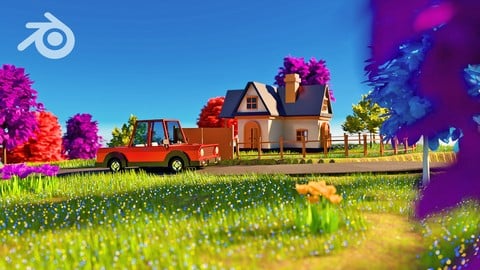
This course is good even for an intermediate Blender user. The tutor explains everything well. Seeing the result of low poly village with a car and characters in the end is great. I hope this tutor makes more Advanced Blender courses.
By Wakas Isaac on 1/29/2025
With this course, at least you can do 3d Low Poly Modelling, Texturing and Animation. Teaching style is awesome and strp by step. At lease teacher has elaborated each important part which is necessary for final result. In short, its a result oriented course.
By Bruno Borges on 1/17/2025
The course covered the basics very well. It goes direct to the point most of the time. It doesn't take more time than necessary to teach you the fundamentals and presents briefly some more complex features, so you know that it exists and can research for yourself. For me, it was a great course.
 Quality Score
No CourseDuck member has rated this course yet. Taken it? Give each part a thumbs up or down.
Overall Score : 92 / 100
- Video Duration:
 15h
15h - Price: $99.99
- Provider: Udemy
- Updated:
 January 2026
 - Level:
 Beginner
 - Language:
 English
 - Certificate:
 Yes
Yes
30-day money-back guarantee on most paid courses
Udemy Coupon Price Tracker
