
 Web Development
 Data Science
 Python
 SQL
SQL JavaScript
 Artificial Intelligence
 IT & Software
 IT Certifications
 Hacking
 AWS
AWS Arduino
 DevOps
 3D Modeling
 Graphic Design
 Photoshop
 Drawing
 Digital Painting
 UX Design
 Business
 Data Analysis
 Communication Skills
 Project Management
 Leadership & Management
 Human Resources
 Digital Marketing
 Social Media Marketing
 Marketing
 SEO
SEO Google Analytics
 Branding
 Excel
Excel Office Productivity
 SAP
SAP PowerPoint
 Microsoft Access
 SharePoint
 Finance & Accounting
 Trading & Investing
 Accounting
 Bitcoin
 Personal Finance
 Video Editing & Animation
 Photography
 Adobe Premier Pro
 Adobe Lightroom
 Personal Development
 Productivity
 Career Development
 Life Coaching
 Health & Fitness
 Meditation & Mindfulness
 Yoga
Yoga Music
Music Music Production
 Guitar
 Piano
Piano Singing
 Language Learning
 Teaching & Academics
 Engineering
 Math
Math Lifestyle
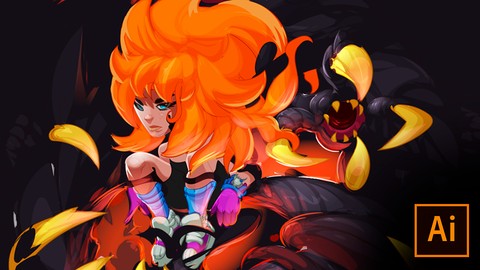
Character Design and Illustration: The Summoner (Udemy.com)
Master the art of character design and illustration using Adobe Illustrator In this over the shoulder demo.
Created by: Michael Austin
Last updated January 2018
 What you will learn
- How to digital ink in Adobe Illustrator
- How to paint vector textures
- How to Cel-Shade in Adobe Illustrator
How it compares
Against the other 175 rated Udemy courses in Digital Painting on CourseDuck:
- Rating4.4 out of 5higher than 26% of them
- Reviews109#106 of 176 by number of reviews
- Length5 hourslonger than 62% of them
- Last updatedJanuary 2018earlier than 89% of them
 Course Description
Character Design and Illustration: The Summoner. Join me as I walk you through my method of character design and illustration using Adobe Illustrator. I spent over 10 years developing the style of illustration using the most robust vector software on the market. You will learn exactly how I approach my character design and illustration as if you're over my shoulder watching me in a real-life studio setting. My approach to character design is very modular, and allows for many different types of genres and design types. So whatever, kind of project you're working on this demo will get you on the right track.
The techniques I'm using in this video series can be carried over into many other painting and drawing applications. The methods I'm using are partial to Adobe Illustrator. This video will focus primarily on how to digital paint in the broadest sense so we can apply the knowledge to any other process as we see fit.
Digital painting and cell shading in Adobe Illustrator allows you to adapt your character designs for many uses and sizes. Since vectors are scalable and do not pixelate when resized.
Just imagine the implications.
In this course, you will learn:
- how to get started inking in Adobe Illustrator
- how to color flats in Adobe Illustrator
- dynamic lighting techniques
Enroll today!

 Udemy Discount
The discount is applied through our link. Open the course from here and Udemy's current promotional price is applied at checkout on most courses, no code to type.
Some courses are excluded from Udemy's promotions. If the price does not drop, clear your browser cookies and use the button again.
Instructor Details

- 4.4 Rating
 109 Reviews
Michael Austin
I have more than ten years experience working with character designs, illustrations, and game art. I specialize in digital painting, vector art, 2-D animation, and concept art. I will break down the creative process for you in easy to follow and digestible steps, that will allow you to apply your newfound skills immediately.
 More courses by Michael Austin
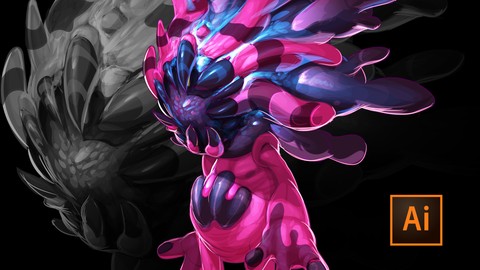
Character Design & Digital Art Demo in Adobe Illustrator (2017)
4.1 (166 Reviews)
 Provider: Udemy
 Time: 1.6h
$44.99
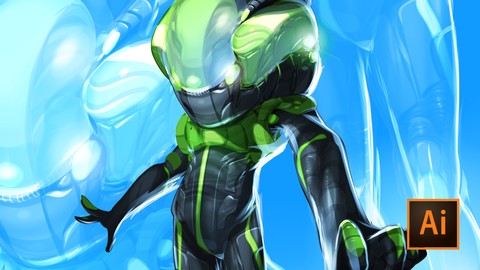
Futuristic Character Design for 2D Game Artist (2018)
4.2 (45 Reviews)
- Provider: Udemy
- Time: 1.2h
$39.99
More Digital Painting courses

Character Art School: Complete Coloring & Painting (2026)
4.8 (6,042 Reviews)
- Provider: Udemy
- Time: 19.5h
$34.99



Procreate Masterclass: Digital Drawing on the iPad (2023)
4.8 (1,744 Reviews)
- Provider: Udemy
- Time: 18.2h
$94.99


Digital painting with Krita 5.0 intermediate level (2022)
4.8 (271 Reviews)
- Provider: Udemy
- Time: 6.8h
$79.99
 Reviews

By Sumit Negi on 7/21/2024
This course is amazing and if you have basic knowledge and an artist who loves to draw then i will 100% recommend to take this course. i was struggling in creating characters in illustrator; however, I am so glad that i came across this course. All you need to know is the technique which you will learn in this course. After that all it will take is practice. I would highly recommend to go for this course.
By Maria Ali on 4/8/2022
I understand and work with Illustrator and Photoshop on a daily basis. I have not come across anyone that has this method of using Illustrator to render artwork. It's amazing and gives your artwork realism with the advantage of vector based quality for reproduction.
By Charles on 2/28/2022
WARNING: If you are going into this course without ANY knowledge in Illustrator, TURN BACK NOW! I used my pre-existing knowledge of Illustrator, photoshop and clip studio paint to have a better understanding of how to apply the various shades! I think this course would have been loads better if a file was included and the explanation simplified for a novice.
By Brendan Hansen on 8/3/2021
I think it was about as expected. I did hop in late in the game and did notice some questions that appear unanswered which does hit hard in an art class... For the concepts discussed and the implementation of a particular style in illustrator this course should be getting a 5 star review. The trick is that you have to be invested and take your own time pausing and rewinding the videos in order to catch certain details and dialogue boxes.
By Tree on 9/16/2020
This course is cool, but not detailed enough. It would be nice if he would explain what he was doing and also to show organization. We should know how he is organizing his layers and when he clicks quickly to adjust something explain where he is going so we can follow along easily. It feels a little amateur and rushed. Not a thought out course especially in this format where we can't ask any questions.
By Riccardo Tirendi on 10/29/2019
He makes really cool things in a very simple way and I'm loving it. The course is so clear too and he always find the time for spending 2 words and this or that just to make things brighter. Great!
By Martin Mannauer on 12/9/2018
Awesome techniques that help me allot to speed up my working processes. Also when I use a different software on my iPad. (On my Pad I use Affinity Designer) Great course.
By Guga Santos on 8/4/2018
The method is very simple and easy to apply. Two things caught my attention: 1 - how he made an efficient brush. 2 - how he did not worry with the quantity of layers. I really liked. It's highly recommended.
By James the Arctic Fox on 4/9/2018
This tutorial is very easy to understand and is extremely useful. My only complaint is that the instructor sometimes leaves out some important details about how he pulls off some techniques. I had trouble understanding what tools he was using sometimes. Overall though, the course is easy to grasp. I recommend getting some basic prior knowledge of Illustrator and its tools. If you are looking for good shading and line-work techniques, this is a wonderful tutorial. If you are trying to learn Illustrator, get another tutorial before or in addition to this one to better understand the methods he uses. Overall, I would recommend this!
By Freddy Studart on 3/23/2018
Awesome drawing. Really talented guy. Very friendly too. I don´t know some of the tools he'd used, but its not an Illustrator course, but how to draw on illustrator. So I might purchase some basic guide on the software before seen some of his videos, in order to understand it better. But its highly recommended.
 Quality Score
No CourseDuck member has rated this course yet. Taken it? Give each part a thumbs up or down.
Overall Score : 88 / 100
- Video Duration:
 5h
5h - Price: $10.99
- Provider: Udemy
- Updated:
 January 2018
 - Level:
 Beginner
 - Language:
 English
 - Certificate:
 Yes
Yes
30-day money-back guarantee on most paid courses
Udemy Coupon Price Tracker
