
 Web Development
 Data Science
 Python
 SQL
SQL JavaScript
 Artificial Intelligence
 IT & Software
 IT Certifications
 Hacking
 AWS
AWS Arduino
 DevOps
 3D Modeling
 Graphic Design
 Photoshop
 Drawing
 Digital Painting
 UX Design
 Business
 Data Analysis
 Communication Skills
 Project Management
 Leadership & Management
 Human Resources
 Digital Marketing
 Social Media Marketing
 Marketing
 SEO
SEO Google Analytics
 Branding
 Excel
Excel Office Productivity
 SAP
SAP PowerPoint
 Microsoft Access
 SharePoint
 Finance & Accounting
 Trading & Investing
 Accounting
 Bitcoin
 Personal Finance
 Video Editing & Animation
 Photography
 Adobe Premier Pro
 Adobe Lightroom
 Personal Development
 Productivity
 Career Development
 Life Coaching
 Health & Fitness
 Meditation & Mindfulness
 Yoga
Yoga Music
Music Music Production
 Guitar
 Piano
Piano Singing
 Language Learning
 Teaching & Academics
 Engineering
 Math
Math Lifestyle
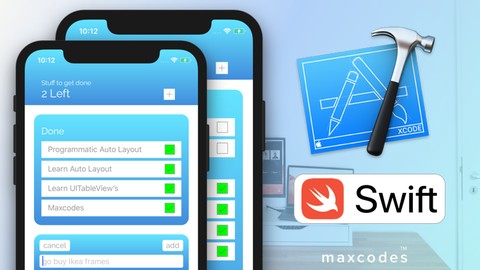
Code a Swift iOS To Do List App, UIKit, CoreData, Table View (Udemy.com)
Learn Widely Used Concepts and Best Practices Used in Modern Day iOS Development to Hone Your Craft and Skill as a Dev
Created by: Max Nelson
Last updated February 2019
 What you will learn
- you will learn the CoreData framework in Swift 4 and Xcode 9
- you will learn the updated UIKit Framework in Swift 4 and Xcode 9
- You will learn how to build apps without using storyboards! (Which is a very good skill)
- You will learn how to build an app from start to finish
- You will learn how to make an app using UILayoutConstraints programmatically, so think of it as storyboards but with only code!
- Make iOS Apps.
- Be able to code in Swift 4
- Make mobile apps
- deal with objects
- more object oriented programming knowledge
- custom UIKit controls
- custom UIViews
How it compares
Against the other 160 rated Udemy courses in iOS Swift on CourseDuck:
- Rating4.3 out of 5higher than 17% of them
- Reviews161#116 of 161 by number of reviews
- Length9.6 hoursshorter than 56% of them
- Last updatedFebruary 2019earlier than 65% of them
 Course Description
Learn Swift, Xcode, and the iOS SDK from a unique perspective by developing a more involved todolist app for the Apple App Store. As a developer it is extremely important you learn specific concepts and technologies that are in demand. In my opinion it is equally important to learn from multiple perspectives and not from just one or two specific instructors. That being said, I think my course offers a very unique perspective on development and this course will teach you the following concepts from my perspective as a professional developer: CAGradientLayer, CoreData, UITableViews, Object Oriented Programming Subclassing, UIKit, self defined Protocols, OptionSet(s) and at least a few more concepts that are contained within the bigger ones. For example, in this course you will learn how to build a custom UITableViewCell and that would fall under learning about UITableViews which is why I didn't initially mention it in this description.

 Udemy Discount
The discount is applied through our link. Open the course from here and Udemy's current promotional price is applied at checkout on most courses, no code to type.
Some courses are excluded from Udemy's promotions. If the price does not drop, clear your browser cookies and use the button again.
Instructor Details

- 4.3 Rating
 161 Reviews
Max Nelson
Max Nelson has been building iOS apps since age sixteen. Since then, he has built dozens of iOS applications for clients and himself. Along side shipping feature rich iOS applications, Max has worked for multiple tech companies. From Junior Web Developer to Lead Mobile iOS Development Engineer, Max has you covered. He will teach you key concepts, best practices, and the inner workings of iOS development so that you can become a professional iOS engineer just like him. Invest in your future, become an iOS engineer today.
 More courses by Max Nelson
The iOS Development Animations Course - Swift 5 & Xcode 10 (2019)
4.1 (166 Reviews)
 Provider: Udemy
 Time: 4.2h
$49.99
More iOS Swift courses

iOS 12 Swift 4.2 - The Complete iOS App Development Bootcamp (2021)
4.9 (562 Reviews)
- Provider: Udemy
- Time: 55.4h
$109.99

Noob to App Store - iPhone Apps with Swift, SwiftUI & iOS 15 (2021)
4.9 (342 Reviews)
- Provider: Udemy
- Time: 7.8h
$69.99

Deep Dive iOS 27 & SwiftUI 6: 90-Hour Project-Based Course (2026)
4.8 (983 Reviews)
- Provider: Udemy
- Time: 88.7h
$79.99

The Swift Arcade Data Structures and Algorithms Bootcamp (2022)
4.8 (839 Reviews)
- Provider: Udemy
- Time: 7.2h
$84.99

How To Make An App For Beginners (iOS/Swift - 2019)
4.8 (658 Reviews)
- Provider: Udemy
- Time: 4.3h
Free

SwiftUI iOS13 Coffee Shop Application, Order Products Online (2020)
4.8 (158 Reviews)
- Provider: Udemy
- Time: 8.2h
$109.99
 Reviews

By Yash Shelatkar on 7/20/2019
One of the best course on UDEMY for Learning Programatic UI & Code Data, Max easily explains concepts as well as quickly replies on questions, Would highly recommend this to all iOS Devs who use story boards and want to learn Core Data or Programatic UI.
By Scott Bolin on 7/5/2019
Decent course- + I like have a lot of short videos on a single topic, easy to digest and search later. + Good variety of topics covered, sort of 'little bit of everything' + Liked that it stuck with Apple technology, and didn't (say) use Realm or whatever for the DB. I wanted to learn the basics of Apple supplied APIs, and this course covered that. - Sort of disorganized presentation - I realize that was sort of the point, but was sort of distracting. - Since I'm being picky, half star deducted for not even touching on how to delete the todos later. Yea yea, I should work it out myself, I know, but could at least mention hints for how to do this would be good. This is a good course (not Average as 3-1/2 stars may represent), and I recommend it. The way the tableview was created programmatically and the animations were really good and helpful.
By Mahdi Bagheri on 6/21/2019
I watched the whole course now and therefore I am writing this completely new review. I liked the course very much. It showed many concepts by building the app programmatically and I could learn a lot. But here some feedback for improvements, when creating another tutorial. - Sometimes you appear like you yourself don't even know which approach you wanna use. You start coding it one way, then suddenly midway you stop, undo the written code and start another approach you like better. I think you should prepare your approaches beforehand, and then record your video. Because this sometimes confused me, while trying to understand what you are doing, while you were doing it. - While I also liked that you showed how one can design the app visually nice. I myself would have preferred another order on showing it. I would have liked it more if you could have build at first the app very basic, very simple to show the concepts of adding the different kind of functions necessary to make the app work. And that you would have later on redesigned the app. Because the more code there was for the design, the more I got overwhelmed by all the code there was and there I became confused again as beginner. I know it might sound now like a lot of negative feedback because of the amount of text written for improvements. But it should just be a suggestion for a different possible approach.
By Douglas Hartman on 5/22/2019
Clearly, he knows what he's talking about but; however, he rambles and seems to have no lesson plan whatsover, regularly going off onto tangents. I prefer instructors who have an organized lesson plan and go through it step by step. I just learn better that way. Right or wrong, it also gives me the sense that the instructor is disciplined. Don't get me wrong, I know it takes all kinds to make the world go around.
By Allicia Burke on 11/14/2018
I feel like there isn't enough specific information about the course. I didn't have xcode downloaded on my mac (have never built an app before), didn't know where the simulator came from nor that it auto appears. Some of the shortcuts that were made (like where to find that initial "label" are in a different spot on the newer version of xcode, i feel like it will make sense once i'm done, but it's not just yet.
By Steven Pike on 8/5/2018
I really enjoy the instructor's style. He doesn't have a prepared script so you are basically programming 'over the shoulder'. It's like a friend who is an expert programmer showing you how to program. He also takes you along the 'back road'. Since he doesn't use storyboards, I feel like am learning expert inside knowledge. On the surface, I am building a To-Do app, but I am learning much much more than that. The instructor states that he's going to be doing swift tutorials, I would rather he stick to this style and create more lessons where he's building an actual app. I would buy everyone of them. This is the kind of course you take slow, and do more than once.
By Lancelot Edwards on 6/13/2018
The significant benefit to me taking this course is working without storyboards. Working in code alone wasn't as difficult as I thought it would be and it better allowed me to grasp what storyboards are doing behind the scenes.
By Seph Cordovano on 6/4/2018
I've been following Max for a while now and he just constantly puts out great material. He's growing and learning at a rapid pace and eager to share what he knows with others! This course is perfect for someone just getting into Swift! Coming from other languages it went at a great pace to get the basics in without much fluff.
By Jose Davalos Rosas on 6/3/2018
He estado buscando un curso como este desde hace tiempo. La mayoría de los cursos se enfocan en enseñarte los temas utilizando storyboards lo cual puede ser tedioso una vez que el proyecto crece y se vuelve difícil el mantenimiento de los mismos. En lo personal pienso que es mucho mas rápido y cómodo hacer todo desde el código.
By Nathan Beier on 6/1/2018
A really excellent iOS course. Really thorough and swift, as well as extremely applicable towards getting a job doing iOS with the programmatic views, and all of the other lessons. The instructor uses clear and thought-out examples while still showing real world factors. Who better to be taught by than a lead instructor and course creator. I look forward to many other lessons and courses to come.
 Quality Score
No CourseDuck member has rated this course yet. Taken it? Give each part a thumbs up or down.
Overall Score : 86 / 100
- Video Duration:
 9.6h
9.6h - Price: $54.99
- Provider: Udemy
- Updated:
 February 2019
 - Level:
 All Levels
 - Language:
 English
 - Certificate:
 Yes
Yes
30-day money-back guarantee on most paid courses
Udemy Coupon Price Tracker
