
 Web Development
 Data Science
 Python
 SQL
SQL JavaScript
 Artificial Intelligence
 IT & Software
 IT Certifications
 Hacking
 AWS
AWS Arduino
 DevOps
 3D Modeling
 Graphic Design
 Photoshop
 Drawing
 Digital Painting
 UX Design
 Business
 Data Analysis
 Communication Skills
 Project Management
 Leadership & Management
 Human Resources
 Digital Marketing
 Social Media Marketing
 Marketing
 SEO
SEO Google Analytics
 Branding
 Excel
Excel Office Productivity
 SAP
SAP PowerPoint
 Microsoft Access
 SharePoint
 Finance & Accounting
 Trading & Investing
 Accounting
 Bitcoin
 Personal Finance
 Video Editing & Animation
 Photography
 Adobe Premier Pro
 Adobe Lightroom
 Personal Development
 Productivity
 Career Development
 Life Coaching
 Health & Fitness
 Meditation & Mindfulness
 Yoga
Yoga Music
Music Music Production
 Guitar
 Piano
Piano Singing
 Language Learning
 Teaching & Academics
 Engineering
 Math
Math Lifestyle
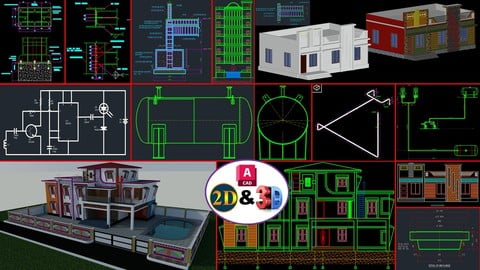
Complete AutoCAD 2D&3D From Beginners To Expert Course (Udemy.com)
This course make you better professional AutoCAD expert. All AutoCAD Basics + advanced level practice & Quiz included
Created by: Rajesh K
Last updated August 2026
 What you will learn
- To learn all basic and advanced AutoCAD 2D&3D toolbars
- To learn advanced Blocks and Dynamic Block
- To learn Basic Sketch Practice, Floor Plan & House Elevation drawing,
- To learn Circuit Diagram drawing
- To learn Steel Structure and Mechanical drawing
- To Prepare for AutoCAD Interview and Exams
- To Create Drawing Sheet, BOM and Layout usage
- To learn Sheet set Manager and Xref Features
- To learn Annotative Features
- To learn Pressure vessel and Oil & Gas industrial drawing
How it compares
Against the other 545 rated Udemy courses in 3D Modeling on CourseDuck:
- Rating4.5 out of 5higher than 37% of them
- Reviews1,419#55 of 546 by number of reviews
- Length72.4 hourslonger than 99% of them
- Last updatedAugust 2026more recently than 98% of them
 Course Description
AutoCAD one of the most powerful design and drafting software. All the engineering professionals must to learn this software. This course will make you better professional AutoCAD Designer or Engineer. All the Tools and command clearly explained and practically made for all level students.
Architects, Steel Structural Engineers, Mechanical Engineers, Electrical and Electronic Engineers and Civil Engineers this course will helps you to improve your design and drafting knowledge in professional way
Well planned training and clear explanation of AutoCAD tools
This course will teach you all the basic and advanced feature of AutoCAD 2D&3D
This course will teach you to create accurate dimensional objects
This course will teach you layers functions and its management
This course will teach you various status bar actions
This course will teach you Quick tools operations
This course will teach you better understanding of model space and layout space
This course will teach you to create drawing sheets with using attributes and fields
This course will teach you to create blocks and advanced level dynamic blocks
This course will teach you to work with parametric features using Geometric and dimensional constraints
This course will teach you to create sheet set manager and advanced features of view port control
This course will teach you to work with external references
This course will teach you to create Annotative objects and its uses
This course will teach you how to use express tool
Practice drawing and quizzes at the end of every section
Advanced practice and projects in end of this course
After this course you will get knowledge to handle Any AutoCAD related jobs
Make proper schedule Finish course 100% Get life long useful knowledge
(Section No: 1 to 50) 25 language subtitles available in this course
1 Afrikaans
2 Arabic
3 Chinese Simplified
4 Dutch
5 English
6 Filipino
7 French
8 German
9 Greek
10 Hindi
11 Indonesian
12 Italian
13 Japanese
14 Kannada
15 Korean
16 Malayalam
17 Polish
18 Russian
19 Spanish
20 Tamil
21 Telugu
22 Thai
23 Turkish
24 Ukrainian
25 Vietnamese
Don’t wait, Let’s Start your good Steps your life
Best of Luck

 Udemy Discount
The discount is applied through our link. Open the course from here and Udemy's current promotional price is applied at checkout on most courses, no code to type.
Some courses are excluded from Udemy's promotions. If the price does not drop, clear your browser cookies and use the button again.
Instructor Details

- 4.5 Rating
 1,419 Reviews
Rajesh K
I am an Engineering Design professional with 20+ years of experience in various engineering design industries, working with multiple industry-standard design and engineering software packages. I also have more than 10 years of experience as an industry expert trainer, helping students and working professionals develop practical, job-oriented technical skills.
Over the course of my career, I have been associated with several engineering and construction sectors, including:
· Boiler Industry
· Oil & Gas Industry
· Process Industry
· Textile Machinery Manufacturing Industry
· Building Construction Industry
· Structural Steel & Industrial Structures
· PEB and Steel Detailing Projects
My technical expertise includes Tekla Structures, AutoCAD, Revit Architecture, Staad Pro, Etabs, Structural Steel Detailing, BIM Modeling, Structural Engineering, Piping, RCC Structures and Industrial Engineering Design.
 More 3D Modeling courses

3D Printing with " Ultimaker CURA Slicer- Start to finish" (2025)
4.9 (192 Reviews)
 Provider: Udemy
 Time: 1h
$34.99

Girl and the Dog Creation in Zbrush for Intermediate Level (2020)
4.9 (173 Reviews)
- Provider: Udemy
- Time: 48.8h
$59.99



Blender Character Creator for Video Games (2026)
4.8 (9,160 Reviews)
- Provider: Udemy
- Time: 34.3h
$159.99

Master SOLIDWORKS 3D CAD using real-world examples (2022)
4.8 (2,451 Reviews)
- Provider: Udemy
- Time: 18.9h
$69.99
 Reviews

By Dani D on 4/20/2026
The course feels very good so far, with very detailed courses and the practice drawings which im loving them. Only reason i dont put 5 stars is because of the english level and the sound quality. However if someone truly wants to learn those factors are not a problem.
By Charles Charles on 12/29/2025
The teaching style is great. Very easy to follow. The style of teaching is amazing. From simple concept to complex explanation that makes anyone easy to understand and follow the lecture. I will recomend this class to anyone. Great teacher.
By Kaumi Bulama on 9/7/2025
I REALLY ENJOYED THIS COURSE. I FINALLY LEARNED autoCAD STEP BY STEP, AND THE LESSONS WERE CLEAR AND EASY TO FOLLOW. IT GAVE ME CONFIDENCE TO START DESIGNING ON MY OWN. THIS WAS A PERFECT MATCH FOR ME
By Vivek M.J on 7/16/2025
Its a very good course if you are starting to learn autocad. The communication is also very clear and direct which makes it easier to understand. However, i wish the instructor emphasized on text commands as that is the whole point of using autocad.
By Kasturi Sonar on 11/26/2024
The course has exceeded my expectations. The explanations are clear, and the step-by-step approach makes it easy to practice alongside. I especially like how both basic and advanced commands are covered in detail. It’s a perfect course for anyone who wants to build strong AutoCAD skills from scratch.
By Roberto Garcia on 10/16/2024
I found this AutoCAD course to be excellent. The communication is clear, and the instructor goes in-depth with each tool, guiding you step-by-step through the process. The course is incredible in terms of the content and the way it's structured. However, I believe it would be better if the course were split into two separate courses. One focusing solely on 2D and another on 3D. Not everyone needs the 3D part, and it would make it more tailored to specific learning needs. But this course it's highly recommend.
By OLUGBENGA Oz GAIUS on 10/7/2024
i have been trying to download the courses till now have not been able to download all and the once I have been able to have not yet open the thing is just loading and loading is so frustrating and is pissing me off
By Adluri Akshay Raj on 6/14/2024
don't judge a book by it's cover. don't judge this course by the sound clarity of the videos. I thought this course may or may not satisfies my needs but it's too good the instructor tells you about each and every tab icon of the autocad window he explains everything to make someone from zero to hero in autocad somehow the first few lectures are not so good at audio but not all videos be like that more than 90% of the content is with good sound just a 5-10% videos are not so good at sound I happy to recommend you to enroll the course
By Karl on 4/2/2024
This course is excellent. You can take the course at your own speed and go back on subjects if you need reminding of how to do something. Like having your own personal teacher.
By Jobert Villanueva on 7/23/2022
I entered this course without any knowledge in using AutoCAD but now, I can create my own template, use different control functions, and have knowledge in some basic details and information on how to use AutoCAD. I can say that the instructor's method of teaching is effective. I am looking forward to gain more knowledge as these courses go further.
 Quality Score
No CourseDuck member has rated this course yet. Taken it? Give each part a thumbs up or down.
Overall Score : 90 / 100
- Video Duration:
 72.4h
72.4h - Price: $12.99
- Provider: Udemy
- Updated:
 August 2026
 - Level:
 All Levels
 - Language:
 English
 - Certificate:
 Yes
Yes
30-day money-back guarantee on most paid courses
Udemy Coupon Price Tracker
