
 Web Development
 Data Science
 Python
 SQL
SQL JavaScript
 Artificial Intelligence
 IT & Software
 IT Certifications
 Hacking
 AWS
AWS Arduino
 DevOps
 3D Modeling
 Graphic Design
 Photoshop
 Drawing
 Digital Painting
 UX Design
 Business
 Data Analysis
 Communication Skills
 Project Management
 Leadership & Management
 Human Resources
 Digital Marketing
 Social Media Marketing
 Marketing
 SEO
SEO Google Analytics
 Branding
 Excel
Excel Office Productivity
 SAP
SAP PowerPoint
 Microsoft Access
 SharePoint
 Finance & Accounting
 Trading & Investing
 Accounting
 Bitcoin
 Personal Finance
 Video Editing & Animation
 Photography
 Adobe Premier Pro
 Adobe Lightroom
 Personal Development
 Productivity
 Career Development
 Life Coaching
 Health & Fitness
 Meditation & Mindfulness
 Yoga
Yoga Music
Music Music Production
 Guitar
 Piano
Piano Singing
 Language Learning
 Teaching & Academics
 Engineering
 Math
Math Lifestyle
Control a LED Matrix via web interface with Arduino ESP32 (Udemy.com)
Via a local web server at the ESP we can change the ticker on the LED matrix (MAX7219 8x32)
Created by: Markus Edenhauser
Last updated December 2021
 What you will learn
- Control of LED matrix via created web interface
- Using HTTP request to load data from public APIs
- Using JSON objects in Arduino
- Displaying graphics and text on a display
How it compares
Against the other 295 rated Udemy courses in Arduino on CourseDuck:
- Rating4.3 out of 5higher than 36% of them
- Reviews26#280 of 296 by number of reviews
- Length2.4 hoursshorter than 75% of them
- Last updatedDecember 2021earlier than 67% of them
 Course Description
We build this practical project step by step and you can download all the codes for each chapter. Frustration-free development is guaranteed!
In this video course you will learn how to control a 8x32 LED matrix (or a MAX72xx module). We use the MD_Parola library for this project. With this library we can control the text in many different ways. With this library we have the possibility to implement different ticker settings easily and fast. A text can slide in from one side and stop in the middle of the matrix for a certain time. The duration of the ticker can be adjusted and also the speed and brightness of the ticker can be easily adjusted.
We will also insert dot graphics that will make the text "disappear" as soon as the graphic slides over the text.
We will create a website in the course using a local web server running on the ESP32/8266. The web server will be configured in such a way that you can access the created (also in this course) website using a fixed IP address. On the website there is an input field where you can enter text. Using jQuery we send a GET request to the Arduino, which evaluates the content and displays it on the LED matrix. This way you can individually control the text via the web server.
The text as well as the website data are stored on the ESP using SPIFFS. This is the flash memory of the Arduino. This means that the current text can be displayed on the website after each opening. By storing the data on the flash memory, every person/end device that calls up the website can see the current text on the LED matrix. Thus, one could also design a larger advertising space via a web server. If the Arduino were disconnected from power, the content of the output would not disappear and would automatically output the text again when the power source is connected again.
We will also display the local time. For this we connect to a NTP server and download the current timestamp. We convert this timestamp into a readable date/time.
Last but not least, we fetch the current bitcoin price from a public interface. Thus you learn how to control public APIs with the Arduino and how to evaluate the return value using Arduino JSON.
After each video I have saved my code. You can download all codes, so you can get to the result without frustration.
We use the following components in this project.
ESP32/ESP8266
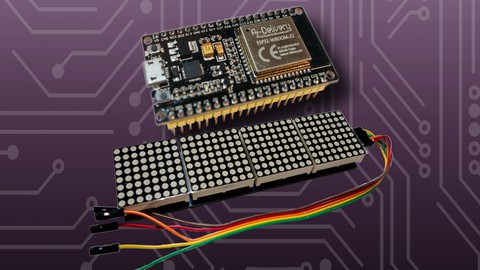
MAX7219 8x32 LED-Matrix
Step-down-Modul for external 12v power supply (optional)
See you in class.
pixelEDI

 Udemy Discount
The discount is applied through our link. Open the course from here and Udemy's current promotional price is applied at checkout on most courses, no code to type.
Some courses are excluded from Udemy's promotions. If the price does not drop, clear your browser cookies and use the button again.
Instructor Details

- 4.3 Rating
 26 Reviews
Markus Edenhauser
Markus Edenhauser, geboren 1985 in Tirol, ist Werkmeister für Elektrotechnik und hat zwei Masterabschlüsse in Wirtschaftsinformatik und systemischem Coaching. Er verbindet technische Architektur mit strukturiertem Denken und entwickelt Systeme, die nachvollziehbar und reproduzierbar bleiben.
Als Autor und Dozent veröffentlicht er Fachbücher und Inhalte rund um Linux, Embedded und Open Source – mit Fokus auf Systemverständnis statt Tool-Hype.
Sein Ansatz: nicht nur zeigen, was funktioniert, sondern erklären, warum es funktioniert – damit Technik bewusst beherrschbar wird.
 More courses by Markus Edenhauser
Node-RED: IoT projects with ESP32, MQTT and Docker (2023)
4.4 (216 Reviews)
 Provider: Udemy
 Time: 10.1h
$84.99

Mastering hardware protocols with ESP32 and Arduinos (2023)
4.6 (43 Reviews)
- Provider: Udemy
- Time: 6h
$79.99
Introduction to object-oriented programming with Arduino (2022)
4.4 (30 Reviews)
- Provider: Udemy
- Time: 5.8h
$49.99
More Arduino courses


Learn to Build a Computer (PC) in 2026 - all types!
4.9 (245 Reviews)
- Provider: Udemy
- Time: 6.1h
$74.99

Raspberry Pi For Beginners - 2026 Complete Course
4.8 (3,105 Reviews)
- Provider: Udemy
- Time: 10.6h
$89.99

Ultimate Guide to Raspberry Pi : Tips, Tricks and Hacks (2023)
4.8 (2,363 Reviews)
- Provider: Udemy
- Time: 5.2h
$69.99

Mastering Microcontroller: STM32-LTDC, LCD-TFT, LVGL (MCU3) (2026)
4.8 (487 Reviews)
- Provider: Udemy
- Time: 8.1h
$79.99

Arduino Step by Step: Getting Started (2024)
4.7 (8,714 Reviews)
- Provider: Udemy
- Time: 21.4h
$159.99
 Reviews

By Adrian Se on 3/1/2025
So far,, I like the course but the present skips over steps very quickly. I find myself going back to review things he did or freeze frame to see what he is entering. He explains using a variable power supply but does not mention what that supply is (Model Number or manufacturer).
By Thiago Garofalo Do Carmo on 11/20/2024
Muito útil. Ótima didática
By Mr. Julieus B. Villa. on 4/7/2024
Salute, great tutorial in the online remarks.
By Richard Freeman on 9/8/2023
Good lessons however there are some details skimmed over like how he connected the two leds. Also the closed captioning doesn’t seem to capture his speech correctly. I had to rewatch the videos a few times. Other than that, he’s a great teacher and I appreciate him sharing his knowledge.
By Richard Wimmer on 10/29/2022
Fun project and thank you for the support.
By Jonatan Rembrandt on 7/11/2022
Cool little project
By Joshua Misali on 12/26/2021
i actually went through the course, but it kind of dificult for me to understand, because: 1. there is no detail explaination. 2. the teacher actualy knows the course but only the people the knows the course can know what he is doing that is; no simplification. 3. there some some information that link one topic to another that are skip.
By Eljas Lohengrin on 6/8/2022
By Censu Farquhar on 12/30/2021
 Quality Score
No CourseDuck member has rated this course yet. Taken it? Give each part a thumbs up or down.
Overall Score : 86 / 100
- Video Duration:
 2.4h
2.4h - Price: $64.99
- Provider: Udemy
- Updated:
 December 2021
 - Level:
 Beginner
 - Language:
 English
 - Certificate:
 Yes
Yes
30-day money-back guarantee on most paid courses
Udemy Coupon Price Tracker
