
 Web Development
 Data Science
 Python
 SQL
SQL JavaScript
 Artificial Intelligence
 IT & Software
 IT Certifications
 Hacking
 AWS
AWS Arduino
 DevOps
 3D Modeling
 Graphic Design
 Photoshop
 Drawing
 Digital Painting
 UX Design
 Business
 Data Analysis
 Communication Skills
 Project Management
 Leadership & Management
 Human Resources
 Digital Marketing
 Social Media Marketing
 Marketing
 SEO
SEO Google Analytics
 Branding
 Excel
Excel Office Productivity
 SAP
SAP PowerPoint
 Microsoft Access
 SharePoint
 Finance & Accounting
 Trading & Investing
 Accounting
 Bitcoin
 Personal Finance
 Video Editing & Animation
 Photography
 Adobe Premier Pro
 Adobe Lightroom
 Personal Development
 Productivity
 Career Development
 Life Coaching
 Health & Fitness
 Meditation & Mindfulness
 Yoga
Yoga Music
Music Music Production
 Guitar
 Piano
Piano Singing
 Language Learning
 Teaching & Academics
 Engineering
 Math
Math Lifestyle
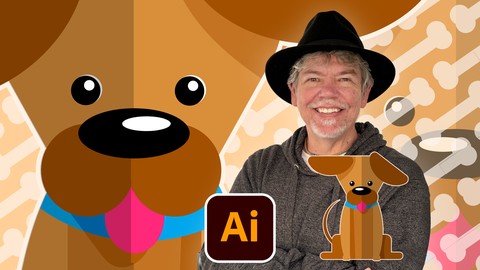
Flat-Art Puppy Character Design in Adobe Illustrator (Udemy.com)
Beginner friendly, step-by step, fun, short course using basic shapes, color blocking & simple vectors
Created by: Tim Wilson
Last updated June 2025
 What you will learn
- How to set up an Illustrator artboard
- How to create logos, graphics and icons
- How to draw with circles, rectangles and triangles
- Draw your own shapes and manipulate them with ease
- How to use the Shape Builder tool - manipulate simple shapes by subtracting one from the other / adding to each other
- How to change the stacking order of objects
- How to round the corners using the little corner widget on the shape
- Create patterns in your Swatch
- How to color and export your final design
- Export multiple sized images for web or print using the Artboard export options
How it compares
Against the other 413 rated Udemy courses in Graphic Design on CourseDuck:
- Rating4.8 out of 5higher than 91% of them
- Reviews38#388 of 414 by number of reviews
- Length0.6 hoursshorter than 97% of them
- Last updatedJune 2025more recently than 51% of them
 Course Description
Join me on this fun, beginner-friendly, short character design course in how to create a flat-art style puppy in Adobe Illustrator!
No drawing skills are needed!
In my usual hands-on style, you’ll follow a step-by-step process to design a charming puppy illustration using basic shapes, color blocking, and simple vector techniques.
Hi, I'm Tim!
I’m an Adobe Certified Instructor and Expert, as well as a designer based in London.
What you’ll learn:
How to set up an Illustrator artboard
How to draw with circles, rectangles and triangles
How to use the Shape Builder tool
How to change the stacking order of objects
How to color and export your final design
Create patterns in your Swatch
Export multiple sized images for web or print using the Artboard export options
All lessons are delivered in short, clear videos with a hands-on project.
There are no resource files for this course.
By the end of the course, you’ll have a solid grasp of creating simple characters from Illustrator's basic shape tools. You'll be able to manipulate simple shapes by subtracting one from the other as well as round the corners using the little corner widget on the shape. You will change the stacking order of objects and look at using a opacity to create simple 2D shadows.
Don’t forget to share your work—I love seeing what you create!

 Udemy Discount
The discount is applied through our link. Open the course from here and Udemy's current promotional price is applied at checkout on most courses, no code to type.
Some courses are excluded from Udemy's promotions. If the price does not drop, clear your browser cookies and use the button again.
Instructor Details

- 4.8 Rating
 38 Reviews
Tim Wilson
Tim divides his time between training, and undertaking design and photography projects. He has trained a range of companies including BBC, Disney, Aardman, Sky, Nissan, Ford, British Airways, Virgin, Barclays, KPMG, NHS, the Times and Adobe amongst many others.
Tim spent many years as a lecturer for Graphic Design and Photography Honour Degree students at universities. He loves sharing his passion for design and this is reflected by the enthusiasm from his students who rebook his courses to continue their professional development.
 More courses by Tim Wilson

Adobe Illustrator - Beginner to Pro Level With New AI (2026)
4.8 (1,368 Reviews)
 Provider: Udemy
 Time: 13.7h
$89.99


Affinity: The Complete Design Course – Beginner to Pro (2026)
4.8 (466 Reviews)
- Provider: Udemy
- Time: 23.8h
$19.99
Affinity Publisher - The Essentials for Beginners V1 & V2 (2022)
4.5 (441 Reviews)
- Provider: Udemy
- Time: 5.3h
$69.99
Affinity Designer Desktop V2 - From Beginner to Pro Level (2023)
4.6 (434 Reviews)
- Provider: Udemy
- Time: 11.3h
$84.99

Beginner to Wow - Affinity Photo Version 2 (2022)
4.9 (420 Reviews)
- Provider: Udemy
- Time: 4.8h
$69.99
More Graphic Design courses

Adobe InDesign - From Basics to Professional Level Designs (2024)
4.9 (320 Reviews)
- Provider: Udemy
- Time: 11.4h
$84.99

Shop Drawing & Details-Autodesk Revit 2025- for BIM Modelers
4.9 (300 Reviews)
- Provider: Udemy
- Time: 30.9h
$10.99

The Adobe Illustrator CC Mastery Course: Basics to Pro + AI (2026)
4.9 (268 Reviews)
- Provider: Udemy
- Time: 30.8h
$19.99


Software Architecture & System Design Practical Case Studies (2026)
4.8 (2,584 Reviews)
- Provider: Udemy
- Time: 4h
$15.99

Graphic Design Masterclass: Design 40+ Projects in Photoshop (2025)
4.8 (668 Reviews)
- Provider: Udemy
- Time: 16.5h
$109.99
 Reviews

By Kate Hiles on 1/30/2026
I found Tim's teaching style easy to follow, and enjoyed this class.
By Ana on 1/20/2026
Good course for beginners!
By The fun Bear on 12/20/2025
thanks for this course i realy appreciate that it's so easy to understand all the steps
By Mohamed Khaled on 10/15/2025
great instructer
By Kristine Veshaguri on 7/8/2025
I loved it, it was so cute and easy
By Graham Scott on 6/30/2025
good pace and well explained step by step
By Yanis Mokhtari on 5/28/2026
By Mohammed afzal on 7/17/2025
 Quality Score
No CourseDuck member has rated this course yet. Taken it? Give each part a thumbs up or down.
Overall Score : 96 / 100
- Video Duration:
 36 mins
 - Price: Free
- Provider: Udemy
- Updated:
 June 2025
 - Level:
 Beginner
 - Language:
 English
 - Certificate:
 No
No
Udemy Coupon Price Tracker
