
 Web Development
 Data Science
 Python
 SQL
SQL JavaScript
 Artificial Intelligence
 IT & Software
 IT Certifications
 Hacking
 AWS
AWS Arduino
 DevOps
 3D Modeling
 Graphic Design
 Photoshop
 Drawing
 Digital Painting
 UX Design
 Business
 Data Analysis
 Communication Skills
 Project Management
 Leadership & Management
 Human Resources
 Digital Marketing
 Social Media Marketing
 Marketing
 SEO
SEO Google Analytics
 Branding
 Excel
Excel Office Productivity
 SAP
SAP PowerPoint
 Microsoft Access
 SharePoint
 Finance & Accounting
 Trading & Investing
 Accounting
 Bitcoin
 Personal Finance
 Video Editing & Animation
 Photography
 Adobe Premier Pro
 Adobe Lightroom
 Personal Development
 Productivity
 Career Development
 Life Coaching
 Health & Fitness
 Meditation & Mindfulness
 Yoga
Yoga Music
Music Music Production
 Guitar
 Piano
Piano Singing
 Language Learning
 Teaching & Academics
 Engineering
 Math
Math Lifestyle
How to create a movie in Unreal Engine 5 Beginners Edition (Udemy.com)
Learn how to make a CG Animation in Unreal Engine 5 (Updated for Official UE5 Release)
Created by: JSFILMZ Entertainment
Last updated December 2022
 What you will learn
- How to use Unreal Engine 5's cinematic sequencer to make CG animation
- How to create CG animation inside Unreal Engine 5
- Installing Unreal Engine 5
- Adding and working with cameras
- Create animation in unreal engine 5
- How to use unreal engine 5
- Introduction to unreal engine 5
- Introduction to animation in unreal engine 5
How it compares
Against the other 545 rated Udemy courses in 3D Modeling on CourseDuck:
- Rating4.5 out of 5higher than 37% of them
- Reviews550#137 of 546 by number of reviews
- Length2.6 hoursshorter than 79% of them
- Last updatedDecember 2022more recently than 51% of them
 Course Description
*WARNING* I Had to create an entire section for this course since Epic Games changed things when they released the final version of Unreal Engine 5 in April 5. So with that being said you can follow along if you have the older Unreal Engine 5 Early Access or the Official Unreal Engine 5 version.
Getting alot of questions regarding the motion capture part of this course. I will provide you with 2 FBX files containing the motion capture in this course. You will not need a suit to follow this course.
Thank you for checking out my How to make a movie in Unreal Engine 5 Beginners Edition Course.
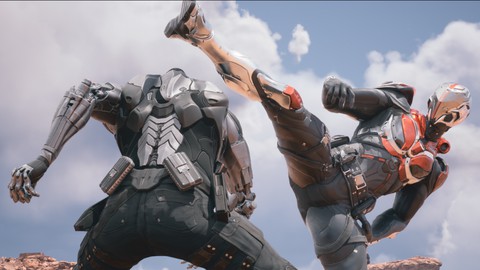
In this 2.4 hour course, you will learn to install Unreal Engine 5 and create a short action movie in Unreal Engine 5 using free Metahumans and free AAA 3d characters from the Epic Marketplace.
From the past I have used free animations from the Epic Marketplace but this time around, I was fortunate enough to acquire professional grade action motion capture animation from James Croak and his team of talented stuntman Christopher Troy and Braxton McAllister. Although just a disclaimer, the motion capture animations I provide in this course (2 FBX files) are only for educational use and cannot be used commercially. Also, if you have purchased one of my past courses, I listed what you will learn from this course so that you won't have to pay for something you already know.
Like always I truly appreciate your support if you decide to purchase this course. Thank you!
Recommended Hardware Specs: Windows 10 64 Bit, 12-core CPU at 3.4 GHz, with an NVIDIA RTX 2080 or AMD Radeon 5700 XT graphics card or higher, and 64 GB of system RAM,atleast 500GB of hard drive space. If you own an Apple computer I am sorry but I am not familiar with Mac computers so I do not know if it works with Unreal. Additionally, I will be using Davinci Resolve to view the final movie but any NLE will work. Lastly to follow along with the facial motion capture portion of the course will require you to have an Iphone device that has truedepth technology which I believe is Iphone X and up.
Support Files are available in zipped file under Part 2
Course Parts
Unrea Engine 5 Course Update to accomodate April 5 Release of Unreal Engine 5 (skip this if you are still using the older UE5 Early Access)
Installing Unreal Engine 5
Installing Plugin for motion capture data
Creating new project
Importing Metahuman Characters to Unreal Engine 5
Enabling motion capture plugin
Placing Metahuman characters in the scene
Applying body motion capture data to Metahuman characters
Part 1:
Installing Unreal Engine 5
Installing Plugin for motion capture data
Creating new project
Getting familiar with UE5 editor
Introduction to Quixel Bridge
Introduction to Quixel Megascan
Creating a quick set using Quixel Megascan assets
Part 2:
Downloading Unreal Engine 4.26 for migrating older projects to UE5
Downloading free environment from Epic Marketplace
Downloading free AAA characters from Epic Marketplace
Introduction to Epic Games Metahuman Creator Tool (Need to request access from Epic Games to use the Metahuman Creator Tool)
Creating quick character in Metahuman Creator Tool
Importing Metahuman Characters to Unreal Engine 5
Enabling motion capture plugin
Placing Metahuman characters in the scene
Getting highest quality from Metahuman using Level of Detail
Using free IOS app Livelink Face App to animate metahuman's face (optional with Iphone device)
Part 3:
Fixing texture streaming over budget error
Importing professional motion capture fbx into Unreal Engine 5
Introduction to Cinematic Sequencer
Applying body motion capture data to Metahuman characters
Combining facial and body motion capture to Metahuman characters
Fixing common errors with Metahuman bodies
Creating and working with lights
Creating & working with cameras
Quick tip on how to make Metahumans look realistic
Autofocus metahuman characters
Creating multiple camera cuts
Introduction to post process volume
Adding sound in sequencer
Test render movie
Part 4: Metahuman Scene Indoors
Importing movie in NLE (Optional)
Finessing scene back in Unreal Engine 5
Adding custom textures to lights
Finessing lighting for more dramatic effect
New feature in UE5 Virtual Shadow Map
Re-render sequence again
Part 5: Cyborg Scene Outdoors
Downloading Valley of the Ancient project (requires decent hardware. see recommended specs)
Migrating Unreal Engine 4 assets to Unreal Engine 5
Importing characters from Epic Marketplace in Unreal Engine 5
Removing unwanted weapons
Applying motion capture data to imported Characters
Quickly fixing unwanted environment assets
Creating slow motion/speed ramp effect
Creating multiple cameras and cut track
Finessing action scene
Making lighting changes outdoors
Introduction to Unreal Engine 5 control rig
Editing motion capture data non-destructively using control rig
Changing settings for final render
Removing unwanted UI before final render
Render final movie
Import final sequence to Davinci Resolve (optional)
Part 6: Troubleshooting Metahuman 0.5 update glitches.
The End.

 Udemy Discount
The discount is applied through our link. Open the course from here and Udemy's current promotional price is applied at checkout on most courses, no code to type.
Some courses are excluded from Udemy's promotions. If the price does not drop, clear your browser cookies and use the button again.
Instructor Details

- 4.5 Rating
 550 Reviews
JSFILMZ Entertainment
My name is Jae. I have a youtube channel called JSFILMZ where I have tutorials on Unreal Engine 4 & 5. I decided to start creating paid courses to teach people Unreal Engine 4 & 5 for filmmaking since majority of tutorials online for Unreal are for creating video games. I truly believe Unreal is the future and I want to give people the head start by creating videos here.
 More 3D Modeling courses

3D Printing with " Ultimaker CURA Slicer- Start to finish" (2025)
4.9 (192 Reviews)
 Provider: Udemy
 Time: 1h
$34.99

Girl and the Dog Creation in Zbrush for Intermediate Level (2020)
4.9 (173 Reviews)
- Provider: Udemy
- Time: 48.8h
$59.99



Blender Character Creator for Video Games (2026)
4.8 (9,160 Reviews)
- Provider: Udemy
- Time: 34.3h
$159.99

Master SOLIDWORKS 3D CAD using real-world examples (2022)
4.8 (2,451 Reviews)
- Provider: Udemy
- Time: 18.9h
$69.99
 Reviews

By Jason Stelzel on 12/21/2023
Very quickly gets into navigating the essential parts of the UI and building a set from scratch in the first section and shows how to use high quality assets from Quixel bridge.
By Andrea Rosati on 12/6/2023
This is a great course for someone like me who is a beginner to the world of cinematic in Unreal Engine. I highly recommend it to everyone, regardless of your level of knowledge of the program.
By Jack Sparrow on 8/31/2023
A good match for me. The subject of animating characters in Unreal was my focus and this did an excellent job instilling confidence in my ability to do so.
By Michel ROUSSEAU on 12/28/2022
Great course. Too bad that there's only one animation in this scene. I mean it would be great to explain how to put several animations on the same character, on a same track in order to do an entire scene and not only one little animation. Actually I don't know how to do that.
By Lo on 4/8/2022
This is my first time using this software and so far its been so educational and such an amazing experience going through all the projects myself along side the instructor. I am not done with it yet but I would definitely take other courses offered by him as he is very good with explanations and makes a project that looked somewhat intimidating very feasible to accomplish. Thank you for creating this course.
By Nash on 3/11/2022
the tutorial is good for expert or advanced in unreal engine, if this is the first learning for beginner then they will give up especially part2 and the rest. You should teach the easy way for creating character and not straith way jump to neuron,metahumans.....
By George Kim on 1/7/2022
If you are new to Unreal Engine but looking for practical application of Unreal Engine 5 for film but you are not a beginner in 3D this could be the best on UDEMY. But if you are totally new to 3D graphics, you might be baffled by the presentation. I reserved one star, though, because the course videos could be further refined. The teacher apparently made unrefined one-take videos, which includes repetitive demonstration of some same tricks, like camera animation keying. The teacher could have save a lot of time of his viewers by editing the course video. And there are some critical things missing that could make "beginners" or intermediate users unable to fully follow along, such as what plugins you need to set up before using iphones for facial motion capture.
By Michael Carter on 12/12/2021
I really appreciate the way the teacher takes time to walk you through the basics in simple terms. I've been interested in producing something in Unreal Engine and now I feel like I'm moving closer to making that happen. Cheers!
By Andrew Thomson on 10/25/2021
Just getting started but easy to understand and informative. Will give a final rating at the end of the course. If it stays the way it's going, I'm not only excited for the end result, but also certain it will be a 5 star experience.
By Tony G on 8/11/2021
For a beginners course he uses terminology without full explanations. A good amount of time (1.5-2hrs) is spent on camera angles and watching him tweak things. Since I would guess that most people don't have motion capture suits/data...incorporating pre-built animations like those in Maximo would have been great. Also note that the facial motion capture is done with an iphone x or higher. It would have been nice for him to have discussed options, if any..... I did however learn some useful things and he was fun to listen to.
 Quality Score
No CourseDuck member has rated this course yet. Taken it? Give each part a thumbs up or down.
Overall Score : 90 / 100
- Video Duration:
 2.6h
2.6h - Price: $24.99
- Provider: Udemy
- Updated:
 December 2022
 - Level:
 Beginner
 - Language:
 English
 - Certificate:
 Yes
Yes
30-day money-back guarantee on most paid courses
Udemy Coupon Price Tracker
