
 Web Development
 Data Science
 Python
 SQL
SQL JavaScript
 Artificial Intelligence
 IT & Software
 IT Certifications
 Hacking
 AWS
AWS Arduino
 DevOps
 3D Modeling
 Graphic Design
 Photoshop
 Drawing
 Digital Painting
 UX Design
 Business
 Data Analysis
 Communication Skills
 Project Management
 Leadership & Management
 Human Resources
 Digital Marketing
 Social Media Marketing
 Marketing
 SEO
SEO Google Analytics
 Branding
 Excel
Excel Office Productivity
 SAP
SAP PowerPoint
 Microsoft Access
 SharePoint
 Finance & Accounting
 Trading & Investing
 Accounting
 Bitcoin
 Personal Finance
 Video Editing & Animation
 Photography
 Adobe Premier Pro
 Adobe Lightroom
 Personal Development
 Productivity
 Career Development
 Life Coaching
 Health & Fitness
 Meditation & Mindfulness
 Yoga
Yoga Music
Music Music Production
 Guitar
 Piano
Piano Singing
 Language Learning
 Teaching & Academics
 Engineering
 Math
Math Lifestyle
How to make a 3D floor plan interior design in SketchUp Free (Udemy.com)
Learn to create a professional interior 3D floor plan design presentation and learn how to draw in SketchUp
Created by: Auke Design
Last updated November 2022
 What you will learn
- How you can draw a 3D floor plan in SketchUp
- How to become an interior designer
- How to furnish a room with 3D furniture
- How to add colors and create materials in sketchup
- How to present a design to your client
How it compares
Against the other 545 rated Udemy courses in 3D Modeling on CourseDuck:
- Rating4.5 out of 5higher than 37% of them
- Reviews119#418 of 546 by number of reviews
- Length1.8 hoursshorter than 89% of them
- Last updatedNovember 2022more recently than 50% of them
 Course Description
How to create a professional 3D floor plan - Quickstart Sketch Up course
This course is especially designed for interior designers and home stylists. You don't need any experience with SketchUp.
In this series I teach you step by step how to become a professional interior designer.
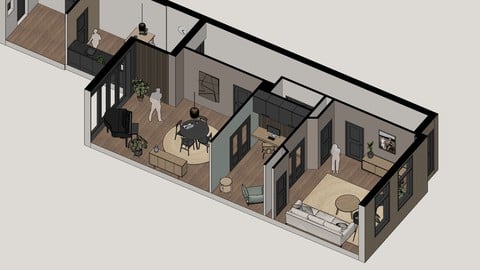
In this course I show you how to make a 3D floorplan in SketchUp.
A 3D floorplan is a great way to impress your clients, friends and family with your idea’s.
It tells you way more than a sketch or 2D floorplan. You can place furniture, styling objects and colors and textures. But at the same time you are making a realistic and makable design with the right dimensions.
When you’re not familiar with sketchup, this is a great place to start because I tell you everything you need to know to get started. I tried to be clear and focused on the right topics so you exactly learn what you need to learn.
SketchUp has many tools and functionalities. But in this course I only tell you the tools you need to know and understand so it becomes a tool you can use the rest of your life.
I use SketchUp in pretty much all my designs and made over a 1000 3D models so far.
SketchUp is a great tool because it works fast and intuitive. It’s like making a digital sketch but than realistic and precise.
I’ve received many questions from people who ask me how I can draw this fast and efficient.
In this course I’m gonna share a bunch of my secrets, tips & tricks about my workflow and way of working to create a professional 3D floorplan with the right look and feel.
I’m sure this course is gonna inspire you and help you to get started right away.
Every class comes with a class project. When you follow all the steps You end up with a professional 3D floor plan.
Lesson 1 - Setup SketchUp
Create a free Sketch Up account
Setup the right settings
Save your project
Lesson 2 - Import & Scale
Import a picture of a floor plan
Practice using the shortcuts
Scale your model to a 1 on 1 scale
Lesson 3 - Drawing outer walls
Draw the outer walls
Practice using the Line, Offset, Rectangle and Push/Pull tool
Lesson 4 - Drawing inner walls
Draw the inner walls with cut-outs for windows and doors
Practice using the Line, Rectangle, Push/Pull, Move and Scale tool
Lesson 5 - Doors & windows
Draw the windows and doors
Practice making groups and components
Lesson 6 - Tags & scenes
Categorize the groups by using tags
Create optimal viewpoints with scenes
Lesson 7 - Furnishing
Download interior and styling items from the 3D warehouse
Position the items and make a beautiful design
Lesson 8 - Colors, textures & materials
Practice using the paint bucket and eyedropper tool
Make your own textures by downloading or importing images
Color all the walls, floors and furniture
Harmonize your model by changing certain colors
Lesson 9 - 2D floorplans & sections
Create dimensions and put them under a separate tag
Make a 2D floorplan scene and choose a nice style
Lesson 10 - Presentation

 Udemy Discount
The discount is applied through our link. Open the course from here and Udemy's current promotional price is applied at checkout on most courses, no code to type.
Some courses are excluded from Udemy's promotions. If the price does not drop, clear your browser cookies and use the button again.
Instructor Details

- 4.5 Rating
 119 Reviews
Auke Design
Hi my name is Auke, I am a Dutch architectural designer and engineer with over 7 years experience in designing Nomadic architecture such as Tiny Houses, cabins and hide-outs. I love the combination of durable, smart, efficient and of course stylish designs. Always looking for new ways of transforming good idea’s into action to create a better world.
 More courses by Auke Design
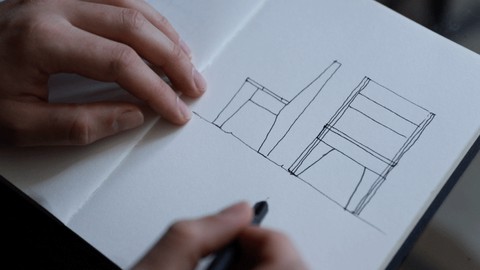
How to design furniture + Quickstart Sketch Up Course (2020)
4.4 (96 Reviews)
 Provider: Udemy
 Time: 42 mins
$10.99
More 3D Modeling courses

3D Printing with " Ultimaker CURA Slicer- Start to finish" (2025)
4.9 (192 Reviews)
- Provider: Udemy
- Time: 1h
$34.99

Girl and the Dog Creation in Zbrush for Intermediate Level (2020)
4.9 (173 Reviews)
- Provider: Udemy
- Time: 48.8h
$59.99



Blender Character Creator for Video Games (2026)
4.8 (9,160 Reviews)
- Provider: Udemy
- Time: 34.3h
$159.99

Master SOLIDWORKS 3D CAD using real-world examples (2022)
4.8 (2,451 Reviews)
- Provider: Udemy
- Time: 18.9h
$69.99
 Reviews

By Bryan Aringga Wibisono on 2/16/2026
I just completed this 2-hour (or indefinitely) SketchUp course, and it was a great experience overall. The explanations were simple, clear, and easy to follow, which made it beginner-friendly. However, since I’ve never used any design apps before, I found myself taking extra time just to navigate between tools and functions. I got stuck quite many times and had to figure things out on my own, which was honestly a bit frustrating at moments. That said, it was still fun and engaging, and it made me even more eager to keep learning and improving my skills.
By Sasan on 1/14/2026
I highly recommend this course. I liked his way of teaching, and he focuses on the main subjects without repeating things too much. He explains everything clearly.
By Richard K. Schutz on 1/20/2024
Not all things work as described, might be a different version of the software maybe.
By Sharifah Anne on 12/17/2023
As for me as a beginner, this course helps me to learn how to make a 3d model. Easy to learn and understand. Worth it to buy this course!! Love it so much. Highly recommended for a dummy with zero knowledge about 3d software like me.
By Zoryana on 8/1/2023
This course was short and to the point - very helpful to me, a complete beginner who just wants to get started with the software quickly. I purchased another, much longer course, and found out that it over-loads my brain, so to speak. This short course was much better as I actually managed to get floor plan done as I was progressing through it.
By Studio Lona on 7/22/2023
You are taken step by step and everything is explained calmly. I like that I can participate in sketchUp right away, that's how I learn best. Love it!
By Aaditiya Joy Kapoor on 5/14/2023
I liked the course very much and was above my expectations because I learnt many new features. I did not know that other objects could have been imported and learnt many tricks to the problems I faced earlier.
By Tanya Boomsma on 5/1/2023
Great course to get started within sketchup! Easy to follow and brilliant tips along the way. I wish there was a "classroom"/live course so you can ask questions on the way or get your floorplan checked as I'm pretty sure I made a mistake along the way but cant figure it out where I went wrong. However, would still absolutely recommend this course.
By Padmanabhan SK on 4/13/2023
very basic course that also not having a clear details. not satisfied. try for refund but they neglect very sad. I've buy several course here about SketchUp this one is very very useless or less use for a student.
By suzie Cranford on 4/12/2023
Very informative! I would say that its best to wait until you've finished the lesson before trying to follow his steps--sometimes I paused to follow what he does and got stuck because he uses something he explains 2 minutes later lol! Besides that its a great course!
 Quality Score
No CourseDuck member has rated this course yet. Taken it? Give each part a thumbs up or down.
Overall Score : 90 / 100
- Video Duration:
 1.8h
1.8h - Price: $10.99
- Provider: Udemy
- Updated:
 November 2022
 - Level:
 All Levels
 - Language:
 English
 - Certificate:
 Yes
Yes
30-day money-back guarantee on most paid courses
Udemy Coupon Price Tracker
