
 Web Development
 Data Science
 Python
 SQL
 JavaScript
 Artificial Intelligence
 IT & Software
 IT Certifications
 Hacking
 Microsoft Azure
 AWS
 Arduino
 3D Modeling
 Graphic Design
 Photoshop
 Drawing
 Digital Painting
 UX Design
 Business
 Data Analysis
 Communication Skills
 Project Management
 Leadership & Management
 Human Resources
 Digital Marketing
 Social Media Marketing
 Marketing
 SEO
 Google Analytics
 Branding
 Excel
 Office Productivity
 SAP
 PowerPoint
 Microsoft Copilot
 Microsoft Access
 Finance & Accounting
 Trading & Investing
 Accounting
 Bitcoin
 Personal Finance
 Video Editing & Animation
 Photography
 Adobe Premier Pro
 Adobe Lightroom
 Personal Development
 Productivity
 Career Development
 Life Coaching
 Health & Fitness
 Yoga
 Meditation & Mindfulness
 Music
 Music Production
 Guitar
 Piano
 Singing
 Teaching & Academics
 Engineering
 Language Learning
 English Language
 Math
 Lifestyle
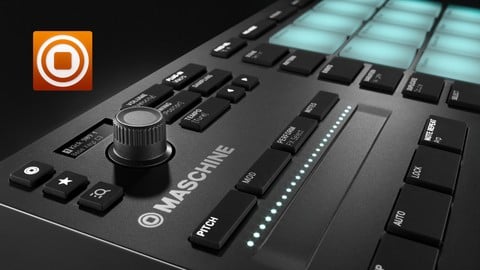
Intro to Music Production: Maschine Mikro mk3 (Udemy.com)
How to Use Maschine Mikro mk3
Created by: Cory K
Last updated October 2018
Our take
Based on the ratings of 232 students, a sample of their written reviews and the syllabus, as the course stood in October 2018. No course pays to be reviewed.
This is a short starter class, seven lectures and about 38 minutes, built around one EDM track made on the Maschine Mikro mk3 with Maschine 2. Cory K starts with a four-on-the-floor drum beat built from scratch, adds a bass line, then covers chord sets, arp, note repeat, quantizing and gain staging. You need the controller and the software before you start. It's meant for someone who just unboxed the Mikro and has never produced music.
Reviewers who match that profile are happy. They like the worked example, and one singles out the Shift shortcuts as useful. The 4.3 rating hides a real split, though. Several 2 and 1 star reviews call it far too short to pay for and say YouTube and the Native Instruments docs cover the same ground for free. People also list what's missing: scenes, patterns, sampling, FX and transport controls. One student says the instructor sometimes moves on without making clear what he just did.
It was published in November 2018 and hasn't been updated since. With 694 students and 232 reviews it's a niche pick. Treat it as a guided first hour if you'd rather follow one person through a full loop than piece together free videos. Anyone hoping to learn the whole Maschine workflow will outgrow it fast.
Pros
- Builds one complete loop step by step, so beginners finish with something that sounds like music
- Covers the Shift shortcuts on the Mikro mk3, which one reviewer says made the course stand out
- Touches chord sets, arp and note repeat, not just drums
- Short enough to finish in one sitting right after unboxing
Cons
- Only 38 minutes, and many reviewers say free YouTube videos cover the same basics
- Skips scenes, patterns, sampling, FX and DAW integration completely
- Not updated since 2018, and some steps go by without enough narration
If you've just unboxed your Maschine Mikro, this is a nice short course to get you started with the basics. Enough to let you realise the potential for what Maschine can do.
Truly beginner level: it assumes no music knowledge, only that you own a Mikro mk3, Maschine 2 and a laptop.
 What you will learn
- Build Drum Patterns from scratch
- Write Energetic Bass Lines
- Add Groove and Rhythm to Sounds
- Compose Interesting Chord Progressions on-the-fly
- Understand the Basics of Mixing
- Master Maschine Mikro mk3's Basic Functions
- Record and Export Song Ideas using Maschine 2 Software
Course content
4 sections · 7 lectures · 38 min of video 1 assignment
- 1Introduction 1 free preview1 lecture · 1 quiz · 1 min
- 2Building Drum Patterns 1 free preview2 lectures · 14 min
- 3Creating Bass Lines2 lectures · 12 min
- 4Advanced Tonal Tricks Using Maschine Mikro2 lectures · 11 min
Who it is for
The instructor says it suits
- This class is made for Beginners who are interested in Music Production
- Requires no prior knowledge or experience
What you need before you start
- No prior knowledge or experience, except downloading applications
- Maschine 2 Software
- Maschine Mikro mk3
- Laptop to run software and controller
How it compares
Against the other 249 rated Udemy courses in Music Production on CourseDuck:
- Rating4.3 out of 5higher than 13% of them
- Reviews232#120 of 250 by number of reviews
- Length0.6 hoursshorter than 98% of them
- Last updatedOctober 2018earlier than 85% of them
 Course Description
Learn the Basics of Music Production and start an EDM track using the Maschine Mikro mk3, an Integrated Groove Production System that works in tandem with Native Instrument's Maschine 2 Software and the Komplete Sound Libraries. The hardware/software combo between Maschine Mikro and Maschine Software puts everything you need to start making great music at your finger tips.
In this Class you will be guided through a step-by-step Song Creation Process, starting with the groove and building a classic "four on the floor" drum beat from scratch. Then you'll learn how to lay down an energetic bass line using Maschine Mikro mk3.
In addition to basic song creation, you'll explore and learn advanced features and functions using the Maschine Mikro mk3 - such as: Chord Sets, Arp and Note Repeat Functions, Count-In Recording, Quantization, and Gain Staging.

 Udemy Discount
The discount is applied through our link. Open the course from here and Udemy's current promotional price is applied at checkout on most courses, no code to type.
Some courses are excluded from Udemy's promotions. If the price does not drop, clear your browser cookies and use the button again.
Instructor Details

- 4.3 Rating
 232 Reviews
Cory K
With over a decade of experience in the world of online content creation, Cory is not just an instructor; he's a seasoned creator who has honed his skills in the realms of music production and digital creation. He's excited to share his wealth of knowledge with you.
Expertise: Cory's passion for music production and digital creation is unmatched. His deep understanding of these fields has allowed him to create a variety of engaging and high-quality courses that resonates with his audience.
Proven Track Record: With thousands of satisfied students, Cory has a reputation for delivering top-notch courses that are both informative and enjoyable. His teaching methods are practically-focused, ensuring that you'll grasp the concepts quickly and effectively.
Join Cory’s courses on Udemy today and embark on a transformative learning experience that will empower you to create, produce, and express yourself through the incredible mediums of music and digital creation. Your creative journey starts here with an instructor who has the experience, passion, and dedication to guide you towards excellence. Enroll now and unlock your full creative potential!
 More Music Production courses
Electronic Music Production with Ableton Live (2025)
4.9 (2,479 Reviews)
 Provider: Udemy
 Time: 11.9h
$13.99
Original price
Garageband IOS (iPhone/iPad): The Complete Beginners Guide (2021)
4.9 (535 Reviews)
- Provider: Udemy
- Time: 3.5h
$10.99
Original price
How to Become a DJ - Learn How to Start DJing Online Today (2021)
4.8 (5,221 Reviews)
- Provider: Udemy
- Time: 10.8h
$17.99
Original price
Domine Todos os Recursos do Pro Tools (2023)
4.8 (548 Reviews)
- Provider: Udemy
- Time: 17.5h
$11.99
Original price
Ultimate Ableton Live 9 Complete: Parts 4, 5, & 6 (2026)
4.8 (512 Reviews)
- Provider: Udemy
- Time: 11.8h
$15.99
Original price
Music Production + Composition in FL Studio - Complete Guide (2023)
4.8 (466 Reviews)
- Provider: Udemy
- Time: 21.6h
$10.99
Original price  Reviews

By Manfred Müller on 1/9/2025
Very good stuff for getting started with the basics. A worked-through example is a very good way to explain the handling of the NI hardware and software. However, for my intents and purposes too superficial.
By Darren Henderson on 7/16/2023
Occasionally teacher moves on or does something and it's not clear what he did. Maybe slightly more narration or make it very clear for beginners. Apart from that, very good.
By Jani Reinikainen on 7/3/2022
Good for someone who's just taken the device out of the box and want's to get first idea down. Covers the essentials of operation of the controller and the software but the production side is quite basic. Anyone who knows how to put a basic beat down there's little new to learn.
By Jason Prosser on 5/24/2022
I enjoy the tutorial I used to make 4/4 house music and dance music but I've changed over to trap and lofi hip hop styles. So the actual track is not my thing but the learning process and learning how to use the midi controller its good easy to navigate through the videos and there very user friendly. what i mean easy to follow and grasp the concepts of how the device works,
By Ilacqua on 11/20/2021
I'm giving this course a very qualified 5 stars. TL;DR - If you are totally new, you'll finish this course with a loop that sounds pretty good and the confidence to keep going. If you already have skills, look elsewhere. There are plenty of free tutorials on YouTube. When it comes to the drum track, they play something that sounds good and move on. If you can do that, just play in the drums, do *not* waste your money on this course. However, if, like me, you are completely new not just to Maschine, but to music making, this course is useful. The approach is simpler, and well explained. The instructor shows his mistakes and how he corrects them. The YouTube videos are perfect on the first try. Where the YouTube tutorials left me feeling lost, this course made me feel like Maschine is actually something I can learn. That said, is a very short course and a lot is left out, Scenes and Pad Mode for example. Once you have a little confidence, you will need those YouTube tutorials.
By Michael Gordon on 7/2/2020
I’m a recent owner of a mashine device; this made it easy and straightforward to get to using and making music I’ll recommend this class to anybody interested in making music with maschine.
By Ray Davis on 5/12/2020
The course was decent, I'm a visual learner so reading the manual wasn't an option for me. But I definitely feel there could've been more added to the course. I get hung on in a few spots because the same I picked wasn't one-shots, they were loops within the expansion. It took me a bit to realize that I couldn't use them to recreate what he was doing. But all an all a decent course. It covered the basics and that's really what I needed. Now its time to have some fun.
By Kelvis Avila on 12/16/2019
It was good for the basics, didnt like all the blurriness through out the course. Its very important to be very visible because of certain details that needs to be clear to see. Other than that good basic info
By Bhalendu Chaubey on 2/15/2019
Yes, it was interesting to know how music is layout in terms of kick snare hi hat stuff. I have no knowledge of music but this is great information.
By Kenneth Knight on 2/4/2019
Clear, helpful explanations - reassuringly positive and encouraging approach - pace about right for me (a beginner) - at the end of this short course I can now create simple EDM loops, mix them and export them - he also suggested avenues for further exploration . . . would be good if he did one or two more courses on further aspects of the Mikro Mk3, he's a good teacher! KK
 Quality Score
No CourseDuck member has rated this course yet. Taken it? Give each part a thumbs up or down.
Overall Score : 86 / 100
- Video Duration:
 36 mins
- Price: $39.99
- Provider: Udemy
- Updated:
 October 2018
- Level:
 Beginner
- Language:
 English
- Certificate:
 Yes
- Lectures:7 in 4 sections
- Students:694
- Subtitles:1 language
30-day money-back guarantee on most paid courses
Udemy Coupon Price Tracker
