
 Web Development
 Data Science
 Python
 SQL
SQL JavaScript
 Artificial Intelligence
 IT & Software
 IT Certifications
 Hacking
 AWS
AWS Arduino
 DevOps
 3D Modeling
 Graphic Design
 Photoshop
 Drawing
 Digital Painting
 UX Design
 Business
 Data Analysis
 Communication Skills
 Project Management
 Leadership & Management
 Human Resources
 Digital Marketing
 Social Media Marketing
 Marketing
 SEO
SEO Google Analytics
 Branding
 Excel
Excel Office Productivity
 SAP
SAP PowerPoint
 Microsoft Access
 SharePoint
 Finance & Accounting
 Trading & Investing
 Accounting
 Bitcoin
 Personal Finance
 Video Editing & Animation
 Photography
 Adobe Premier Pro
 Adobe Lightroom
 Personal Development
 Productivity
 Career Development
 Life Coaching
 Health & Fitness
 Meditation & Mindfulness
 Yoga
Yoga Music
Music Music Production
 Guitar
 Piano
Piano Singing
 Language Learning
 Teaching & Academics
 Engineering
 Math
Math Lifestyle
Digital painting with Krita 5.0 for beginners (Udemy.com)
Learn to use Krita’s powerful features for speed and non-destructive illustration
Created by: Widhi Muttaqien
Last updated December 2022
Our take
Based on the ratings of 3,072 students, a sample of their written reviews and the syllabus, as the course stood in December 2022. No course pays to be reviewed.
This is the tool course in our digital painting list. The other four teach painting in general or on an iPad with Procreate; this one teaches Krita, the free, open-source Photoshop alternative, from setting up a drawing tablet through to a finished illustration. It runs about 7.5 hours over 63 lectures. Widhi Muttaqien starts with computer graphics theory (raster versus vector, RGB and HSV, bit depth) before touching a brush, then moves through the interface, brushes, selections, layers, and a comic-style inking and coloring workflow. It holds a 4.6 rating from about 3,000 reviews.
Students praise the order things are taught in. Review after review calls the explanations clear, more than one says step by step, and one new artist says the small projects along the way let them practice each tool rather than just watch. Subtitles and a text transcript are there for anyone who struggles with the audio. That audio is the main complaint. The narration has a strong accent and, to some ears, sounds filtered or synthetic; two of the three-star reviews call it a robot or AI voice. One five-star reviewer says she got used to it quickly. One reviewer also felt some feature walkthroughs went deeper than a painter will ever need.
The course was last updated in December 2022 and is built around Krita 5.0, so later releases may look different in places. It is narrower than the mega courses it sits beside, and that is the point: it teaches the software, not how to draw. Pair it with an art fundamentals course if drawing is the weak spot. For anyone who has picked Krita because it is free and wants to stop guessing what the buttons do, this is the one we would pick.
Pros
- Tools are introduced in a logical order, each one explained before it is used in a small project.
- Starts with graphics theory (raster vs vector, color models, bit depth) before any brush is picked up.
- Subtitles and a text transcript help if the narration is hard to follow.
- Ends with a non-destructive illustration workflow using group layers, alpha inheritance and blending modes.
Cons
- Narration has a heavy accent and a filtered, almost synthetic sound; some reviewers found it hard to understand.
- Last updated December 2022 for Krita 5.0, so newer versions may differ in places.
- Some sections go deeper into features than a painter will ever need, according to one reviewer.
The tools are explained step by step in a clear and easy-to-understand way. It is very suitable for beginners and helped me understand Krita much better.
Genuinely beginner-level, but plan on buying a pressure-sensitive tablet; the course strongly recommends one.
 What you will learn
- Important computer graphics concepts related to the process of creating digital artworks.
- Basic features of Krita such as the UI, canvas navigation, and so on.
- Basic drawing, inking, dan coloring techniques using a style commonly found in superhero comics.
- Learn more sophisticated techniques to speed up the creation process such as using selection, layer composition, blending modes, and so on.
- Learn shading concepts and techniques for digital painting.
- Create an illustration using a non-destructive workflow.
Course content
10 sections · 63 lectures · 7.5 hours of video
- 1INTRODUCTION 1 free preview4 lectures · 27 min
- 2BASIC COMPUTER GRAPHICS CONCEPTS 1 free preview6 lectures · 42 min
- 3BASIC FEATURES6 lectures · 42 min
- 4BRUSH AND COLOR 1 free preview7 lectures · 47 min
- 5OTHER BRUSH-BASED TOOLS 1 free preview4 lectures · 23 min
- 6SELECTION AND BASIC COMPOSITION 1 free preview10 lectures · 1 hour
- 7DRAWING AND COLORING10 lectures · 1.5 hours
- 8BASIC DIGITAL PAINTING 1 free preview7 lectures · 53 min
- 9NON-DESTRUCTIVE ILLUSTRATION8 lectures · 1.1 hours
- 10CLOSING1 lecture · 1 min
Who it is for
The instructor says it suits
- Anyone who wants to learn digital illustration from scratch
- Anyone who wants to learn Krita from the very basic
- Photoshop or Corel-Painter users who want to migrate to an open source alternative
What you need before you start
- Designed for complete beginners. No prior experience needed!
- Able to use basic computer operations such as copying file, extracting zip file, installing software, etc.
- It is strongly recommended that you have a pressure-sensitive drawing tablet such as: Wacom, XP-Pen, Huion, etc.
How it compares
Against the other 175 rated Udemy courses in Digital Painting on CourseDuck:
- Rating4.6 out of 5higher than 54% of them
- Reviews3,072#10 of 176 by number of reviews
- Length7.5 hourslonger than 76% of them
- Last updatedDecember 2022more recently than 65% of them
 Quality Score
Overall Score : 92 / 100
 Course Description
"Krita" is a graphic application comparable to Photoshop. But unlike Photoshop, Krita is free and open-source software. So, you don't need to pay anything to download and use it. Another thing that makes Krita different from Photoshop, is that Krita is more focused on digital painting. That is why in Krita, you can find many features related to digital painting that do not exist in Photoshop. If you need software for drawing or creating illustrations, then Krita will make you feel right at home.
If you have never used Krita before or even never used any graphic software such as Photoshop, Gimp, and so on. You don't need to worry. Because we will start from the very basics. I have carefully crafted the curriculum for convenience and speed. In sha Allah, you can master Krita quickly but through an easy and enjoyable learning experience.
What you will learn
There are a lot of things that you are going to learn in this course. Just for a quick preview, this online course consists of 8 chapters, outside the introduction chapter.
In chapter zero or the introduction chapter, you will learn how to set up the drawing tablet. And also various tips to make Krita perform optimally.
Then in the first chapter, you will learn the theories and concepts around computer graphics which will be relevant later in the digital painting process. You will learn the difference between raster and vector graphics. Then learn various types of color models that exist in the world, such as RGB and HSV. Then learn the basic concepts behind "bits per channel", "high range images", "hexadecimal" color codes, and so on.
In the second chapter, you will start learning the basic features of Krita. From how to work with documents. Understanding the UI and how to tweak it. Then learn the different methods of canvas navigation.
In the next chapter, you will learn how to use the "freehand brush tool" and also how to work with color in Krita. From choosing and managing "brush presets". How to use the "pop-up palette". Understanding various parameters related to brush, such as "size", "opacity", "flow", "eraser mode", etc. Then learn how to use the "advanced color selector", "color sampling" technique, how to use the "color palette", and so on.
In the fourth chapter, we are going to discuss various tools that are based on the brush engine. We will learn tools like the "line tool", "rectangle tool", "Ellipse tool", "polygon tool", "polyline tool", and so on.
In the fifth chapter, you will learn about the selection and layer composition. We will start by discussing the basic selection techniques. Then move on to custom-shaped selection techniques. Then discuss the background layer. Learn the different types of layers available in Krita. Understand various properties related to layers. Learn to make complex compositions using "group layer", "alpha inheritance", "blending mode", etc. In this chapter, we will draw a simple landscape illustration using various tools and features we discussed earlier.
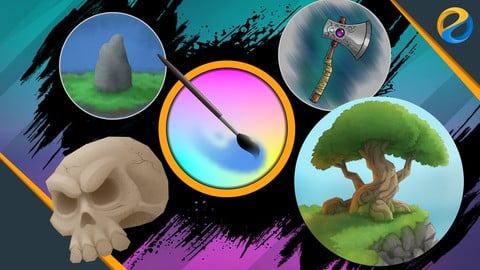
In chapter six, you will learn the basic techniques of drawing and coloring in Krita. To practice the techniques, you will create an ax weapon illustration from start to finish. You will start by drawing the sketch. Then learn various techniques for drawing smooth "line arts". Then learn the various types of "assistant tools" available in Krita. You will also learn different approaches of adding base colors to a drawing. One of the techniques is to use the "colorize mask" feature. After that, you will learn how to add shading and highlight colors with a style you often see in superhero comics.
In the seventh chapter, you will learn the basics of creating digital paintings with smoother shading colors. You will start by preparing all the brush presets. Then learn to create custom shortcuts for faster workflow. Then we will discuss the basic concepts of shading. Learn how to form any shape we want by manipulating the color gradation on the canvas. Then we move on to learn different shading techniques. After that, we will put into practice the techniques that we learned by making a skull illustration. From drawing the sketch, adding the base color, applying "shading" and "highlight" colors, and finally adding details and textures to the drawing.
In the last chapter, we are going to discuss the workflow for creating a non-destructive illustration. We are going to create a tree on the cliff illustration from start to finish using all the techniques we learned before. The benefit of having a non-destructive composition is that it will be easier if we need to make some changes or revisions. In some cases, this kind of workflow becomes very crucial. Such as when you need to create a lot of variations from a single artwork as quickly as possible.
So, join the course now! And start creating beautiful artworks using Krita.

 Udemy Discount
The discount is applied through our link. Open the course from here and Udemy's current promotional price is applied at checkout on most courses, no code to type.
Some courses are excluded from Udemy's promotions. If the price does not drop, clear your browser cookies and use the button again.
Instructor Details

- 4.6 Rating
 3,072 Reviews
Widhi Muttaqien
Widhi is the CEO of Expose Academy and the founder of several other creative-based companies. He has a bachelor's degree in information technology and a master's degree in business management and information system. Besides doing business he is also an academic lecturer in the computer graphics field.
With more than 20 years of experience in the CG industry, he finished hundreds of projects with clients from all over the globe. He has been producing thousands of CG images and animations. His deep passion for computer graphics leads him to dive into digital painting, 3D visualization, animation, game development, web design, video, and motion graphic.
 More courses by Widhi Muttaqien

Adobe Illustrator Advanced Vector Artwork (2020)
4.8 (1,988 Reviews)
 Provider: Udemy
 Time: 8.3h
$14.99

3D Visualization For Beginners: Interior Scene with 3DS MAX (2021)
4.5 (1,673 Reviews)
- Provider: Udemy
- Time: 12.9h
$13.99
Microsoft Excel dari dasar hingga pakar (2025)
4.8 (1,527 Reviews)
- Provider: Udemy
- Time: 17.4h
$11.99
Photoshop and Illustrator speed illustration workflow (2019)
4.7 (787 Reviews)
- Provider: Udemy
- Time: 12.1h
$64.99

Digital painting with Krita 5.0 intermediate level (2022)
4.8 (271 Reviews)
- Provider: Udemy
- Time: 6.8h
$79.99
More Digital Painting courses

Character Art School: Complete Coloring & Painting (2026)
4.8 (6,042 Reviews)
- Provider: Udemy
- Time: 19.5h
$34.99



Procreate Masterclass: Digital Drawing on the iPad (2023)
4.8 (1,744 Reviews)
- Provider: Udemy
- Time: 18.2h
$94.99

Digital painting with Krita 5.0 intermediate level (2022)
4.8 (271 Reviews)
- Provider: Udemy
- Time: 6.8h
$79.99
 Reviews

By Lidija Dambrauskaite on 8/24/2026
A very detailed and well-structured course. The tools are explained step by step in a clear and easy-to-understand way. It is very suitable for beginners and helped me understand Krita much better. I especially liked that everything is taught in a logical order, so it is easy to follow along. At first, I wasn't a fan of the voice used in the course, but I quickly got used to it, and now I wouldn't want it any other way If you want to learn working with Krita, I recommend this course. I am moving on to intermediate course now.
By James Nelson on 6/21/2026
A very knowledgeable instructor who covers a lot of useful basics. I was already a little familiar with Krita and some other digital drawing programs, but I feel much more confident after filling these gaps in my foundations. It's a small touch, but I really appreciate the emphasis that this is A way, not THE way -- it's not a course meant to teach a particular style of illustration, it's an introduction to a tool.
By Lane Salisbury on 1/17/2026
He explains all of the concepts and tools really well so far. I have an idea of where and how to use each tool and the places the various tools have in my artwork. As a new artist, the small projects have given me the ability both to practice/cement the skills and to see what I can do, which gets me excited to continue learning! Great course so far!
By Calcifer Heart on 1/6/2026
This course is highly recommended. It is very thorough. It covers computer graphics theory to give you a background of what computer graphics actually are, as well as Krita functions and pen setup and use. I am a computer science teacher I already knew some of the theoretical parts, but I could see that the instructor is gifted teacher and explains everything simply and effectively. Besides the audio of the courses, there are also subtitles and text transcription which are very helpful if you find it difficulty understanding the speech. Also, the instructor regularly includes text boxes in the video with key points, if you want to make notes. It is a very well structured course to teach you all the basics and help you get started. The theory and overview of the Krita software functionalities make up a big part of the course and require some patience on the part of the learner who might be anxious to jump right into action. But in my opinion the background theory is absolutely necessary for beginners and form an essential part of the course. I bought the course for my teenage daughters who like to draw, but I happily watch it myself as well, as an opportunity to learn new things. I have made a setup with two screens. I watch the lesson on the laptop and have Krita open on the secondary screen. That way, I can immediately explore and try what is explained on the video.
By van gomes on 12/31/2025
Perfeito! Muito bem explicado e ensinado com total dominância do assunto. O professor é excelente, e aprendi neste curso o que sozinho não conseguia aprender por meses tentando. Super recomendo. Se você é iniciante ou total leigo no uso do Krita, faça esse curso. Tenho certeza que irá aprender. Parabéns ao professor. Agora que conclui esse nível básico, irei praticar mais e em breve começarei o nível intermediário.
By Regina Navarra on 12/5/2025
I found this to be extremely helpful as it was detailed in explaining tools and features and using examples and exercises to demonstrate the practical uses of those tools and features along with some basic drawing concepts mixed in. As someone in the software training and support industry, I would consider this top notch. Worth every penny and every minute to me.
By Luciano Mota on 11/3/2025
Não aparece a imagem do vídeo. Já fiz de tudo e nada resolveu.
By Bruno Merizzi on 10/29/2025
I already had some exposure to Krita, and this course is well above my expectations. Everything is explained clearly, and a lot of Krita features are covered, including some that I wasn't even aware of. The instructor then takes the time to sketch and paint a few simple illustrations as examples, to put everything into practice, which is really helpful for learning. I have yet to find a course as comprehensive as this one for Clip Studio Paint.
By Ingrid Edisen on 9/30/2020
Complete info. Logical. VERY Comprehensive. The narrator takes a little getting used to but I am finding the screens and the accompanying descriptions perfectly matched. Everything is presented in a clear manner. This is proving to be a much larger course than I thought...a lot of bang for the buck. Super glad I chose this course.
By Arturo Espinosa on 10/28/2019
Excelente curso, no podía ser mejor, la forma de explicar muy buena, los 3 proyectos de muestra me gustaron mucho realmente pones en practica muchas herramientas, no se vieron vectores ni curvas bezier por ejemplo pero no puedes pedir todo en un solo curso, me ha abierto camino en krita ahora ya empiezo a realizar mis propios proyectos. Gracias Widhi!.
- Video Duration:
 7.5h
7.5h - Price: $89.99
- Provider: Udemy
- Updated:
 December 2022
 - Level:
 Beginner
 - Language:
 English
 - Certificate:
 Yes
Yes - Lectures:63 in 10 sections
- Students:14,200
- Subtitles:4 languages
- Udemy badge:Bestseller
30-day money-back guarantee on most paid courses
Udemy Coupon Price Tracker
