
 Web Development
 Data Science
 Python
 SQL
SQL JavaScript
 Artificial Intelligence
 IT & Software
 IT Certifications
 Hacking
 AWS
AWS Arduino
 DevOps
 3D Modeling
 Graphic Design
 Photoshop
 Drawing
 Digital Painting
 UX Design
 Business
 Data Analysis
 Communication Skills
 Project Management
 Leadership & Management
 Human Resources
 Digital Marketing
 Social Media Marketing
 Marketing
 SEO
SEO Google Analytics
 Branding
 Excel
Excel Office Productivity
 SAP
SAP PowerPoint
 Microsoft Access
 SharePoint
 Finance & Accounting
 Trading & Investing
 Accounting
 Bitcoin
 Personal Finance
 Video Editing & Animation
 Photography
 Adobe Premier Pro
 Adobe Lightroom
 Personal Development
 Productivity
 Career Development
 Life Coaching
 Health & Fitness
 Meditation & Mindfulness
 Yoga
Yoga Music
Music Music Production
 Guitar
 Piano
Piano Singing
 Language Learning
 Teaching & Academics
 Engineering
 Math
Math Lifestyle
Learning The Adobe Textile Designer Extension for Photoshop (Udemy.com)
Learn this indispensable tool every surface pattern designer should use!
Created by: Delores Orridge Naskrent
Last updated September 2019
 What you will learn
- Students will learn how to use the Adobe Textile Designer Extension
- No more calculations and measurements! It is all automatic!
- Learn to create different colorways for patterns
- Learn how to export pattern swatches
How it compares
Against the other 188 rated Udemy courses in Photoshop on CourseDuck:
- Rating3.4 out of 5among the lower-rated ones
- Reviews8#188 of 189 by number of reviews
- Length0.7 hoursshorter than 98% of them
- Last updatedSeptember 2019earlier than 60% of them
 Quality Score
Overall Score : 68 / 100
 Course Description
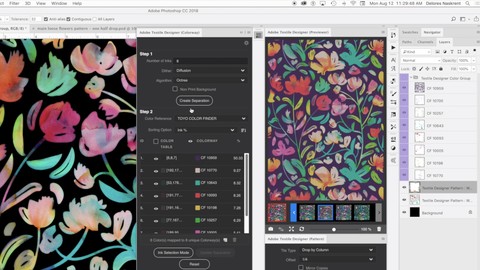
Textile Designer for Adobe Photoshop CC is a set of tools for fabric and surface pattern designers to help demystify the process of designing seamless pattern repeat prints. It was discontinued in November 2020 but will soon be re-released by Aquario. Then, from within Photoshop, there will be an automated process for creating the repeats, while keeping every element editable until ready to send it to your printer. Adobe Textile Designer lets you create a print that repeats on a basic grid, a horizontal brick, or a vertical drop. You will see your work in situ of the repeat and the effect of changes you make are live, on screen! Do you need to fill a void on the edges of your tile? Adobe Textile Designer provides a quick fix that allows for element continuation beyond the edge of the main tile and wraps them around to the other side for a seamless result. And there are no calculations to make! It’s automatic! This new plugin includes panels for previewing patterns, experimenting with repeat styles, defining separations and setting colorways. And guess what? This extension is completely free!
In this course, you will be guided step-by-step through the process of producing a repeating pattern composition in Photoshop using the Adobe Textile Designer extension. After your tile is complete, you will experiment with different colorways. Finally, you will be guided through applying your exciting new pattern to mockups. You will use the Adobe Photoshop program for the entire course, with that extra special plugin, ATD, with a short segway into InDesign to create the mill sheet. You will be sure to learn an abundance of helpful tips along the way!
The verbal guidance and demonstrations will help you learn all the necessary core skills that can be applied to so many of your future designs. Whether you are new to surface pattern design, or a fully qualified designer who has been using Photoshop with calculations and measurements to repeat your patterns, learning the new ATD will be pivotal in your surface pattern design adventure! Imagine the time you will save!
In this class we will go through specific concepts in 6 lessons that cover:
Installing the Textile Designer plugin.
Creating the main pattern tile seamlessly and ensuring the repeat works.
Using colorways to create different color schemes.
Exporting colorways and creating mill sheets.
Working with mockups in Adobe Photoshop.
You will get the bonus of…
40 minutes of direction from a 30 year veteran instructor who has been in the graphic design and art licensing business for over 40 years as well (ya, I'm a workaholic!)
a list of helpful online sites to further your education into surface pattern design.
Upon conclusion of my class, I encourage you to create a project and try out the ATD extension. Whether you are a surface pattern design novice or a well-versed expert, the use of Adobe Textile Designer is becoming “essential knowledge” in the trade. So join the ATD revolution! Start your Adobe Textile Designer class NOW!

 Udemy Discount
The discount is applied through our link. Open the course from here and Udemy's current promotional price is applied at checkout on most courses, no code to type.
Some courses are excluded from Udemy's promotions. If the price does not drop, clear your browser cookies and use the button again.
Instructor Details

- 3.4 Rating
 8 Reviews
Delores Orridge Naskrent
Hello, I'm Delores. I was an art educator for 30 years, teaching graphic design, fine art, and theatrical design. My own education took place at college and university, in Manitoba, Canada, and has been honed through decades of graphic design experience and my work as a professional artist, which I have done for over 40 years (eeek!). In the last few years I have also been involved in art licensing with contracts from Russ, Artwall, Studio El, Trends, Metaverse and more.
This is where I say something existential or clever about my inspiration: The colours of nature and my intuition guide my art: my most generous muses are light, sunshine, and flora. My work ranges through multiple media: my confidence with acrylic paint, ink, marker, collage, pencil, pastels, pencil crayon, watercolour, and digital painting provide many ready paths of self-expression.
But to be honest, often I don’t plan how a piece will ultimately look, but work in many layers, creating new relationships and deepening the complexity, intricacy and subtlety of the images over time. Once complete, I use this art for greeting cards, wall art and many other pieces I sell though art licensing and on products I create for my store. The bottom line? I love to experiment and mix both natural and digital mediums to create everything from very commercial work to very non-commercial fine art abstract paintings (and yes, I do sell these, so I guess they are commercial after all).
 More Photoshop courses


Adobe Photoshop CC: For Complete Beginner (Sinhala Medium) (2026)
4.9 (110 Reviews)
 Provider: Udemy
 Time: 8.4h
$59.99

Adobe Photoshop CC – Essentials Training Course (2025)
4.8 (36,753 Reviews)
- Provider: Udemy
- Time: 11.6h
$189.99


47 Graphic Design Projects for Photoshop Beginners (2025)
4.8 (466 Reviews)
- Provider: Udemy
- Time: 7.9h
$99.99

Photoshop Efficiency - Techniques For Consistent Marketing (2025)
4.8 (144 Reviews)
- Provider: Udemy
- Time: 1.4h
$49.99
 Reviews

By Lynn Grant on 6/19/2020
The camera angle (above, pointing down) was a little distracting. Also the camera was too close and gave a little fisheye effect. The content was great. I would have liked for the part on wraps to go a little more slowly (perhaps displaying just the wrapped layer), to make it clearer what the plugin was doing.
- Video Duration:
 42 mins
 - Price: See price on Udemy
- Provider: Udemy
- Updated:
 September 2019
 - Level:
 Intermediate
 - Language:
 English
 - Certificate:
 Yes
Yes
30-day money-back guarantee on most paid courses
Udemy Coupon Price Tracker
