
 Web Development
 Data Science
 Python
 SQL
SQL JavaScript
 Artificial Intelligence
 IT & Software
 IT Certifications
 Hacking
 AWS
AWS Arduino
 DevOps
 3D Modeling
 Graphic Design
 Photoshop
 Drawing
 Digital Painting
 UX Design
 Business
 Data Analysis
 Communication Skills
 Project Management
 Leadership & Management
 Human Resources
 Digital Marketing
 Social Media Marketing
 Marketing
 SEO
SEO Google Analytics
 Branding
 Excel
Excel Office Productivity
 SAP
SAP PowerPoint
 Microsoft Access
 SharePoint
 Finance & Accounting
 Trading & Investing
 Accounting
 Bitcoin
 Personal Finance
 Video Editing & Animation
 Photography
 Adobe Premier Pro
 Adobe Lightroom
 Personal Development
 Productivity
 Career Development
 Life Coaching
 Health & Fitness
 Meditation & Mindfulness
 Yoga
Yoga Music
Music Music Production
 Guitar
 Piano
Piano Singing
 Language Learning
 Teaching & Academics
 Engineering
 Math
Math Lifestyle
Master Adobe Lightroom Fast (Udemy.com)
Learn how to use Adobe Lightroom to organize, keyword, and edit your photos. This course will get you up to speed fast!
Created by: Mark Richardson
Last updated February 2017
 What you will learn
- Organize and Edit your Photos with Adobe Lightroom.
How it compares
Against the other 73 rated Udemy courses in Adobe Lightroom on CourseDuck:
- Rating4.2 out of 5higher than 17% of them
- Reviews841#7 of 74 by number of reviews
- Length1.9 hoursshorter than 76% of them
- Last updatedFebruary 2017earlier than 82% of them
 Quality Score
Overall Score : 84 / 100
 Course Description
This Adobe Lightroom training course from Camera Stupid is designed to get you started using Adobe Lightroom to organize, edit, and backup your photos as quickly as possible. Adobe Lightroom is a fantastic tool for amateur or professional photographers looking to streamline their workflow and produce professional photographic results for their clients or personal enjoyment. In this digital age, many photographers struggle to maintain the thousands of photos they take each month. Adobe Lightroom solves the problem of photo organization with a robust collection system and keyword tagging features. Never misplace a digital photo again!
No prior Adobe Lightroom knowledge is required to benefit from this course. You can apply what you learn in this course to your existing workflow. This course is designed to get to the point quickly and clearly, giving you more time to do what you love. Each lesson is recorded in High Definition and allows students to follow along on the instructor's screen.
The training will begin by demonstrating the basic steps to import photos, group them into collections, and tag them with relevant keywords. The course will cover backup strategies and offer advice for keeping your photos secure. From there we will dive deeper into editing techniques, presets, tethering, tone curve, panoramas, and file formats.
By the end of this video based training course on Adobe Lightroom you will be able to successfully manage your own growing photo portfolio using a tool that many photographers consider to be the industry standard. You'll be able to create and manage your own presets, and export them to share with friends or fellow photographers. You'll be able to apply non-destructive edits to your photos that will drastically improve them and get the look you desire. Most importantly, you'll be able to rest assured knowing that your photos are safe, organized, and accessible with just a keystroke.

 Udemy Discount
The discount is applied through our link. Open the course from here and Udemy's current promotional price is applied at checkout on most courses, no code to type.
Some courses are excluded from Udemy's promotions. If the price does not drop, clear your browser cookies and use the button again.
Instructor Details
- 4.2 Rating
 841 Reviews
Mark Richardson
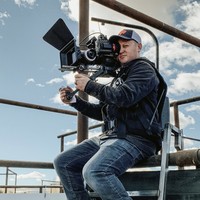
Mark Richardson is a full-time professional photographer, cinematographer, and creative director. His job has taken him to over 30 countries where he capture stunning imagery for corporate and commercial productions.
Mark is currently acting as the Director of Photography on a television series called Bison Boys. Coming in 2019, Bison Boys is a docuseries featuring two fearless brothers and thousands of wild bison.
Mark's first love will always be great landscape photography but he is interested many different styles and subjects including architecture, food, portraiture, product, and of course aerial photography.
Mark studied photography, videography, and graphic design at BYU-Idaho where he received a Bachelors of Science. Since graduating in 2009, Mark has worked in the industry using photography and videography to tell brand stories.
Mark has another passion: Helping others find success and happiness in learning. Mark loves to teach people of any age and enjoys learning from students as well. Mark is good at explaining difficult or complicated concepts in a way that anyone can understand.
 More Adobe Lightroom courses

Master Adobe Lightroom Classic & Lightroom CC (2026)
4.7 (2,820 Reviews)
 Provider: Udemy
 Time: 22.5h
$129.99



Principles of Photo Composition and Digital Image Post-Production
4.7 (131 Reviews)
- Provider: Coursera
- Time: 16h
Free

Adobe Lightroom CC Photo Editing: Your Lightroom Masterclass (2026)
4.6 (7,321 Reviews)
- Provider: Udemy
- Time: 23.4h
$99.99

 Reviews

By Tanica Witt on 4/3/2023
In one of the areas with the cute little red haired boy he told us he would show us how to finish retouching in PhotoShop but didn't do that. I thought overall it was helpful. What would be more helpful would be to have a list of the shortcuts in Mac and Word.
By Gordon Sherman on 3/31/2020
I couldn't finish the course because somehow it left my computer. In some cases I could not understand how to bring photos from my hard drive so I could use light room to process the photos. Not being able to re-run the lesson again to find that info. I could not go any farther.
By Anonymized User on 1/10/2019
I just purchased Lightroom and needed help so far it's great. The only recommendation I would make is to tell people you need Lightroom Classic to follow along. I have both Classic and CC and originally opened the CC version and the interface was slightly different. I also recommend sticking to Lightroom and not bringing in photoshop and the instructors software he sells.
By Anonymized User on 11/5/2018
The best course I've done so far on Udemy. You can't see the instructor as all you see is Lightroom/Photoshop, nevertheless, it was still very engaging due to his great intonation and a perfect pace of speaking. The course mostly presents different methods of enhancing your pictures in Lightroom but there are also some episodes about editing it in Photoshop. It made me want to download it and start my editing adventure.
By Anonymized User on 9/24/2018
The course is pretty basic; I can say for someone who's never edited a photo ever, with google's help. Could have had more examples of editing in different light conditions for portraits. A lot of good examples were added probably from the instructor's website, which are already free I guess, and were only meant for Adobe Photoshop NOT Lightroom! Slight turnoff! Good for someone with ZERO experience to get on speed with Lightroom, but a BIG no if you know even 20% about the editing and are familiar even with Photoshop editing. Mostly a marketing move for instructor to promote website and his products. Not bad but not too good either.
By Bill Denfeld on 8/25/2016
This class is very basic and incomplete as the the subjects it covers. The techniques the instructor demonstrates are often not the best methods and don't rest in the best outcome that Lightroom would be capable of achieving. I would not recommend this class to someone interested in learning best practices or needing a complete understanding of methods in Lightroom.
By Philip W Smith on 7/30/2016
Lots of great stuff in here! I appreciated the integration of some Photoshop stuff also. I am completely new to photography as a hobby and loving it. Similar to other courses by Mark Richardson, this is very engaging and informative without being overwhelming. Thanks Mark!!
By Kaeli Laxson on 7/25/2016
I feel this course gave me a great basic understanding of Lightroom. I would like to get more familiar with learning the techs behind some of the tools (learning to use the histogram, adjusting photos manually to achieve different moods, etc.) rather than just slapping on presets. But all in all I walked away with more knowledge than I had before!
By Stu Harvey on 4/15/2016
very good mark...appreciate your work and the help with getting into light room in a way that starts to bring my workflow under control after the shift over to digital and having to shift to coping with vast numbers of photos... Cheers, Stu Harvey
By John Sumilat on 9/15/2015
I've been using Lightroom for about a year now. Decided I should actually invest in a program that would teach me the basics. This course helped me greatly with organization of my pictures, usage of presets (downloading, importing and exporting them), as well as usage of the adjustment brush. Went through all the vids in just one sitting of about an hour. Easy to learn and easy to understand. Thanks a lot Mark! Thanks for the presets too!!
- Video Duration:
 1.9h
1.9h - Price: $49.99
- Provider: Udemy
- Updated:
 February 2017
 - Level:
 Beginner
 - Language:
 English
 - Certificate:
 Yes
Yes
30-day money-back guarantee on most paid courses
Udemy Coupon Price Tracker
