
 Web Development
 Data Science
 Python
 SQL
SQL JavaScript
 Artificial Intelligence
 IT & Software
 IT Certifications
 Hacking
 AWS
AWS Arduino
 DevOps
 3D Modeling
 Graphic Design
 Photoshop
 Drawing
 Digital Painting
 UX Design
 Business
 Data Analysis
 Communication Skills
 Project Management
 Leadership & Management
 Human Resources
 Digital Marketing
 Social Media Marketing
 Marketing
 SEO
SEO Google Analytics
 Branding
 Excel
Excel Office Productivity
 SAP
SAP PowerPoint
 Microsoft Access
 SharePoint
 Finance & Accounting
 Trading & Investing
 Accounting
 Bitcoin
 Personal Finance
 Video Editing & Animation
 Photography
 Adobe Premier Pro
 Adobe Lightroom
 Personal Development
 Productivity
 Career Development
 Life Coaching
 Health & Fitness
 Meditation & Mindfulness
 Yoga
Yoga Music
Music Music Production
 Guitar
 Piano
Piano Singing
 Language Learning
 Teaching & Academics
 Engineering
 Math
Math Lifestyle
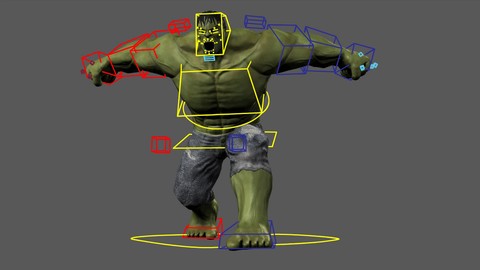
Rigging for characters in Autodesk Maya (Udemy.com)
Learn to create the most complete and functional rig to animate your 3D characters from scratch to final complete rig
Created by: Rey3D .com
Last updated November 2018
 What you will learn
- At the end of the course, you will be able to create your own complete rigs for animation.
- Create custom controls.
- Add both IK and FK modes.
- Achieve excellent deformations almost automatically without using plug ins.
- Use Autodesk Maya for Rigging.
- Create facial and body rig.
- Master the complete rig that a character requires to be animated.
How it compares
Against the other 545 rated Udemy courses in 3D Modeling on CourseDuck:
- Rating4.2 out of 5higher than 10% of them
- Reviews183#339 of 546 by number of reviews
- Length8.5 hourslonger than 60% of them
- Last updatedNovember 2018earlier than 84% of them
 Course Description
A great course where you will learn to create a very complete rig, both facial and body excellent to be animated later, we will start from scratch having the character ready to get the final complete rig, we will create the bones (joints) and name them appropriately to duplicate them to the other side automatically, we will create the IK handles to give movement in hands and feet, we will create the controls for each part of the body, we will configure the switch from IK to FK for the arms, in this way our character will be able to emulate any movement of the hand, later we will create the facial controls, as well as the jaw bone to have an easy-to-use facial rig, we will configure the eyes, the overall control and the mouth of the character.
Finally we will create the facial gestures, we will configure the rig of the fingers and weigh the character to achieve excellent deformations almost automatically and without using plugins.
No doubt the ideal course for you if you are interested in learning to create complete and functional rigs for the animation of 3D characters.
At the end of the course you will be able to create a complete and functional rig for your own characters and thus move to the animation stage.
In summary, with this course you will learn:
- Use Autodesk Maya for Rigging
- Create complete and functional rigs for animation
- Create custom controls
- Add both IK and FK modes
- Automate a rig
- Create facial and body rig
- Achieve excellent deformations almost automatically
- Create facial gestures
- Automate the creation of facial gestures
- Tips for locating bones and controls
- Configure the jaw and mouth in general
- Test and optimize a rig

 Udemy Discount
The discount is applied through our link. Open the course from here and Udemy's current promotional price is applied at checkout on most courses, no code to type.
Some courses are excluded from Udemy's promotions. If the price does not drop, clear your browser cookies and use the button again.
Instructor Details

- 4.2 Rating
 183 Reviews
Rey3D .com
Rey3D - Teaching you what you really need about 3D and VFX.
Learn to create and animate 3D characters, video games, fantastics environments, rigging and VFX.
All our courses are in video, step by step, online access and downloadable, lifetime access and doubts support directly by instructor.
Learn all 3D animation process from the concept to the entire rendered deliverable scene, understanding the key poses, video reference, blockout, in-betweens, polish, from there add a 3D complete and detailed environment, add atmosphere and finally render the scene.
 More 3D Modeling courses

3D Printing with " Ultimaker CURA Slicer- Start to finish" (2025)
4.9 (192 Reviews)
 Provider: Udemy
 Time: 1h
$34.99

Girl and the Dog Creation in Zbrush for Intermediate Level (2020)
4.9 (173 Reviews)
- Provider: Udemy
- Time: 48.8h
$59.99



Blender Character Creator for Video Games (2026)
4.8 (9,160 Reviews)
- Provider: Udemy
- Time: 34.3h
$159.99

Master SOLIDWORKS 3D CAD using real-world examples (2022)
4.8 (2,451 Reviews)
- Provider: Udemy
- Time: 18.9h
$69.99
 Reviews

By Stephen Oliver on 12/20/2024
This is incredible! I've learned more about professional rigging in a month than my college has taught me in four years! No complaints aside from the class videos not being organized into chapters. It'd be really nice to refer back to without having to guess between videos so having sections like: Basic rig Structure, Legs, Arms, Torso, Weights, etc. would be incredible to have.
By Niranjan Bharadwaj on 9/13/2022
Lovely Explaination. . .Keep Going Bro. Need more tutorials with more insights of Ik/ Fk Rig variations and details like IK/FK switching at same place, soft IK rig, Auto clavical rig and more.
By Justin R Key on 6/5/2022
Difficult to understand his English. Also, some general Maya navigation pointers would be nice, even some references to the Maya tutorials for general navigation are helpful.
By Kelly Pfeiffer on 8/8/2021
The instructor is thorough and thoughtful! And explains why controls are made differently and how so. I really love this class and have gained so much knowledge!
By Antonio Rosas on 5/22/2020
Great, just needs to be complete and probably need an update on the blend shapes part of the course, since shape editor is the way to go since Maya 2019.
By Max Ashby on 4/30/2020
Well explained, easily digestible, not too long to be boring but not too short to miss out important things. Learned some cool new stuff. The ending is incomplete (missing out one lecture) and a few things unresolved but nothing that breaks the rig :) all in all happy with it, would reccommend!
By Yuval Zabusky on 1/8/2020
The fingers section are a bit annoying, all the rotation of the joints to the correct way, i know it can be prevented with different methoods, orient the joints to the correct way before connecting the ctrls
By Anonymized User on 10/19/2019
Great teacher. Explain without losing focus and master the subject, but jesus christ udemy, advise him to avoid coughing in the videos, it's pretty annoying. VERY annoying.
By Emmanuel on 9/14/2018
Atlast! I found a very presicely complete good tutorial on rig :D!!!!! This is awesome!!!! Just what I need for my projects!! I'm really looking for a very well explained step by step complete rig tutorial and this is it! Its has Fk/iK functions and a Blendshape, It all worth it!! I save my ass a bunch of money on this course. You will find a course like this with the price range of $100 and its really hard to find a good one, but this one is different, its complete package!!!! To be honest all of the course that I have, I can say that, that this is the best of all!! absolutely worth my money!! Thank you very much for this wonderful tutorial!!!! I've learned a lot !!!!! :)))))))))))))
By MARWAN AMMAR on 5/10/2018
Great Course for everyone who wants to learn Rigging in Maya. I liked the way of the explanation,very clear and easy to follow, great content and great explanations for all steps.
 Quality Score
No CourseDuck member has rated this course yet. Taken it? Give each part a thumbs up or down.
Overall Score : 84 / 100
- Video Duration:
 8.5h
8.5h - Price: $49.99
- Provider: Udemy
- Updated:
 November 2018
 - Level:
 Intermediate
 - Language:
 English
 - Certificate:
 Yes
Yes
30-day money-back guarantee on most paid courses
Udemy Coupon Price Tracker
