
 Web Development
 Data Science
 Python
 SQL
SQL JavaScript
 Artificial Intelligence
 IT & Software
 IT Certifications
 Hacking
 AWS
AWS Arduino
 DevOps
 3D Modeling
 Graphic Design
 Photoshop
 Drawing
 Digital Painting
 UX Design
 Business
 Data Analysis
 Communication Skills
 Project Management
 Leadership & Management
 Human Resources
 Digital Marketing
 Social Media Marketing
 Marketing
 SEO
SEO Google Analytics
 Branding
 Excel
Excel Office Productivity
 SAP
SAP PowerPoint
 Microsoft Access
 SharePoint
 Finance & Accounting
 Trading & Investing
 Accounting
 Bitcoin
 Personal Finance
 Video Editing & Animation
 Photography
 Adobe Premier Pro
 Adobe Lightroom
 Personal Development
 Productivity
 Career Development
 Life Coaching
 Health & Fitness
 Meditation & Mindfulness
 Yoga
Yoga Music
Music Music Production
 Guitar
 Piano
Piano Singing
 Language Learning
 Teaching & Academics
 Engineering
 Math
Math Lifestyle
SketchUp & Twilight for Interior Designers (Udemy.com)
A workflow & organisation system to maximise efficiency of modelling and producing both technical drawings and renders
Created by: Kim Debling
Last updated January 2017
 What you will learn
- Start each SketchUp project with a ready-made feature-rich template file
- Switch quickly and easily between views that are custom made for Interior Designers
- Turn on and off specific parts of their models, whether it be Architectural details such as 'furniture' or conceptual details such as 'existing architecture'
- Use Twilight Render with confidence to produce photorealistic renders
- Add specialist materials such as reflecting mirrors, textured surfaces with a bump map and surfaces which emit light
- Add specialist lighting based on real light fittings and bulb details
How it compares
Against the other 545 rated Udemy courses in 3D Modeling on CourseDuck:
- Rating4.5 out of 5higher than 37% of them
- Reviews134#389 of 546 by number of reviews
- Length1.5 hoursshorter than 92% of them
- Last updatedJanuary 2017earlier than 92% of them
 Course Description
[Update April 18 from Kim: In an effort to give full disclosure to future students I'd like to let you know that I'm undergoing treatment for Stage 4 Lymphoma. I hope and aim to make a full recovery by next year! This means I'm not able to participate as an instructor as much as I'd like to but students have excellent reviews of my courses and ask surprisingly few questions - I hope that means that my courses are complete enough without needing lots of clarification. Please remember there is a money back guarantee so if you purchase my course then decide you would need more instructor input you can utilise that feature. So remember life is short - take the course - learn the skills - make the move - do the thing - eat the cake - and remember to always check that what you are doing makes you happy!]
If you're an interior designer you need this course!
- Organise with layers, styles and scenes so that you can easily switch between architectural drawings and 3D design views
- Produce electrician drawings, plumbing drawings and section cuts at the click of a button - all within SketchUp
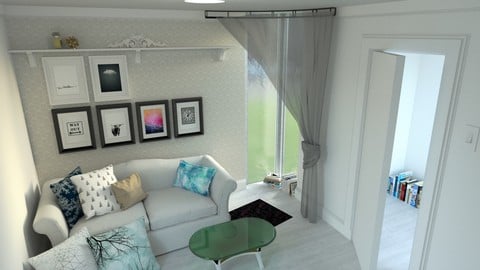
- Render photorealistic images with reflective surfaces, lighting and custom textures using Twilight from within SketchUp
- Receive a full PDF copy of my published workbook that compliments this course, available on Amazon/Kindle/Apple Books but FREE to all course members
Its likely that you've used and liked SketchUp - the once-Google software now owned and operated by Trimble that is free at entry level and easy to use. SketchUp makes it easy to build furniture, buildings and entire towns all from your imagination or replicating reality. Perhaps, like me, you started your Interior Design journey by obsessively building and designing room after room in SketchUp.
Now its time to either go back to SketchUp or improve your experience of it - by harnessing the powerful system that harnesses SketchUp's Layer organisation, styles and scenes. This system means that you can switch between a designing view and a 2D plan, a wireframe and a cross section, a view of the clients home with existing items in grey and proposed changes in green, a view that shows only the internal fixtures of your design or one that shows only the walls.
Without this system it is likely that the only way you could do these things was to copy your model and modify it for specific uses - deleting what wasn't needed in each one. But any changes in one model would need to be copied into others. This is of course highly inefficient and ultimately unworkable - the system covered in this course will revolutionise your workflow to use just one model to cover everything. Make the change once then just switch views to see the technical plans, elevations and sections with the new change reflected.
Its not only the organisational system we're covering. We're also going to learn how to use Twilight Render. This is a SketchUp plugin, again free at entry level, that works directly from within SketchUp to render photorealistic images. We're finally going to be able to:
- display bumpy textures without modelling the bumps into the model
- have reflective surfaces such as mirrors and shiny surfaces
- have realistic 'scenery' seen outside windows without modelling
- create light sources that brighten your room as per your own lighting design and set up
All this will help you to make SketchUp your main or only software to do your Interior Design work. You'll be able to produces work at a new speed and efficiency. Small changes now no longer mean hours of extra work tweaking all the architectural drawings. You are just one click away from a plumbers plan to an electricians plan, a cross section and an ideal view set up ready to render.
Have a look at the free preview videos to see the system in action and I can't wait to see you inside the course!

 Udemy Discount
The discount is applied through our link. Open the course from here and Udemy's current promotional price is applied at checkout on most courses, no code to type.
Some courses are excluded from Udemy's promotions. If the price does not drop, clear your browser cookies and use the button again.
Instructor Details

- 4.5 Rating
 134 Reviews
Kim Debling
Kim Debling owns and runs her design company Kestrel Design from the comfort of her home office. Her employees and freelancers all work from home too as she and they value the freedom and lifestyle this affords. She began and built her company over several years whilst working full time as an Air Traffic Controller. She is focused, dedicated and frantically entrepreneurial. She also has a thirst for learning and passing on her knowledge that perfectly aligns with what Udemy offers.
As an Air Traffic Control Officer for 11 years she was a supervisor, instructor and examiner - guiding new Air Traffic Controllers as they come into the job and then signing them off as suitable to control solo. It was a rewarding experience - especially seeing under-confident new controllers shine and become more qualified themselves. Her calm, no-nonsense instructional delivery was honed during these years in this fast-paced but safety critical training environment.
Due to the stressful nature of the job, Kim started to become extremely interested in self-management of stress, self-improvement and the work-life balance. Over the years she has become passionate about regaining control over our own lives and working out what works for each individual. This is often reflected in her courses, social media channels and products.
 More 3D Modeling courses

3D Printing with " Ultimaker CURA Slicer- Start to finish" (2025)
4.9 (192 Reviews)
 Provider: Udemy
 Time: 1h
$34.99

Girl and the Dog Creation in Zbrush for Intermediate Level (2020)
4.9 (173 Reviews)
- Provider: Udemy
- Time: 48.8h
$59.99



Blender Character Creator for Video Games (2026)
4.8 (9,160 Reviews)
- Provider: Udemy
- Time: 34.3h
$159.99

Master SOLIDWORKS 3D CAD using real-world examples (2022)
4.8 (2,451 Reviews)
- Provider: Udemy
- Time: 18.9h
$69.99
 Reviews

By Bret Overmyer on 1/15/2023
Well done. Very organized and did not waste time with tedious tasks. I will look for more courses from Kim.
By Sukanya E on 8/7/2020
Its easy to understand and explained in detail but it covers only few area.
By Liezl Kenyon on 5/13/2020
Really enjoyed it, just had to refer to the manual often as the intermediate steps sometimes escaped me.
By Paul Harris on 4/13/2020
Very clear and concise instruction, easy to follow, some great knowledge and tips n tricks.
By Kathy Shelton on 7/3/2019
Learning SketchUp for my interior design courses. Taking more demanding classes necessitates me to master this program. So far, so good. thanks for the detail and especially a downloadable instruction set.
By RaulCifuentes on 4/24/2019
The content is well explained and the way the course is designed makes it easy to follow and understand!
By S. Mannhom on 4/10/2019
This has been a solid introduction to organizing your Sketchup models so that your modeling time is efficient and productive. The quality of my presentations is sure to improve and I know I'll be saving time when I go to generate architectural drawings. I do wish there had been more time spent on creating construction documents, but understand that circumstances did not allow for this. My very best wishes to Kim's family.
By kay p on 11/25/2018
Great course ! I has taken some other courses but this one has just right amount of details and speed. Thanks .
By Udayini Bandaru on 9/19/2018
This course is exactly what I needed. Crisp and clear. Can be elaborated.
By Cesar Scofano Damasceno Peixoto on 4/14/2018
I really enjoyed the course, how to organize workflow helps a lot. The teaching materials are excellent.
 Quality Score
No CourseDuck member has rated this course yet. Taken it? Give each part a thumbs up or down.
Overall Score : 90 / 100
- Video Duration:
 1.5h
1.5h - Price: $13.99
- Provider: Udemy
- Updated:
 January 2017
 - Level:
 Intermediate
 - Language:
 English
 - Certificate:
 Yes
Yes
30-day money-back guarantee on most paid courses
Udemy Coupon Price Tracker
