
 Web Development
 Data Science
 Python
 SQL
SQL JavaScript
 Artificial Intelligence
 IT & Software
 IT Certifications
 Hacking
 AWS
AWS Arduino
 DevOps
 3D Modeling
 Graphic Design
 Photoshop
 Drawing
 Digital Painting
 UX Design
 Business
 Data Analysis
 Communication Skills
 Project Management
 Leadership & Management
 Human Resources
 Digital Marketing
 Social Media Marketing
 Marketing
 SEO
SEO Google Analytics
 Branding
 Excel
Excel Office Productivity
 SAP
SAP PowerPoint
 Microsoft Access
 SharePoint
 Finance & Accounting
 Trading & Investing
 Accounting
 Bitcoin
 Personal Finance
 Video Editing & Animation
 Photography
 Adobe Premier Pro
 Adobe Lightroom
 Personal Development
 Productivity
 Career Development
 Life Coaching
 Health & Fitness
 Meditation & Mindfulness
 Yoga
Yoga Music
Music Music Production
 Guitar
 Piano
Piano Singing
 Language Learning
 Teaching & Academics
 Engineering
 Math
Math Lifestyle
The Ultimate Web Designing Course in Photoshop (Udemy.com)
Learn Web Designing in Photoshop step by step (Over 20 PSD Files, 3 Mega Web Design Projects Included)
Created by: Supriyo Kundu
Last updated August 2022
 What you will learn
- You will be able to Design Awesome Professional Websites in Photoshop
- You will be able to Design UI Elements in Photoshop
- You will Learn various Cool Tips and Tricks in Photoshop for Web Designing
- You will get the PSD Templates designed in this course
- You will Learn the step by step Procedure of Web Designing
How it compares
Against the other 188 rated Udemy courses in Photoshop on CourseDuck:
- Rating4.5 out of 5higher than 52% of them
- Reviews584#56 of 189 by number of reviews
- Length9.8 hourslonger than 78% of them
- Last updatedAugust 2022more recently than 67% of them
 Course Description
Do you want to become a professional web designer ?
if your answer is yes , then this course is for you
Welcome to the Ultimate Web Design Course in Photoshop
After completing this course , you will have enormous confidence in yourself , that you can design any website in Photoshop.
We will cover the followings :
- You will get acquainted with the tools required for web designing in photoshop
- We will design UI elements like navigation , progress bar , contact form ,pricing table, slider , call to action buttons , glossy button
- You will learn various tips and tricks in photoshop for web designing
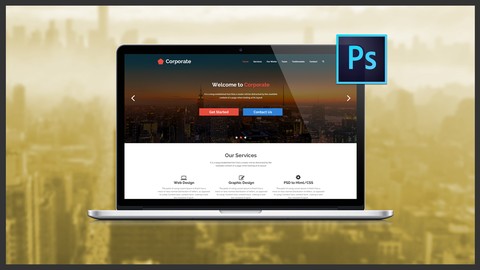
- We will design a Cool Modern Professional Corporate PSD Template
- We will design an Awesome Hosting PSD Template
- We will design a Multipage Portfolio PSD Template
- You will Learn the proper steps of getting into web design freelancing career
- You will learn 5 ways of earning money by designing websites in Photoshop
You will have 30 days money back guarantee. If you dont like this course, you will get 100% refund with no questions asked.
So why waiting . Lets enroll in this course and take your first step to become a professional web designer

 Udemy Discount
The discount is applied through our link. Open the course from here and Udemy's current promotional price is applied at checkout on most courses, no code to type.
Some courses are excluded from Udemy's promotions. If the price does not drop, clear your browser cookies and use the button again.
Instructor Details

- 4.5 Rating
 584 Reviews
Supriyo Kundu
Hi, I'm Supriyo Kundu, a Computer Science Engineer with a deep passion for both programming and design.
I’m currently working as a Generative AI Developer at a leading multinational company (MNC), where I specialize in cutting-edge technologies including Python, FastAPI, LangChain, LangGraph, and Gen AI. I’m also an experienced Machine Learning (ML) and Artificial Intelligence (AI) expert, continuously exploring and integrating the latest advancements to stay at the forefront of innovation.
As an instructor, I’m committed to helping students master both creative and technical skills. My core areas of expertise include:
Graphic Design: Photoshop, Illustrator, Retouching, Photo Manipulation, Visual Effects
Web Design & Development: HTML, CSS, JavaScript, WordPress, Elementor, Responsive Design
Programming, ML & AI: Python, API Development, Machine Learning, Gen AI Integration, LangChain Workflows
 More courses by Supriyo Kundu
Photoshop and Illustrator Mastery with AI : 120+ Projects (2025)
4.4 (621 Reviews)
 Provider: Udemy
 Time: 44.8h
$74.99
The Most Comprehensive Web Development Course (2023)
4.5 (511 Reviews)
- Provider: Udemy
- Time: 47.5h
$69.99

Complete Web Design Bootcamp 2026 : 18 Courses in 1
4.5 (338 Reviews)
- Provider: Udemy
- Time: 45.3h
$64.99
Learn PSD to Responsive Parallax HTML/CSS Web Design (2017)
4.6 (244 Reviews)
- Provider: Udemy
- Time: 9.3h
$49.99
Complete Illustrator CC MasterCourse : 36 Projects Included (2020)
4.3 (222 Reviews)
- Provider: Udemy
- Time: 18.1h
$64.99
Learn PSD to HTML : Responsive Portfolio Website Design (2019)
4.4 (158 Reviews)
- Provider: Udemy
- Time: 17.4h
$44.99
More Photoshop courses


Adobe Photoshop CC: For Complete Beginner (Sinhala Medium) (2026)
4.9 (110 Reviews)
- Provider: Udemy
- Time: 8.4h
$59.99

Adobe Photoshop CC – Essentials Training Course (2025)
4.8 (36,753 Reviews)
- Provider: Udemy
- Time: 11.6h
$189.99


47 Graphic Design Projects for Photoshop Beginners (2025)
4.8 (466 Reviews)
- Provider: Udemy
- Time: 7.9h
$99.99

Photoshop Efficiency - Techniques For Consistent Marketing (2025)
4.8 (144 Reviews)
- Provider: Udemy
- Time: 1.4h
$49.99
 Reviews

By John Anderson on 6/11/2020
The first three or four sections were useful as I learned more about Photoshop tools. The elements designed felt stylistically out of date. I didn't finish the course because, as we got further into it, design decisions were made without comment as to why they were made. "This text looks better at 26px." Does it? Why does it? What should I be looking for in good design? None of this was explained.
By Mayank Sagar on 2/3/2019
Well I just completed this course before i started i have basic skills in photoshop but after this i am feeling much more confident about my skills . I have build all the templates that instructor told me to build and this been a great experience over all . But i am still confused about proper spacing in design for example if i use the distribute spacing form the photoshop move tool options and when i calculate the spacing between two objects they are not same spaces. generally happens when i use icons which are not same size any help in this topic will be helpful. Thank You sir for sharing your knowledge with me.
By Sonia Dhariwal on 8/12/2018
I am a logo designer since last 5 years but now because of supriyo I am sure I will become an awesome web designer even . Thank you so much. I have done this course with practical implementation and was able to design in the same manner without any difficulty because of the in depth explanations.
By Kirandeep Bhullar on 6/15/2017
I used to hesitate using Photoshop when it came to creating websites as I wasn't confident using the tools and techniques to create a professional looking page. But during this course, I have already learnt so much and seen how easy it is to create a professional looking website, without spending hours and hours trying to perfect and align things using HTML/CSS. Thank you so much - your courses are awesome!
By Joshua Omundson on 3/17/2017
The content is good and I have learn a lot about how to use photoshop to create websites. My only issue is that the resources that are used in the tutorials (images, icons, etc.) are not provided individually before you start the tutorial and are only provided in the completed work. It would have been nice if all of the unaltered images were provided as a resource download before starting the project.
By Patrick Belcher on 3/9/2017
The instructor is quite thorough. I have learned quite about design from the instructor and I have been using Photoshop for years. Instructor goes into great detail and explanations are clear. Designs are very modern and have a polished look. You will get your money's worth and more in this course.
By Arun Prakash P on 2/13/2017
I was literally looking for a best web designing course, I browsed lots of course and also completed few web designing course. The best part I really enjoyed in this course is selecting fonts, height, width and spacing. Many thanks to the author for a best and easiest way he teaches the course. Hope if he add few more projects into the lecture. Overall 5 stars rating for this best course. Many Thanks.....
By Jahangir Alam on 9/15/2016
Course topics coverage is average. I clearly understand that I can not start freelancing without having some more advanced knowledge's on Photoshop. But Supriyo's responses in questions and answer section is fantastic. I personally recommend this course for beginners. Apart from that, I enjoyed his delivery very much as his delivery is in Indian excent which is clearly understandable for me as a Bangladeshi.
By L Couch on 5/14/2016
(Only half way through the course). Excellent way to learn Photoshop - by DOING projects.. Instructor clearly demonstrates step-by-step as we create a modern style web page structure using a grid and various Photoshop tools. Viewing the progress of sections encourage us to continue through the lectures. Can't wait to see our accomplishments.
By Carlos Almada on 4/10/2016
This course is great if you want to learn how to design a web site, Supriyo is an excellent teacher and he always answer your doubts or questions. I really don't had any knowledge of photoshop and now i'm that i'm finished this course i feel really confident about creating web sites. I really recommend this course, you'll end up building awesome web design
 Quality Score
No CourseDuck member has rated this course yet. Taken it? Give each part a thumbs up or down.
Overall Score : 90 / 100
- Video Duration:
 9.8h
9.8h - Price: $74.99
- Provider: Udemy
- Updated:
 August 2022
 - Level:
 All Levels
 - Language:
 English
 - Certificate:
 Yes
Yes
30-day money-back guarantee on most paid courses
Udemy Coupon Price Tracker
