
 Web Development
 Data Science
 Python
 SQL
SQL JavaScript
 Artificial Intelligence
 IT & Software
 IT Certifications
 Hacking
 AWS
AWS Arduino
 DevOps
 3D Modeling
 Graphic Design
 Photoshop
 Drawing
 Digital Painting
 UX Design
 Business
 Data Analysis
 Communication Skills
 Project Management
 Leadership & Management
 Human Resources
 Digital Marketing
 Social Media Marketing
 Marketing
 SEO
SEO Google Analytics
 Branding
 Excel
Excel Office Productivity
 SAP
SAP PowerPoint
 Microsoft Access
 SharePoint
 Finance & Accounting
 Trading & Investing
 Accounting
 Bitcoin
 Personal Finance
 Video Editing & Animation
 Photography
 Adobe Premier Pro
 Adobe Lightroom
 Personal Development
 Productivity
 Career Development
 Life Coaching
 Health & Fitness
 Meditation & Mindfulness
 Yoga
Yoga Music
Music Music Production
 Guitar
 Piano
Piano Singing
 Language Learning
 Teaching & Academics
 Engineering
 Math
Math Lifestyle
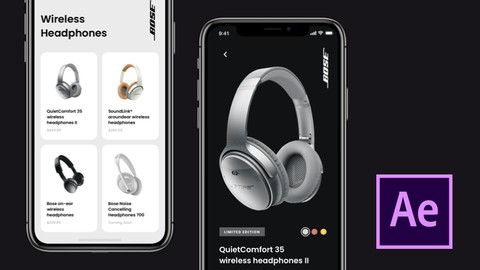
UI Animations and Interactions with After Effects (Udemy.com)
Learn how to create smooth interactions for your products
Created by: Karim Balaa
Last updated October 2019
 What you will learn
- UI animations and interactions with Adobe After Effects
How it compares
Against the other 118 rated Udemy courses in Adobe After Effects on CourseDuck:
- Rating4.0 out of 5higher than 3% of them
- Reviews34#103 of 119 by number of reviews
- Length0.9 hoursshorter than 89% of them
- Last updatedOctober 2019earlier than 72% of them
 Course Description
In this class, you will learn how to import your designs into After Effects and create beautiful interactions to show off in your next product demo. The ability to show how a screen moves and interacts is a crucial part of the UI process and this class is meant to help you take that process to the next level and give you the tools to create beautiful interactions for your products.

 Udemy Discount
The discount is applied through our link. Open the course from here and Udemy's current promotional price is applied at checkout on most courses, no code to type.
Some courses are excluded from Udemy's promotions. If the price does not drop, clear your browser cookies and use the button again.
Instructor Details

- 4.0 Rating
 34 Reviews
Karim Balaa
Hello. My name is Karim Balaa. Im a UI/UX & Product designer from Ottawa Canada. I design all kinds of digital experiences and focus on creating simple-to-use products and thoughtful visual languages for startups and brands. I love conceptualizing and prototyping ideas and see them come to fruition.
Throughout my years I've had the pleasure of working with some of the worlds most popular brands as well as young and innovating startups. I love this field and would love to share some of my knowledge with you.
 More Adobe After Effects courses

Motion Design & Animation Principles in Adobe After Effects (2025)
4.8 (1,594 Reviews)
 Provider: Udemy
 Time: 5.8h
$99.99


Futuristic HUD Motion Graphics in After Effects (2018)
4.7 (664 Reviews)
- Provider: Udemy
- Time: 1.5h
$69.99

Course Design - How to Create Impressive Text Animations (2017)
4.7 (207 Reviews)
- Provider: Udemy
- Time: 2.7h
$74.99

After Effects Masterclass: The Ultimate Guide for Beginners (2020)
4.7 (198 Reviews)
- Provider: Udemy
- Time: 9h
$74.99

 Reviews

By Daniel Ferreira on 10/19/2022
For an experienced motion designer like me, my goal was to better understand how to animate app elements in order for them to be implemented on an actual app. Not really how to work with After Effects. Best practices thinking about the developers and how they would receive and work with it would be a good subject to cover or if there's any technical details we need to pay attention, for example. Still a well explained and structured course, perfect for anyone starting to explore these type of animations.
By Urszula Gebska on 6/4/2022
Amazing course!
By Joel Lee on 7/23/2021
Good. Easy to follow. Just maybe to have a demonstration without using Motion V2 to create the bouncing effect.
By Loren Tracy on 8/9/2020
Overall, really helpful course. Would love to see higher quality videos. Also there were a few keyboard shortcuts used that I wasn't sure how they were done like clipping the cursor layer after it animates off in the last video. Otherwise, really great course.
By Melek Oruc on 4/14/2020
hayır değildi. UX bilgilerinin olacağını düşünmüştüm. Çok temel seviye AE öğretiliyor.
By Daniel Cardoz on 2/17/2020
Thank you Karim for sharing your process & workflow. It might be better to call out the use of the motion plugin in the introductory video since a lot of the effects are simplified using it. Looking forward to seeing more tutorials with more complex interactions :)
By Sidharth Sankh on 1/6/2020
We expecting more animation tricks and more screen transitions.
By Trevor Wells on 11/11/2019
Difficult to see what the tutor is clicking on, doesn't explain some of the tools he used. One of the useful plugins used is an additional expense
By Tomáš Zúbrik on 10/11/2019
Great course! It gives you basics to create professional looking animations, from Sketch to After Effects.
By James Harmer on 10/2/2019
Relies heavily on a $65 plugin. Would be useful to be shown how to achieve the same result without it as it is definitely possible.
 Quality Score
No CourseDuck member has rated this course yet. Taken it? Give each part a thumbs up or down.
Overall Score : 80 / 100
- Video Duration:
 54 mins
 - Price: $29.99
- Provider: Udemy
- Updated:
 October 2019
 - Level:
 All Levels
 - Language:
 English
 - Certificate:
 Yes
Yes
30-day money-back guarantee on most paid courses
Udemy Coupon Price Tracker
