
 Web Development
 Data Science
 Python
 SQL
SQL JavaScript
 Artificial Intelligence
 IT & Software
 IT Certifications
 Hacking
 AWS
AWS Arduino
 DevOps
 3D Modeling
 Graphic Design
 Photoshop
 Drawing
 Digital Painting
 UX Design
 Business
 Data Analysis
 Communication Skills
 Project Management
 Leadership & Management
 Human Resources
 Digital Marketing
 Social Media Marketing
 Marketing
 SEO
SEO Google Analytics
 Branding
 Excel
Excel Office Productivity
 SAP
SAP PowerPoint
 Microsoft Access
 SharePoint
 Finance & Accounting
 Trading & Investing
 Accounting
 Bitcoin
 Personal Finance
 Video Editing & Animation
 Photography
 Adobe Premier Pro
 Adobe Lightroom
 Personal Development
 Productivity
 Career Development
 Life Coaching
 Health & Fitness
 Meditation & Mindfulness
 Yoga
Yoga Music
Music Music Production
 Guitar
 Piano
Piano Singing
 Language Learning
 Teaching & Academics
 Engineering
 Math
Math Lifestyle
Ultimate character creation in Blender: From beginner to pro (Udemy.com)
The complete guide on how to model, texture and rig professional 3D characters with Blender!
Created by: Monica 3D
Last updated September 2021
 What you will learn
- How to navigate in Blender and recognize the workspace.
- Be able to identify the different 3D modeling techniques.
- How to place reference images which will serve as a guide to model 3D characters.
- Use the box modeling technique to create a hard surface character with primitive shapes.
- Use the polygon modeling technique to create a simple organic character.
- How to use modifiers that will affect an object's geometry in a non-destructive way.
- How to model a professional looking human character with the polygon modeling technique and the curves modeling method.
- Create and assign materials to the model.
- Understand how to unwrap a 3D mesh into a UV map.
- How to organize and export a UV layout to later use it as a guide for painting textures.
- Recognize how to use the shader editor and identify certain nodes.
- Apply texture images and PBR maps in order to create different materials.
How it compares
Against the other 545 rated Udemy courses in 3D Modeling on CourseDuck:
- Rating4.5 out of 5higher than 37% of them
- Reviews518#151 of 546 by number of reviews
- Length30.9 hourslonger than 94% of them
- Last updatedSeptember 2021earlier than 60% of them
 Course Description
Welcome to the "Ultimate character creation in Blender: From beginner to pro".
In this course we will be using the open-source 3D software, Blender, to learn how to model, texture and rig 3D characters with a professional look.
We will start by getting an overview of the Blender interface, so we can get familiar with it and with all the tools that will be needed for the development of the course. We will get to know all of the very basics, how to navigate around the viewport, manipulate objects on the scene and learn some shortcuts so we can work more efficiently with the software.
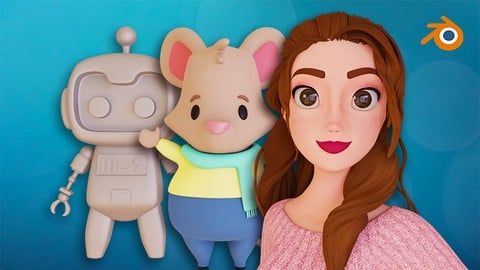
When we finish getting the quick run-through of the Blender basics, we will actually start creating some characters. Our first approach to 3D modeling will be by using the box modeling technique which will allow us to model a hard-surface character, we will be using reference images and some primitive 3D shapes to create a Robot.
Then we will create our second character which is a Mouse. Here we will be using the polygon modeling technique which lets us model organic characters.
For our last and biggest project we will be creating a human character. We will use two techniques, the polygon modeling and the curves modeling method. We will make sure to work with the proper edge-flow for animation and we will model the face, body, hands, feet, hair, clothes and shoes, all from scratch.
When we finish modeling the human, we will continue by unwrapping all of the parts of the character creating its UV maps, so we can texture it later. For the shading phase, we will learn different methods that we can use to create materials, such as painting textures in other digital painting softwares, applying textures found in the internet, creating and applying PBR maps, creating procedural textures and using Blender's own Texture Paint tool.
Later on, we will continue with the rigging section. We will be able to create a facial rig using shape keys, bones with drivers and constraints, so our human character can get some facial expressions. Then we will create the body rig by adding bones and following the right method to make them move, we will understand the difference between forward and inverse kinematics and we will be using controllers that will let us pose the character. Afterwards, we will give the bones a nicer look so the rig turns more appealing and intuitive to use.
Lastly, we will assign automatic weights from the rig into the mesh and we will also learn how to paint weights manually with the Weight Paint tool within Blender, so we can change the influence of the bones according to our needs.
In the end, when all of that is done, we will be able to pose our character and we will be ready to use our human character for animation purposes!
So, if you want to be able to create your own 3D characters for animation, this is the right course for you!
By the end of the lessons, you will be completely trained and will have all the necessary skills to build your own characters in Blender.
This course has over 30 hours of content, more than 200 videos and one teacher who just wanted to share her knowledge with fellow 3D artists.
What are you waiting for? Join me as we create professional looking 3D characters with Blender!

 Udemy Discount
The discount is applied through our link. Open the course from here and Udemy's current promotional price is applied at checkout on most courses, no code to type.
Some courses are excluded from Udemy's promotions. If the price does not drop, clear your browser cookies and use the button again.
Instructor Details

- 4.5 Rating
 518 Reviews
Monica 3D
Hi! I'm Monica
I'm a dedicated 3D artist specializing in modeling and look development. I also enjoy coding and using procedural methods to enhance my art and create useful tools.
I have a degree in Multimedia Engineering and a Master of Arts in Visual Effects, which gave me both technical and artistic skills. I have worked with Blender for over 9 years and I'm currently working for a prestigious feature animation studio.
I consider myself a nerd and beyond my passion for 3D art, I'm an avid enthusiast of films, books, musicals and science!
 More 3D Modeling courses

3D Printing with " Ultimaker CURA Slicer- Start to finish" (2025)
4.9 (192 Reviews)
 Provider: Udemy
 Time: 1h
$34.99

Girl and the Dog Creation in Zbrush for Intermediate Level (2020)
4.9 (173 Reviews)
- Provider: Udemy
- Time: 48.8h
$59.99



Blender Character Creator for Video Games (2026)
4.8 (9,160 Reviews)
- Provider: Udemy
- Time: 34.3h
$159.99

Master SOLIDWORKS 3D CAD using real-world examples (2022)
4.8 (2,451 Reviews)
- Provider: Udemy
- Time: 18.9h
$69.99
 Reviews

By Purrcy Vanderstorme on 6/24/2026
Good course to get you started! From the description I was hoping to get more understanding of what it is we're actually doing in many of the videos, but they give you plenty of things to google if you need to know something in more detail. I tried getting into 3D modeling multiple times, never to much avail, but when I started this course I managed to stick to it and get somewhere. I got confident with my tools in blender relatively quick and managed to get really creative with my own model. You're lead through many basic principles by the tutor, for a basic understanding of what you're doing. My biggest gripe was how un-planned this course feels, with the tutor going back on her own words a couple of times a couple videos down the line, and he reference images sometimes being hard to work with. Another thing that really bothered me was how lackluster the weightpainting part is explanation wise, in contrast with how other things are shown in detail. Weightpainting isn't fun in general, but I had to really supplement the 3 videos on it with youtube videos, which made it feel like that last part was very rushed. With this course being 5 years old by the time I followed it, some stuff was unfortunately outdated, by no fault of the tutor That all being said, this course delivered on it's promise to teach how to make a full character from scratch, animation ready! I'm proud of myself, and have no regrets buying this course. If you're looking to learn this skill, I would absolutely still recommend this course!
By Satya Uppalapu on 1/3/2026
Overall, it's really good and explains really well on specific detail how to duplicate and keep objects in line and basic modeling. But, I have noticed some parts where she would get a bit confused or pause and then have us redo a mistake without being exactly specific on what needs to be done. I would also like specified explanations as to why she is doing certain things during the tutorial.
By Nguyen Phuong My on 2/16/2024
Wonderful course for a total beginner like me. I've made my first robot in blender in 2 days. There're are something I had to search outside such as how to install screencastkeys, or how to put the cursor in the world origin to make the mirror add on worked. But it's really a joy to practice along. I'm thankful for all that you do for us.
By Visitor Code on 11/11/2023
No idea why the negative reviews even exist for this course. Sure, maybe there are some things she could go deeper into details with, but looking at the context of the entire course - it's a great course and she's a good teacher. There is no instructor who is teaching pure Blender modelling from simple to complex characters, including teeth and full body. Grant Abbit from GameDev does a good job but his character models are usually incomplete - missing teeth, tongue and other details. Instead of giving a negative review for this course, give feedback via Q&A instead because this are little things that help improve the course since majority of the course is great! Some people are just whiners.
By Erin McKee on 3/4/2023
Edited to add: I've finished the course and created all the models. I've used the course to create three characters of my own. It's been really helpful! I've been looking for a course just like this. It's easy to follow along. I've made the robot and am now working on the mouse. I'm looking forward to making my own characters soon! I'm now on to Mavis and making good progress. This video is exactly what I was looking for.
By Ross Hugh Kilpatrick on 9/1/2022
While I am enjoying this course as a good way to upskill into character art/modelling, I do think there's an issue with not explaining certain decisions well when making modifications and creating extra parts for the models. I am not a total beginner so I can understand the reasons well enough but an explanation would still be good so I can understand that I am on the same page as the tutor. Still, I am enjoying this course, and it has certainly helped me improve my character modelling. I am looking forward to continuing my Mavis model and getting to texture, rig and animate her.
By Ajay Singh Bora on 5/30/2022
This course is awesome. Anyone with this course can get to the advanced level of character modelling easily. Monica is one of the best teacher & artist out there. I hope she will create more Character modelling courses like for anime related character etc. Thank you very much for the great 3D course.
By William Bryan on 3/1/2022
What a fun course! Update: Going through these videos is taking me quite a while, but the content here is very informative and worth the effort. I'm a blender noob and this is giving me the confidence to make the characters I want to make. If you are on the fence, jump right in!
By Karen Dennis on 2/25/2022
Thank you so much . This was an amazing course and I loved every bit of it. The instructions were clear and it progressed at an excellent pace. I did get a little frustrated at times and things went wrong but I was always able to fix them. I am a fashion designer specialising in recycled garments and I have been able to import my own designs onto the figure. I am very excited for the possibilities of taking my work into the digital sphere. It took me about 4 weeks to complete, fitting it around other work. Focusing on the course got me through some tough times and I am so glad I did. It was so great immersing myself in the software. Loved the whole manner and approach taken by the tutor. Truly fantastic. Well done on such an educational tool. Very talented !!
By Sandra Fischer on 1/31/2022
Very good course. I like how nice and slow she goes telling us exactly what to do next. I think especially for a beginner this is perfect for learning how to model in blender. I look forward to more courses from her in English of course.
 Quality Score
No CourseDuck member has rated this course yet. Taken it? Give each part a thumbs up or down.
Overall Score : 90 / 100
- Video Duration:
 30.9h
30.9h - Price: $94.99
- Provider: Udemy
- Updated:
 September 2021
 - Level:
 All Levels
 - Language:
 English
 - Certificate:
 Yes
Yes
30-day money-back guarantee on most paid courses
Udemy Coupon Price Tracker
