
 Web Development
 Data Science
 Python
 SQL
SQL JavaScript
 Artificial Intelligence
 IT & Software
 IT Certifications
 Hacking
 AWS
AWS Arduino
 DevOps
 3D Modeling
 Graphic Design
 Photoshop
 Drawing
 Digital Painting
 UX Design
 Business
 Data Analysis
 Communication Skills
 Project Management
 Leadership & Management
 Human Resources
 Digital Marketing
 Social Media Marketing
 Marketing
 SEO
SEO Google Analytics
 Branding
 Excel
Excel Office Productivity
 SAP
SAP PowerPoint
 Microsoft Access
 SharePoint
 Finance & Accounting
 Trading & Investing
 Accounting
 Bitcoin
 Personal Finance
 Video Editing & Animation
 Photography
 Adobe Premier Pro
 Adobe Lightroom
 Personal Development
 Productivity
 Career Development
 Life Coaching
 Health & Fitness
 Meditation & Mindfulness
 Yoga
Yoga Music
Music Music Production
 Guitar
 Piano
Piano Singing
 Language Learning
 Teaching & Academics
 Engineering
 Math
Math Lifestyle
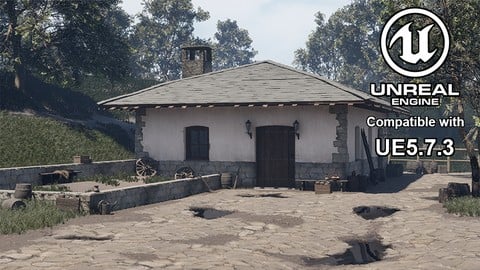
Unreal Engine 5 - Build a AAA-Quality Game Environment (Udemy.com)
Portfolio-ready Workflow - Learn from a AAA Environment Artist by mastering Modular Building Kits and Trim Sheets
Created by: Nicolas Bucco
Last updated June 2026
 What you will learn
- Planning your Projects professionally
- Planning and creating Modular Building Kits
- Planning and creating Trim Sheets
- Creating a clean Project Structure using 3Ds Max and Unreal Engine 5
- Understanding and following the Texel Density guidelines
- Integrating Assets by increments in UE5
- Creating basic and advanced shaders in UE5
- Using Weighted Normals
- Adding Props for Set Dressing a scenne in UE5
- Sculpting a custom terrain using UE5 Landscape Tool
- Using the Foliage tool to create an organic composition to complement your exterior environments
- Environment Lighting / Post-Process / Composition for a final Render
- Creating High Quality Renders using the Movie render Queues
- Creating a Professional Breakdown Document for your Portfolio
How it compares
Against the other 545 rated Udemy courses in 3D Modeling on CourseDuck:
- Rating4.6 out of 5higher than 56% of them
- Reviews390#200 of 546 by number of reviews
- Length39.9 hourslonger than 96% of them
- Last updatedJune 2026more recently than 94% of them
 Course Description
Become a AAA-Level Environment Artist in Unreal Engine 5
Learn how to plan, model, and integrate a portfolio-ready 3D environment using the same techniques used in AAA studios. By the end of this course, you’ll know exactly what employers look for in a Level/Environment Artist, and you’ll have a completed environment to showcase in your portfolio.
With hands-on modules, templates, and step-by-step guidance, this course is perfect for beginners, intermediate artists, and junior professionals looking to level up.
Why This Course Works
I’ve worked on and shipped games with Ubisoft and an indie studio, including:
Splinter Cell Remake
Rainbow Six Siege X
Postal 4 No Regerts
I’ve condensed years of industry experience into a workflow that is efficient, professional, and portfolio-focused, so you can build AAA-quality environments faster and smarter.
What You’ll Learn (Portfolio-Ready Skills)
Project Planning & Studio Workflow
Plan your environment like a professional
Organize your project structure in 3Ds Max and UE5
Incrementally integrate assets to avoid common pitfalls
3D Modeling & Modular Kits
Create reusable modular building kits
Build trim sheets for efficiency
Maintain consistent texel density
Materials & Shaders
Create basic and advanced UE5 materials
Master instancing and weighted normals
Optimize performance without sacrificing quality
Environment Composition & Props
Add props and set dressing with purpose
Sculpt organic terrain with UE5 Landscape Tool
Use foliage tools for realistic, balanced environments
Lighting, Post-Processing & Rendering
Adjust lighting and post-process for cinematic results
Create high-quality renders for your portfolio
Generate professional breakdowns that impress employers
Bonus Tips from AAA & Indie Production
Efficient non-destructive workflows
Quick prototyping & research techniques
Portfolio tips that catch recruiters’ eyes
Understanding the differences between AAA and indie production
Requirements
No formal knowledge is required, but you’ll need:
Unreal Engine 5 (basic understanding helpful)
3D modeling software (3Ds Max, Maya, or Blender)
2D editing software (Photoshop or Canva)
Substance Painter (for texturing)
Course resources (provided)
Who This Course is For
Beginner 3D artists: Learn the most relevant skills to get started without wasting time.
Intermediate artists: Avoid long projects that teach little; focus on portfolio-ready outcomes.
Junior professionals: Improve your workflow and production quality to reach the next level.
The Outcome
By the end of this course, you’ll:
Build a complete AAA-quality environment from scratch
Have a finished portfolio piece ready for job applications
Understand studio workflows used in AAA and indie productions
Gain practical knowledge employers value most

 Udemy Discount
The discount is applied through our link. Open the course from here and Udemy's current promotional price is applied at checkout on most courses, no code to type.
Some courses are excluded from Udemy's promotions. If the price does not drop, clear your browser cookies and use the button again.
Instructor Details

- 4.6 Rating
 390 Reviews
Nicolas Bucco
With over 10 years of professional experience working as a 3D Artist in a wide range of fields such as Architecture, Real Estate, 3D Animation, Virtual Reality and Video Games, I have learned many things and gained great insights on what it takes to work on professional production teams.
In the Video Games Industry, in the last 4 years, I worked as Level Designer and Level/Environment Artist on both Indie and AAA productions. Some famous IPs I have worked on include Splinter Cell and Rainbow Six Siege.
I have also been teaching in College for over 10 years many different classes from 3D Modelling, Texturing and Shaders for Video Games, Environment Design, Level Design, Demo Reel, Virtual Reality, Production Methodology and many more.
Along the years, I have seen successful students going from hopeful amateurs to Industry professionals and I am happy to share what they did to get there.
With a little curiosity, humility, a strong desire to learn and if you are ready to work relentlessly until you reach your goal, nothing is impossible!
 More 3D Modeling courses

3D Printing with " Ultimaker CURA Slicer- Start to finish" (2025)
4.9 (192 Reviews)
 Provider: Udemy
 Time: 1h
$34.99

Girl and the Dog Creation in Zbrush for Intermediate Level (2020)
4.9 (173 Reviews)
- Provider: Udemy
- Time: 48.8h
$59.99



Blender Character Creator for Video Games (2026)
4.8 (9,160 Reviews)
- Provider: Udemy
- Time: 34.3h
$159.99

Master SOLIDWORKS 3D CAD using real-world examples (2022)
4.8 (2,451 Reviews)
- Provider: Udemy
- Time: 18.9h
$69.99
 Reviews

By Maj Kramer on 7/28/2026
I'm about 30% into the course, but i can definitely say that the course is worth the money. I think Nicolas explains everything with great detail but still manages to explain it in a way that is understandable. My reason for buying it was to learn/understand texel density,and i can safely say that i now understand it. I will still need to practice for that second nature feel. If you are using blender and are afraid of not understanding things, don't be afraid,because everything is very translatable from 3Ds Max to blender. I think the course is also for any skill level artist,meaning even if you are a somewhat of a professional you will still be able to learn some things. All in all,great course with a lot of content and info. Props to Nicolas and i hope i get to see more courses.
By Ahmet on 7/27/2026
"A great instructor doesn't just teach, they make you love learning." I've just started the course, and the value I'm getting so far is incredible. The instructor’s teaching style, approach to the topics, and overall energy make the lessons incredibly enjoyable. They've made concepts I used to find intimidating feel so simple and easy to digest. I highly recommend this course to anyone looking to improve themselves in this field. Don't procrastinate, just dive in!
By Jimmy Johansson on 7/21/2026
I learned a lot from this course and don't regret taking it. It gave me a much better understanding of modular environment creation, trim sheets, texel density, and overall environment production. The reason I'm giving it 3 instead of 5 stars is that I felt the course was much longer than necessary. Many tasks are performed entirely by hand, even though modern procedural tools and workflows can achieve the same results much faster. I also found the approach to texel density inconsistent. The instructor repeatedly emphasizes how important it is for AAA production and follows it well on the building itself, but largely ignores it on many props and decals. Since the course is marketed around AAA quality workflows, I expected these standards to be applied consistently throughout the project. Finally, there were several moments where it felt like the instructor was figuring things out as he went rather than demonstrating a well planned workflow. One of the main reasons I purchased the course was to gain confidence in professional production methods and avoid having to guess my way through my own projects, so this made the learning experience less valuable than I had hoped. Overall, I still recommend the course because I learned a lot from it and the final result is excellent. However, I think it could be more efficient and better aligned with the production practices it aims to teach.
By Duc Nguyen Minh on 6/23/2026
I'm Vietnamese, when I see this source from your youtube, about breakding down game Crimson Desert.. I'm follow tutorial step by step exepcet I'm modingling some stuff with Blender. So far this coursce make me improming my skill in Unreal Engine and modeling, of couse. My ultimate goal is to create a well-optimized game that can run on all PCs.
By Spencer Buffum on 5/13/2026
I had a really good time going through this course. Apart from the audio being inconsistent(the 3ds Max export sound haunts me) id say everything that Nic covers is well delivered and easy to understand. As someone who really wanted to see an entire environment workflow from start to finish, I couldn't have asked for a better course. Great job, Nic really appreciate you taking the time to put this course together!
By Fernando Antonio Julio on 5/4/2026
Hey Nicolas! Cheers from Brazil!. I wanna thank you for this awesome course. I found your yt channel a few weeks ago and I thought your content very informative and well explained. About the course, Im having a good time. Im a 35 old guy that works with marketing and graphic design for a living and I have an old dream of working in the game industry. This is the beginning of my journey and if one day I get a job in the industry, you will be partly responsible. Now, I think we always have room to improve, so a little feedback: next time pay attention to the notification sfx of windows. Its very loud and reducing the db in that part would mitigate it. In the future i will test another approach using displace and decimate modifiers to the meshes (blender user were). I think nanite can handle geometry very well. The real deal is knowing how to work with trimsheets to reduce the amount of materials in the scene, and you explained very well. This is core knowledge! Thanks Nicolas and keep the good work!
By Miriam on 5/1/2026
If you're like me and you're tired of the same beginner level courses that take way to long to explain to you how you open blender, and what all the buttons on the screen do, just give this one a try. There is no unnecessary fluff in this one, and even though it's 40h long, the instructor really respects your time, all the information is really valuable.
By Dmytro Chornyi on 4/17/2026
Nicolas, I'm not going to say I don't like the course. There’s genuinely some new and useful information in it for me, and I'm not going to question your experience, though some things did seem strange to me. One issue that bothered me quite a bit was the sound balance. In some parts you sound pretty quiet while your system volume is cranked up to 100%, so sudden system alerts almost made my ears bleed. Please, consider lowering or turning off the system volume down in your next tutorials. Best regards!
By Putu R.A. on 10/8/2025
Thank you so much for the awesome course Mr. Bucco! I followed this course step by step up until the midpoint and started over using the same workflow but with different environment because I wanted to create something new and I can tell you my project is going well! I just wish the microphone audio level is a little bit higher, but other than that this course is perfect!
By Lucie D on 6/7/2025
I loved this course ! All the steps are explained in detail and at a good pace to really understand. There are no cuts even during the bugs and problems so you can see how Nicolas solves them. It's a great way for beginners and intermediates to learn, as Nicolas also gives tips on how to be more efficient. Thank you Nicolas !
 Quality Score
No CourseDuck member has rated this course yet. Taken it? Give each part a thumbs up or down.
Overall Score : 92 / 100
- Video Duration:
 39.9h
39.9h - Price: $94.99
- Provider: Udemy
- Updated:
 June 2026
 - Level:
 Beginner
 - Language:
 English
 - Certificate:
 Yes
Yes
30-day money-back guarantee on most paid courses
Udemy Coupon Price Tracker
