
 Web Development
 Data Science
 Python
 SQL
 JavaScript
 Artificial Intelligence
 IT & Software
 IT Certifications
 Hacking
 Microsoft Azure
 AWS
 Arduino
 3D Modeling
 Graphic Design
 Photoshop
 Drawing
 Digital Painting
 UX Design
 Business
 Data Analysis
 Communication Skills
 Project Management
 Leadership & Management
 Human Resources
 Digital Marketing
 Social Media Marketing
 Marketing
 SEO
 Google Analytics
 Branding
 Excel
 Office Productivity
 SAP
 PowerPoint
 Microsoft Copilot
 Microsoft Access
 Finance & Accounting
 Trading & Investing
 Accounting
 Bitcoin
 Personal Finance
 Video Editing & Animation
 Photography
 Adobe Premier Pro
 Adobe Lightroom
 Personal Development
 Productivity
 Career Development
 Life Coaching
 Health & Fitness
 Yoga
 Meditation & Mindfulness
 Music
 Music Production
 Guitar
 Piano
 Singing
 Teaching & Academics
 Engineering
 Language Learning
 English Language
 Math
 Lifestyle
Unreal Engine Game Environment design MasterClass (Udemy.com)
Learn How to Create AAA game environment using unreal engine 4
Created by: Nabil Kechiche
Last updated October 2020
Our take
Based on the ratings of 108 students, a sample of their written reviews and the syllabus, as the course stood in October 2020. No course pays to be reviewed.
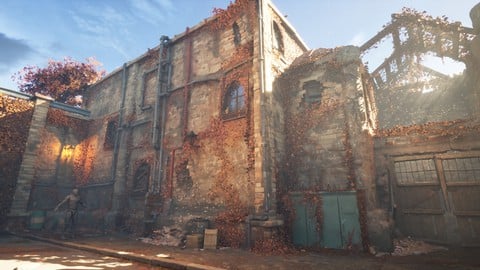
Nabil Kechiche builds one ray-traced street scene in Unreal Engine 4 over 45 hours, starting with the road and curbs, then about 35 to 40 custom modular pieces made in 3ds Max, then lighting and effects. There are no time lapses, so students watch him work in real time. The syllabus is clear that it's not for beginners: it expects experience with Unreal and a modeling and texturing package. Most of the runtime, around 32 hours, sits in one giant section on modular pieces and details.
Reviewers like the shader work, the vertex painting and the steady stream of tips, and several say the finished scene really does look AAA. The main complaint shows up in good and bad reviews alike: he shows more than he explains. Students describe tweaking node values without knowing why, and some clicks go by too fast to follow. One student praises his help on Discord, while a 1-star review says questions went unanswered. Another wishes it leaned less on Megascans and more on custom models.
The last update was October 2020, so this is UE4 only and predates Unreal Engine 5. Still, the 4.2 rating from 108 reviews, with 66 of them five stars, shows most buyers got what they wanted. It's a good follow-along for intermediate artists who want to see a pro's whole workflow. Anyone who needs the reasoning behind materials spelled out will likely get frustrated.
Pros
- No time lapses: every step of the 45-hour build is shown, so it can be followed in real time
- Advanced material shaders and vertex painting that reviewers single out as the highlight
- Covers about 35 to 40 custom modular pieces plus Blueprint spline tools, decals and foliage
- One reviewer says the instructor answers questions and gives feedback on Discord
Cons
- Shows more than it explains; students tweak shader values without learning why
- Last updated in 2020 and built in UE4, so it predates Unreal Engine 5
- Some steps fly by, and one 1-star reviewer says questions went unanswered
Love all the tips and tricks. Some parts are super fast where he clicks multiple things within a couple seconds.
Truly intermediate: assumes working knowledge of UE4 and a 3D modeling and texturing tool. One Blender user says he could keep up.
 What you will learn
- Learn all the required steps to create a next gen game environment
- Learn how to create modular pieces
- Learn how to use Megascans
- Learn how to deliver a story through level design
- Learn Advanced Shaders Techniques & much more..
Course content
6 sections · 72 lectures · 45 hours of video
- 1Introduction 2 free previews3 lectures · 5 min
- 2Creating the road 1 free preview8 lectures · 3.7 hours
- 3Adding Curbs to our scene3 lectures · 2.1 hours
- 4Adding Road Side piece4 lectures · 1.8 hours
- 5Adding different modular pieces & details 1 free preview45 lectures · 32 hours
- 6Lightning and advanced effects9 lectures · 5.6 hours
Who it is for
The instructor says it suits
- intermediate game artists / developpers
- Unreal Engine Users
- intermediate 3d artist wants to learn game environment design
What you need before you start
- already have experience with 3d modeling / texturing tools & unreal engine4
How it compares
Against the other 71 rated Udemy courses in Unreal Engine on CourseDuck:
- Rating4.2 out of 5higher than 18% of them
- Reviews108#65 of 72 by number of reviews
- Length45.2 hourslonger than 95% of them
- Last updatedOctober 2020earlier than 78% of them
 Course Description
INTRODUCTION:
Welcome to the Game Environment Masterclass 2020 with Unreal Engine 4! This course is packed with expert insight, technical skills, secret tips, and the black arts of environment design that will help you level up your environment design and art skills to a whole new level! All Packed into a compact 45 hours of content that would be impossible to get anywhere else.
DESCRIPTION:
In this course, we will create a professional, next-gen-game environment using state of the art tools and resources
Here are few of the main points we’ll cover in this course:
- How to properly use Megascans and Unreal Engine 4 to create ray traced game environments
- Use tiled textures from Megascans to create modular pieces or custom pieces. We will make around 35-40 custom pieces using 3Dsmax and I will show you how, step-by-step.
- Setup a wide variety of advanced shaders in Unreal Engine 4
- Learn how to make every portion of the environment blend together very well to create a single seamless world
- How to properly use and reuse decals
- Using foliage to enhance the scene look by placing them in a smart way.
- Create custom masks for things like window glass using Substance Painter
- Learn how to customise Megascans PBR textures to make them more usable and to suit your environment
- How to enhance and carry out storytelling through your level design
- How to fake destroyed assets such as ruins of buildings and walls
- Use Unreal Engine’s Blueprints system to create splines tools that support both instancing and procedural meshes.
- Make sure the Blueprints tools we created are extensible and artist-friendly
- We will cover a bit of VFX and their shaders to help bring the scene to life
- Lighting is key to bring everything together and create truly beautiful worlds. You will learn how to beautifully light your scene and present it in the best possible way. You will also learn how to optimise lightning alongside ray tracing and post-process effects
- AND MUCH, MUCH MORE ...
The best way to describe this course is: become a one-man army. It’s not for beginners as I won’t cover the basics but if you’ve got a handle on artist tools then get strapped-in for quite the ride! There are no time lapse sequences and no pre-planned segments. Students will be able to follow me live digging my way to the end. I’ll be showing and explaining every little step along the way, allowing you to follow along in real-time or watch at your leisure.
WHO THIS COURSE IS FOR:
Intermediate game artists, level designers, game developers, or game designers
Unreal Engine users
Intermediate artists who want to learn game environment design

 Udemy Discount
The discount is applied through our link. Open the course from here and Udemy's current promotional price is applied at checkout on most courses, no code to type.
Some courses are excluded from Udemy's promotions. If the price does not drop, clear your browser cookies and use the button again.
Instructor Details

- 4.2 Rating
 108 Reviews
Nabil Kechiche
Hi there my Name is Nabil Kechiche and I have been a 3D Freelance Technical artist for 3 years , I am very passionate about computer graphics and I’m very committed in learning & sharing new things everyday . I wanted to find a way to give back a little to the community through my online courses.. so I felt this would be an excellent place to start.
 More Unreal Engine courses
Unreal Engine 5: One Course Solution For Material (2026)
4.9 (1,774 Reviews)
 Provider: Udemy
 Time: 14.1h
$14.99
Original price
Unreal Engine 5 Blueprints - The Ultimate Developer Course (2026)
4.8 (4,636 Reviews)
- Provider: Udemy
- Time: 41.6h
$12.99
Original price
The Ultimate Unreal Engine 2D Game Development Course (2026)
4.8 (3,290 Reviews)
- Provider: Udemy
- Time: 12.1h
$13.99
Original price
Unreal Engine: Character Skill System (2025)
4.8 (562 Reviews)
- Provider: Udemy
- Time: 25.8h
$13.99
Original price
Unreal 5 Materials - Part 1 Environments (2024)
4.8 (221 Reviews)
- Provider: Udemy
- Time: 14.4h
$11.99
Original price
Unreal Engine 5 - Gameplay Ability System - Top Down RPG (2026)
4.7 (3,529 Reviews)
- Provider: Udemy
- Time: 105.8h
$15.99
Original price  Reviews

By Santiago Lazo on 10/4/2021
Terrible 'explanation' about nodes and logic for the creation of materials, not worthy the price of this course
By Harchit Singh Chugh on 9/22/2021
really looking forward for the course. for learning more on digital twins and real world applications for unreal engine..
By Stuart Deakin-Berry on 6/1/2021
Great course, lots of interesting techniques to use in UE4. Knocked one star off because at time I felt some processes weren't explained clearly or why we were doing it. Lots of time spent fiddling with number/parameters to get a result/look but no real understanding of why we were doing this. So this made it frustrating to know how to achieve a result/look as we just messed with numbers constantly not knowing what they were really doing.
By Marcelo Carvalho do Amaral on 4/29/2021
Amazing course with good topics, no fast forward all are showed and explained. My only recommendation that is can be used less megascans in the project and more custom models.
By Ignacio on 4/2/2021
Good course, where you learn the entire workflow to create a AAA quality environment. The author is very detailed.
By Paul Smith on 3/16/2021
Love all the tips and tricks. Some parts are super fast where he clicks multiple things within a couple seconds. Overall the course is super helpful.
By Joel Bydeley on 10/17/2020
I've really learned a lot during this course. The vertex painting and material shaders are great. Never knew I could do so much with the Unreal Engine. Great course. I've recommended it to a few other friends. The teacher is easy to get ahold of on Discord and answers the questions and gives great feedback.
By Bhaskar Bhattacharya on 9/19/2020
This is a really good course with lots of very good information. This will actually help someone make a AAA quality scene without any doubt.
By André Castman on 9/16/2020
Have just speeded through this tutorial to see what it covers, but I am beyond satisfied with the quality of this course. There are tons to learn in here and the end result is really beautiful!
By Syr Tristram de Lyones on 9/16/2020
Incredible class which is painstakingly described with a tremendous wealth of features, tips and tricks to achieve AAA quality environments. A monumental course! So much more to complete here so will update my review when further along.
 Quality Score
No CourseDuck member has rated this course yet. Taken it? Give each part a thumbs up or down.
Overall Score : 84 / 100
- Video Duration:
 45.2h
- Price: $64.99
- Provider: Udemy
- Updated:
 October 2020
- Level:
 Intermediate
- Language:
 English
- Certificate:
 Yes
- Lectures:72 in 6 sections
- Students:814
- Subtitles:1 language
30-day money-back guarantee on most paid courses
Udemy Coupon Price Tracker
