
 Web Development
 Data Science
 Python
 SQL
SQL JavaScript
 Artificial Intelligence
 IT & Software
 IT Certifications
 Hacking
 AWS
AWS Arduino
 DevOps
 3D Modeling
 Graphic Design
 Photoshop
 Drawing
 Digital Painting
 UX Design
 Business
 Data Analysis
 Communication Skills
 Project Management
 Leadership & Management
 Human Resources
 Digital Marketing
 Social Media Marketing
 Marketing
 SEO
SEO Google Analytics
 Branding
 Excel
Excel Office Productivity
 SAP
SAP PowerPoint
 Microsoft Access
 SharePoint
 Finance & Accounting
 Trading & Investing
 Accounting
 Bitcoin
 Personal Finance
 Video Editing & Animation
 Photography
 Adobe Premier Pro
 Adobe Lightroom
 Personal Development
 Productivity
 Career Development
 Life Coaching
 Health & Fitness
 Meditation & Mindfulness
 Yoga
Yoga Music
Music Music Production
 Guitar
 Piano
Piano Singing
 Language Learning
 Teaching & Academics
 Engineering
 Math
Math Lifestyle
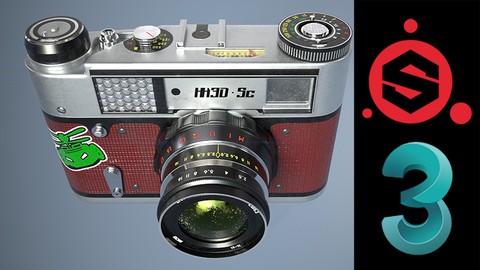
Videogame Prop Modeling: From Beginner to Advanced (Udemy.com)
An in-depth approach to creating props with 3DS Max and Substance Painter
Created by: Jon Holland
Last updated December 2023
 What you will learn
- Students will learn how to model and texture a high-quality, game-ready 3D asset from scratch
- Low-poly and high-poly modeling techniques
- Efficient UV unwrapping within 3DS Max
- Baking seamless texture maps within Substance Painter
- Realistic texture creation with PBR materials within Substance Painter
- Time-saving techniques to make the creation process more efficient
How it compares
Against the other 545 rated Udemy courses in 3D Modeling on CourseDuck:
- Rating4.8 out of 5higher than 90% of them
- Reviews76#485 of 546 by number of reviews
- Length13 hourslonger than 77% of them
- Last updatedDecember 2023more recently than 62% of them
 Course Description
- In this course, students will become familiar with all of the fundamentals used to create high-quality videogame props.
- All aspects of the creation process will be covered, everything from creating the low-poly model all the way to rendering a final image.
- Specifically, we will be covering the following processes in depth:
- Creating the low-poly model using reference images within 3DS Max
- Creating the high-poly model using 3DS Max
- UV unwrapping the low-poly model using 3DS Max
- Baking the Normal map using the high-poly model in Substance Painter
- Baking ambient occlusion, thickness, material ID, and curvature maps in Substance Painter
- Texturing in Substance Painter
- Rendering in iRay within Substance Painter
- Various tools and techniques of model creation and texturing will be explored. A strong emphasis is placed on using different techniques to approach similar modeling problems as a means to teach students as many different techniques as possible.
- Time-saving techniques will be explored, such as setting up hotkeys, customizing the interface, and utilizing scripts to accomplish complex modeling tasks quickly.
- By the end of this course, students will have a solid understanding of how to create high-quality videogame props and will be able to apply that knowledge to the creation of their own 3D models.

 Udemy Discount
The discount is applied through our link. Open the course from here and Udemy's current promotional price is applied at checkout on most courses, no code to type.
Some courses are excluded from Udemy's promotions. If the price does not drop, clear your browser cookies and use the button again.
Instructor Details

- 4.8 Rating
 76 Reviews
Jon Holland
Hello! My name is Jon Holland and I've been a 3D artist for over ten years. My main focus is creating art for videogames using 3DS Max, Zbrush, and Substance Painter. My goal in creating online courses is to help others overcome the hurdles I struggled with when first becoming a 3D artist.
 More 3D Modeling courses

3D Printing with " Ultimaker CURA Slicer- Start to finish" (2025)
4.9 (192 Reviews)
 Provider: Udemy
 Time: 1h
$34.99

Girl and the Dog Creation in Zbrush for Intermediate Level (2020)
4.9 (173 Reviews)
- Provider: Udemy
- Time: 48.8h
$59.99



Blender Character Creator for Video Games (2026)
4.8 (9,160 Reviews)
- Provider: Udemy
- Time: 34.3h
$159.99

Master SOLIDWORKS 3D CAD using real-world examples (2022)
4.8 (2,451 Reviews)
- Provider: Udemy
- Time: 18.9h
$69.99
 Reviews

By Kevin Mesesan on 8/12/2024
As someone who's been using Maya for 9 years I've been struggling to learn 3DS Max and overcome my Maya controls muscle memory with YouTube tutorials. Just these first two videos have already made me feel more confident
By Abhinand A R on 1/14/2024
Jon is an amazing instructor, his clear explanations and hands-on demonstrations, especially in 3ds Max basics and texture creation using Substance Painter, have significantly contributed to my skill development. This course is a must for anyone aspiring to create high-quality game props, providing a solid foundation and practical insights that can be applied to their 3D models. Well-structured short lessons are an effective approach for online courses. Thanks, Jon, for this awesome course! Hoping for other related courses.
By Tamara Hooijmans on 9/1/2022
Very slowly explained. Very good for beginners. Some parts are faster but easy to pause. 1 video had some troubles because the audio came before the video. Which made it a little harder to follow. After a while he stops naming every button he is clicking which is good because that way you'll learn better and faster. I have learned so much already and I've only done 25% off the course so far.
By Georgi Markov on 6/23/2022
he explains very good but there is always room to improve, so that's why I picked 4 and half stars instead of 5
By R Gayle on 6/22/2022
Very accurate and well paced instructions, for my level I found a bit slow, but I do understand some people will be new to 3ds max modelling toolset. I would say I would use the stack a lot more than the instructor, also I would of used spline modelling and poly subdivision more than the instructor did. That said the Substance workflow was great and well worth the effort to watch till the end.
By Alexander Wood on 6/3/2022
It's my first time to recommend the course, the instructor's workflow is probably the most fluent one to finish a high quality model. At the first glance, it might be pretty commonplace to model a "camera", it's neither cool nor magnificent at all. However, I found I'm wrong; it's amazing to make such an ordinary object you could get in real world PRETTY. By the way, this course might be kind of difficult for a complete beginner, but it's totally worth to learn full course.
By Lincoln Hyde on 5/19/2022
Amazing course so far, i imagine it would be slightly difficult if you were completely new to 3d. I know other software so my main goal was learning the features and interface of 3ds Max. So far an excellent course, highly recommend.
By Nicolo Mari T Quibilan on 1/2/2022
I highly recommend this course to anyone who would be interested in 3d video game modeling! Instructor was great in delivering his knowledge with 3dsmax, Substance Painter and Photoshop and was very helpful!
By Bela Viczian on 11/12/2021
Exeptional tutor, very collected and calm. explains everything in a simple professional manner. I've been doing courses for over a year and this has taught me the most. Can't recommend it enough, worth every penny. Can't wait for his next course to drop!
By Benjamin Boone on 10/13/2021
This course helped me become familiar with all the fundamentals I was looking for. As a beginner, I was specifically looking for help unwrapping my low-poly models and baking ambient occlusion/material ids. This course answered most of my questions and the instructor did a great job of laying out the content in concise, easy to digest sections. I feel like he progressed the level of instruction at an appropriate rate for me. I particularly liked how in depth he went to help me set up techniques and save time in the end. Can't tell you how long I've spent fumbling around in the program just trying to get started. All said, this was a solid course and I'd recommend it to anyone looking to up their game in 3DS MAX.
 Quality Score
No CourseDuck member has rated this course yet. Taken it? Give each part a thumbs up or down.
Overall Score : 96 / 100
- Video Duration:
 13h
13h - Price: $59.99
- Provider: Udemy
- Updated:
 December 2023
 - Level:
 All Levels
 - Language:
 English
 - Certificate:
 Yes
Yes
30-day money-back guarantee on most paid courses
Udemy Coupon Price Tracker
